
Cooler Master Q300L V1
4.5Editor score
Transparent side panel
Modular I/O panel
High airflow design
This guide compares the top ten Matx Case options for October 2026, evaluating airflow, build quality, and GPU support to help you choose the right Micro ATX
Choosing the right Matx Case is essential for building a compact yet powerful desktop computer. These cases offer a balance between space efficiency and component support, making them ideal for gamers and creators alike.
We have carefully reviewed ten leading models based on airflow design, compatibility with modern hardware, and build quality. Each product was analyzed for its unique features and value proposition in the current market.
Every pick highlights specific strengths like glass panels, wood finishes, or modular cooling. Please note that product availability and pricing can change frequently, so verify details before purchasing your next build.
4.5Editor score

4.8Editor score

4.7Editor score
The following table provides a side-by-side comparison of all ten selected Micro ATX cases. Review key specifications like dimensions, GPU support, and included fans to find the perfect fit for your build.




The Lian Li A3-mATX stands out as the top choice for builders seeking a blend of aesthetics and performance. With a high rating, it promises reliability and excellent thermal management for modern hardware.
We may earn a commission when you buy through this link, at no additional cost to you.
Its compact 26.3-liter footprint hides powerful capabilities including support for graphics cards up to 415mm in length. The steel mesh panels ensure high airflow while the wood front adds a sophisticated touch to any desk setup.
While the price is higher than budget options, the build quality and feature set justify the investment. The flexible PSU installation allows for better cable management and component clearance in tight spaces.
This case is ideal for users who want a clean look without compromising on cooling or component size. It offers a premium build experience that balances form and function exceptionally well.
The steel mesh panels on the side and top ensure that air moves freely through the chassis.
The walnut wood front panel provides a unique aesthetic that elevates your desk environment.
We may earn a commission when you buy through this link, at no additional cost to you.
The Cooler Master Q300L V1 offers exceptional value for builders on a budget. It balances essential features with an affordable price point making it a great entry-level option.
We may earn a commission when you buy through this link, at no additional cost to you.
Its transparent side panel allows you to show off your build while the modular I/O panel gives you the flexibility to adjust ports to your preference. This versatility is rare at this price point.
While it lacks the premium feel of high-end cases, the open thermal design ensures decent airflow for standard components. Magnetic dust filters add convenience for long-term maintenance without extra cost.
Choose this case if you want a functional chassis that looks good without breaking the bank. It is perfect for first-time builders or those prioritizing cost efficiency.
Adjust the position of the I/O panel to front, top, or bottom for better cable routing.
The edge-to-edge transparent panel lets you showcase your components with pride.
We may earn a commission when you buy through this link, at no additional cost to you.
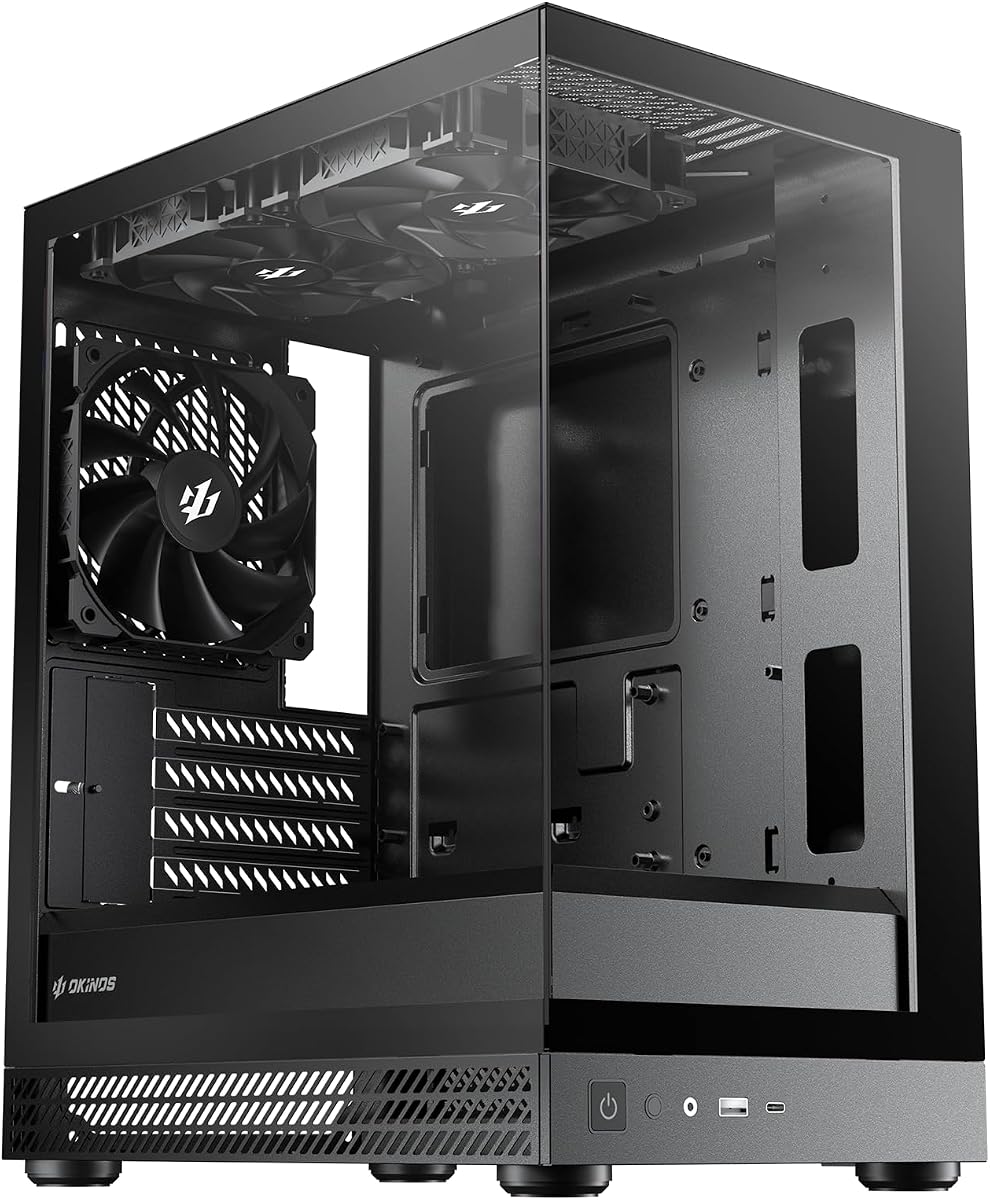
The Okinos Aqua 3 delivers a premium visual experience with its panoramic glass design. It is perfect for users who want their hardware to be the centerpiece of their setup.
We may earn a commission when you buy through this link, at no additional cost to you.
Features like the Type-C 3.2 Gen 2 port and built-in ARGB fan controller add high-end utility. The quick-release panels make maintenance easy without risking glass damage during removal.
While the glass limits some airflow compared to mesh, the vertical airflow design with included fans helps mitigate this. It provides a sleek look that appeals to aesthetic-focused builders.
Invest in this case if you value style and connectivity alongside functionality. It creates a vibrant and modern workspace that highlights your custom PC build.
Enjoy a 270 degree wide angle view of your components with diamond cut angles.
The 10Gbps Type-C port ensures fast data transfer for modern devices.
We may earn a commission when you buy through this link, at no additional cost to you.
This case introduces a unique blend of nature and technology with its genuine walnut wood decoration. It appeals to those seeking a warm and organic look for their computer setup.
We may earn a commission when you buy through this link, at no additional cost to you.
The Type-C 3.2 Gen 2 port provides modern connectivity while the pre-installed fans offer immediate cooling ready. The design ensures optimal airflow with its mesh intake and glass side panel.
Although the fans are non-PWM which limits speed control, the inclusion of a splitter simplifies cable management. The wood panel adds a distinct touch that matches home office aesthetics perfectly.
Choose this case if you want to merge your PC build with your home decor seamlessly. It stands out for its craftsmanship and thoughtful feature integration.
The walnut wood on the front panel complements your home decor effortlessly.
Three-sided mesh intake ensures high cooling efficiency for internal components.
We may earn a commission when you buy through this link, at no additional cost to you.
The Zalman CUBIX is a true space-saver designed for users with tight desk limits. Its sleek design hides a sturdy build that supports essential components well.
We may earn a commission when you buy through this link, at no additional cost to you.
Despite its small 17.1-liter volume it supports standard ATX power supplies and GPUs up to 260mm. The perforated front panel helps airflow despite the compact interior size.
It is not ideal for high-end cooling but works well for standard office or light gaming builds. The durable steel construction ensures it will withstand daily use reliably over time.
This case is perfect for minimalist setups where space is at a premium. It proves that functionality does not have to be sacrificed for a smaller footprint.
A sleek design with 17.1-liter total volume that fits anywhere.
Built with durable 0.8T steel for a robust and sturdy structure.
We may earn a commission when you buy through this link, at no additional cost to you.
This model focuses on delivering high airflow on a budget through its perforated front design. It is a strong candidate for users who prioritize cooling efficiency over premium materials.
We may earn a commission when you buy through this link, at no additional cost to you.
The slim interior supports a 120mm fan and radiators up to 135mm height. It supports standard ATX power supplies and fits both Mini ITX and Micro ATX motherboards.
Be aware that the maximum GPU length changes depending on front fan placement. This requires careful planning but ensures the parts fit within the tight constraints of the case.
Consider this case if you need a functional chassis for a budget build. It offers essential cooling features without unnecessary extras that drive up the cost.
Perforated front filters air directly through the case to cool down components.
Compact interior fits fans and radiators while saving valuable desk space.
We may earn a commission when you buy through this link, at no additional cost to you.
The Okinos Aqua UNO simplifies building with its tool-free stud-mount design for glass panels. It is built for air cooling users who value easy access for maintenance.
We may earn a commission when you buy through this link, at no additional cost to you.
Its spacious cable routing area and Velcro straps help keep internal components organized. The dust filters on top, side, and bottom protect your system from debris effectively.
While it does not support water cooling radiators, the design maximizes airflow for air coolers. The Type-C port and clear space make it practical for daily use.
This case is ideal for straightforward air cooling builds where ease of access matters. It balances practical features with modern connectivity options well.
Advanced quick-release panels allow easy glass removal without screws.
Optimized cable space with included straps ensures a tidy build experience.
We may earn a commission when you buy through this link, at no additional cost to you.
This Vector V100 offers a seamless 270 degree view with its tempered glass panels. It includes four ARGB fans and an integrated lighting strip for a polished look out of the box.
We may earn a commission when you buy through this link, at no additional cost to you.
Supporting GPUs up to 415mm it handles high-end graphics cards well. The design supports back-connect M-ATX motherboards which simplifies cable management significantly for modern builds.
Ensure your motherboard is compatible before purchasing as it does not support full-size ATX boards. The included anti-sag bracket adds reliability for long graphics card installations.
Select this case if you want an immersive visual experience with strong hardware support. It offers a premium build feel with significant attention to aesthetic detail.
The 4mm tempered glass front and side panels provide a seamless 270 degree view.
Includes four ARGB PWM side intake fans for immediate cooling performance.
We may earn a commission when you buy through this link, at no additional cost to you.
The Okinos MATX Mirage 4 optimizes thermal management with its vertical airflow system. It allows for superior cooling efficiency through its bottom-to-top airflow path design.
We may earn a commission when you buy through this link, at no additional cost to you.
Features include a 1.2mm mesh right panel and magnetic dust filters for easy maintenance. The pre-installed ARGB fans and controller offer customization options for lighting effects.
With five PCIe slots it improves GPU compatibility and cooling space significantly. The cable management space ensures a seamless installation experience for builders of any skill.
Choose this case if you prioritize airflow and cooling potential in a compact size. It balances aesthetics with functional engineering to keep components cool under load.
Supports up to 5 fans optimizing bottom-to-top thermal management.
Improves GPU compatibility and cooling space significantly for high-end cards.
We may earn a commission when you buy through this link, at no additional cost to you.
This B4-mATX combines a premium wood finish with versatile positioning options. You can use it horizontally as a desktop or vertically to save space depending on your needs.
We may earn a commission when you buy through this link, at no additional cost to you.
It supports graphics cards up to 358mm and comes with slim 120mm fans for immediate cooling. The real wood finish offers a stylish look that blends well in professional settings.
The slim fans are quiet but might not provide maximum airflow compared to standard fans. It is ideal for users who value form and flexibility over extreme performance specifications.
Pick this case if you need a stylish chassis that adapts to different desk layouts. It balances elegant aesthetics with solid hardware compatibility for modern systems.
Use horizontally for a desktop blend or vertically for a space-saving design.
Elegant aesthetic with premium real wood finish for a stylish look.
We may earn a commission when you buy through this link, at no additional cost to you.
Selecting the right Matx Case involves considering several technical and aesthetic factors to ensure compatibility and performance.
Always measure your available desk space before choosing a case. Micro ATX cases vary in height and width which impacts where you can place them comfortably.
Check the volume in liters to understand how compact the unit truly is for your specific room layout.
Verify the maximum graphics card length and power supply length allowed by the case. High-end GPUs often require more space than older models do.
Ensure your power supply unit fits either at the bottom or top depending on the case design specifications.
Look for cases with perforated front panels or mesh designs to maximize airflow. Better airflow leads to lower component temperatures and longer hardware life.
Check if the case includes fans or if you need to purchase them separately for adequate cooling.
Decide between glass, mesh, or wood panels based on your aesthetic preference. Glass offers visibility but limits airflow while wood adds a unique touch.
Mesh panels are best for cooling while glass is ideal for showcasing RGB lighting and components.
Modern builds benefit from having USB Type-C ports for fast data transfer. Check if the case includes USB 3.0 and audio jacks for daily use.
Ensure the I/O panel placement matches your desk setup for easy access without cable strain.
Steel thickness like 0.8T or more ensures durability and stability during transport. Thicker steel reduces vibration and protects sensitive components from physical damage.
Look for sturdy hinges on side panels and robust screw mounts for easy access without breakage.
Standard Micro ATX cases typically offer four or five PCIe slots for graphics cards and expansion. Ensure there is enough space for large coolers and GPUs.
More slots provide flexibility for multi-card setups if you plan to upgrade your system later.
Check for cable routing holes and space behind the motherboard tray. Good cable management improves airflow and makes the build look professional.
Look for included zip ties or Velcro straps to secure cables neatly during installation.
Start by ensuring all dust filters are clean before installing components to maximize airflow efficiency. This simple step prevents overheating and keeps internal parts free from debris accumulation.
When installing the motherboard use the provided standoffs to prevent electrical shorts. Make sure to follow the manual carefully to align screws correctly with the Micro ATX layout.
Regularly clean the exterior panels and intake filters to maintain optimal performance. Use a soft brush or vacuum to remove dust without scratching glass or wood surfaces.
A Matx Case is a computer chassis designed specifically for Micro ATX motherboards. It provides a compact footprint while still supporting essential components like GPUs and power supplies.
Matx cases are better for saving space and reducing costs. However ATX cases offer more expansion slots and better cable management for larger builds.
Most Matx cases support Mini ITX motherboards. Always check the compatibility list to ensure the mounting holes match your specific board model.
Typically a Matx Case supports between four to six fans depending on the model. Some high-airflow designs allow for more cooling configurations.
Many Matx cases support standard ATX power supplies. Check the PSU clearance limit in the product specifications to confirm compatibility.
Some models come with pre-installed fans while others do not. Review the product details to see what is included before purchase.
We explored ten top Matx Case options ranging from budget-friendly to premium models. Each offers unique features like wood panels or panoramic glass to suit different preferences.
Prioritize airflow and component compatibility to ensure your build runs cool and efficient. A well-chosen case can improve the longevity and performance of your entire system.
Remember to check current pricing and availability as these details may change over time. Select the model that best fits your technical needs and aesthetic vision.