
Anderic RR1004 Big Button TV Remote Control
4.0Editor score
Glow in dark keys
Minimalist control layout
Learning function available
This guide compares ten easy to use TV remote for seniors options, evaluating button size, setup ease, and compatibility to help families choose the best
Finding the right control for a loved one can be challenging when vision or dexterity declines. A simple device reduces frustration and helps maintain independence at home. We have reviewed ten options designed specifically for older adults and those needing clarity.
Our comparison focuses on usability, button layout, and compatibility with common television brands. We analyzed user feedback and technical specifications to identify models that prioritize simplicity over complexity. Each entry offers a different approach to solving the confusion of modern remotes.
Every pick highlights key strengths and potential limitations based on the available product data. Prices and availability may shift over time, so checking the current listing is wise. This list aims to provide a clear starting point for your search.
4.0Editor score

4.3Editor score
4.2Editor score
This side by side comparison outlines the core features and compatibility of each selected remote. It helps you quickly identify which model matches your specific television brand and user needs.


The GE BigEZ OneTouch stands out as a highly practical solution for seniors needing a straightforward remote. With a 4.3 rating, it is praised for its bright white design and backlit buttons that glow in low light.
We may earn a commission when you buy through this link, at no additional cost to you.
Its vision friendly features include color coding for volume and channel buttons, making it easier to identify functions without squinting. The preset buttons for Samsung, LG, Vizio, Sony, and Roku simplify the setup process significantly.
While it covers major brands, users with other TV models may find the compatibility limited. Additionally, the need for two AA batteries means keeping spares handy is necessary for uninterrupted viewing.
This remote is ideal for seniors who prioritize visibility and ease of setup. It offers a balanced mix of functionality and simplicity, making it a strong choice for household entertainment control.
The remote features fully backlit buttons and color coding to assist users with low vision or color blindness.
Users can quickly activate the remote by pressing the TV brand button and following minimal steps to start controlling their television.
We may earn a commission when you buy through this link, at no additional cost to you.
The Anderic RR1004 is a cost effective choice for those seeking a no frills remote. It features extra large glow in dark keys that ensure visibility in dim rooms without needing batteries for lighting.
We may earn a commission when you buy through this link, at no additional cost to you.
Its minimalist design includes only essential controls like power, volume, and channel, which reduces confusion for seniors. The learning function allows copying commands from an existing remote for custom setups.
However, it is not compatible with RF or Bluetooth systems, which limits use with modern streaming boxes. Initial programming might require assistance for users unfamiliar with IR remotes.
This model is best suited for budget conscious buyers with standard IR TVs. It provides reliable basic control without the complexity of smart remote interfaces.
The keys glow in the dark, allowing easy location and use in low light settings without requiring extra power.
Users can copy functions from their old remote to add specific commands like inputs or streaming buttons.
We may earn a commission when you buy through this link, at no additional cost to you.
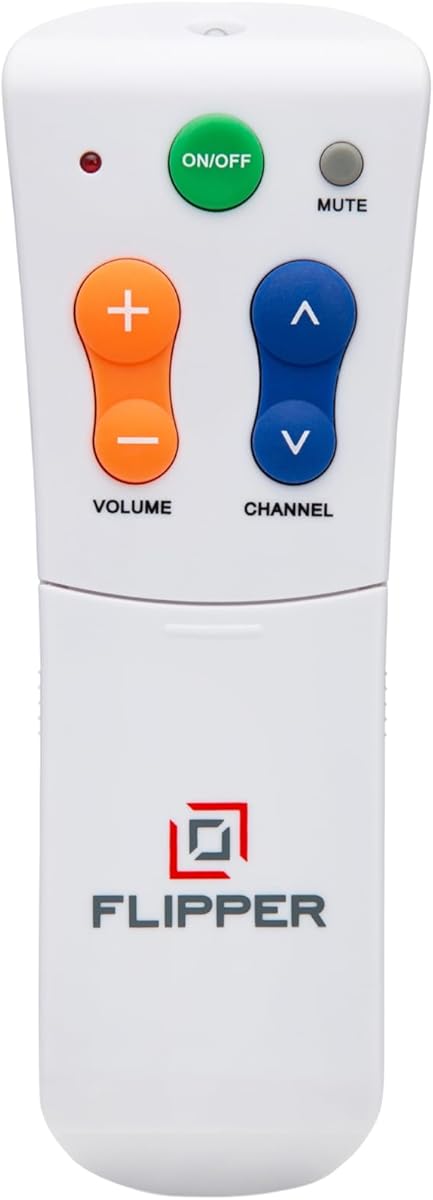
Flipper is specifically designed to support seniors with dementia or Alzheimer's by simplifying TV control. It features a clean four button layout with color coding to guide users intuitively without confusion.
We may earn a commission when you buy through this link, at no additional cost to you.
The remote allows control of both TV and cable boxes, reducing clutter. Hidden buttons can be slid to reveal for customizing favorite channels, adding flexibility while keeping the main face simple.
It does not support streaming apps, which may be a limitation for households relying on Netflix or YouTube. The premium price reflects its specialized design and focus on user independence.
This remote is highly recommended for caregivers seeking to reduce frustration for loved ones with cognitive challenges. It balances simplicity with essential functionality for traditional viewing.
Buttons are color coded by function, such as green for power and blue for channels, to aid quick identification.
Users can slide to reveal hidden buttons to set favorite channels, allowing personalization without cluttering the main interface.
We may earn a commission when you buy through this link, at no additional cost to you.
The EZclicker Big Button Universal offers tactile feedback and large controls for a comfortable user experience. It features an extra large enter button and a simple hold setup that requires no complex coding.
We may earn a commission when you buy through this link, at no additional cost to you.
Its compact size makes it easy to handle for those with limited dexterity. The remote works with many TV brands, providing versatility across different household setups.
Users should note it does not work with cable boxes or streaming sticks, limiting it to TV functions. It requires two AAA batteries, so replacements should be kept on hand.
This model is great for seniors who value physical feedback from buttons and a straightforward setup. It provides a reliable way to control TV basics without frustration.
The buttons provide tactile feedback, helping users confirm presses without needing to look closely at the remote.
Setup involves holding mute and volume buttons together until the volume changes, making it accessible for most users.
We may earn a commission when you buy through this link, at no additional cost to you.
This EZclicker model is designed for simplicity and compactness, making it easy to store and handle. It features extra simple big buttons and a straightforward setup process for immediate use.
We may earn a commission when you buy through this link, at no additional cost to you.
It works with major TV brands but does not support streaming or cable boxes. The lightweight build helps those with weaker grip strength use it comfortably throughout the day.
While it lacks advanced features, it covers the basics well for traditional TV viewing. Users should be aware of the battery requirements before purchase.
It is a solid choice for seniors who need a small, unobtrusive remote for basic TV control. The design prioritizes ease of use over additional functions.
At six inches long, this remote is easier to grip and store compared to larger standard models.
The remote provides direct control over essential TV functions without the complexity of menu navigation.
We may earn a commission when you buy through this link, at no additional cost to you.
This remote stands out for requiring no programming, allowing immediate use after inserting batteries. It is compatible with a wide range of TV brands, making it versatile for different households.
We may earn a commission when you buy through this link, at no additional cost to you.
The extra large enter button and tactile feedback help users confirm actions easily. A 90 day warranty offers additional peace of mind for buyers concerned about reliability.
It does not work with streaming devices or cable boxes, focusing solely on TV functionality. Users need to provide their own batteries to get started.
For those who want a remote that works right away without setup, this is a strong option. It balances simplicity with broad compatibility for traditional TV viewing.
This remote requires no pairing or code entry, allowing users to start using it immediately after adding batteries.
It works with most major brands including Samsung, LG, and Sony, ensuring it fits many existing TV setups.
We may earn a commission when you buy through this link, at no additional cost to you.
This remote features an ergonomic design with a lightweight body, making it comfortable for extended use. The clear marked buttons and simple layout help users navigate controls without confusion.
We may earn a commission when you buy through this link, at no additional cost to you.
It works with most major TV brands but excludes niche models and cable boxes. The sturdy construction ensures it can withstand daily handling in a home environment.
Users with specific niche TVs may find compatibility limited. It is a reliable choice for general household use where durability and comfort are priorities.
Ideal for seniors who prefer a remote that feels good in the hand and has a straightforward button layout. It offers dependable performance for traditional TV control.
The remote is designed to fit comfortably in the hand, reducing strain during regular use throughout the day.
Buttons are clearly marked to help users identify functions quickly and reduce the chance of accidental presses.
We may earn a commission when you buy through this link, at no additional cost to you.
The Philips BigEZ OneTouch offers multi device control and a backlit keypad for visibility in the dark. Its OneTouch setup makes activation quick, requiring minimal steps to get started.
We may earn a commission when you buy through this link, at no additional cost to you.
It works with five major TV brands and can control soundbars or set top boxes. The large color buttons aid quick identification, similar to other vision friendly remotes.
While it has strong features, its lower rating suggests mixed user experiences. It remains a good option for those needing multi device support with simple controls.
This remote is suitable for users who want a single device to manage TV and audio equipment. The technical support adds value for troubleshooting any issues.
The setup process is streamlined to allow activation with minimal input, reducing the risk of user error during programming.
The keypad lights up in low light conditions, making it easier to find and press buttons without extra effort.
We may earn a commission when you buy through this link, at no additional cost to you.
This remote focuses on simplicity with a basic layout and tactile buttons to reduce accidental presses. It is designed for those who need a straightforward control for traditional TV use.
We may earn a commission when you buy through this link, at no additional cost to you.
It works with most major brands but excludes streaming devices and niche models. The large buttons help reduce misclicks, making it stress free for users with vision challenges.
While it is effective for basic needs, it lacks advanced features like voice control. Users should check compatibility with their specific TV model before purchase.
It is a practical option for seniors who prefer a no frills remote. The design aims to reduce frustration and provide reliable daily use.
The large button design reduces the chance of pressing the wrong key, helping users feel more confident when using the remote.
This remote is optimized for standard television control without attempting to navigate complex streaming app interfaces.
We may earn a commission when you buy through this link, at no additional cost to you.
This remote is specifically designed for Samsung TVs, offering a backlit interface that stays lit for thirty seconds to help in low light. It includes a protective cover and a mount hook for convenience.
We may earn a commission when you buy through this link, at no additional cost to you.
It requires no setup, allowing immediate use after adding batteries. The ergonomic design ensures a comfortable grip for those with limited dexterity.
It is not compatible with other TV brands, so Samsung owners are the target users. The included accessories add value by protecting the remote and keeping it accessible.
Ideal for Samsung users who need a reliable, no setup remote with visibility features. The included cover and hook make it a complete package for daily use.
The package includes a hook that helps keep the remote in a consistent place, reducing time spent searching for it.
A soft silicone cover is included to prevent cracks and spills, extending the life of the remote in busy homes.
We may earn a commission when you buy through this link, at no additional cost to you.
Selecting the right remote involves considering several factors that impact daily usability. We have outlined key elements to help guide your decision.
Large, clearly separated buttons reduce the chance of pressing the wrong key. Look for remotes that prioritize essential controls like power, volume, and channel to avoid overwhelming layouts.
Prioritize simple layouts with minimal distractions for better daily use.
Ensure the remote works with your specific TV brand to avoid compatibility issues. Some models are universal while others are designed for specific manufacturers like Samsung or LG.
Check the compatibility list before buying to ensure it supports your TV.
Backlit or glow in the dark buttons help users see controls in low light. This feature is crucial for seniors who may watch TV in dim environments.
Look for remotes with built in lighting to improve visibility.
Some remotes require complex programming while others work out of the box. Choose a model that matches the technical comfort level of the user.
Select remotes with minimal or no setup requirements when possible.
Consider the type of batteries needed and whether they are included. Some use AAA while others use AA batteries, which affects long term costs.
Verify battery type and availability before purchasing to avoid inconvenience.
Some remotes come with covers, hooks, or cases to protect the device. These extras can extend the life of the remote and keep it organized.
Look for models that include protective accessories for better value.
Access to technical support can be vital if issues arise with programming. Brands offering U.S. based support may provide easier troubleshooting for families.
Choose brands that offer reliable customer service for assistance.
Consider specific needs such as dementia care or limited dexterity. Specialized remotes like Flipper are designed for cognitive challenges while others focus on physical grip.
Match the remote features to the user's physical or cognitive needs.
Insert the recommended batteries into the remote according to the instructions. Most remotes use AAA or AA batteries, so check the compartment before starting.
Place the remote in a consistent location like a tray on a side table so it is easy to find. This reduces the need to search during use.
Clean the remote regularly with a soft cloth to remove dust and grime. Avoid liquid cleaners directly on the buttons to prevent internal damage.
Most remotes listed are designed for TV control only. Some models like Flipper do work with cable boxes but you should check the product details. Many do not support streaming devices or cable setups at all.
Yes, many work with basic smart TV functions like power and volume. However they often cannot navigate streaming apps like Netflix or YouTube. You may need a separate remote for streaming content.
Some models require simple setup by pressing brand buttons while others work out of the box. Always check the product description to understand the setup process. Several options need no pairing or coding.
Most remotes use either AAA or AA batteries depending on the model. Some require two batteries while others may need more. Check the specs to know which type to buy.
Yes, models like Flipper are designed specifically for dementia and Alzheimer's care. They feature simplified layouts and color coding to reduce confusion. These remotes prioritize independence for users with cognitive challenges.
Most platforms allow returns within a specific window. You should check the seller's return policy on the product page. Some brands also offer warranties for replacements within a certain period.
We have reviewed ten remotes that simplify TV control for seniors. The GE BigEZ OneTouch offers a great balance of visibility and ease of use.
Focus on factors like lighting and button size when choosing. A simple layout can significantly reduce daily frustration for users.
Always check current prices and availability on the product pages. This ensures you get the best value for the chosen remote.