
MELOGAGA RGB Computer Speakers
4.2Editor score
Vibrant 7 color LED lighting
Dual 3W high fidelity drivers
Ultra-compact clutter free design
Discover the top cheap PC speakers for 2026. We compare sound quality, build, and value to help you find the perfect budget audio setup for your desk.
Finding the right audio setup does not require breaking the bank. Cheap PC speakers offer excellent value for gamers, professionals, and casual listeners alike. This guide highlights top models delivering clear sound without a high price tag.
We evaluated ten highly rated models based on sound performance, connectivity options, and build quality. Our comparison focuses on USB powered units that simplify setup. Each product brings unique strengths to satisfy different desktop needs and preferences.
Every pick includes key specs, pros, cons, and detailed analysis to help you decide. Prices and availability fluctuate often so check current listings before buying. Use this resource to upgrade your workspace audio experience efficiently today.
4.2Editor score

4.6Editor score

4.2Editor score
This side by side comparison breaks down the ten leading budget speaker models available today. We analyze connectivity, sound output, physical design, and control methods to show how each unit stacks up against the competition for everyday desktop use.



The Creative Pebble 2.0 stands out as a top choice for those seeking high value. Rated highly by users it delivers clear audio without needing extra drivers or power bricks. Its simple setup makes it perfect for busy workspaces.
We may earn a commission when you buy through this link, at no additional cost to you.
The 45 degree elevated drivers project sound directly toward your ears. This design enhances audio projection and creates a more immersive experience. The passive radiators help produce deeper bass than typical compact units of this size.
While it lacks a dedicated subwoofer the sound remains balanced and crisp. Users note that the front volume control is very convenient. The only real trade-off is limited low end which might not satisfy heavy bass lovers.
Anyone needing reliable desk audio will find this model hard to beat. It fits well under monitors and offers great aesthetics. For students and professionals alike it represents a smart investment in daily listening quality.
The angled drivers ensure sound reaches your ears directly reducing reflections from desk surfaces.
Single USB cable design reduces cable clutter keeping your workspace tidy and organized.
We may earn a commission when you buy through this link, at no additional cost to you.
The MELOGAGA RGB speakers combine affordability with stylish visual flair. These compact units bring life to your setup with dynamic RGB lighting. Sound quality remains solid for the price with crisp mids and decent highs.
We may earn a commission when you buy through this link, at no additional cost to you.
The inline volume control allows quick adjustments without reaching for software settings. The slim design fits seamlessly into small desks without taking up too much space. Dual 3W drivers ensure the audio is loud enough for movies and gaming.
While the lighting is a nice touch it cannot be customized beyond preset cycles. The small size also means deep bass is not the focus. However for casual listeners this model delivers excellent value for everyday use.
Gamers and budget shoppers will appreciate the blend of function and form. The setup is truly plug and play. If you want a bit of style without spending much this is a top contender for budget buyers.
Dynamic RGB lighting cycles through colors to enhance your gaming or workspace ambiance.
Slim design fits seamlessly on any desk without cluttering your limited workspace.
We may earn a commission when you buy through this link, at no additional cost to you.
The FUNLOGY Speaker offers premium features rarely seen at this price point. With 14W of total output it delivers punchy bass and clear mids. The Japanese quality build ensures durability and reliable performance over time.
We may earn a commission when you buy through this link, at no additional cost to you.
Its 30 degree tilt design optimizes sound delivery directly to your ears. This smart layout improves immersion while saving desk space. The gold-plated AUX input minimizes signal noise for cleaner audio during startup and shutdown.
While the price is higher than basic models the performance justifies the cost. Users appreciate the sturdy build and consistent sound clarity. The lack of Bluetooth keeps it simple but limits wireless flexibility for mobile devices.
This model is ideal for those who want quality without overspending. It works well with desktops laptops and consoles. If you prioritize sound fidelity and build robustness this speaker stands out as a top tier pick.
The upward-facing layout ensures sound reaches your ears directly enhancing the listening experience.
Award-winning Japanese quality guarantees durable materials and reliable long-term performance.
We may earn a commission when you buy through this link, at no additional cost to you.
This soundbar offers a unique approach to desktop audio by mounting on the monitor. The clip-on design frees up valuable desk space for other peripherals. Its adaptive channel switching ensures left right audio remains correct regardless of position.
We may earn a commission when you buy through this link, at no additional cost to you.
Users love the USB-C adapter which connects to modern devices like MacBooks. The dual passive radiators deliver deep bass that enhances movies and games. Touch controls provide a sleek modern interface for adjusting volume and muting easily.
One downside is that mounting on some monitors may interfere with airflow vents. The touch buttons can be overly sensitive for some users. Still the sound quality and space-saving design make it a practical choice for many.
Best for those wanting to maximize workspace efficiency without sacrificing audio. The setup works with Windows and Mac systems alike. If you need a clean look and powerful sound this model is a strong contender.
Clip-on mount frees up desk space for other peripherals and workspace accessories.
Ensures left and right sound remain correctly positioned no matter how you mount it.
We may earn a commission when you buy through this link, at no additional cost to you.
The Amazon Basics USB Powered speakers are designed for portability and ease of use. They plug directly into your computer for immediate audio without extra cables. The compact size makes them perfect for laptops or small desks.
We may earn a commission when you buy through this link, at no additional cost to you.
Built-in headphone jack allows you to switch between speakers and private listening easily. The simple plug-and-play setup works with most OS without driver issues. Users find the basic controls straightforward and functional for daily tasks.
Output power is modest compared to larger models so bass is limited. Build materials are plastic and reflect the budget nature of the product. However for basic media consumption they perform adequately without frustration or noise.
Ideal for travelers or those with minimal desk space. The reliability of the brand adds peace of mind. If you need straightforward sound on a budget this is a sensible and safe option.
Compact size and USB power make these speakers easy to move between rooms.
Switch effortlessly between speakers and headphones with the built-in audio jack.
We may earn a commission when you buy through this link, at no additional cost to you.
These upgraded speakers offer broad compatibility across many operating systems. Whether you use Windows macOS or Linux they work seamlessly. The single cable solution handles both audio and power reducing cable clutter effectively.
We may earn a commission when you buy through this link, at no additional cost to you.
The dual 3W drivers provide loud sound with an enhanced bass response. Users note that the passive radiator helps improve low-end frequencies. This makes them suitable for movies and music despite their small size.
Build quality is functional but entirely plastic which may feel less premium. There are no color options available just standard black. Still the performance per dollar remains high for users needing simple external audio.
This model is great for mixed device environments or budget setups. The loud sound ensures you do not struggle with quiet audio. If compatibility and ease of use are your top needs this is a solid choice.
Works flawlessly with Windows macOS ChromeOS and Linux systems for easy connectivity.
One USB cable provides both power and audio reducing desktop wire clutter.
We may earn a commission when you buy through this link, at no additional cost to you.
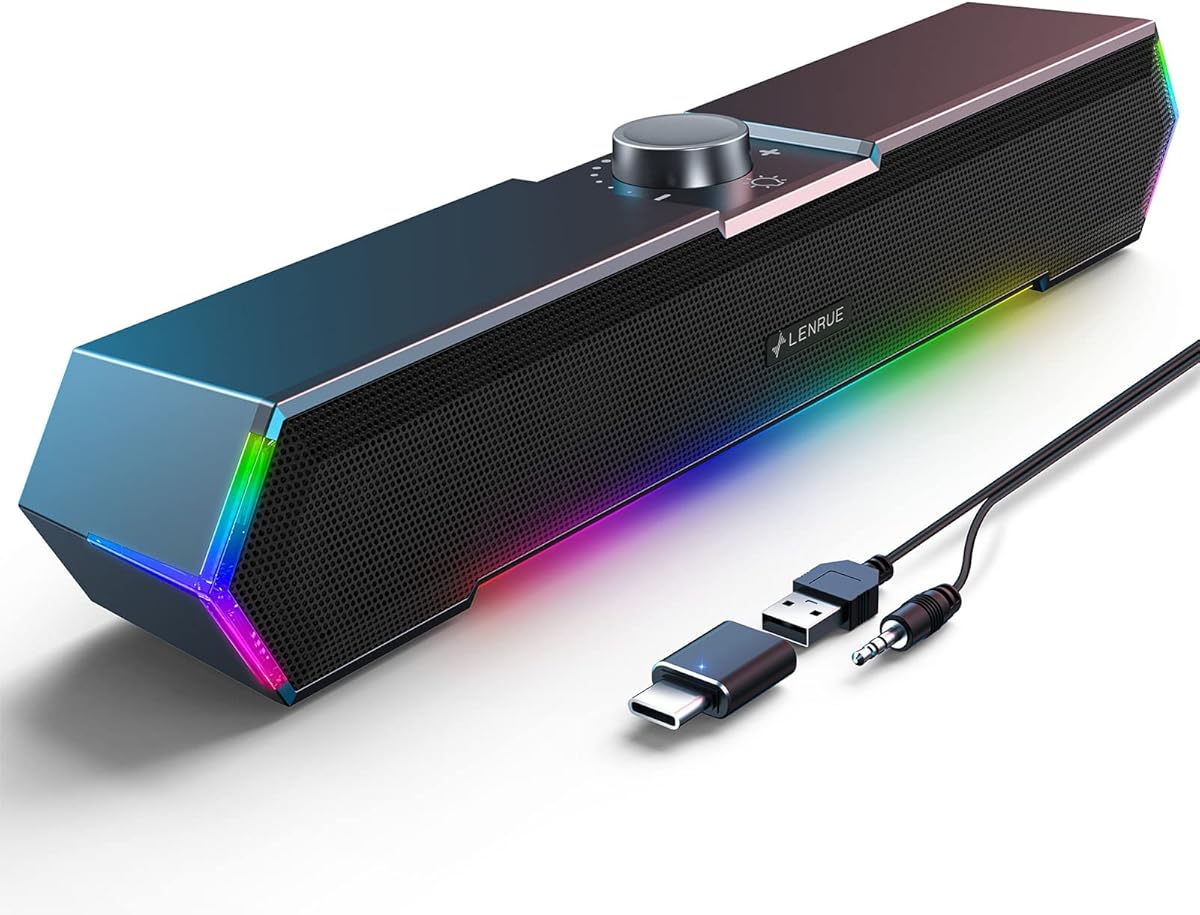
The LENRUE G11 brings cinema-like sound to your desk with its surge stereo technology. Four large amplifier IC horns deliver distortion-free audio ideal for movies and games. The touch lights add a cool ambiance that enhances your setup.
We may earn a commission when you buy through this link, at no additional cost to you.
It includes a Type-C adapter for modern devices making connectivity flexible. The top volume knob is easy to reach for quick adjustments. The compact shape fits under monitors without taking up extra desktop real estate.
Keep in mind it does not include a mic or headphone port. This limits use cases where hands-free calling is needed. But for pure media consumption the sound clarity and visual flair are quite impressive.
Gamers who want a bit of style will enjoy this pick. The lighting is unique and the sound is loud enough for a full experience. If you value atmosphere along with clear audio this model delivers well.
Surge stereo sound creates a dynamic listening environment for movies and games.
Dynamic angular lights add a stylish glow controlled by one simple touch button.
We may earn a commission when you buy through this link, at no additional cost to you.
These desktop speakers prioritize loud clear audio for simple home office setups. The plug-and-play setup gets you working fast without driver installation. The unique column shape gives them a distinct look on any desk surface.
We may earn a commission when you buy through this link, at no additional cost to you.
In-line volume control allows for easy adjustments while you work. The anti-slip foot pads keep them stable during intense gaming or music listening. Users appreciate the loud sound that meets most audio needs easily.
The cables may tangle easily without management features. The design is basic compared to other budget units with lighting. Still for the price the performance is reliable and functional for everyday listening tasks.
Good for those wanting a no-fuss solution for audio. The warranty provides additional peace of mind for buyers. If you need loud sound in a small package this model offers great utility.
Delivers crisp distortion-free audio that satisfies daily music and movie needs.
Foot pads prevent sliding ensuring stable placement on smooth desk surfaces.
We may earn a commission when you buy through this link, at no additional cost to you.
The Uakinat desktop speaker uses upgraded 2x3W tech to deliver crisp loud audio. It fits any desktop without taking extra space. The glued cables prevent clutter making setup visually clean immediately after unboxing.
We may earn a commission when you buy through this link, at no additional cost to you.
Plug-and-play functionality ensures it works instantly with PCs and laptops. In-line volume control lets you adjust sound quickly without software access. The anti-slip pads keep the speakers firmly in place during use.
The fixed cable length might be short for larger desks. Build quality is standard plastic which feels lightweight. However the sound clarity meets expectations for casual listening at this price point comfortably.
This model is great for budget conscious buyers needing simple reliability. The 60-day guarantee adds confidence to the purchase. If you want loud sound and tidy cables this speaker fits the bill well.
Glued cables reduce desktop clutter keeping your workspace neat and organized.
Upgraded technology delivers distortion-free audio for immersive daily listening.
We may earn a commission when you buy through this link, at no additional cost to you.
These stereo speakers provide a reliable classic option for desktop audio. The USB power ensures they run off your computer without extra adapters. In-line volume control gives you easy access to adjust levels on the fly.
We may earn a commission when you buy through this link, at no additional cost to you.
A bottom radiator helps create a springy bass sound that feels robust for the size. The blue LED lights add a touch of style though they cannot be turned off. The padded base protects your desk from scratches.
Build materials are standard plastic with metal finish accents. The LEDs might be distracting in dark rooms for some users. However the sound quality remains balanced and clear for general media consumption.
Best for users wanting a traditional setup without complex features. The reliable performance ensures you get consistent audio day after day. If you value simplicity and ease of use this model is a safe bet.
Enhances bass response to deliver a fuller sound experience for the size.
In-line control makes adjusting levels simple during any activity.
We may earn a commission when you buy through this link, at no additional cost to you.
Selecting the right budget speaker involves evaluating several key features to match your specific needs and setup constraints.
Most cheap PC speakers use USB for power and audio which simplifies setup by using a single cable. Some models also include 3.5mm aux inputs for more flexibility with non-USB devices. Always check if your computer has the necessary ports before buying.
Prioritize USB power and audio cables to reduce desk clutter and ensure compatibility with modern devices.
Output power measured in watts determines loudness but quality depends on driver design and tuning. Look for passive radiators which help boost bass response in compact speakers without needing a subwoofer. Clear mids and highs matter more than raw power.
Check for features like full-range drivers and acoustic tuning to ensure balanced sound rather than just high wattage.
Compact designs save valuable desk space which is crucial for small home offices or gaming setups. Some models offer clip-on mounts to attach directly to monitors for even more space savings. Measure your available desk width before purchasing.
Choose a footprint that fits under your monitor or alongside your keyboard without obstructing your workflow.
Having physical volume controls on the speakers or an inline cable makes quick adjustments easy. Touch buttons offer modern aesthetics but can be sensitive or hard to locate during use. Ensure mute or standby features are readily accessible for convenience.
Prioritize speakers with easy-to-reach controls to adjust volume quickly without interrupting your work or gameplay.
Plastic bodies are common in budget models but look for scratch-free pads and sturdy feet to prevent desk damage. Metal accents can improve durability and aesthetic appeal slightly. A warranty indicates manufacturer confidence in the product lifespan.
Check for protective foot pads and warranty coverage to ensure the speakers last through daily use.
Most models work with Windows macOS and Linux but verify driver-free setup for Mac users. USB-C adapters are helpful for modern laptops lacking standard USB ports. Ensure the audio format matches your system requirements for seamless playback.
Confirm system compatibility and port types to avoid connection issues after purchase.
Some speakers include LED lighting or specific design accents that enhance the visual appeal of your workspace. These features do not impact sound but can personalize your setup. Decide if aesthetics matter as much as performance for your use case.
Consider lighting or design accents only if they align with your personal style preferences.
Start by connecting the USB cable to your computer and ensuring the 3.5mm audio jack is plugged in if required. If your computer does not recognize the speakers automatically check the sound settings to select the correct playback device.
Adjust the volume using the inline knob or software controls to avoid distortion at maximum levels. Place the speakers at ear level or slightly above to achieve the best sound projection and stereo imaging for your listening position.
Keep the speakers away from direct sunlight and moisture to preserve their finish and internal electronics. Clean the exterior with a soft dry cloth periodically to remove dust without using harsh chemicals or liquids.
No most USB powered speakers have built-in audio decoders so you do not need a separate sound card. They work directly with your computer's standard audio ports for simple plug-and-play setup.
Yes most of these models work with macOS without installing extra drivers. However you may need to select the USB speakers in System Preferences under sound settings for proper audio routing.
Many models connect via USB or 3.5mm which works with consoles like Xbox or PlayStation. Always verify your console supports external USB audio before buying to ensure compatibility with the controller or output ports.
Budget speakers typically produce clear sound suitable for small to medium rooms. While they may not fill a large hall they are loud enough for personal listening and casual gaming without being overly noisy.
Most budget desktop models do not include a built-in microphone for calls. If you need one for voice chat look for a combo device or use a separate headset plugged into your computer.
Ensure your audio drivers are up to date and check your computer's sound mixer settings. Using high-quality cables and keeping the speakers away from electrical interference sources helps reduce static or hum during playback.
Choosing the right budget speaker comes down to balancing sound quality size and specific needs. The Creative Pebble 2.0 leads in overall performance while the MELOGAGA RGB shines for visual appeal at a low cost.
Prioritize features like USB connectivity and physical volume controls for ease of use in daily tasks. The FUNLOGY Speaker offers a premium feel if you need better power and build quality in a compact form factor.
Remember that prices and stock levels change frequently so check current deals before finalizing your purchase. Use this guide as a reference to find the perfect audio setup that fits your budget and workspace.