
VolenGo H1100
4.3Editor score
Backlit LCD screen
Waterproof laminated tapes
User-friendly interface
Discover the best label maker for network cables in October 2026. This guide compares top models for durability, speed, and compliance.
Organizing network cables is essential for maintaining a clean and efficient workspace. A reliable label maker helps you identify wires quickly and reduces confusion during maintenance or upgrades.
We evaluated ten top-rated devices based on print quality, durability, ease of use, and compliance with industry standards. Each model offers unique features suited for different environments.
Each pick highlights specific strengths like heat shrink support or battery life. Prices may fluctuate, so check current listings before purchasing to ensure you get the best value.
4.3Editor score

4.6Editor score
4.3Editor score
The following table provides a side-by-side comparison of all ten selected label makers. Review key specifications to find the device that matches your specific needs.


The Makeid P31S stands out as a top choice for professionals needing reliable cable identification. It offers thermal transfer technology that ensures labels last in harsh environments.
We may earn a commission when you buy through this link, at no additional cost to you.
Its 300 DPI resolution delivers sharp text and barcodes essential for complex networks. The rechargeable battery supports extended use without frequent recharging.
While it carries a higher price, the durability and compliance with ANSI standards justify the investment. It handles various tapes including heat shrink effectively.
Ideal for IT managers and electricians who need precision and longevity in their labeling tasks.
Labels printed with thermal transfer resist water and oil ensuring they remain readable over time.
PC software allows for bulk data imports and complex layouts saving time on large projects.
We may earn a commission when you buy through this link, at no additional cost to you.
The VolenGo H1100 is an excellent entry-level option for those needing simple cable labeling. It provides a backlit screen for visibility in dim areas.
We may earn a commission when you buy through this link, at no additional cost to you.
Its waterproof tapes ensure labels stay legible even in damp environments. The interface is intuitive making it accessible for beginners.
Though less rugged than premium models it offers great value for small projects. It is lightweight and easy to carry around.
Best suited for home users or small offices needing basic cable management solutions.
The backlit LCD ensures you can see your work clearly regardless of lighting conditions.
Affordable pricing makes it accessible for users with limited budgets needing immediate solutions.
We may earn a commission when you buy through this link, at no additional cost to you.
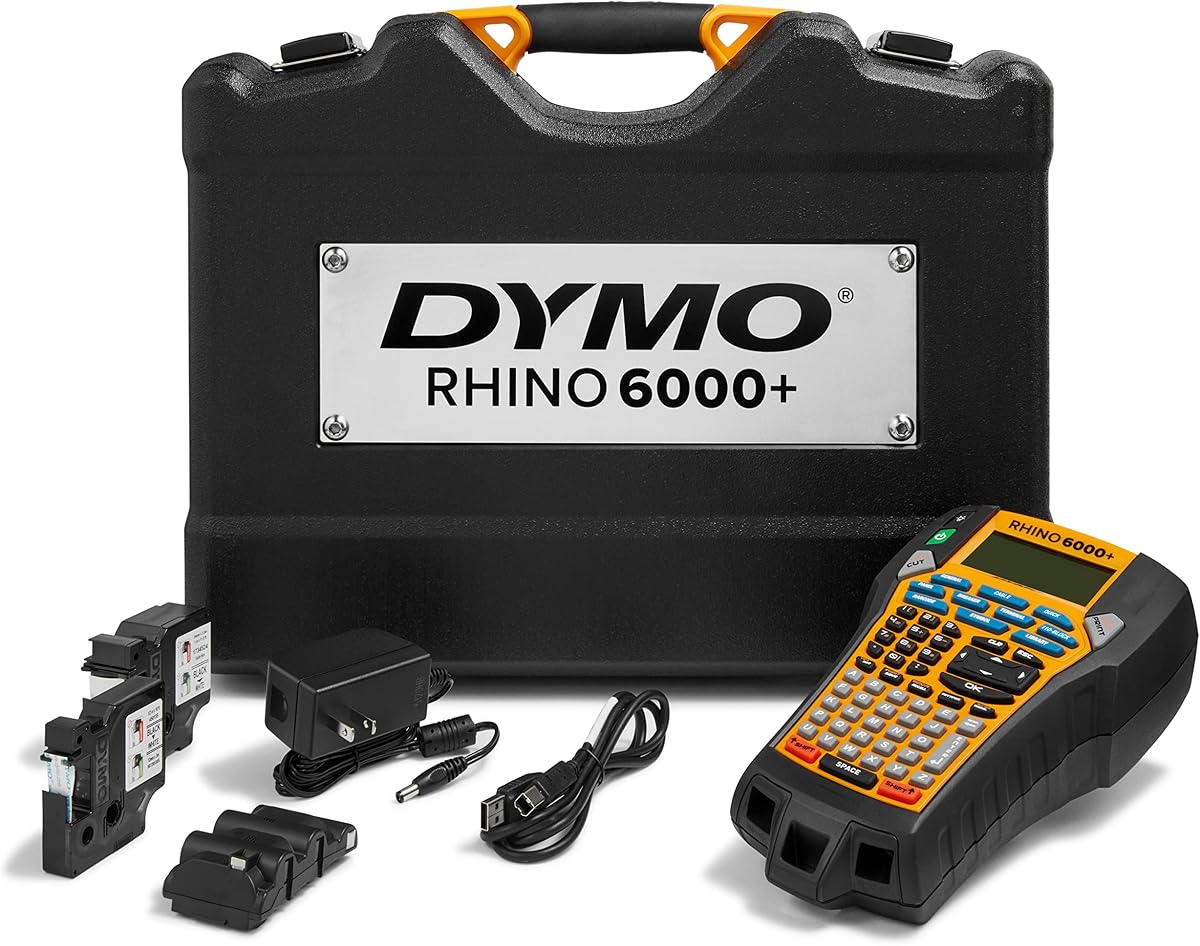
The DYMO Rhino 6000 is designed for serious professionals requiring advanced labeling capabilities. It connects to a PC for complex label creation and bulk printing.
We may earn a commission when you buy through this link, at no additional cost to you.
Its hot keys automate formatting ensuring consistency across large networks. The hard case protects the device during transport to job sites.
While expensive and heavy it delivers unmatched precision and control. The rechargeable battery supports all-day use on-site.
Perfect for enterprise IT teams managing extensive infrastructure needing detailed asset tags.
Desktop software enables complex designs and data imports that handheld units cannot match.
The included hard case ensures the device survives harsh transport conditions on the job.
We may earn a commission when you buy through this link, at no additional cost to you.
The E1000 focuses on heat shrink applications ideal for electrical work. It includes tapes that wrap around wires permanently after shrinking.
We may earn a commission when you buy through this link, at no additional cost to you.
Its QWERTY keyboard speeds up text entry significantly compared to multi-tap systems. Multiple modes help organize labels for different tasks.
Though the screen is small the functionality remains robust. The USB power option offers flexibility for continuous use.
Ideal for electricians requiring secure heat shrink identification on power cables.
Heat shrink tubes provide a permanent bond that resists wear and tear over years.
Standard keyboard layout allows for rapid data entry reducing fatigue during long shifts.
We may earn a commission when you buy through this link, at no additional cost to you.
The Brother P-touch PTH111 simplifies electrical labeling with dedicated one-touch keys. It allows quick access to cable wrap and flag formats.
We may earn a commission when you buy through this link, at no additional cost to you.
Its graphical LCD lets you preview labels before printing to avoid waste. The device is lightweight and includes a wrist strap for mobility.
While limited to two lines of text it covers most basic needs effectively. The build quality ensures longevity in workshop environments.
Recommended for general maintenance staff needing quick and reliable wire labels.
Dedicated keys remove the need for complex menu navigation saving valuable time.
Screen preview prevents errors by showing exact text placement before ink is used.
We may earn a commission when you buy through this link, at no additional cost to you.
The BRADY M210 is built to withstand harsh industrial conditions without failure. It offers straightforward operation for users focused on results.
We may earn a commission when you buy through this link, at no additional cost to you.
Its rugged construction ensures it survives drops and exposure to dust. The interface is minimal reducing learning time for new workers.
While it lacks advanced features it delivers consistent performance when reliability matters most. It uses standard tapes for easy replacement.
Best for industrial environments where durability is the top priority.
Built tough to handle the rigors of manufacturing plants and construction sites.
Minimalist design ensures operators can focus on the task rather than complex settings.
We may earn a commission when you buy through this link, at no additional cost to you.
The Epson LABELWORKS LW-PX700 offers peace of mind with a lifetime warranty. It supports wide tapes up to one inch for large labels.
We may earn a commission when you buy through this link, at no additional cost to you.
Its preview screen helps users verify content before printing ensuring accuracy. The kit includes essential accessories to get started immediately.
Although heavier than others the warranty coverage justifies the investment for professionals. It handles industrial tapes effectively.
Ideal for businesses needing long-term support and versatile label options.
Lifetime warranty provides unmatched peace of mind for daily professional use.
Supports multiple tape types allowing flexible solutions for various labeling challenges.
We may earn a commission when you buy through this link, at no additional cost to you.
The Brady M211 Kit brings wireless convenience to label creation. It connects via Bluetooth to your phone for seamless printing.
We may earn a commission when you buy through this link, at no additional cost to you.
Included accessories like a magnet and hard case enhance usability on-site. The app interface allows quick editing on the go.
Dependent on a smartphone which may limit use in some areas. The price reflects its specialized mobile-first design.
Great for technicians who prefer mobile workflows and need hands-free options.
Connects directly to smartphones allowing label creation without carrying a separate device.
Included magnet and case make handling and storage convenient for field work.
We may earn a commission when you buy through this link, at no additional cost to you.
The DYMO Rhino 5200 remains a top-rated choice for industrial labeling needs. It prints up to five lines allowing detailed asset information.
We may earn a commission when you buy through this link, at no additional cost to you.
Its hot keys streamline formatting ensuring consistent label styles across projects. The high rating reflects reliability and ease of use.
Being an older model it lacks some modern connectivity features found in newer units. It remains a solid performer for standard tasks.
Suitable for users needing multi-line tags without advanced connectivity requirements.
Five line capacity allows including dates serials and asset IDs on one label.
Consistently high ratings confirm it is a trusted workhorse in many industries.
We may earn a commission when you buy through this link, at no additional cost to you.
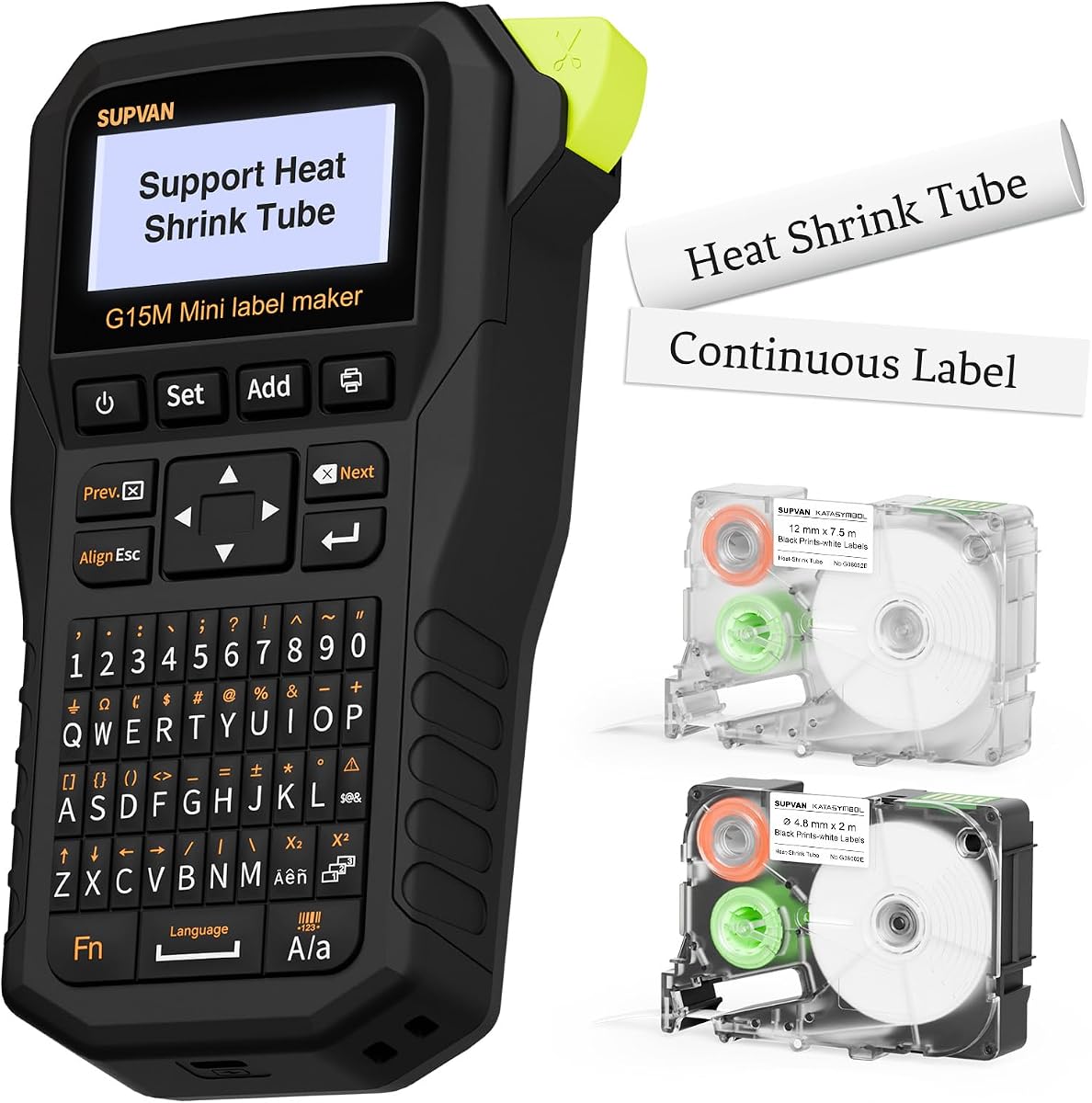
The SUPVAN G15M is a compact option for users valuing portability. It weighs less than a pound making it easy to carry in a pocket.
We may earn a commission when you buy through this link, at no additional cost to you.
Thermal transfer technology ensures labels last up to ten years indoors or outdoors. The long battery life supports extended use without charging.
Its small size limits the width of labels produced. However it covers standard network cable needs effectively.
Perfect for technicians who need a lightweight tool for quick on-the-go labeling.
Ultra-light design allows easy transport in tool belts or small pockets.
Built-in rechargeable battery supports months of usage between charges.
We may earn a commission when you buy through this link, at no additional cost to you.
Selecting the right label maker depends on specific needs such as environment, durability, and budget. Consider these factors before buying.
Thermal transfer offers the best durability for industrial settings while direct thermal is suitable for indoor use. Consider where labels will be placed.
Choose thermal transfer for harsh environments and direct thermal for cost savings indoors.
Ensure the device supports the tape width needed for your cables. Heat shrink tapes are essential for electrical wire identification.
Check compatibility with heat shrink and self-laminating tapes before purchasing.
Rechargeable batteries reduce waste and cost over time but may require downtime to charge. AAA batteries offer portability but need replacement.
Opt for rechargeable models if you work full days without easy access to power.
Bluetooth or USB options allow PC control for large batches. Standalone devices are simpler but less flexible for complex data.
Select connected models if you manage thousands of assets needing bulk data entry.
For IT and electrical work ensure the device meets ANSI or TIA standards. This ensures labels survive professional inspection.
Verify compliance with industry regulations to avoid costly rework or safety issues.
Rugged devices withstand drops and dust common on job sites. Look for models rated for drops and shocks.
Choose industrial-grade builds for field work to ensure long-term reliability.
Look for intuitive interfaces with preview screens and QWERTY keyboards. Complex menus slow down workflow significantly.
Prioritize user-friendly interfaces to maximize efficiency during labeling tasks.
Consider the price of replacement tapes as some brands are exclusive and costly. Ensure tape availability is consistent for your needs.
Calculate long-term costs by checking price and availability of replacement tapes.
Start by selecting the correct tape type for your cable surface. Ensure the tape is loaded securely to prevent jams during printing.
Use the preview function to verify text accuracy before printing. This reduces waste and ensures professional results on your labels.
Keep the device clean and store it in a dry place to maintain print head health. Regularly check battery levels to avoid interruptions during work.
For network cables, a label maker that supports self-laminating wraps or heat shrink tubes is ideal. These ensure labels stay in place and remain readable even in dusty environments.
Thermal transfer labels are generally better for longevity as they use ink ribbons to create durable prints. Direct thermal can fade over time when exposed to heat or light.
Not necessarily. Many handheld label makers operate independently. However, models with PC connectivity allow for bulk imports which is useful for large networks.
Yes, some label makers support heat shrink tubes specifically. These are often used for electrical wire identification as they conform tightly to the cable surface.
Battery life varies by model. Rechargeable units may last weeks on standby while AAA-powered devices depend on usage frequency. Check specifications for exact estimates.
Yes, standards like ANSI/TIA-606-B outline best practices for labeling. Following these helps with compliance and easier troubleshooting within professional IT environments.
Yes, provided the labels are waterproof and weather-resistant. Look for industrial-grade tapes that protect against UV light and moisture.
We reviewed ten top label makers tailored to different needs from budget-friendly options to industrial-grade tools. The Makeid P31S stands out as an all-around excellent choice.
Prioritize durability and compliance if you work in professional IT or electrical settings. For home users, a simpler model might suffice for basic organization tasks.
Prices for these devices fluctuate so always check current listings before buying. Investing in the right tool will save time and effort on future projects.