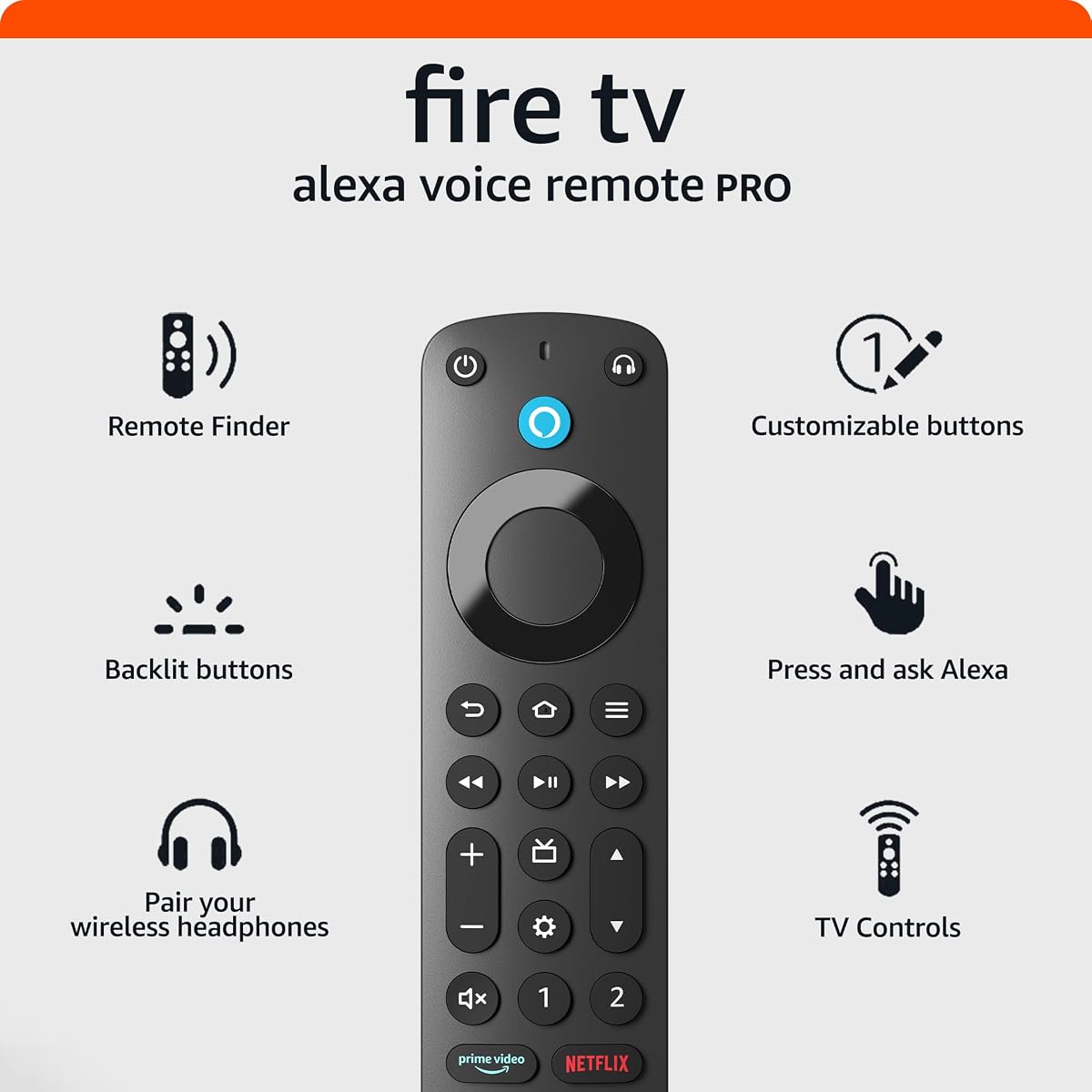
Amazon Fire TV Alexa Voice Remote Pro
4.5Editor score
Backlit buttons for convenience
Remote finder with Alexa
Customizable shortcut buttons
This guide compares the top Fire Stick Replacement Remote options available in October 2026 to help you choose the best voice remote for your Amazon streaming
Finding a reliable Fire Stick Replacement Remote is essential for seamless streaming when your original controller stops working. A good remote offers responsive buttons, voice control, and compatibility with your specific device model.
We evaluated ten highly rated replacement remotes based on user feedback, feature sets, and compatibility data. This list covers budget options, premium models, and official Amazon replacements to suit every need.
Each pick highlights key specifications, pros, and cons to help you make an informed decision. Keep in mind that product availability and pricing may change over time so verify details before purchasing.
4.5Editor score

4.5Editor score

4.5Editor score
This comparison table provides a side-by-side overview of the ten top Fire Stick Replacement Remote options evaluated in this guide. Use it to quickly identify key specifications and compatibility details.
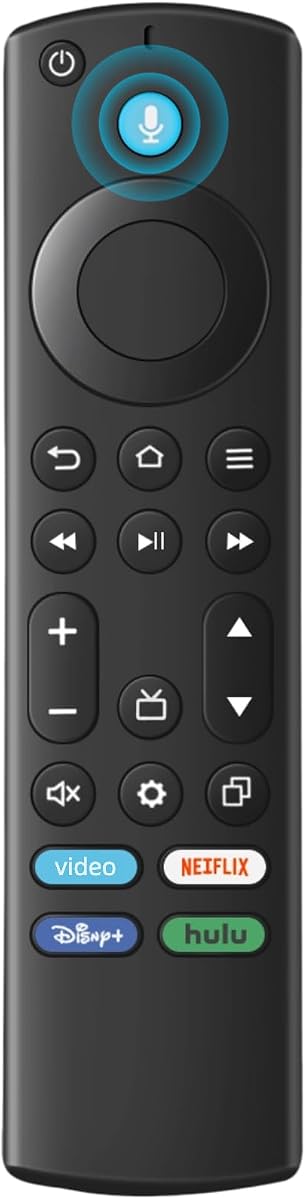


This replacement voice remote is designed for users seeking broad compatibility across Amazon Fire devices. It supports multiple generations of Fire Stick and Fire Cube along with various smart TV models.
We may earn a commission when you buy through this link, at no additional cost to you.
The remote includes voice command functionality allowing you to search for content using your voice. It also features four preset shortcut buttons for quick access to popular apps and channels.
While it lacks some premium features like backlit buttons it offers solid performance for the price. Users should verify their device model before purchasing to ensure proper pairing.
It is an ideal choice for those who need a reliable secondary remote or a cost effective replacement without sacrificing core functionality.
This remote works with Fire Stick 4K Max and Fire Cube 2nd Gen as well as Omni and Insignia smart TVs.
Use voice commands to find content faster or control compatible smart home devices for added convenience.
We may earn a commission when you buy through this link, at no additional cost to you.
The Fire TV Alexa Voice Remote Pro stands out for its premium design and advanced features. It is ideal for users who want the best experience and are willing to pay more.
We may earn a commission when you buy through this link, at no additional cost to you.
Its backlit buttons illuminate when you move the remote making it easy to use in low light. The remote finder feature helps you locate lost remotes by emitting a ring when asked via Alexa.
Two customizable buttons let you create shortcuts to favorite apps or commands. However it is not compatible with older Fire TV models like the 1st Gen or Fire TV Edition devices.
This is the top pick for tech enthusiasts who value convenience and advanced functionality in their streaming setup.
Navigate movie night easily with buttons that light up automatically when you pick up the remote.
Ask Alexa to find your remote and it will emit a sound helping you locate it quickly on a couch.
We may earn a commission when you buy through this link, at no additional cost to you.
This budget remote offers excellent value for users who need a functional replacement without spending much. It supports a wide range of Fire TV and Fire Stick models including Cube devices.
We may earn a commission when you buy through this link, at no additional cost to you.
It features four shortcut buttons for instant access to streaming services and two customizable buttons for additional flexibility. Voice control is included allowing hands free operation.
While it does not work with Roku devices it covers most Amazon Fire ecosystem needs. The design is basic but durable enough for daily use.
For those seeking an economical solution this remote delivers reliable performance and essential features at a low cost.
Get a working voice remote for under ten dollars saving money compared to buying an official Amazon remote.
Program two buttons to launch your favorite apps quickly reducing the number of steps to access content.
We may earn a commission when you buy through this link, at no additional cost to you.
This remote is known for its reliable connectivity and long range performance. It can control devices from up to twelve meters away which is useful for larger rooms.
We may earn a commission when you buy through this link, at no additional cost to you.
The remote includes a built-in microphone for voice commands and supports Fire Smart TVs like Omni and Toshiba. It comes with a sixty day satisfaction guarantee providing peace of mind.
While it does not have backlit buttons it offers solid functionality for standard viewing. Pairing requires disconnecting power and following instructions to activate voice control.
It is a strong choice for users who prioritize range and customer support over premium design features.
Control your streaming device from across a large living room without moving closer to the TV.
Benefit from a sixty day satisfaction guarantee and responsive support team for any issues.
We may earn a commission when you buy through this link, at no additional cost to you.
This remote emphasizes ease of use and quick setup for most Fire Stick models. It automatically syncs with compatible streaming devices and smart TVs reducing configuration time.
We may earn a commission when you buy through this link, at no additional cost to you.
It includes four pre-programmed buttons for popular apps and voice control for hands free navigation. It works with Insignia and Toshiba smart TVs as well as Fire Stick devices.
The remote is straightforward and avoids complex menus. However it lacks backlit buttons and does not include batteries which you must purchase separately.
It is suitable for users who want a no-fuss replacement that works quickly with minimal setup steps.
This remote pairs automatically with your device removing the need for manual coding or complex steps.
Launch your top streaming apps instantly with four dedicated buttons for quick access.
We may earn a commission when you buy through this link, at no additional cost to you.
This remote covers a broad range of Fire Series devices including Fire TV Stick Lite and Fire TV Cube. It is designed to work with most modern Fire Smart TV models.
We may earn a commission when you buy through this link, at no additional cost to you.
Voice control allows you to find content and manage smart home devices easily. Pairing is automatic when you follow the simple instructions involving the home button.
While it does not support older first generation smart TVs it fits most users needs. It lacks backlit buttons but offers reliable performance for the price.
It is a practical choice for those needing a versatile remote that works across multiple Fire devices.
Designed to work with a wide variety of Fire Stick and Fire Cube models ensuring you find a fit.
Use voice commands to check weather or control lights without needing to find a separate smart device.
We may earn a commission when you buy through this link, at no additional cost to you.
This official Amazon remote ensures full compatibility and quality assurance. It is designed for Fire TV Stick 3rd Gen and later models including Fire TV Cube 2nd Gen.
We may earn a commission when you buy through this link, at no additional cost to you.
It comes with batteries included which is convenient. The remote has dedicated power volume and mute buttons for controlling your TV and soundbar easily.
The guide button helps you access live TV apps all in one place. It is compatible with Echo Show 15 making it a versatile choice for households.
For users wanting guaranteed quality and battery inclusion this official remote is a reliable and convenient option.
Save time and money as the package includes two AAA batteries ready for immediate use.
Press the guide button to see all live TV apps in one place without switching inputs manually.
We may earn a commission when you buy through this link, at no additional cost to you.
This remote is designed for Fire Stick Lite and Fire TV Cube 2nd and 3rd Gen models. It offers voice command support and works with Fire Smart TVs of the 3rd generation.
We may earn a commission when you buy through this link, at no additional cost to you.
Pairing involves holding the home button for about ten seconds until the LED flashes. It is straightforward and requires no complex coding.
The remote is affordable and provides essential features. If it fails to connect checking battery levels usually resolves the issue.
It is a good option for those needing a cost effective replacement with voice capabilities.
Hold the home button for ten seconds to enter pairing mode and connect quickly to your device.
Use voice commands to turn on the TV or switch channels without pressing physical buttons.
We may earn a commission when you buy through this link, at no additional cost to you.
This remote is unique in its support for Hisense and Insignia smart TVs alongside Fire Stick devices. It includes voice functionality and four preset app buttons.
We may earn a commission when you buy through this link, at no additional cost to you.
It is ideal for households with mixed smart TV brands. Pairing is automatic after following a simple procedure involving the home button.
The remote offers good value and broad brand support. It does not work with Samsung devices so check your model before purchasing.
It is a practical solution for those who need a single remote to control both Fire devices and compatible smart TVs.
Work seamlessly with both Amazon Fire devices and third party smart TVs like Hisense and Insignia.
Launch your favorite streaming apps instantly using four dedicated preset buttons on the remote.
We may earn a commission when you buy through this link, at no additional cost to you.
This remote is designed for Fire Stick devices and Omni QLED Fire-Series smart TVs. It includes voice control and four dedicated shortcut buttons.
We may earn a commission when you buy through this link, at no additional cost to you.
It supports Insignia and Toshiba models making it versatile for different home setups. Pairing is done by holding the home button until the LED blinks.
The remote is affordable and covers many popular smart TV brands. It is not compatible with older first generation smart TVs.
It is a solid budget option for users needing a replacement that supports Omni and Fire TV ecosystems.
Control your Omni QLED TV directly from this remote simplifying your home entertainment setup.
Press one of four shortcut buttons to launch your favorite apps quickly without navigating menus.
We may earn a commission when you buy through this link, at no additional cost to you.
Selecting the right Fire Stick Replacement Remote requires considering compatibility features and budget. This guide outlines key factors to help you decide.
Verify that the remote supports your specific Fire Stick model and smart TV generation. Many remotes work with 3rd Gen and newer devices but not older 1st or 2nd Gen units.
Always check the product description for listed compatible models before purchasing to avoid returns or pairing issues.
Most modern remotes include voice control allowing you to search for content or control smart home devices. Ensure the remote has a built-in microphone for this functionality.
Voice features are essential for hands free operation and can significantly enhance the user experience.
If you often use your streaming device in low light conditions look for a remote with backlit buttons. This feature helps you see controls in the dark.
Only higher-end models like the Fire TV Remote Pro offer this feature so check the specs if you need it.
Some remotes allow you to program buttons to launch favorite apps or commands instantly. This can save time and simplify navigation.
Check if the remote includes customizable buttons and how to program them before buying.
Premium remotes often include a remote finder that emits a sound when asked via Alexa. This helps locate misplaced remotes quickly.
This feature is mostly found in official Amazon models and some premium third-party options.
Most remotes require two AAA batteries which are not included. Some official Amazon remotes may include batteries but verify this.
Consider the long-term cost of replacing batteries when evaluating your options.
Replacement remotes range from budget options to premium models. Decide how much you are willing to spend based on needed features.
Affordable remotes can provide reliable performance without advanced features like backlit buttons.
Look for remotes that offer a satisfaction guarantee or customer support. Some third-party sellers provide limited warranties.
A good support policy can help resolve pairing issues or defects after purchase.
To pair a new remote disconnect power from your streaming device. Wait fifteen seconds then reconnect power. Insert batteries into the remote and hold the Home button until the LED flashes.
Keep your remote away from moisture and extreme temperatures to ensure longevity. Avoid dropping it as internal components can be sensitive to impact.
Replace batteries regularly to maintain optimal performance. If the remote becomes unresponsive remove and reinsert batteries to reset the connection.
Yes many replacement Fire Stick remotes are compatible with Fire OS smart TVs like Toshiba and Insignia. Check the product details to confirm support for your specific TV model before purchasing.
Most modern replacement remotes include voice control features. However older basic remotes may not have a microphone. Look for voice enabled models if you need this functionality.
Most third-party replacement remotes do not include batteries. Official Amazon remotes may include them. Always check the product description to confirm what is included in the package.
Pairing usually involves holding the Home button for ten to fifteen seconds. Consult the user manual that comes with your remote for specific steps as procedures can vary by model.
Common causes include dead batteries or incorrect pairing steps. Ensure you disconnect power from your device before pairing. If issues persist try resetting the remote or contacting customer support.
Official remotes offer guaranteed compatibility and may include extras like backlit buttons. However third-party remotes provide significant savings. Choose based on your budget and feature needs.
Yes many remotes include dedicated TV controls for power and volume. Check the product details to ensure it supports your TV brand for seamless operation.
Most modern remotes support 3rd Gen and newer devices but not older generations. Verify compatibility with your specific Fire Stick model to avoid purchasing an incompatible remote.
Choosing the right Fire Stick Replacement Remote depends on your device model and feature preferences. The top picks offer reliable performance across different price ranges.
Prioritize compatibility with your specific Fire Stick or smart TV generation to ensure proper functionality. Voice control and shortcuts can enhance the user experience.
Prices and availability can change so verify details before purchasing. Use this guide to find a remote that meets your needs and budget.