
PXN X8 Arcade Stick
4.7Editor score
Mechanical blue switch buttons
Keyboard-like directional inputs
Turbo function support
Discover the top fight stick for console fighting games in 2026 with expert reviews and comparisons to help you choose the perfect controller for competitive
Choosing the right fight stick for console fighting games can transform your gaming experience from casual to competitive. These specialized controllers offer precision, durability, and customization that standard gamepads simply cannot match for serious players.
We have analyzed the latest models available in November 2026 to bring you a comprehensive guide. Our evaluation covers compatibility, build quality, button responsiveness, and overall value to ensure you find a controller that meets your specific needs.
Each pick below highlights key features and potential trade-offs to help you make an informed decision. Keep in mind that availability and pricing can fluctuate, so checking current listings is always recommended before finalizing your purchase.
4.7Editor score

4.5Editor score

4.6Editor score
This side-by-side comparison highlights the key specifications and unique selling points of each top-rated fight stick available this month to help you quickly identify the model that aligns best with your gaming setup.




The 8Bitdo Arcade Stick stands out for its versatile connectivity options and seamless integration with Switch and Windows systems. It features a dynamic button layout that changes functionally and visually based on the selected mode.
We may earn a commission when you buy through this link, at no additional cost to you.
Its support for the ultimate software allows deep customization including button mapping and macro creation which appeals to competitive players. The stick is ultra-moddable with a universal mounting plate that supports Sanwa arcade sticks for those seeking premium components.
While it offers three connection ways including Bluetooth and 2.4G wired USB-C the price point is higher than entry-level models. The hidden compartment for the receiver is a thoughtful touch that prevents loss during travel.
This controller is ideal for gamers who want wireless freedom without sacrificing performance. It balances portability with robust features making it a strong choice for both casual and serious fighting game enthusiasts.
Bluetooth and 2.4G options allow untethered play without lag or connectivity issues.
The ultimate software enables complex macros and button mapping for tailored control schemes.
We may earn a commission when you buy through this link, at no additional cost to you.
The MAYFLASH F300 delivers exceptional value with support for a vast array of consoles including Switch PS4 Xbox and PC. It supports both XINPUT and DINPUT modes on PC ensuring broad software compatibility for emulators and modern titles.
We may earn a commission when you buy through this link, at no additional cost to you.
Customization is straightforward as the stick is designed to accept Sanwa Denshi buttons and joystick components. Turbo functions with different speed settings add utility for players who need rapid input repetition for specific game mechanics.
While it lacks official licensing on some platforms it remains a practical choice due to its wide compatibility. The build quality is reliable though the aesthetic is more functional than flashy compared to premium licensed models.
This fight stick is perfect for players on a budget who still demand performance across multiple systems. Its open design invites future upgrades making it a long-term viable option for growing enthusiasts.
Supports Switch PS4 Xbox Series S Xbox One Xbox 360 macOS Windows and Steam Deck seamlessly.
The open layout allows easy swapping of buttons and joystick for improved tactile feedback.
We may earn a commission when you buy through this link, at no additional cost to you.
The HORI PlayStation 5 Fighting Stick Alpha is a high-end pro fight stick officially licensed by Sony for PS5 PS4 and PC. It features Hayabusa buttons and a joystick known for their responsiveness and durability in competitive environments.
We may earn a commission when you buy through this link, at no additional cost to you.
The unit opens up for easy customization and maintenance allowing users to replace the top panel artwork or service internal components. This tournament grade design ensures it can withstand the rigors of frequent intense play sessions.
While it carries a higher price point than generic alternatives the official licensing and premium components justify the investment. It is not compatible with Xbox consoles which limits its utility for multi-platform users.
This stick is the top choice for PlayStation players seeking a reliable and high-performance controller. Its build quality and official status make it a safe bet for serious competitors.
Designed to withstand competitive play with durable components and secure internal structure.
Sony approval guarantees seamless integration with system firmware and game compatibility.
We may earn a commission when you buy through this link, at no additional cost to you.
The Nacon Daija Arcade Stick is developed in collaboration with professional gamers for top fighting games like Marvel vs Capcom and Street Fighter. It offers full button mapping using intuitive user-friendly software on PC and Mac.
We may earn a commission when you buy through this link, at no additional cost to you.
Comfort is prioritized with a textured palm rest that provides sturdy support during long sessions. The inclusion of a 3.5mm audio jack port allows direct connection of competition-grade headsets for chat and background music.
While the rating is slightly lower than premium rivals the feature set is robust. The front plate is customizable with three faceplate options or a template for your own design to match your style.
This controller is great for players who value comfort and audio convenience. The lock function prevents accidental presses ensuring your focus stays on the fight without unintended inputs.
Dedicated 3.5mm jack allows for seamless headset connection without extra dongles.
Textured palm rest offers ergonomic support to reduce hand fatigue during play.
We may earn a commission when you buy through this link, at no additional cost to you.
The MAYFLASH F700 is designed specifically for fighting games on PS5 PS4 Switch and Windows. It supports three connection ways including Bluetooth and 2.4G with a wired USB option for maximum flexibility.
We may earn a commission when you buy through this link, at no additional cost to you.
The included receiver has a hidden compartment to store it safely which is convenient for portable setups. It supports wired headsets to output background music and online chat on PS5 and PC Xinput modes.
While it does not support non-fighting games the focus allows it to excel in its niche. Firmware updates enable Switch 2 compatibility via Bluetooth ensuring it stays relevant as new hardware launches.
This stick is ideal for PS5 players wanting wireless freedom without adapters. Its compatibility with Sanwa components means you can customize it further to suit your precise control needs.
Bluetooth connectivity allows wireless gameplay on PS5 without needing extra hardware.
Turbo functions with speed settings help execute rapid combos effortlessly.
We may earn a commission when you buy through this link, at no additional cost to you.
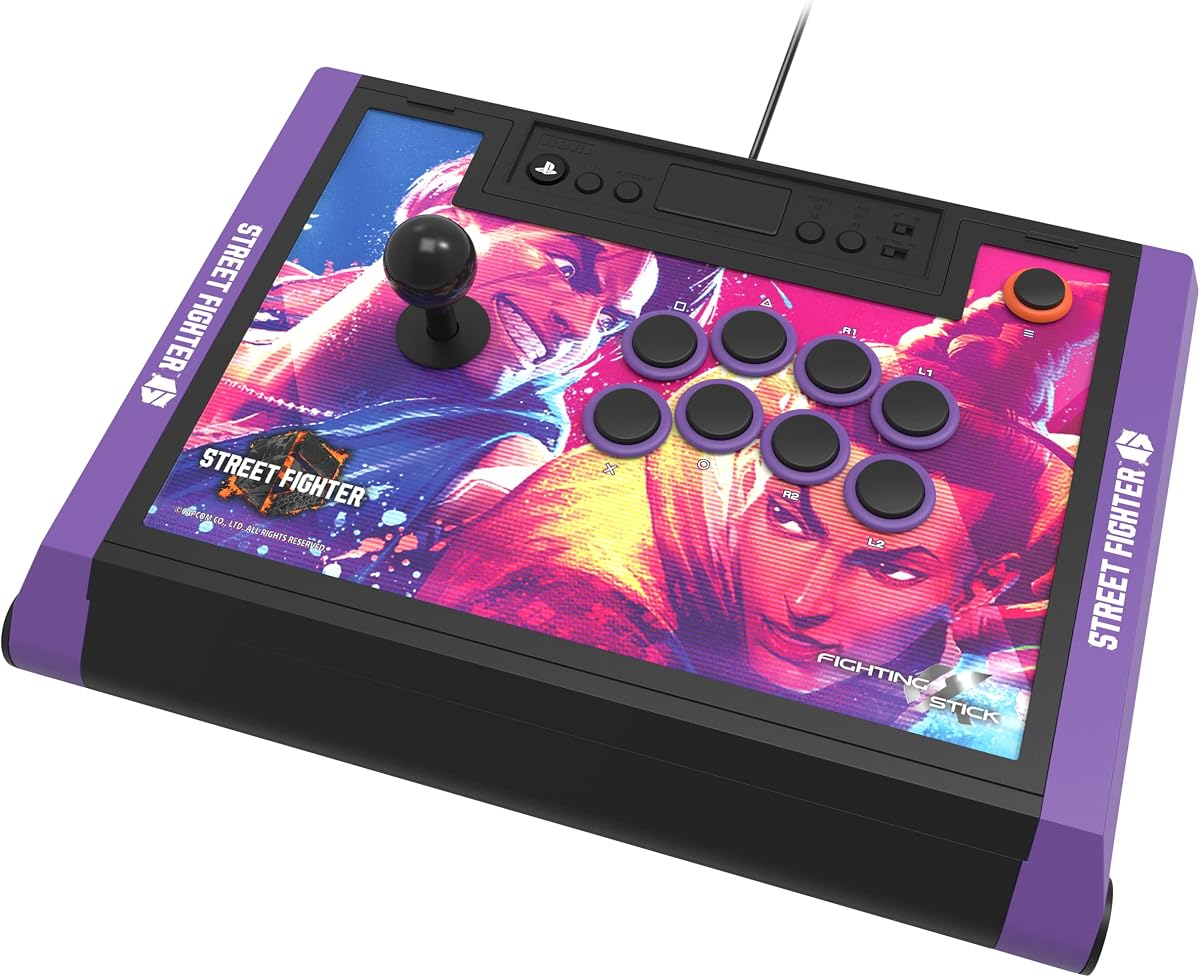
The HORI Street Fighter 6 Edition is a high-end tournament ready fight stick officially licensed by Sony and Capcom. It features proprietary HAYABUSA buttons and joystick for reliable performance in matches.
We may earn a commission when you buy through this link, at no additional cost to you.
The top panel artwork is unique to the game and includes a link to downloadable high-resolution images for further customization. This allows players to personalize their setup while maintaining the official licensed aesthetic.
As a premium model it comes with a higher price but the official licensing and build quality are top-tier. It is designed for PS5 PS4 and PC but does not support Xbox consoles.
This controller is perfect for fans of Street Fighter 6 wanting a themed experience. The tournament grade build ensures it performs well in competitive settings while looking authentic.
Official Street Fighter 6 artwork adds visual appeal to your gaming setup.
Included link provides high-resolution images for customizing the top panel further.
We may earn a commission when you buy through this link, at no additional cost to you.
The Qanba Sapphire S1 is a leverless arcade controller officially licensed by Sony featuring exclusive Street Fighter 6 Juri artwork. It offers eighteen adjustable throw distance buttons compatible with Cherry MX switch series for personal preferences.
We may earn a commission when you buy through this link, at no additional cost to you.
A button map profile switch lets you remap buttons and save multiple configuration files giving a competitive edge. It includes a detachable memory foam wrist rest and shoulder strap for portability and extended sessions.
This controller offers broad compatibility with PlayStation 5 4 and PC with a headphone jack included for audio convenience. The leverless design may take adjustment but it offers speed and precision for advanced players.
This controller is ideal for players seeking a modern twist on classic stick controls. The official license and premium adjustability make it a strong choice for serious competitors.
The unique design allows for faster inputs and precise movements in high speed combat.
Eighteen adjustable throw distance buttons accommodate various finger styles and sizes.
We may earn a commission when you buy through this link, at no additional cost to you.
The MAYFLASH F500 Bundle includes a Magic Boots-S5 adapter to enable compatibility with PS5 and PS4 without a primary controller. It supports Xbox Series S X Xbox One and 360 plus Switch and PC systems.
We may earn a commission when you buy through this link, at no additional cost to you.
Headsets can output background music and online chat on PS4 and Xbox One via the built-in port. Turbo functions with different speed settings provide utility for rapid inputs during specific moves.
While the rating is lower than premium models the bundle value is high for multi-platform users. A wired Microsoft Xbox 360 or Xbox One Controller is required when using on those specific consoles.
This bundle is perfect for owners of multiple consoles needing one controller. The Magic Boots adapter simplifies setup making it accessible for various gaming environments.
Adapter allows the stick to function as a native controller on PS5 and PS4.
Works across Xbox PS Switch and PC ensuring one stick for your entire collection.
We may earn a commission when you buy through this link, at no additional cost to you.
The HORI TEKKEN 8 Edition is a high-end tournament ready fight stick officially licensed by Sony and Bandai Namco. It features proprietary HAYABUSA buttons and joystick for superior feedback and response times.
We may earn a commission when you buy through this link, at no additional cost to you.
The top panel showcases TEKKEN 8 artwork with downloadable alternate options available for printing. This ensures the stick looks unique and authentic to the game while maintaining the quality expected from HORI.
This is a solid choice for TEKKEN fans wanting official gear that performs reliably. It is compatible with PS5 PS4 and PC but excludes Xbox which may be a limitation for some.
The controller delivers tournament grade performance for competitive play. Its high-quality components and official licensing make it a trustworthy option for TEKKEN enthusiasts.
Authorized by Namco ensures full support and design accuracy for TEKKEN 8.
Top tier components ensure the stick withstands heavy use over many years.
We may earn a commission when you buy through this link, at no additional cost to you.
The PXN X8 Arcade Stick features keyboard-like directional buttons and Blue-Switch Mechanical buttons for a unique tactile experience. It supports cross-platform compatibility including Xbox One PC PS3 and Switch.
We may earn a commission when you buy through this link, at no additional cost to you.
The control buttons offer a sharp tactile feel and distinctive sound that delivers clear feedback. Turbo support allows customizable combination functions for quick attacks and efficient gameplay execution.
Direction buttons can be assigned to D-Pad or Left Stick functions to meet different needs. This flexibility plus mechanical durability makes it a standout for budget conscious players seeking premium feel.
This controller is perfect for those wanting mechanical feedback without a high price. It is designed to last with over 50 million presses life expectancy ensuring long-term use.
Blue-Switch buttons provide audible and tactile feedback similar to a mechanical keyboard.
Directional buttons mimic keyboard inputs for precise and familiar control schemes.
We may earn a commission when you buy through this link, at no additional cost to you.
Selecting the right fight stick requires understanding your console needs and personal preferences. This section outlines key factors to consider for a perfect match.
Ensure the fight stick supports your primary console such as PS5 Xbox Series X or Switch. Officially licensed models guarantee seamless integration but universal options offer more flexibility for multi-console setups.
Check if the stick works natively or requires adapters. Some models like the F500 come with Magic Boots for PS5 while others rely on native firmware updates.
Decide between wired and wireless connectivity. Wired sticks offer zero latency which is critical for competitive play while wireless models provide freedom of movement during casual sessions.
Look for sticks with multiple connection modes such as Bluetooth and 2.4G receivers. This ensures you can choose the best option for your environment and setup.
Durability is key in a fight stick. Premium sticks use Sanwa or HO-I components that resist wear over thousands of plays. Check if the chassis is solid and if parts are replaceable.
Models like the HORI Alpha feature official licensed parts that maintain integrity. Lower cost models may require third-party upgrades to reach the same durability standards.
Consider if you want to map buttons or change layouts. High-end sticks offer software for complex macros while others require physical reassembly for changes. This impacts how easily you can adapt to different games.
Look for top-panel customization and button swaps. Some sticks like the Nacon Daija allow you to change faceplates or reassign buttons via software for personalized layouts.
Choose between standard arcade layouts or mechanical layouts. Keyboard style buttons like the PXN X8 offer tactile feedback while traditional sticks mimic arcade cabinets. This affects how quickly you can adapt.
Check if the stick supports VEWLIX or standard button configurations. Different layouts suit different playstyles so understanding your preferences will help choose the best fit.
If you travel to tournaments a compact and detachable stick is vital. Look for sticks with included cases or detachable wrist rests to protect components during transit.
Lighter models are easier to carry but ensure they still offer solid stability. Some sticks feature shoulder straps or storage compartments for accessories to reduce bulk.
Some sticks include a 3.5mm audio jack for headsets. This is crucial for players who want to hear game audio and talk to teammates without a separate controller.
Check if the audio jack is on the stick or requires a separate hub. Models with built-in ports provide a cleaner setup and reduce cable clutter.
Balance your budget with features. Expensive sticks offer official licensing and premium parts but entry models may be sufficient for casual play. Decide if you need top-tier parts or a general utility controller.
Consider long-term costs. A stick that accepts third-party upgrades might cost more upfront but save money in the long run if components break or wear out.
Connect the stick to your console using the appropriate cable or wireless method. Ensure the firmware is up to date for compatibility with new game titles and system updates.
Adjust your grip and hand position to match the stick's design. Use the wrist rest if included to reduce fatigue during long sessions and maintain consistent input accuracy.
Keep your stick clean and free of dust. Use a soft cloth to wipe down buttons and joystick regularly and check for wear on internal switches to ensure longevity.
While casual players can use standard controllers fight sticks offer better precision and comfort for games with complex combos. They are most valuable if you play fighting games frequently and value tactile feedback.
Not all sticks work on Xbox. Some like the F300 have dedicated Xbox modes while others like the HORI Alpha are Sony only. Always check the product details for Xbox Series S X compatibility.
Yes many sticks allow replacement of buttons and joysticks. Models like the F300 and PXN X8 use standard sizes like Sanwa or Cherry MX making upgrades affordable and easy.
Most modern fight sticks support PC via XINPUT or DINPUT modes. Some like the F300 offer both modes for broader compatibility with emulators and modern games.
Bluetooth or 2.4G wireless options are common. Connect via settings on your console and ensure firmware is updated. Some models hide the receiver in the base for protection.
Wired sticks generally offer zero latency which is critical for competitive play. Wireless offers convenience but ensure it has a stable connection and low latency for fighting games.
We reviewed ten top fight sticks including the 8Bitdo for wireless flexibility and the HORI Alpha for premium build. Each model offers unique strengths to match different play styles and budget constraints.
Prioritize compatibility and build quality when choosing. Whether you prefer mechanical buttons or classic arcade layouts the right stick enhances your gaming experience significantly.
Remember to check current availability and prices before buying as these can change over time. Selecting a model that fits your needs now ensures you enjoy competitive play for years to come.