
Harvopu for iPad A16
4.3Editor score
RGB backlight with 7 colors
Magnetic detachable keyboard
Multiple viewing angles support
This guide compares the top iPad A16 Folio Case with Keyboard options for productivity, protection, and typing comfort to help you choose the right accessory.
Choosing the right iPad A16 Folio Case with Keyboard transforms your tablet into a powerful laptop alternative for work and creativity. These versatile accessories offer typing convenience, trackpad navigation, and essential protection in a single streamlined package that adapts to your needs.
We evaluated ten real products based on build quality, typing experience, trackpad responsiveness, battery life, and overall value. Each option was analyzed for compatibility with your specific iPad models to ensure you get a perfect fit without compatibility issues or frustration.
Every pick below highlights key strengths, trade-offs, and ideal use cases to help you decide quickly. Prices and stock change frequently so verify current details before purchasing. Our goal is to provide clear unbiased information for smart buying decisions today.
4.3Editor score

4.4Editor score

4.4Editor score
Below is a detailed side-by-side comparison of all ten products featuring their core specifications, design highlights, and unique advantages to help you compare features at a glance.




The Apple Magic Keyboard Folio stands out as the top choice for iPad A16 users seeking premium productivity. With a 4.4 rating and built-in trackpad, it delivers a laptop-like experience without Bluetooth pairing hassles.
We may earn a commission when you buy through this link, at no additional cost to you.
Its detachable two-piece design allows flexible typing with magnetic attachment to your iPad. The trackpad supports Multi-Touch gestures for seamless cursor control, while the 14-key function row provides quick access to essential controls.
Users note the keyboard requires no charging since it powers from the iPad via connection. The adjustable stand on the back panel enables smooth continuous viewing angles for work or media. Protective back panel covers both front and back.
Ideal for professionals or students prioritizing reliability and performance, this is the go-to pick for those wanting official Apple quality. If you seek unmatched typing comfort and gesture navigation, this keyboard sets the benchmark.
The two-piece magnetic design allows quick transitions between typing and tablet modes without tools or cables, keeping your workflow uninterrupted.
Built-in trackpad with Multi-Touch gestures enables precise cursor movement, making document editing and browsing more efficient than touch-only input.
We may earn a commission when you buy through this link, at no additional cost to you.
Harvopu offers an excellent budget option for iPad A16 users needing keyboard functionality without overspending. Rated 4.3, it includes a trackpad and RGB backlight for customizable typing in any lighting condition.
We may earn a commission when you buy through this link, at no additional cost to you.
The magnetic detachable keyboard connects via Bluetooth with shortcuts matching iPadOS functions. A 420mAh battery provides long standby time with auto sleep mode. The case features 3 viewing angles via grooves for versatile positioning.
Soft PU organosilicon material resists stains while TPU interior absorbs shock. Pencil holder included for convenience. Note pairing via function keys. Overall solid value for students or casual use.
For buyers prioritizing cost and RGB lighting this is a strong contender. The trackpad adds laptop-like convenience at a fraction of premium prices making it ideal for home office or school tasks.
7 RGB backlight colors with adjustable brightness create engaging typing experience in dim environments or personal style preferences.
Honeycomb TPU interior absorbs impact while stain-resistant outer keeps case looking new despite daily use or accidental spills.
We may earn a commission when you buy through this link, at no additional cost to you.
typecase Edge delivers premium features like a floating stand that elevates the iPad above the keyboard for better ergonomics. With 4.4 rating, it combines precision trackpad with 11-color backlighting for versatile use.
We may earn a commission when you buy through this link, at no additional cost to you.
The floating magnetic stand holds iPad securely for laptop-like setup ideal for work or study. Palm rejection reduces accidental cursor movement. Full row of iPadOS shortcuts ensures quick media or brightness controls.
All-in-one synthetic vegan leather design includes pencil holder and secure magnetic closure. Typecase provides 12-month support for hinge and Bluetooth reliability. Tested for key feel and everyday durability.
This is the choice for those wanting ergonomic advantages and advanced trackpad features. If you type daily and value standing options, the floating design plus premium build justify the higher price.
Floating stand lifts iPad for better posture during long typing sessions reducing strain on wrists and neck compared to flat setups.
Precision trackpad with palm rejection prevents accidental touches while typing keeping cursor control smooth and accurate across apps.
We may earn a commission when you buy through this link, at no additional cost to you.
CHESONA highlights a robust multi-touch trackpad that adapts well to iPadOS gestures. With 4.5 rating, this case offers wireless detachment and dual device connectivity for multitasking professionals needing flexible setups.
We may earn a commission when you buy through this link, at no additional cost to you.
Backlit keyboard with 7 LED colors dims automatically after 30 seconds of inactivity to conserve power. The 500mAh battery lasts up to 120 days standby. Pair via Bluetooth with one-click device switching between two systems.
Case includes pencil holder for Apple Pencil storage and adapter slots. Magnetic detachment lets you switch between laptop and tablet modes easily. Precision cutouts ensure full access to all tablet ports and sensors.
For users needing dual-device workflow and reliable trackpad, this is a top pick. The auto-off backlight balances visibility and battery life while wireless convenience supports dynamic work environments.
Switch between two paired devices with one click enabling seamless transitions between iPad and Mac for efficient multitasking.
Backlight auto off after inactivity extends battery life ensuring typing stays visible when needed without constant charging.
We may earn a commission when you buy through this link, at no additional cost to you.
Logitech Rugged Folio excels in durability with proprietary shock-absorbent technology meeting military drop standards. Rated 4.3, it transforms your iPad into a tough tool for rugged environments using Smart Connector for instant connection.
We may earn a commission when you buy through this link, at no additional cost to you.
Four modes include Type Write Sketch View and Read adapting to various tasks. The membrane seals keyboard from spills and crumbs for easy wiping. Smart Connector powers the keyboard from iPad without Bluetooth pairing.
Magnetic latch keeps case secure and stores stylus safely. Full row of shortcut keys covers media and Dictation. Uses FSC-certified paper packaging. Ideal for field work or active daily use.
Buyers needing drop resistance and spill protection should choose this. The Smart Connector convenience ensures reliability without battery drain making it perfect for on-the-go professionals.
Military-standard protection absorbs drops and impacts keeping iPad safe in tough conditions while maintaining full functionality.
Smart Connector eliminates Bluetooth pairing delays and provides direct power ensuring keyboard stays ready whenever you open the case.
We may earn a commission when you buy through this link, at no additional cost to you.
typecase Folio balances protection and portability with an ultra-lightweight synthetic leather case. Rated 4.6, it features a magnetic detachable keyboard with 7 backlight colors for comfortable typing in varied lighting.
We may earn a commission when you buy through this link, at no additional cost to you.
The keyboard recharges via USB-C and includes shortcut keys for common tasks. A built-in pencil holder keeps your stylus secure and within reach. Precise cutouts maintain access to ports without removing the case.
Lightweight synthetic leather and flexible TPU edges protect against scratches while staying easy to carry. Ideal for students or travelers who value minimal bulk without sacrificing typing functionality or protection.
This is the pick for lightweight portability and essential typing features. The pencil holder and detachable design add convenience making it versatile for daily classes or casual writing tasks.
Slim profile reduces added bulk ensuring iPad stays easy to carry while retaining essential keyboard and trackpad productivity features.
Built-in pencil holder secures Apple Pencil inside the case preventing loss and keeping stylus ready for quick annotation.
We may earn a commission when you buy through this link, at no additional cost to you.
typecase Folio Duo adapts seamlessly between portrait and landscape use with a magnetic detachable design. Rated 4.4, it offers precision trackpad gestures and 7-color backlighting for dynamic creative or work workflows.
We may earn a commission when you buy through this link, at no additional cost to you.
The keyboard snaps on for focused typing then detaches for slimmer tablet mode without removing the case. A stable support structure holds position across orientations. Refined leather-style exterior with soft shock-absorbing inner case.
Integrated pencil slot keeps stylus secure while full row of iPadOS shortcuts aids productivity. The 12-month warranty ensures confidence in hinge and Bluetooth reliability. Ideal for users switching orientations often.
Buyers needing multi-angle support should prefer this. The adaptability and trackpad precision make it suitable for sketching or writing across different orientations without compromising typing efficiency.
Flexible support adapts to portrait and landscape use allowing comfortable viewing for writing sketching or media depending on task.
Precision multi-touch gestures enable smooth navigation and app switching reducing reliance on touch gestures for faster workflow.
We may earn a commission when you buy through this link, at no additional cost to you.
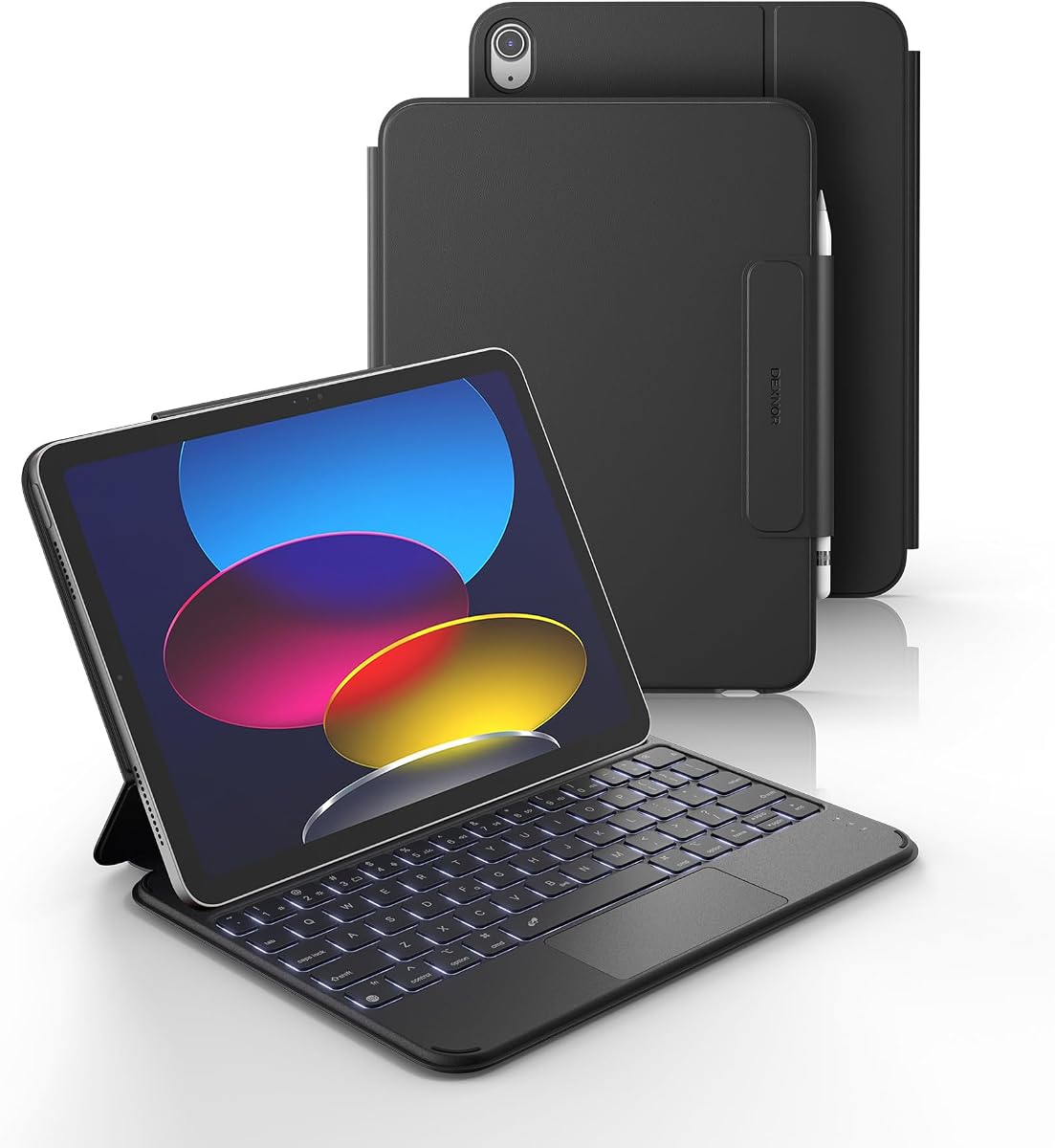
Dexnor delivers outstanding battery performance with a 650mAh lithium polymer unit rated 4.3. It supports up to 200 hours of typing without backlight and 1200 hours standby reducing charging frequency.
We may earn a commission when you buy through this link, at no additional cost to you.
The 120-degree ergonomic viewing angle keeps iPad stable on desks or laps. Multi-touch trackpad supports gestures but can be disabled via key combo. Scissor-switch keys provide responsive laptop-like typing.
Auto power on when opening case and sleep mode after inactivity extend efficiency. Solid white adjustable backlight ensures visibility without color options. Ideal for travelers or remote workers prioritizing endurance.
For users needing minimal charging interruptions this is optimal. The extended battery life and stable magnetic anchor make it reliable for long sessions anywhere without tethered power.
Large capacity battery supports days of use between charges ensuring uninterrupted typing during long trips or busy workdays.
Reinforced magnetic system anchors iPad firmly to prevent slipping allowing confident typing on uneven surfaces or laps.
We may earn a commission when you buy through this link, at no additional cost to you.
ESR stands out with an extra-large precision trackpad 65% bigger than standard options. Rated 4.4, it features a slim 6.9 mm design and magnetic detachable keyboard for seamless workflow with Mac users.
We may earn a commission when you buy through this link, at no additional cost to you.
Two viewing angles support different tasks while Air Guard corners protect against drops. Magnetic attachment allows quick detachment for tablet mode. No backlight but lightweight carry and responsive gestures.
Precise cutouts ensure access to buttons and ports without removal. Triangular support keeps setup steady. Ideal for users prioritizing large navigation surface and ultra-portability over lighting features.
This is ideal for users needing large touchpad control. The slim profile and gesture support make it great for daily commuting or light professional work.
65% larger trackpad provides ample space for smooth scrolling and gestures reducing fatigue during prolonged browsing or editing.
Ultra-thin profile minimizes bulk ensuring iPad remains easy to slide into bags without adding significant weight.
We may earn a commission when you buy through this link, at no additional cost to you.
CC Store offers best value with marathon battery delivering over 200 hours of use per charge. Rated 4.6, it features a magnetic detachable keyboard and adjustable kickstand for versatile typing and viewing angles.
We may earn a commission when you buy through this link, at no additional cost to you.
Premium PU leather case resists scratches and fingerprints while pencil holder keeps stylus safe. Complete package includes keyboard case USB-C cable and manual. Ideal for budget-conscious buyers needing essential features.
No trackpad or backlight keeps design simple and durable. Responsive support resolves any concerns quickly. Best for those prioritizing battery life and protection over advanced navigation.
For buyers seeking reliable battery and protection without extras this is ideal. The complete package and support ensure hassle-free setup for daily use.
High capacity battery supports over 200 hours of typing reducing recharge frequency and enabling uninterrupted productivity sessions.
Includes all necessary accessories and manual for quick setup allowing immediate use without additional purchases.
We may earn a commission when you buy through this link, at no additional cost to you.
Selecting the right iPad A16 Folio Case with Keyboard involves weighing protection typing comfort connectivity and budget to match your workflow and usage habits.
Always confirm your iPad model number matches the case specifications before purchasing. The iPad A16 (11th gen 2025) and 10th gen (2022) have unique dimensions and connector types. Using an incompatible case can lead to poor fit or functionality issues.
Check the back of your tablet for the A-number model code to ensure perfect fit and full feature support.
Decide between Smart Connector keyboards like Logitech Rugged Folio that draw power from the iPad without charging or Bluetooth models requiring pairing. Smart connectors offer instant connection but limit device compatibility.
Smart connectors eliminate charging needs while Bluetooth offers multi-device flexibility for power users.
A trackpad transforms your iPad into a laptop with Multi-Touch gestures for scrolling and cursor control. Look for palm rejection to avoid accidental touches while typing. Trackpads enhance productivity for document editing.
Trackpads with palm rejection enable smoother navigation and typing accuracy without relying solely on touch input.
Bluetooth keyboards need internal batteries measured in hours or standby time. High capacity options last longer between charges but may add weight. Auto sleep modes help conserve power during inactivity.
High-capacity batteries with auto sleep features reduce recharge frequency for uninterrupted use on long trips.
Backlighting enables typing in low-light conditions. Options range from single-color white to RGB with 7 or 11 colors. Adjustable brightness helps balance visibility with battery consumption.
Adjustable backlighting improves visibility in dim environments while conserving power when not needed.
Cases vary from slim folios to rugged military-grade protection. Consider your environment whether office school or outdoor. Reinforced corners and water resistance add durability against drops and spills.
Reinforced corners and spill-resistant materials protect against common accidents and extend device lifespan.
Look for adjustable kickstands or multiple grooves to find comfortable viewing angles. Some designs allow portrait and landscape use while others fix the tablet position. Ergonomic angles reduce neck strain.
Adjustable angles support comfortable typing and viewing for extended sessions regardless of task.
Integrated pencil holders keep your Apple Pencil secure and accessible without adding extra clips. This helps prevent loss during travel and ensures quick access for drawing or note-taking.
Built-in pencil slots prevent loss and keep your stylus ready when needed.
For magnetic or Smart Connector models simply align the keyboard with iPad edges and press gently until it snaps into place. Ensure the iPad is powered on for instant connection. For Bluetooth models open Settings and pair via the specified function keys.
Keep the case clean by wiping with a soft dry cloth to remove dust and oils. Avoid harsh chemicals that damage synthetic leather or trackpad surfaces. If spilled liquids occur power off and dry immediately to prevent damage.
Store your iPad in the closed case to engage sleep mode and save power. Charge the keyboard via USB-C before battery drains completely to maintain longevity. Remove Apple Pencil occasionally to prevent adhesive wear on holder slots.
Many models are specifically designed to support both iPad A16 (11th gen 2025) and 10th gen (2022) as long as dimensions match. Always verify the model number listed by the manufacturer to confirm compatibility before purchasing.
It depends on the model. Smart Connector keyboards like Logitech draw power from the iPad and do not require separate charging. Bluetooth models have internal batteries and need periodic USB-C charging to function properly.
Yes most designs allow you to detach the keyboard magnetically or physically while keeping the protective case attached. This lets you switch between laptop and tablet modes without removing the case entirely.
Power on the keyboard enter pairing mode via function keys usually Fn+C then open Bluetooth settings on your iPad. Select the keyboard from available devices and follow on-screen prompts. It will auto-connect when turned on.
Most modern cases support Multi-Touch gestures like swipe and scroll similar to macOS or iOS trackpad controls. Check product specs to confirm gesture compatibility for navigation and app switching efficiency.
Rechargeable batteries last several hundred charge cycles before noticeable capacity drop. With proper care and avoiding full depletion they should last multiple years. Standby times range from 120 to 1200 hours depending on usage.
Most cases include a dedicated pencil holder slot on the side or top. This keeps the stylus secure while using the case. Ensure the holder fits your Pencil generation before purchasing for proper fit.
Use a soft dry cloth or compressed air to remove debris. Avoid liquid cleaners directly on keys to prevent moisture damage. For stubborn dirt lightly dampen cloth and wipe carefully without letting moisture enter key gaps.
The Apple Magic Keyboard Folio leads overall with unmatched integration trackpad precision and no-charging convenience for power users. Harvopu offers the best budget option with RGB backlight and trackpad features for casual users.
If you prioritize ergonomic standing designs typecase Edge provides a floating stand for better posture. For rugged needs Logitech Rugged Folio delivers military-grade protection. Always consider battery life and trackpad features for your workflow.
Prices and availability change so verify current deals and compatibility before buying. Our goal is to help you find a keyboard case that boosts productivity while protecting your iPad investment effectively.