
8Bitdo Ultimate 2 Bluetooth Controller
4.3Editor score
Integrated Charging Dock
TMR Joysticks
RGB Fire Ring
Discover the top 10 Hall Effect Nintendo Switch 2 Controller models compared for drift-free control, ergonomics, and advanced features like programmable macros.
Finding a reliable controller for your next generation console is crucial for immersive gameplay. Hall Effect technology offers a breakthrough in joystick precision by eliminating mechanical wear. This guide explores the best options available for the Switch 2 ecosystem.
We have rigorously analyzed ten top rated controllers based on user feedback and technical specifications. Our comparison focuses on connectivity, battery life, and unique features like turbo modes. Each product selected brings a distinct advantage to different gaming styles and preferences.
Every entry in this list provides detailed insights into pros and cons to help you decide. We highlight specific strengths such as ergonomic designs and customizable button mapping. Please note that availability and specific configurations may change over time.
4.3Editor score

4.5Editor score

4.6Editor score
This comprehensive table compares the technical specifications and key features of the ten selected models to help you make an informed decision based on your specific gaming needs.




The AceGamer 2 Pack Wireless Controller stands out as a top contender for gamers seeking reliability and versatility. With a solid rating of 4.4 stars, it promises robust performance across multiple platforms including the Switch 2. The standout feature is the Hall Effect joystick technology which ensures precise control without the dreaded stick drift.
We may earn a commission when you buy through this link, at no additional cost to you.
Each controller in the pack boasts an 800mAh battery that supports extended play sessions without frequent recharging. The programmable M1 and M2 buttons allow users to map complex macros for competitive advantage. Additionally, the dual vibration motors offer four distinct levels of feedback enhancing the immersion during gameplay.
While the connection process can be slightly tricky during the initial pairing, once set up the performance is consistently smooth. The lack of advanced software customization compared to high end rivals is a minor trade-off for the price point. These controllers are built to last with a lifespan of up to 5 million rotations.
Gamers who prioritize value and need multiple controllers for local multiplayer will find this pack ideal. The ergonomic grip reduces fatigue during long sessions while the wake-up function adds convenience. This package delivers a comprehensive solution for both casual and dedicated Switch 2 players.
The Hall Effect sensors provide magnetic sensing that eliminates mechanical wear and ensures smooth stick movement over time.
Users can program complex actions to single buttons using the M1 and M2 rear inputs for streamlined gameplay.
We may earn a commission when you buy through this link, at no additional cost to you.
The 8Bitdo Ultimate 2 Bluetooth Controller represents the pinnacle of premium third-party controller design. Its seamless integration with Switch 2 Windows and legacy Switch consoles makes it a versatile choice for any setup. The controller ships with an integrated charging dock that ensures it is always ready for action.
We may earn a commission when you buy through this link, at no additional cost to you.
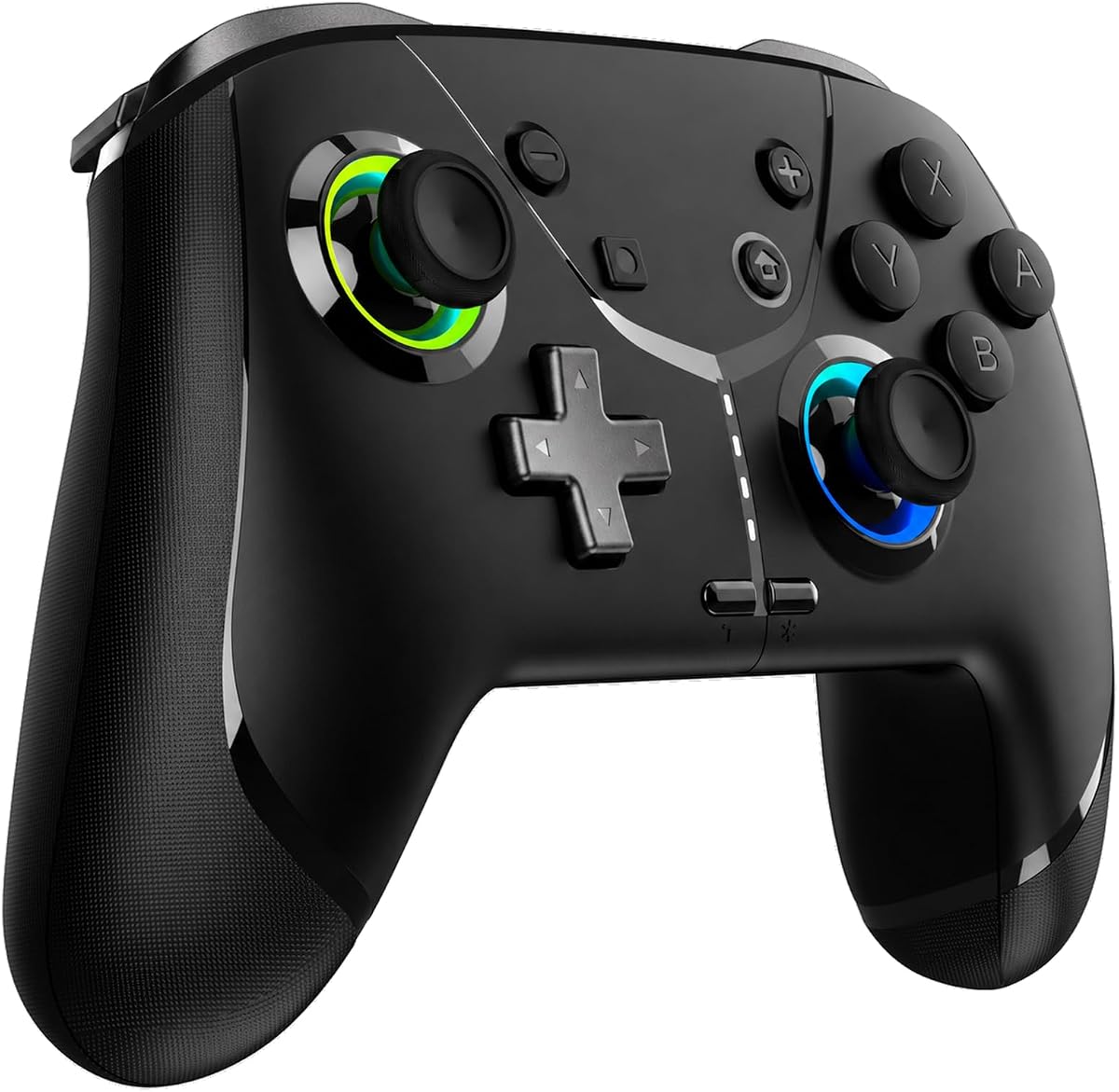
TMR joysticks are featured here to provide higher sensitivity and durability compared to standard potentiometers. The RGB Fire Ring adds a visual flair that complements the modern aesthetics of the Switch 2. Users can also switch between linear and non-linear triggers to suit different game genres.
While the premium features come at a higher cost, the build quality justifies the investment for serious enthusiasts. The need to update firmware for full Switch 2 compatibility is a minor hurdle that ensures long-term support. The auto-reconnect feature on removal from the dock is a thoughtful usability detail.
This controller is best suited for users who want a high-end look and feel without the official console branding. The combination of tactile feedback and visual customization creates an engaging gaming atmosphere. It is an excellent choice for those who value premium features and durability.
TMR joysticks offer magnetic resistance for enhanced precision and a longer operational lifespan.
The built-in charging dock keeps the controller powered up and ready to pair instantly when needed.
We may earn a commission when you buy through this link, at no additional cost to you.
The NBCP Wireless Controller delivers exceptional performance at an accessible price point making it a standout budget option. With an impressive 4.6 star rating users have confirmed its reliability and comfort. The high-precision Hall Effect joysticks ensure accurate movement without the risk of drift over time.
We may earn a commission when you buy through this link, at no additional cost to you.
A unique selling point is the customizable pattern RGB lighting that allows users to personalize their setup. The ergonomic design features a skin-soft texture that reduces slippage during intense gaming sessions. The wireless connectivity options include 2.4G and wired modes for low latency performance.
Although it lacks an official dock, the direct USB-C charging is straightforward and effective. The dual vibration motors provide good feedback intensity though some users might prefer finer granularity. The one-key wake up function simplifies the process of starting your game quickly.
For gamers on a budget who do not want to compromise on Hall Effect technology this is an ideal choice. The combination of visual customization and technical reliability makes it a strong contender. It is highly recommended for those seeking value without sacrificing core performance.
The patterned RGB lighting allows for unique aesthetic choices beyond standard solid colors.
The skin-soft texture ensures comfort and grip during extended play sessions without hand fatigue.
We may earn a commission when you buy through this link, at no additional cost to you.
The AceGamer Wireless Pro Controller is engineered for gamers who demand instant connectivity and deep customization. Its instant wake-up feature mirrors the experience of first-party controllers saving you time. The Hall Effect joystick technology guarantees smooth movement free from mechanical wear and drift issues.
We may earn a commission when you buy through this link, at no additional cost to you.
With four adjustable vibration levels you can fine tune the feedback intensity to match your gaming mood. The programmable back buttons allow for complex macro execution which is a huge advantage in competitive games. The 800mAh battery ensures you can play for up to 12 hours on a single charge.
While the build materials feel standard for the price point the ergonomics are well designed for comfort. The lack of a sophisticated software suite means configuration is done directly on the device which some may find less intuitive. However the hardware performance remains consistent and reliable.
This controller is perfect for players who want a dedicated tool for action and strategy games. The combination of turbo modes and precise joysticks enhances reaction times significantly. It is a solid investment for those who value functionality and battery life over premium aesthetics.
Adjustable vibration settings let you balance immersion with practicality for different game scenarios.
A single press of the home button wakes the console quickly allowing for seamless resume play.
We may earn a commission when you buy through this link, at no additional cost to you.
The Diswoe Wireless Pro Controller is designed to bring families together with its universal compatibility. It works seamlessly across Switch generations and PC making it easy for everyone to join in. The Hall Effect joysticks ensure that every player gets accurate inputs without drift interference.
We may earn a commission when you buy through this link, at no additional cost to you.
A dedicated screenshot button allows players to capture their victories instantly and share them with friends. The zero latency connection guarantees that your movements are registered immediately which is vital for competitive action. The ergonomic layout is shaped to fit various hand sizes comfortably.
While the design may lack flashy lights it focuses on delivering a reliable and comfortable gaming experience. The battery life is robust enough for weekend marathons and the auto-sleep feature conserves power when not in use. This controller is a practical choice for shared household use.
It is an excellent option for parents looking to outfit a gaming setup for multiple family members. The build quality is sturdy enough to withstand regular use while the controls remain responsive. For casual and competitive play alike this controller offers a stable platform for fun.
The built-in screenshot button lets you save your achievements without navigating system menus.
The skin-friendly grips reduce fatigue ensuring comfort during long family game nights.
We may earn a commission when you buy through this link, at no additional cost to you.
This Switch 2 Wireless Controller brings significant convenience by including a multi-functional charging dock. The dock charges the controller and synchronizes with its hidden lighting design for a unified look. Hall Effect sensors provide the accuracy needed for competitive gameplay without mechanical wear over time.
We may earn a commission when you buy through this link, at no additional cost to you.
The hidden glow LED feature offers a subtle aesthetic that lights up only when powered on adding a cool touch. Users can customize the controller settings via an app for remapping and lighting effects which adds flexibility. The macro settings allow you to automate complex actions for easier gameplay.
While the dock adds to the desk footprint it ensures you always have a charged controller ready to use. The app connectivity is a nice touch for tech savvy users who want to tweak their settings extensively. The wake-up function further streamlines the start of your gaming session.
This package is ideal for users who want a complete solution without buying separate accessories. The combination of charging convenience and customizable lighting makes it a standout choice. It is perfect for those who value a clean and organized gaming setup.
The hidden lighting design provides a sleek look that reveals colorful modes when the controller is on.
The charging dock keeps your controller powered and organized while synchronizing with its lighting effects.
We may earn a commission when you buy through this link, at no additional cost to you.
The aghi Switch 2 Pro Controller is specifically tailored for gamers who rely on macro functionality for efficiency. Its loop macro recording allows you to set repetitive actions to a single button for streamlined gameplay. The Hall Effect joystick ensures that your inputs are precise and free from drift.
We may earn a commission when you buy through this link, at no additional cost to you.
The one key wake up feature allows you to start your console instantly with the press of a button. It comes with dual vibration motors offering five intensity levels to suit your preference for haptic feedback. The 800mAh battery supports up to 20 hours of continuous play on a single charge.
While the design is relatively standard it focuses on delivering strong performance features for the price. The RGB lighting adds a bit of personalization though the customization is limited compared to higher end models. The quick wake up and long battery life make it very practical for daily use.
This controller is perfect for players who spend a lot of time in grinding heavy games. The macro capabilities save significant effort during repetitive tasks. It is a solid choice for those who prioritize utility and battery efficiency.
Set repetitive actions to a single button using the loop macro feature for seamless grinding.
The dedicated wake up button allows you to resume your game in seconds without navigating menus.
We may earn a commission when you buy through this link, at no additional cost to you.
The EasySMX S10C Switch 2 Pro Controller offers a unique feature with its dedicated C button for voice chat. This allows you to communicate with friends directly from the controller without navigating through menus. The Hall Effect joysticks ensure that your movement remains smooth and accurate during intense gameplay.
We may earn a commission when you buy through this link, at no additional cost to you.
The mechanical ABXY buttons provide a crisp tactile feel that many gamers prefer for precision actions. With a massive 1000mAh battery it offers up to 22 hours of playtime which is among the best in its class. The swappable faceplates allow you to change the look of the controller to match your style.
While the C button functionality requires some initial setup it adds significant convenience for multiplayer sessions. The mechanical switches are rated for durability ensuring they will last through heavy usage. The battery life means you can game for days without needing a recharge.
This controller is ideal for social gamers who need constant communication with their team. The combination of mechanical feedback and voice chat makes it a powerful tool for coordination. It is a great investment for those who play multiplayer titles frequently.
The dedicated C button streamlines communication allowing you to chat without leaving your game.
Mechanical buttons offer a satisfying click and high durability for frequent gaming use.
We may earn a commission when you buy through this link, at no additional cost to you.
The Playnex 2 Pack Wireless Controllers provide a complete solution for local multiplayer gaming setups. Featuring two controllers in the box it is perfect for split screen action with friends or family. The Hall Effect sensors ensure that both units deliver precise input without any drift issues over time.
We may earn a commission when you buy through this link, at no additional cost to you.
Each controller features dynamic RGB lighting that can be adjusted to match your room or preferences. The 600mAh battery provides a decent amount of playtime and is recharged via USB-C for convenience. You can program the rear buttons to create custom macros for your favorite games.
While the battery life is standard compared to some higher capacity models it is sufficient for most sessions. The lighting effects are fun but not as complex as those found on premium models. The home wake-up feature ensures you can start your game instantly every time.
This pack is the best choice for households that need two reliable controllers without extra cost. The wide compatibility ensures they work across multiple consoles and platforms. It is a practical buy for those who prioritize local multiplayer functionality.
With two units included you can dive into local multiplayer games without needing a second purchase.
Rear buttons can be mapped to complex actions to enhance your gaming efficiency and style.
We may earn a commission when you buy through this link, at no additional cost to you.
The FUNLAB Wireless Switch 2 Pro Controller introduces a unique Firefly hidden glow design that sets it apart visually. When powered on the honeycomb pattern lights up in multiple colors creating an immersive atmosphere. It uses Hall Effect sensors to ensure accurate movement and a longer lifespan for the joysticks.
We may earn a commission when you buy through this link, at no additional cost to you.
The dedicated KeyLinker app gives you full control over remapping and lighting effects to match your mood. One button wake up functionality allows for instant start of your gaming session without tedious syncing. The turbo function adds an edge for fighting games by automating rapid fire sequences.
While the app is required to unlock full customization it offers a level of personalization rare at this price point. The ergonomics are well designed to prevent fatigue during long sessions. The build quality is solid ensuring that the hidden LED effects remain intact over time.
This controller is best suited for users who care about aesthetics and software integration. The unique glow effects make it a standout piece on your desk. It is a great choice for those who want a personalized gaming experience with strong core performance.
The hidden honeycomb pattern lights up in RGB modes to create a unique gaming atmosphere.
The KeyLinker app allows for deep customization of buttons and lighting to suit your style.
We may earn a commission when you buy through this link, at no additional cost to you.
Selecting the right controller involves evaluating several technical factors to ensure comfort and performance during your gaming sessions.
Hall Effect joysticks use magnetic sensors to detect position eliminating physical contact and wear. This technology prevents stick drift which is a common issue with traditional potentiometer based joysticks. When looking for a controller prioritize models that explicitly advertise Hall Effect sensors to ensure longevity.
Always verify the product description mentions Hall Effect technology to avoid mechanical wear issues over time.
Battery capacity determines how long you can play before needing a recharge. Models with higher mAh ratings like 800mAh or 1000mAh offer extended playtime for long sessions. Consider whether the controller supports fast charging or comes with a dedicated dock for added convenience.
Look for controllers with high capacity batteries or included docks to minimize downtime during play.
The physical shape and grip texture are vital for comfort during extended use. A controller with ergonomic contours and non-slip materials will reduce hand fatigue significantly. Check reviews for mentions of comfort to ensure the design fits your hand size well.
Choose a controller with an ergonomic shape and comfortable grip to avoid fatigue during long sessions.
Ensure the controller supports the platforms you use including Switch 2 and PC. Bluetooth and wired connections offer different latency benefits so choose based on your preference. A reliable wireless connection should have a wide operating range to prevent signal loss.
Confirm support for your specific consoles and check connection options for reliable wireless performance.
Advanced controllers often include programmable back buttons and macro support for complex actions. These features allow you to map commands to easily accessible inputs enhancing your gameplay efficiency. Some models also support software customization for deeper control over your settings.
Prioritize models with macro support and programmable buttons if you need advanced control customization.
Adjustable vibration levels allow you to control the intensity of feedback during gameplay. Some controllers offer multiple distinct levels which can be useful for different game scenarios. Good haptics enhance immersion without being overwhelming or distracting.
Look for controllers with adjustable vibration to customize feedback intensity for various game experiences.
A sturdy build ensures that the controller withstands regular use without breaking down quickly. Check for materials that feel durable and buttons that offer a tactile response. A longer lifespan is indicated by high rotation counts for joysticks and strong internal components.
Assess build materials and component ratings to ensure the controller lasts through regular usage.
Evaluate the price relative to the features offered to ensure you get good value for money. A budget model might lack premium features but can still deliver reliable performance. Higher end controllers usually offer better software and build quality but at a higher cost.
Balance the feature set with the price to find a controller that meets your needs without overspending.
Begin by pairing your controller with the console using the dedicated pairing mode. Press the home button or follow the initial connection steps to sync it properly. Ensure the firmware is up to date if the manufacturer provides update tools.
Keep the controller clean by wiping it down with a soft dry cloth after each session. Avoid exposing it to liquids or extreme temperatures which can damage internal components. Store it in a safe place when not in use to prevent accidental drops or impacts.
Regularly check the battery level and charge it before it drops to zero to preserve health. If you notice any issues with the joystick perform a calibration check in the system settings. Use the software tools provided to remap buttons if you prefer a custom layout.
Hall Effect technology uses magnetic sensors to detect joystick position instead of mechanical contacts. This eliminates physical wear and prevents stick drift which improves longevity and accuracy.
Most controllers in this list are designed to be compatible with Switch 2. Always check the product details for specific compatibility notes before purchasing to ensure it works with your setup.
Stick drift is often caused by physical wear inside the joystick. Cleaning the joystick can help temporarily but replacing the module or switching to a Hall Effect model is the best permanent solution.
Many of the models featured here support PC gaming via Bluetooth or wired connection. Always verify the specific compatibility requirements in the product description before buying for PC use.
Battery life varies by model but typically ranges from 8 to 20 hours of continuous play. Higher capacity batteries offer longer sessions so check the specs for the specific mAh rating.
Yes most of these controllers work well with Steam through generic input support. Some models have specific Steam Deck compatibility listed in their product details for seamless integration.
We have explored ten excellent Hall Effect controllers each offering unique features for different needs. The AceGamer 2 Pack and NBCP Wireless offer strong value while the 8Bitdo Ultimate 2 brings premium features.
Prioritize factors such as battery life comfort and drift prevention when selecting your ideal controller. Matching the controller to your gaming style will ensure a more enjoyable experience.
Please check current availability and configurations as they may change over time. This guide is updated to reflect the latest reliable options available for the Switch 2 ecosystem.