
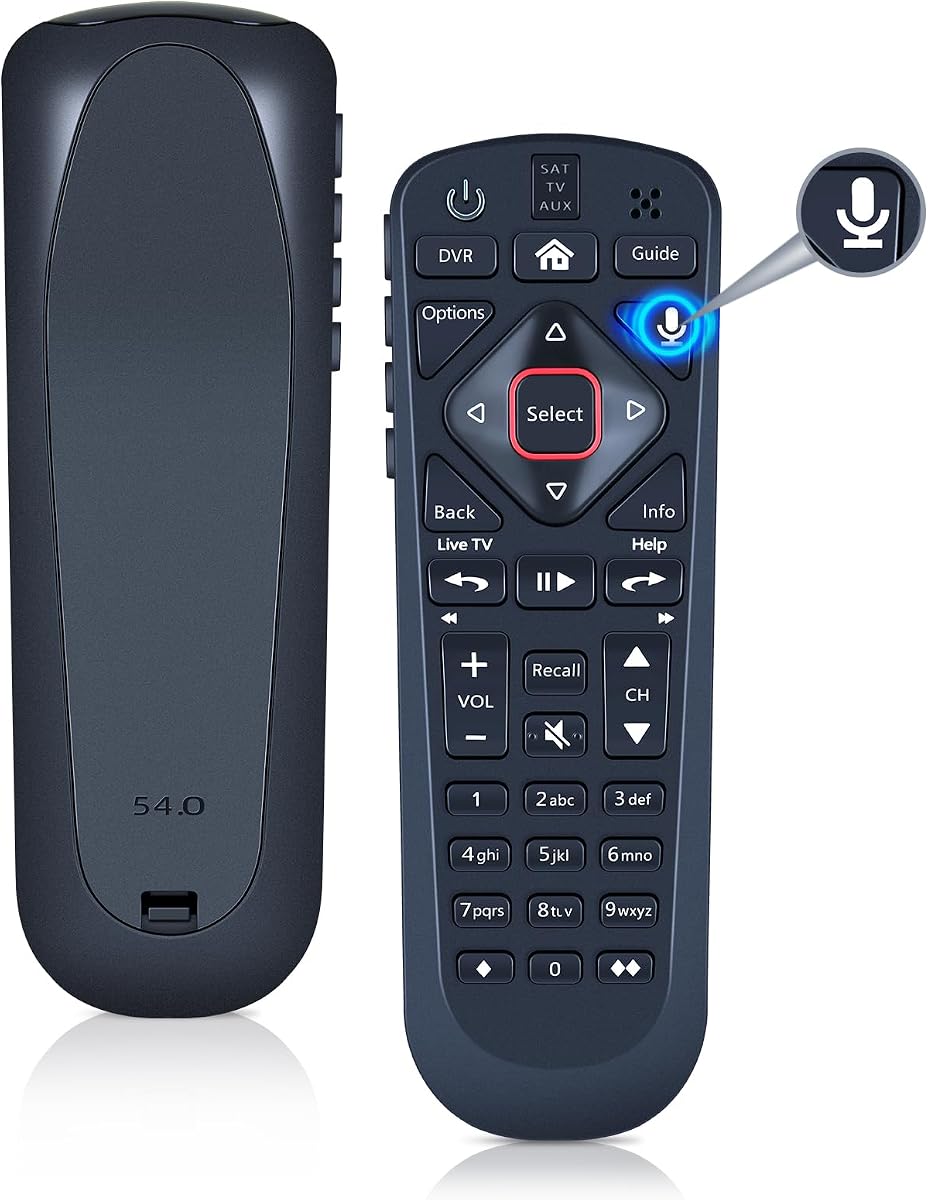
Dish 54.0 Remote Control for The Hopper
4.6Editor score
Backlit keypad keys
Remote locator function
Programmable hot keys
This guide compares the top Dish Network Replacement Remote options available in October 2026, highlighting compatibility, features, and user ratings to help
Finding a reliable Dish Network Replacement Remote can transform your viewing experience by restoring full control over your receiver. Whether your original unit broke or you need a backup, the right remote ensures seamless navigation through channels and recorded content.
We evaluated ten highly rated models based on compatibility with specific Dish receiver families like the Hopper and legacy IR units. Our analysis focuses on pairing ease, build quality, and additional features such as voice search or backlit keys to simplify your setup.
Each selection below details key specifications and real-world performance to guide your decision. Note that availability and pricing may fluctuate over time, so verifying current listings before purchase is always recommended for the best deal.
4.6Editor score

4.5Editor score

3.7Editor score
The following table provides a side-by-side comparison of the ten leading Dish Network Replacement Remote options, detailing their core specifications and intended receiver compatibility to streamline your selection process.




This replacement remote stands out as the top choice for users needing a reliable Dish Network Replacement Remote with advanced features. It achieves a solid rating by offering voice search capabilities that streamline channel navigation significantly.
We may earn a commission when you buy through this link, at no additional cost to you.
The unit is specifically designed to work with Dish Upgraded Network series including models 54.1, 54.2, and 54.3. Users report that the pairing process is straightforward, often requiring just a few button presses to sync with the receiver.
While it offers excellent functionality, users should note that it requires initial setup and does not come with batteries. The UHF signal ensures a strong connection but might take a moment to configure correctly on older receivers.
If you own a compatible Hopper or 54 series receiver, this remote is the ideal upgrade or replacement. Its voice search feature alone justifies the purchase for anyone tired of typing with arrow keys.
Built-in microphone supports voice search so you can find shows faster without typing with arrow keys.
Uses UHF connectivity for a stronger signal range compared to standard infrared remotes.
We may earn a commission when you buy through this link, at no additional cost to you.
The Dish 54.0 Remote Control represents a premium option for those seeking enhanced usability with their Hopper systems. It consistently receives high marks for its thoughtful design features that cater to low light viewing environments.
We may earn a commission when you buy through this link, at no additional cost to you.
Key strengths include backlit keys that illuminate automatically when you pick up the remote in the dark. The remote locator feature also allows you to press a button on the receiver to make the remote beep and blink.
Programming hot keys to launch apps or turn on closed captioning adds convenience that many users appreciate. However, full search functionality does require an internet connection which might be a minor drawback for some.
For Hopper and Joey owners who want the most user experience remote, this model is a top-tier choice. The ability to track it down easily when lost adds significant value to the daily viewing experience.
The keypad illuminates automatically whenever you pick up your remote in a dark setting for easier use.
Simply push a button on your DVR and your remote will beep and blink to help you find it quickly.
We may earn a commission when you buy through this link, at no additional cost to you.
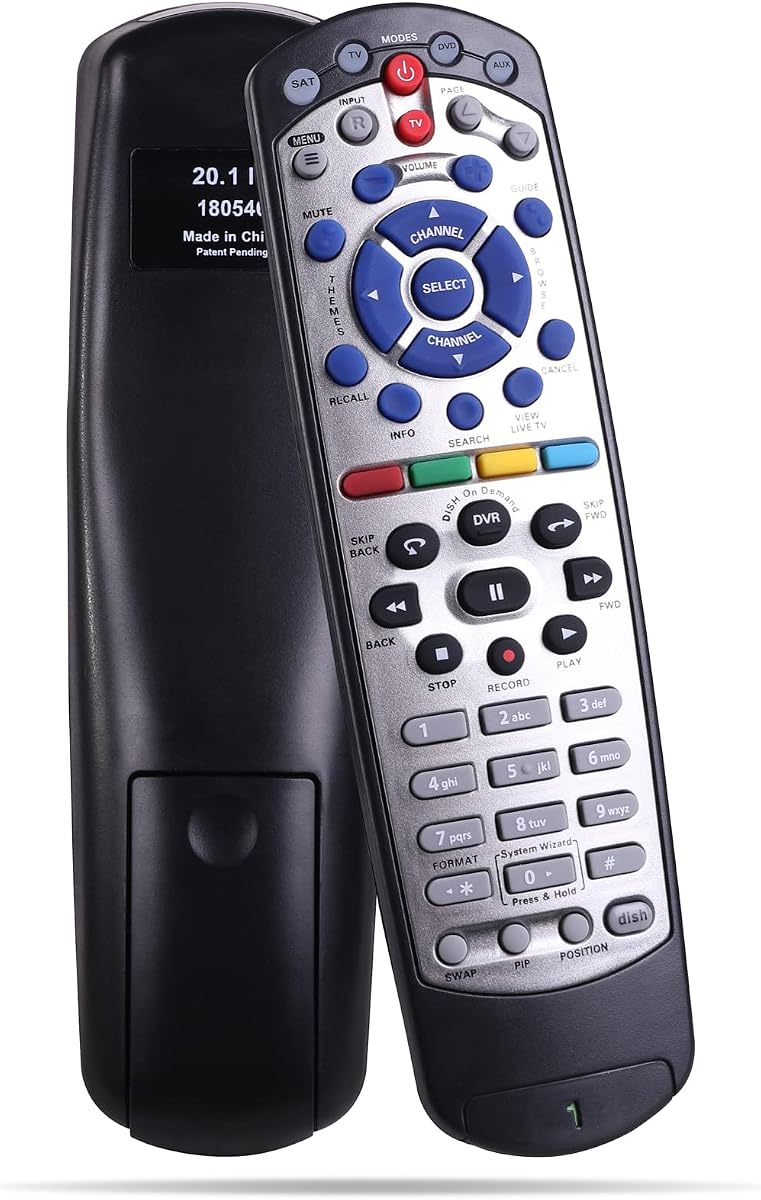
This IR remote control offers a budget-conscious solution for users with older Dish Network 20.1 receivers. It provides basic functionality at a lower cost, making it an attractive option for those who do not need advanced features.
We may earn a commission when you buy through this link, at no additional cost to you.
The remote is designed to work with the 20.1 IR Satellite Receiver along with TV DVD and VCR devices. It comes with a manual to help you pair it and select the correct code for your TV brand.
One important note is that it does not have a learning function or Bluetooth connectivity, which limits its versatility compared to newer models. The build quality is adequate but users might find it feels lighter than premium units.
If you need a quick and affordable replacement for an older system, this remote meets the basic requirements well. Just ensure you complete the setup process before use to avoid any compatibility issues with your TV.
Fit for Dish Network 20.1 IR Satellite Receiver TV DVD VCR with standard infrared signal transmission.
Set up required before using; follow the manual to choose the correct code for your TV brand.
We may earn a commission when you buy through this link, at no additional cost to you.
This replacement remote is another viable option for those owning Dish Upgraded 54 Series receivers. It features voice search capabilities and uses UHF technology to communicate with your receiver effectively.
We may earn a commission when you buy through this link, at no additional cost to you.
Users can pair the remote by pressing the SYS INFO button and then the SAT button on the side. The process is designed to be straightforward, though some users report needing to unpair before retrying connection.
While it shares many features with the top-ranked remote, it is explicitly not compatible with the Hopper 3 receiver. This distinction is critical for buyers to verify before purchasing to ensure it fits their specific model.
For owners of the 54.0 through 54.3 models, this remote provides a solid alternative if your original unit is lost. Always check your receiver model number against the compatibility list to avoid returns or frustration.
This replacement remote is NOT Compatible with Dish Hopper 3 receiver so verify your model before buying.
This remote control has voice search function to help you find shows faster without typing.
We may earn a commission when you buy through this link, at no additional cost to you.
The WDZP replacement voice remote control is designed specifically for the Hopper and 54 Series receivers. It offers a high rating due to its reliable performance and easy pairing process that most users find intuitive.
We may earn a commission when you buy through this link, at no additional cost to you.
Key features include a built-in microphone that supports voice search for faster channel navigation. The remote also allows you to pair with auxiliary devices like Blu-ray players or stereo systems for unified control.
While the warranty period is six months rather than a year, the service guarantee includes free exchange or refund if quality issues arise. This level of support helps mitigate risks associated with third-party replacements.
If you need a dependable voice remote for your 54 series system, this model is worth considering. Ensure you install fresh batteries and follow the pairing steps to maximize its functionality from day one.
Built-in microphone supports voice search so you can find your shows faster without typing.
You can also pair your remote with an Auxiliary Device such as a player or stereo.
We may earn a commission when you buy through this link, at no additional cost to you.
The Dish Network 21.1 IR/UHF PRO Universal Remote is an excellent choice for managing multiple TV locations. It supports both TV1 and TV2 setups, making it versatile for households with more than one receiver.
We may earn a commission when you buy through this link, at no additional cost to you.
This remote uses a combination of IR and UHF PRO signals to ensure reliable communication with your receiver. Users appreciate its straightforward design which lacks unnecessary complexity but covers all essential functions.
While it does not offer advanced features like voice search or backlit keys, it performs its primary role effectively. The high rating reflects its dependability as a replacement for older or lost units.
If you need a simple yet effective remote that handles multiple zones, this model fits the bill. It is particularly useful for secondary bedrooms or locations where advanced features are not required.
Supports DISH TV receivers at TV1 and TV2 locations allowing for flexible home setups.
This universal remote works with various DISH TV receivers for broad compatibility.
We may earn a commission when you buy through this link, at no additional cost to you.
This remote is designed to be a plug-and-play solution for Dish 20.1 and similar TV1 receivers. It stands out for not requiring any programming or pairing steps, which simplifies the setup process significantly.
We may earn a commission when you buy through this link, at no additional cost to you.
It works with a wide range of models including the VIP 622, 722, and 222 among others. The remote stores receiver settings internally so you can keep your configuration even if batteries are changed.
The build quality feels comfortable to hold with sensitive keys that respond well to touch. However, it is purely an infrared device which means line-of-sight is required for it to function properly.
If you prefer a remote that works immediately upon installing batteries, this model is ideal. It covers essential functions without adding unnecessary complexity for users who want a simple viewing experience.
No programming or pairing needed; just install new batteries and you are ready to go.
Universal IR Remote Control for Dish Network IR Receiver Device Code models and VIP series.
We may earn a commission when you buy through this link, at no additional cost to you.
This pack offers two new Dish remotes for Dish Network 20.1 IR Satellite Receivers making it great for backups. Rigorous testing ensures each item works perfectly like the original remote before shipment.
We may earn a commission when you buy through this link, at no additional cost to you.
The remotes are compact and easy to hold with stable performance and a long transmitting distance. They cover all the functions of the original remote control to ensure a complete replacement experience.
Each unit comes with an instruction sheet to help you set up the model number correctly. The packaging is simple but effective, providing clear instructions for use to avoid confusion.
If you want a spare remote ready for a second TV or to replace a lost one, this two-pack is a practical choice. The included warranty adds peace of mind regarding product reliability.
Includes two new remotes so you can keep one as a backup or use in a second room.
Each item is rigorously quality tested before shipment to ensure it works perfectly.
We may earn a commission when you buy through this link, at no additional cost to you.
This IR remote control is designed to replace the standard unit for Dish Network 20.1 receivers. It aims to perform just like your original remote when you insert new batteries and finish the setup.
We may earn a commission when you buy through this link, at no additional cost to you.
The manual included shows you how to pair it and choose the code that matches your TV brand. This step is crucial to ensure all buttons function correctly with your specific TV model.
Users appreciate the one-year warranty which protects against defects and provides a safety net for online purchases. The remote is compact and fits comfortably in the hand for daily use.
If you are looking for a cost-effective way to restore control to your receiver, this remote is a good choice. Just take a moment to follow the pairing instructions to avoid any functionality issues.
Please finish set up before using; the manual will show you how to pair it correctly.
The remote carries a one-year warranty to protect against manufacturing defects.
We may earn a commission when you buy through this link, at no additional cost to you.
The Dish Network Remote 52.0 is a high-rated option that works seamlessly with all Hoppers, Joeys, and Wally Receivers. Its standout feature is the remote finder function which helps locate lost units quickly.
We may earn a commission when you buy through this link, at no additional cost to you.
Backlit keys ensure that the keypad illuminates automatically when you pick up the remote in a dark setting. This usability feature is highly appreciated by users who watch TV in the evenings or at night.
You can program hot keys to launch Netflix, record shows, or turn on closed captioning easily. This personalization makes the remote feel tailored to your specific viewing habits and preferences.
For users of the Hopper family, this remote offers a blend of convenience and reliability. Its high rating reflects strong satisfaction with its build and ease of use across various devices.
Remote Finder function allows you to locate your remote by pressing a button on your receiver.
Program hot keys to launch Netflix, record shows, turn on closed captioning, and more.
We may earn a commission when you buy through this link, at no additional cost to you.
Choosing the right replacement remote requires understanding your receiver model and desired features to ensure seamless integration.
Verify the exact model number of your Dish receiver before purchasing a replacement remote. Some remotes are designed specifically for the 54 Series or Hopper systems while others work with legacy 20.1 models.
Matching the remote to your receiver ensures all buttons function correctly and avoids pairing issues.
Determine if your receiver requires an infrared (IR) or UHF signal. UHF remotes can work through obstacles while IR requires a direct line of sight.
Select a remote with the correct signal type to maintain reliable control over your devices.
If you prefer using voice commands to find shows, look for a remote with a built-in microphone. This feature eliminates the need to type channel names manually.
Prioritize models with voice search if you value faster navigation and hands-free control.
For users who watch TV in low light conditions, backlit keys are a valuable feature. These keys illuminate automatically when you pick up the remote.
Choose a remote with backlighting if you often use your system at night.
Review the pairing instructions before buying to ensure they are straightforward for your setup. Some remotes require entering codes or pressing multiple buttons simultaneously.
Select a model with clear instructions and easy pairing steps to minimize setup time.
Look for remotes made from durable materials that feel comfortable to hold. Sensitive keys and a good grip prevent accidental presses and slippage.
Invest in a well-built remote that will withstand regular use over time.
Check if the remote comes with a warranty or customer support options. Some sellers offer replacements for defective units which adds value.
Prioritize products with warranty coverage to protect your purchase against defects.
Most remotes require AAA batteries which are typically not included. Ensure you have batteries on hand to use the remote immediately.
Confirm the battery type and whether they are included to avoid inconvenience upon arrival.
To start using your new remote, first insert fresh AAA batteries into the battery compartment. Ensure the batteries are aligned correctly with the polarity markings inside the case.
Follow the pairing instructions specific to your remote model. This usually involves pressing a combination of buttons on the remote and your receiver to establish a connection.
Store the remote in a safe place to avoid drops or exposure to moisture. Cleaning the keys with a dry cloth can help maintain responsiveness over time.
Yes, most replacement remotes require a pairing process to communicate with your receiver. This usually involves pressing specific buttons on the remote and the receiver to sync them.
Yes, many remotes like the Dish 54.0 model are compatible with both Hopper and Joey receivers. Check the compatibility list to confirm it supports your specific device.
Most Dish replacement remotes use two or three AAA batteries. These are typically not included in the package so you will need to purchase them separately.
Ensure the remote is compatible with your receiver model. Some remotes also allow you to program codes for your TV brand to control power and volume functions.
No, voice search is a feature found in newer models designed for upgraded networks. Older IR remotes typically do not support this functionality.
Try replacing the batteries and ensuring they are inserted correctly. You may also need to unpair and re-pair the remote to reset the connection with your receiver.
No, most remote controls are not waterproof. Keep them away from liquids to prevent damage to the internal electronics.
Warranty periods vary by seller but typically range from six months to one year. Check the product details for specific warranty terms before purchasing.
We hope this guide helps you find the perfect Dish Network Replacement Remote for your needs. The top picks offer a range of features from voice search to backlit keys to suit different preferences.
Prioritize compatibility with your receiver model and consider whether advanced features like voice search are necessary for your viewing habits. A reliable remote significantly enhances your entertainment experience.
Remember to check current listings and prices before finalizing your purchase as availability can change. With the right choice you will enjoy seamless control over your Dish system for years to come.