
Tokluck PS5/Slim/Pro Cooling Station
4.4Editor score
Auto Turbofan Speed Control
Dual Controller Fast Charging
RGB Lighting Effects Included
Discover the top cooling stand for PS5 console options reviewed for performance, design, and value to keep your system cool and organized.
Keeping your PlayStation 5 console cool during extended gaming sessions is essential for longevity and performance. A quality cooling stand helps dissipate heat efficiently while providing a stable base for your system. This guide explores the best options available to help you make an informed decision for your setup.
We compared ten top-rated cooling stands based on fan performance, charging capabilities, compatibility with PS5 models, and overall build quality. Each product was evaluated for its ability to maintain safe operating temperatures and organize accessories effectively. Our analysis ensures you find a reliable solution tailored to your specific gaming needs and preferences.
Each pick highlights key features, pros, cons, and ideal use cases to help you choose quickly. While prices fluctuate frequently, the quality and performance characteristics remain consistent across these models. Always check current listings before purchasing to ensure you get the best deal available today.
4.4Editor score

4.5Editor score

4.3Editor score
The following table provides a side-by-side comparison of all ten cooling stands to help you quickly identify the best match for your console model and accessory needs.
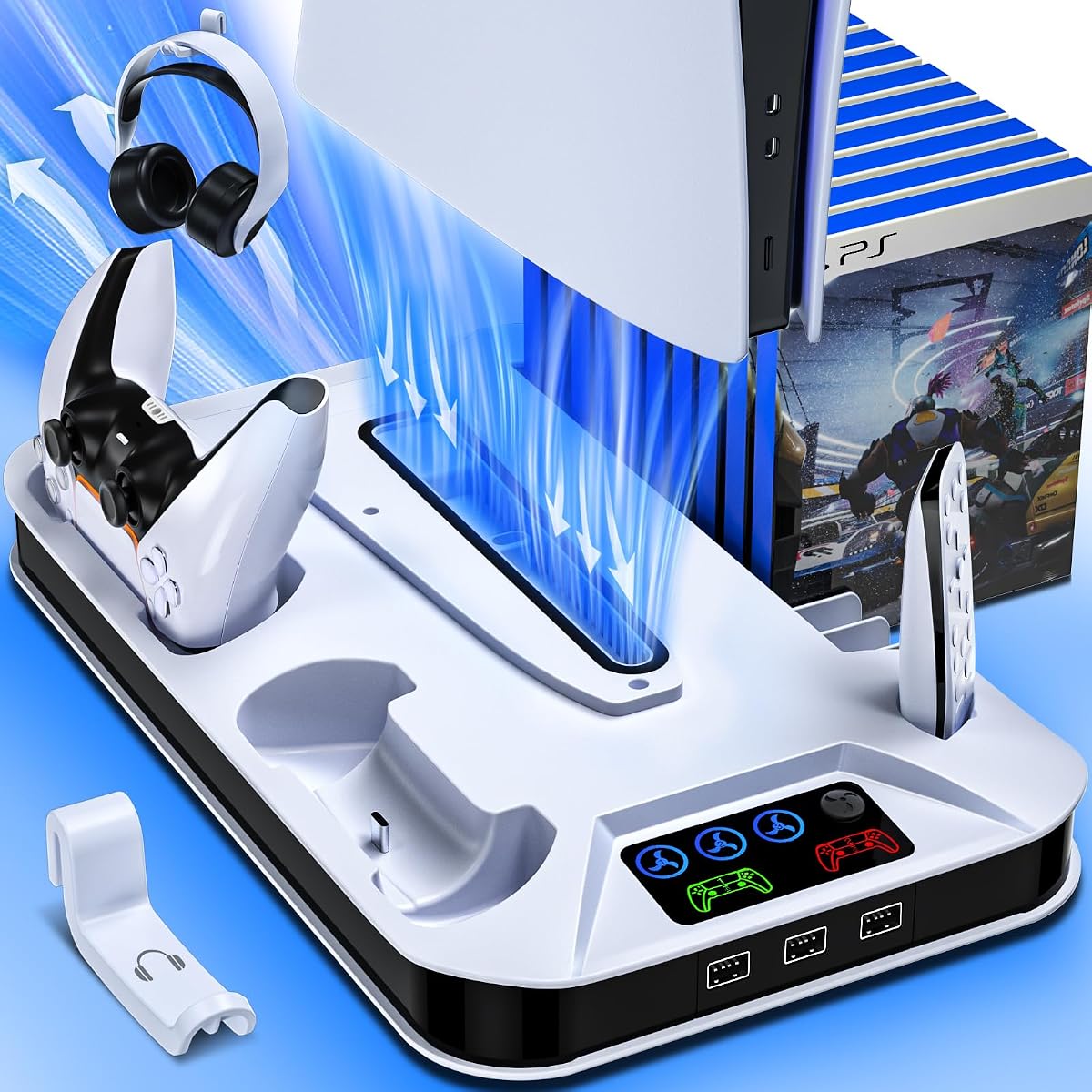


This cooling station offers exceptional value with a three-speed turbo fan that effectively dissipates heat from the console during intense gaming sessions. Its dual controller charger and USB hubs make it a comprehensive accessory hub for your gaming setup while maintaining a sleek vertical design.
We may earn a commission when you buy through this link, at no additional cost to you.
The built-in smart chip protects controllers from overcharging and short circuits, ensuring longevity even when charging overnight. Safety screws and non-slip pads secure the console firmly to prevent accidental slips or damage while the system is running.
While the stand works seamlessly with most PS5 models, users of the Slim or Pro Digital editions must remove the included panel adapter to ensure a proper fit. Additionally, Edge controllers are not supported by the charging docks, which may limit utility for some users.
If you need an all-in-one solution that combines cooling, charging, and organization without breaking the budget, this stand is a top choice. It balances performance and functionality exceptionally well for standard and slim console owners.
The high-efficiency turbo fan provides three adjustable speeds to tailor cooling power based on your current usage and room temperature.
Headset holders, media remote slots, and game disc storage keep your entertainment area tidy and accessible at all times.
We may earn a commission when you buy through this link, at no additional cost to you.
This horizontal stand stands out with its scalable design that accommodates every PS5 generation including Slim and Pro models with precision. The inclusion of EVA foam allows users of digital editions to achieve a snug fit without any wobbling or instability.
We may earn a commission when you buy through this link, at no additional cost to you.
Unlike many competitors, the charging docks support both standard and Edge controllers using an up-and-down push mechanism for secure connection. The touch-controlled three-speed fans let you adjust cooling power instantly without needing to reach for buttons.
Its horizontal orientation requires more desk width than vertical stands but provides a stable platform that is less prone to tipping. Assembly is straightforward with no tools needed, though digital users must place the foam correctly before securing the screws.
If you want a versatile stand that adapts to any PS5 model and supports Edge controllers, this is the premium choice. Its all-in-one design consolidates your setup while ensuring optimal cooling and charging for all devices.
The scalable structure ensures a perfect fit across standard, slim, and pro models without requiring multiple accessories.
Edge controller support and EVA foam inclusions provide extra utility not found in many competing vertical stands.
We may earn a commission when you buy through this link, at no additional cost to you.
This affordable station introduces automatic fan speed control driven by a built-in temperature probe for smarter heat management. The RGB lighting adds customizable ambiance to your setup while the memory function remembers your last preferred settings after every reboot.
We may earn a commission when you buy through this link, at no additional cost to you.
Manual control buttons let you switch between five modes including off and high for precise control over noise and cooling intensity. The movable USB port ensures stable connections for both original and Edge controllers during the charging process.
The RGB lighting while visually appealing may be too distracting for some users and can be disabled with a long press. Digital edition consoles require removal of the panel adapter to ensure proper alignment and cooling airflow.
If you want smart cooling features and customizable lighting at a budget-friendly price, this stand delivers exceptional value. The automatic temperature control ensures your console runs cool without you having to constantly adjust fan settings manually.
A built-in temperature probe adjusts fan speed automatically based on real-time console heat for efficient cooling.
Nine RGB lighting effects let you personalize your gaming atmosphere while maintaining core cooling functionality.
We may earn a commission when you buy through this link, at no additional cost to you.
This vertical stand features a low-noise turbo fan designed to provide effective cooling without adding distracting background noise to your gameplay. The intelligent circuit chip stops charging controllers at 80 percent to protect against battery degradation and overcharging damage.
We may earn a commission when you buy through this link, at no additional cost to you.
Four non-slip pads on the base keep the unit stable even when the console is being removed or adjusted for cleaning or repairs. The included headset holder and media remote slot make it easy to keep your gaming accessories organized in one place.
Edge controllers are not compatible with the charging docks, which may limit utility for owners of this premium controller type. Users with Slim or Pro digital editions should remove the panel adapter for proper fit but this step is straightforward and easy.
If quiet operation and safety features are your priority, this stand is an excellent choice for daily use. The noiseless fan design is especially beneficial for late-night gaming sessions where minimal disturbance is desired.
Low-noise cooling ensures your console stays cool without distracting background noise during gameplay.
A dedicated headset holder and remote slot keep all essential items within reach and neatly arranged.
We may earn a commission when you buy through this link, at no additional cost to you.
This stand offers comprehensive compatibility including support for Edge controllers which many competing stands fail to accommodate properly. The memory function automatically restores your last preferred fan speed setting after every system reboot for seamless operation.
We may earn a commission when you buy through this link, at no additional cost to you.
Safety screws and a secure locking mechanism prevent scratches while ensuring your console remains stable on the base at all times. USB hubs provide convenient additional charging options for headsets and other accessories without cluttering your desk.
Users of the Slim or Pro digital editions must remove the panel adapter for a proper fit which is a minor inconvenience. The absence of RGB lighting may appeal to those who prefer a minimalist design focused purely on functionality and cooling.
If Edge controller support and reliable safety features are essential for your setup, this stand delivers exceptional value. Its memory function and compatibility make it a versatile choice for diverse console models and controller preferences.
The charging docks support both original and Edge controllers for broader accessory compatibility.
Fan settings remember your last selection after power-off to save time and effort daily.
We may earn a commission when you buy through this link, at no additional cost to you.
This stand features a newly enhanced honeycomb lighting system with nine modes to create vibrant and immersive gaming atmospheres. Automatic speed adjustment ensures cooling power matches your console's temperature while the memory function restores your preferred settings seamlessly.
We may earn a commission when you buy through this link, at no additional cost to you.
LED indicators change to blue when controllers are fully charged providing clear visual confirmation without needing to check LEDs manually. The temperature-controlled fan switches between low medium and high speeds based on detected heat levels for efficiency.
The RGB lighting while eye-catching may increase brightness levels in dark rooms but can be turned off with a long press. Standby charging requires specific console power settings to ensure controllers charge even when the system is in rest mode.
If lighting customization and automatic cooling are priorities for your gaming setup this stand offers unique features at an affordable price. The honeycomb design adds a modern aesthetic that complements the PS5 while delivering practical performance.
Nine RGB modes including breathing effects enhance your setup visual appeal without compromising performance.
Fan speeds adjust automatically based on console temperature for efficient cooling without manual inputs.
We may earn a commission when you buy through this link, at no additional cost to you.
This horizontal stand uses a scalable design to fit all PS5 models without requiring additional adapters or modifications. The EVA foam included for digital editions ensures a snug secure fit that prevents wobbling during console removal or repositioning.
We may earn a commission when you buy through this link, at no additional cost to you.
Tool-free assembly means you can set it up in minutes without needing any screwdrivers or extra hardware. The integrated charging dock eliminates the need for separate stations while providing fast charging for two controllers simultaneously.
The horizontal orientation requires more desk width than vertical models which may limit usability on smaller desks or shelves. Digital edition owners must place the foam correctly before securing screws which is straightforward but requires attention to detail.
If desk organization and universal compatibility are your main goals this horizontal stand offers a clean consolidated solution. Its tool-free setup and charging integration make it ideal for users who value convenience and simplicity over vertical space savings.
Scalable structure supports standard slim and pro models with a single base unit.
No tools needed for installation so you can start organizing your setup immediately.
We may earn a commission when you buy through this link, at no additional cost to you.
The high-efficiency turbo fan runs at up to 3500 RPM delivering powerful airflow to dissipate heat during extended gaming sessions. A dedicated hard drive slot and 14 game card storage keep your library organized and accessible without cluttering your media console.
We may earn a commission when you buy through this link, at no additional cost to you.
Smart chip protection stops charging at 70 percent to preserve battery longevity and prevent overheating or overcharging damage. The included Type-C cable offers flexibility for powering the stand from either a wall outlet or your console.
Higher fan speeds may produce more noise than lower RPM alternatives but ensure superior cooling under heavy loads. Users with Slim or Pro editions must remove the panel adapter for proper fit but this step is quick and easy.
If you prioritize maximum cooling performance and need additional storage for games or expansion drives this stand is ideal. Its high RPM fan and organized storage make it a comprehensive solution for power users and collectors.
Up to 3500 RPM provides intense cooling for demanding gaming sessions and hot environments.
Slots for SSDs and game cards maximize organization and expand storage without extra accessories.
We may earn a commission when you buy through this link, at no additional cost to you.
This stand features a silent turbo fan designed to cool your console without adding noise to your gaming environment. The ring of LEDs provides customizable lighting effects with four modes and eight colors to match your personal aesthetic.
We may earn a commission when you buy through this link, at no additional cost to you.
Two panel versions are included so you can choose the right fit for disc or digital editions without buying extra parts. USB A hub ports allow you to charge additional devices such as phones or headphones alongside your controllers.
The ring design can accumulate dust more visibly than flat panels which may require occasional cleaning for best aesthetics. There is no dedicated hard drive slot which may limit expansion options for users needing additional storage.
If silent operation and customizable lighting are essential to your setup this stand offers a well-balanced solution. Its included panels and USB hubs make it versatile for many users while maintaining a sleek modern appearance.
Low-noise fan ensures cooling without disrupting immersive audio or voice chat sessions.
Eight RGB colors with four modes let you match your setup style effortlessly.
We may earn a commission when you buy through this link, at no additional cost to you.
Built with durable materials this stand withstands daily use without shaking or damaging your console or accessories over time. The included three USB hubs plus a Type-C port provide wide connectivity for charging multiple devices without cluttering your desk.
We may earn a commission when you buy through this link, at no additional cost to you.
Concealed built-in cables maintain a clean aesthetic and prevent tripping hazards while the sturdy screws keep the console firmly in place. The design harmonizes with the PS5 console to maintain a cohesive look in your gaming area.
Edge controllers are not supported by the charging docks and slim digital models require panel removal for a proper fit. These limitations are minor given the stand's overall durability and comprehensive port connectivity for other devices.
If durability and connectivity are your priority this stand offers a reliable long-term solution for your gaming setup. Its robust build and aesthetic design ensure your console stays protected and organized while looking professional.
Durable materials ensure longevity and stability during regular console removal and repositioning.
Built-in cables keep the setup tidy and safe without visible wires around the base.
We may earn a commission when you buy through this link, at no additional cost to you.
Selecting the right cooling stand involves evaluating compatibility cooling performance and additional features to match your needs.
Ensure the stand fits your exact PS5 model whether standard Slim or Pro digital or disc edition. Some stands require panel removal or include EVA foam for digital editions so check the product details carefully.
Choose a stand with explicit compatibility notes for your model to avoid fit issues and ensure stable cooling performance.
Look for turbo fans with multiple speed settings to balance noise and cooling intensity based on your environment. Fans with automatic temperature control adjust power based on real-time heat for smarter operation.
Prioritize stands with adjustable speeds or auto modes to keep your console cool without excessive noise during casual gaming.
Evaluate whether the stand supports your controller type including Edge controllers if you own them. Charging speed matters for uninterrupted gaming so dual docks with fast charging save downtime between sessions.
Choose a charging station that supports your specific controllers and offers quick charge times for minimal wait.
Extra USB hubs allow you to charge headsets cameras or other accessories without additional power adapters. A good stand should provide enough ports for your ecosystem of devices.
Check for adequate USB hub coverage to ensure all your accessories stay powered without cluttering your workspace.
Safety screws and non-slip pads keep the console stable and prevent scratches during use. Look for smart chips that protect controllers from overcharging and overheating for added peace of mind.
Prioritize stands with built-in safety protections to extend the life of your console and accessories over time.
Consider whether you prefer vertical or horizontal designs based on your available desk space. Aesthetic features like RGB lighting or concealed cables enhance the look of your gaming area.
Pick a design that matches your setup theme and fits comfortably in your preferred location.
Tool-free setups simplify installation and make the stand accessible for first-time users. Clear instructions and pre-installed components save time and reduce frustration during setup.
Choose a stand that offers easy assembly and intuitive controls for a hassle-free experience.
Headset holders media slots and game storage help keep your gaming area organized and clutter-free. A good stand should consolidate your accessories into one compact footprint.
Look for built-in storage options to maintain a tidy setup and quick access to all your gear.
Place the cooling stand on a stable flat surface away from walls to allow proper airflow underneath and around the console.
Secure your PS5 using the included screws and ensure all cables are connected before powering on the cooling system.
Regularly dust the fan and vents with a soft cloth or compressed air to maintain optimal cooling performance over time.
Yes cooling stands actively dissipate heat through built-in fans that exhaust hot air away from the console. This reduces internal temperatures especially during long gaming sessions preventing thermal throttling and extending hardware lifespan.
Many stands support Slim models but some require panel removal or include EVA foam for proper fit. Check the product compatibility section to confirm your specific edition is supported.
Not all stands support Edge controllers so look for models that specifically mention compatibility. Universal docks with adjustable push designs usually accommodate both standard and Edge versions.
Noise levels vary but many stands offer multiple fan speeds to balance cooling power and sound. Lower speeds are typically quiet enough for casual gaming while higher speeds may be audible.
Fans typically require power to operate so the stand may only work when the console is on or connected to a power source. Some models include memory functions that resume settings when power returns.
Many stands include USB hubs or Type-C ports that support charging additional devices like phones or tablets. Check the number and type of ports to ensure compatibility with your devices.
Use compressed air or a soft brush to remove dust from the fan blades and vents without disassembling the unit. Regular cleaning prevents dust buildup that could reduce cooling efficiency.
Most reputable manufacturers offer warranties ranging from one to two years on parts and labor. Check the product page or seller policy to confirm warranty details before purchasing.
These ten cooling stands offer reliable solutions to keep your PS5 console cool while organizing your gaming accessories efficiently. Each model balances performance features and affordability to suit different user needs and console variations.
Prioritize compatibility with your specific console model and controller types when making your decision to ensure seamless integration and optimal cooling performance during long sessions.
Always check current pricing and availability as offers change frequently. Select a stand that matches your setup style and functional requirements for the best long-term value and experience.