
8Bitdo M30 Wired Controller
4.2Editor score
Officially licensed for Xbox
USB-C wired connection
6-button layout design
This guide compares the top fightpads for Xbox Series X and Xbox One, analyzing features, layout, and performance to help you find the right controller for
Finding the right controller can make or break your experience in competitive fighting games. Whether you are a seasoned veteran or just starting out, the right input device ensures your moves land precisely and consistently every single time you play.
We evaluated ten top-rated controllers designed specifically for Xbox systems. Our analysis covers layout options, build quality, connectivity, and official licensing to ensure compatibility with your console and favorite titles without unnecessary technical hurdles.
Each selection below highlights specific strengths for different play styles and budgets. Keep in mind that product availability and pricing can shift frequently, so verifying current details before purchasing is always a smart move for any serious gamer.
4.2Editor score
3.5Editor score

4.6Editor score
This side-by-side comparison highlights the key specifications of each controller to help you quickly identify which model aligns best with your specific gaming needs and console requirements.


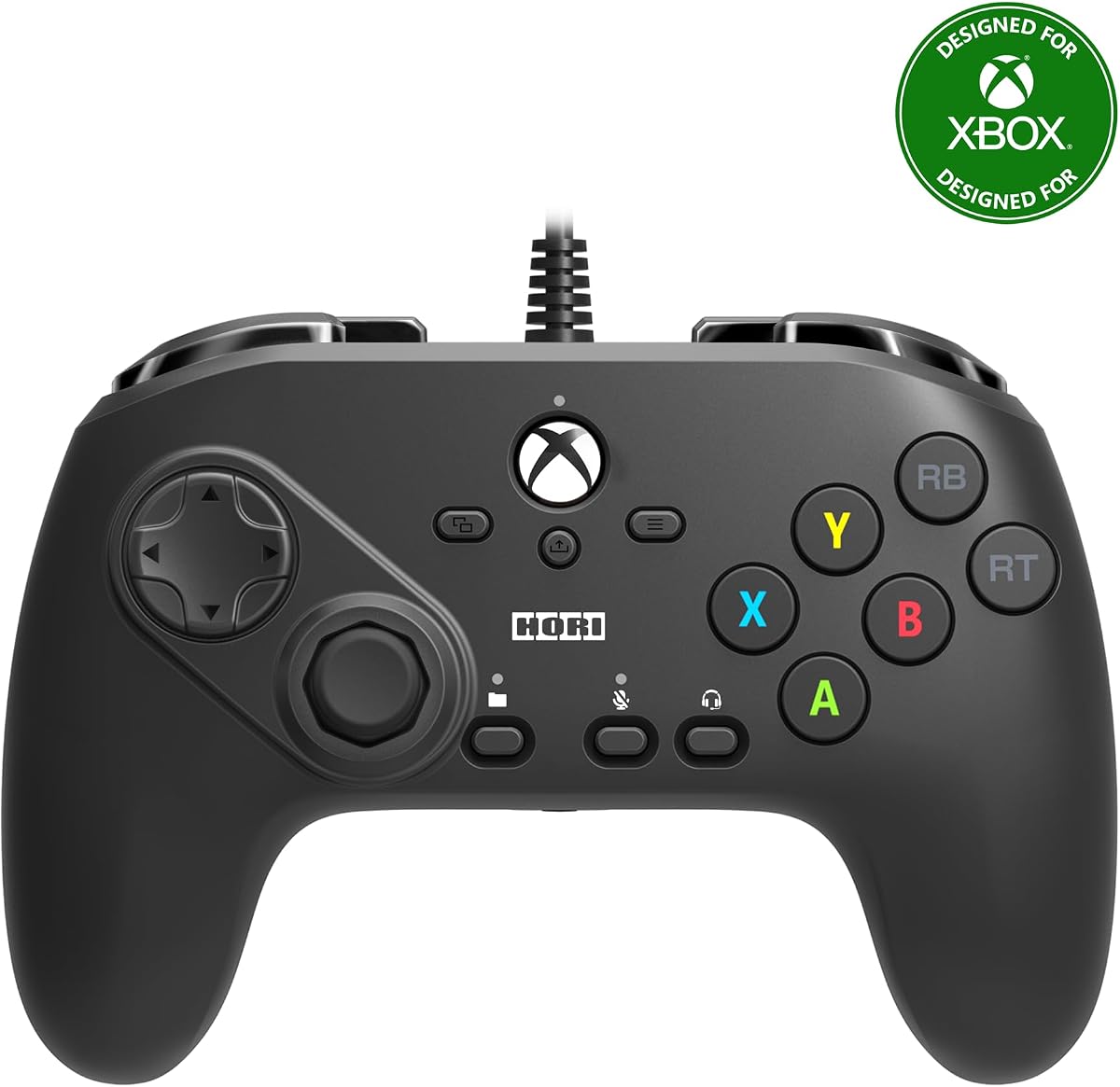
The HORI Fighting Commander Octa is a wired controller optimized specifically for fighting games on Xbox Series X and S. With a 3.5-star rating, it offers a unique six-button layout and micro-switch buttons designed for speed.
We may earn a commission when you buy through this link, at no additional cost to you.
Its standout feature is the adjustable d-pad combined with a short throw analog stick featuring an 8-way Gate. This setup is intended to increase accuracy and execution speed during complex combos.
While the micro switches offer fast response times, some users might find the rating lower than other controllers due to build preferences. The adjustable d-pad helps mitigate directional input issues common in standard pads.
This controller is ideal for players seeking an affordable official alternative to arcade sticks. Its profile customization via a companion app ensures you can switch setups without restarting your console or game.
The micro switches and short throw stick are engineered to minimize input lag during critical moments in matches.
Saving up to four profiles allows quick switching between different fighting game styles or character preferences.
We may earn a commission when you buy through this link, at no additional cost to you.
This Xbox 360 Street Fighter IV FightPad brings a nostalgic design with an enlarged circular 8-way floating D-Pad. It features a 6-button layout with multi-speed Turbo functionality that adds strategic depth to gameplay.
We may earn a commission when you buy through this link, at no additional cost to you.
The 3-way switch enables the D-Pad to also function as a left or right analog stick, adding versatility. An integrated headset port supports communication during online matches on Xbox LIVE.
Compatibility is the main limitation here as it connects via USB to the console with a 9.8-foot cable. While designed for Xbox 360, retro enthusiasts may still find it useful for legacy emulation setups.
This pad is best for collectors or those looking to recreate an authentic arcade feel from a specific era. The Blanka design theme adds visual flair to your gaming station while delivering classic inputs.
Multi-speed turbo adds an extra layer of control allowing players to automate rapid button presses for special moves.
The long USB cable ensures flexibility in placement even if the console is located far from the seating area.
We may earn a commission when you buy through this link, at no additional cost to you.
The 8Bitdo M30 is a wired controller compatible with Xbox Series X|S, Xbox One, and Windows. With a 4.2 rating, it balances cost and quality by offering an official license at an accessible price point.
We may earn a commission when you buy through this link, at no additional cost to you.
It features a classic 6-button layout similar to retro consoles while including modern features like a USB-C connection for reduced lag. The controller supports 8BitDo Ultimate Software for detailed customization of inputs.
Users can switch between three profiles on the fly using a dedicated button which is useful for different game genres. A 3.5mm audio jack and volume control ensure you can manage sound directly from the controller.
This is an excellent entry point for fighters who want official compatibility without breaking the bank. The build quality is solid enough for regular use while maintaining a compact form factor.
The M30 combines retro aesthetics with modern connectivity ensuring it works seamlessly on current generation hardware.
Quickly toggle between different button configurations to suit various titles without needing complex software changes.
We may earn a commission when you buy through this link, at no additional cost to you.
The 8BitDo All-Button Arcade Controller is officially licensed for Xbox Series X|S, Xbox One, and Windows. It stands out with a leverless design that offers ultimate precision through a quad-movement button layout for unmatched accuracy.
We may earn a commission when you buy through this link, at no additional cost to you.
This controller is nearly the size of an A4 sheet and as thin as 1.6 cm making it highly portable. It uses hot-swappable PCBs with Kailh Wizard low-profile mechanical switches that you can customize to your tactile preference.
Wireless connectivity on Xbox and Windows PC removes cable clutter while maintaining a stable connection. Two programmable buttons with fast mapping add extra utility for complex combos or system commands during matches.
Ideal for competitive players seeking a premium portable solution, this controller offers professional-grade customization. The ability to swap switches without soldering ensures longevity and adaptability as your style evolves.
The unique button layout eliminates traditional sticks allowing for faster directional inputs through pure button logic.
Swap switches easily to change feel or repair the controller without voiding warranties or requiring tools.
We may earn a commission when you buy through this link, at no additional cost to you.
The HORI PAD Pro is officially licensed by Microsoft for Xbox Series X|S, Xbox One, and Windows 10. It allows you to fine tune sensitivity for the analog stick, dead zone, and LR triggers to match your specific play style.
We may earn a commission when you buy through this link, at no additional cost to you.
It comes equipped with a Share Button and adjustable vibration feedback in both the controller and triggers for immersive gameplay. Using the companion app you can customize and save up to four profiles easily.
While not a dedicated fighting controller, its customization options make it versatile for various genres. The ability to adjust dead zones helps reduce drift which is critical for precision movement in fighting games.
This controller is best for players who want a premium standard pad with fighting-friendly tweaks. Its official licensing ensures stable connectivity while the profile system helps manage different game preferences.
The companion app allows deep dives into sensitivity and vibration settings to tailor the feel to your hands.
Save up to four different configurations and switch between them instantly using the dedicated profile button.
We may earn a commission when you buy through this link, at no additional cost to you.
The Nacon Daija Arcade Stick is officially licensed for Xbox Series X|S, Xbox One, and Windows. Developed with professional gamers it features a SANWA JOYSTICK and action buttons that guarantee premium quality and durability for intense sessions.
We may earn a commission when you buy through this link, at no additional cost to you.
Buttons are fully configurable using dedicated software allowing you to create specific game profiles with ease. The textured palm rest provides sturdy support so you can maintain comfort during long tournament-style battles.
A lock function prevents accidental presses and the customizable front plate lets you personalize the look. With two joystick heads included you can switch between different control types to find your perfect balance.
This stick is ideal for serious competitors who want a premium arcade setup at home. Its high build quality and software flexibility make it a robust choice for mastering complex fighting mechanics.
Developed in collaboration with professionals this stick mimics the layout and feel of arcade cabinets used in tournaments.
Textured grips and adjustable heads ensure that physical fatigue is minimized during extended practice or competition.
We may earn a commission when you buy through this link, at no additional cost to you.
This 8Bitdo Arcade Stick is the first Xbox-licensed wireless arcade stick worldwide. It is compatible with Xbox Series X|S, Xbox One, Windows 10 and above offering both wireless 2.4G and wired USB connectivity options.
We may earn a commission when you buy through this link, at no additional cost to you.
Support for 8BitDo Ultimate Software allows for detailed customization of button mapping to suit your specific needs. Fast-mapping and profile setting buttons make it easy to configure and change setups on the fly.
With up to 30 play hours of battery life on a 4-hour charge you can play extensively without interruption. The 3.5mm audio jack ensures you can connect headphones directly to the stick for immersive audio.
This stick is perfect for gamers who want the classic arcade feel without cable constraints. Its dual connectivity modes and solid battery life make it a versatile choice for home and portable play.
The 2.4G wireless connection reduces clutter while maintaining low latency for responsive gameplay in fast-paced matches.
A 30-hour battery life ensures you won't need to recharge frequently allowing for uninterrupted tournament practice sessions.
We may earn a commission when you buy through this link, at no additional cost to you.
The HORI Fighting Stick alpha is designed for Xbox Series X|S, Xbox One, and Windows 10. Its chassis opens for easy maintenance and customization allowing you to switch out top housing artwork with your own design easily.
We may earn a commission when you buy through this link, at no additional cost to you.
Buttons are assignable and it includes a Share Button and Profile Button for better workflow. Key Lock Mode helps prevent accidental button presses during intense matches ensuring your inputs are intentional.
Official licensing guarantees stability and compatibility across supported Xbox systems. The modular design means you can repair components without replacing the whole unit which helps with long-term maintenance and cost.
Ideal for customizers and competitive players this stick offers a blend of function and form. The ability to change artwork and maintain internals makes it a lasting investment for fighting game enthusiasts.
The ability to open the chassis ensures that broken parts can be replaced without needing to buy a new stick.
Disable specific buttons to prevent accidental presses during travel or intense gaming scenarios.
We may earn a commission when you buy through this link, at no additional cost to you.
The Akko FUNBOX features next-generation Hall Effect switches with zero wear eliminating physical friction and debris buildup. It supports Rapid Trigger with pro-grade polling ensuring every millisecond counts in fast-paced competitive matches.
We may earn a commission when you buy through this link, at no additional cost to you.
A 2-inch full-color LCD serves as a functional control hub for adjusting SOCD settings and uploading animations. The aluminum multi-function dial provides tactile access to settings without digging through complex button combinations.
It supports PC, PS4, Xbox, Switch, and Android out of the box with tournament-ready SOCD management. The built-in Tournament Lock mode ensures compliance with competition rules for safe use in competitive environments.
This controller is best for tech-savvy players looking for cutting-edge input technology. The combination of Hall Effect switches and advanced customization tools makes it a top choice for future-proofing your setup.
Magnetic switches eliminate physical contact ensuring the controller lasts longer and remains responsive over years of use.
Tournament lock mode prevents simultaneous opposing directional inputs ensuring fair play in competitive settings.
We may earn a commission when you buy through this link, at no additional cost to you.
The HyperX Clutch Gladiate is officially licensed for Xbox One, Xbox Series X|S, and PC. It features Dual Trigger Locks allowing you to set positions for short pulls to execute actions faster during critical moments.
We may earn a commission when you buy through this link, at no additional cost to you.
Rear buttons can be configured to actions like thumb stick clicks for faster access to functions. This programmability gives you an extra edge in competition by reducing the distance your thumb has to travel.
The controller uses dual rumble motors for immersive feedback and comes with textured grips to keep your hold firm. A detachable USB-C cable helps prevent damage from snags and ensures long-term durability for daily gaming.
This controller is best for players who want a hybrid between a standard pad and a specialized fighting tool. Its trigger customization adds a tactical layer that benefits both fighting games and general action titles.
Locking triggers for short pulls ensures faster reaction times for special moves that rely on trigger inputs.
Programmable rear buttons allow you to map essential actions to a more accessible location than standard face buttons.
We may earn a commission when you buy through this link, at no additional cost to you.
Selecting the right fighting controller requires understanding your play style and console compatibility. This guide breaks down the most important factors to consider before making your purchase.
Always verify that the controller is officially licensed for Xbox Series X|S or Xbox One to avoid connectivity issues. Unlicensed controllers may lack full feature support or update compatibility.
Prioritize officially licensed options to ensure seamless pairing and full button functionality.
Decide between a standard gamepad layout or a dedicated fight pad layout with six buttons. Standard pads work well for general play but fight pads offer precision inputs.
Choose a layout that matches your primary game genres for optimal performance.
Wired controllers generally offer lower latency and more stable connections than wireless options. Wireless provides freedom but might introduce slight input lag during intense matches.
Select wired for competitive play and wireless for convenience and portability.
Look for durable materials like high-grade plastics and reliable switches that withstand rapid button presses. Metal components in sticks or pads can add longevity to your setup.
Invest in controllers with replaceable parts to extend their usable life.
Comfort is critical for long gaming sessions. Ensure the controller fits your hand size and has textured grips to prevent slipping during rapid movements.
Test ergonomics if possible to avoid fatigue during long tournament prep.
Some controllers allow you to map buttons or adjust dead zones through software. This flexibility lets you tailor inputs to specific characters or games.
Prioritize software support that allows deep customization for advanced users.
Higher priced controllers often include premium switches or wireless connectivity. Determine which features are worth the cost based on your play frequency.
Balance budget constraints with essential features like response time and durability.
If you plan to take your controller to events, check the weight and dimensions. Compact controllers are easier to transport but might feel less premium than full-size sticks.
Consider portable options if you frequently travel to local meetups.
To maximize performance start by calibrating your controller inputs through the Xbox settings menu. Ensure all buttons and sticks register correctly before diving into competitive matches.
Keep your controller clean by wiping it down with a dry microfiber cloth after each session. Avoid using liquids directly on the buttons to prevent damage to internal circuits.
Store your controller in a dry place away from direct sunlight to prevent discoloration. If using a wired controller, coil the cable neatly to prevent wear and tear over time.
Many top models like those from HORI and 8Bitdo are officially licensed by Microsoft for Xbox. This ensures they work without issues on Series X and Series S consoles.
Yes but a dedicated fight pad offers better precision due to button placement. Standard controllers are fine for casual play but dedicated ones are preferred for competitive modes.
Wireless controllers may have slight latency compared to wired ones. For competitive play wired options are recommended to ensure instant input response.
Use the official companion app provided by the manufacturer to check for updates. Follow the on-screen instructions to ensure your controller is running the latest version.
Most models listed support Windows 10 and above via USB or wireless. Always check the specific product page for PC support details before purchasing.
It allows you to change internal switches without soldering. This is useful for customizing feel or replacing worn parts without buying a new controller.
Choosing the right controller can significantly improve your performance in fighting games. Whether you prioritize customization or portability there is a model here to fit your specific needs.
Consider what matters most whether it is official licensing or budget-friendly options. Your choice should reflect how you play and what features support your style best.
Remember that availability and pricing may fluctuate so double check current details before purchasing. Finding the right fit ensures you are ready for the next big challenge.