
Creality Ender 3 V3 SE
3.8Editor score
CR Touch auto leveling
250mm/s printing speed
Sprite direct extruder
Discover the top auto bed leveling 3D printers for beginners. This guide compares ten reliable models with features that simplify setup and ensure consistent
Choosing the right 3D printer can be overwhelming for newcomers. Auto bed leveling technology simplifies the setup process by automatically calibrating the print bed. This ensures a perfect first layer every time without manual adjustments.
We compared ten popular models based on speed, build quality, ease of use, and leveling features. Each product offers unique advantages for beginners looking to start printing quickly. Our analysis focuses on reliability and user-friendly designs.
Each pick highlights key strengths and potential trade-offs to help you decide. Prices may vary over time so check current listings before purchasing. This guide aims to provide clear insights for your next 3D printing journey.
3.8Editor score

4.3Editor score

4.3Editor score
This side-by-side comparison highlights the core specifications and features of each model. It helps you quickly identify the best fit for your specific needs and budget.


The FLASHFORGE Adventurer 5M stands out as a top choice for beginners seeking speed and ease. It features a reliable auto leveling system that ensures a perfect first layer every time. The build quality and performance justify its strong rating.
We may earn a commission when you buy through this link, at no additional cost to you.
Its core XY motion system supports speeds up to 600mm/s with high acceleration. The direct extruder handles flexible materials well. Vibration compensation helps reduce ghosting. The nozzle heats quickly and supports a variety of filaments.
While the open frame is great for ventilation, it may limit some high-temperature materials. The lack of a chamber means warping is possible with ABS. These trade-offs are acceptable given the speed and price point.
Beginners who want a fast and reliable printer will love this model. The one-click leveling makes setup effortless. It is an excellent starting point for anyone new to 3D printing.
High speeds and acceleration allow quick project completion without sacrificing quality.
One-click leveling and easy assembly get you printing in minutes.
We may earn a commission when you buy through this link, at no additional cost to you.
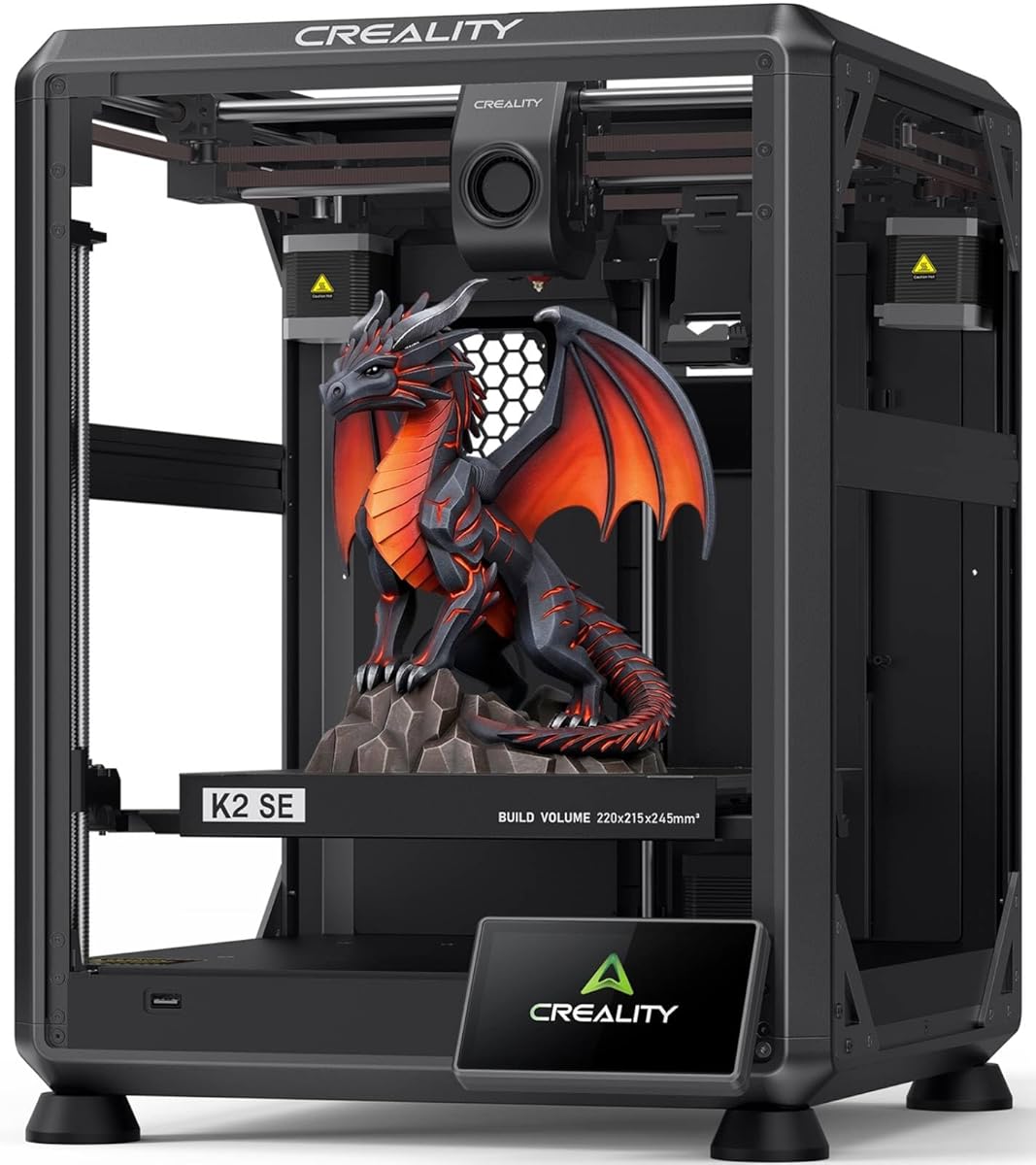
The Creality K2 SE offers a solid metal build and auto leveling at an accessible price. It is designed for speed and precision with a CoreXY system. While the rating is lower, it has strong features for beginners.
We may earn a commission when you buy through this link, at no additional cost to you.
Its die-cast aluminum frame provides stability for high-speed printing. The vibration sensor and input shaping reduce ringing. Direct drive extruder ensures reliable filament flow. Quick-swap nozzles minimize downtime during maintenance.
The rating suggests some users may face initial setup issues. Multicolor printing requires a separate CFS module. These factors may affect the overall experience for first-time buyers.
For those seeking a robust build and future expandability, this model is compelling. The auto leveling simplifies setup. It is a good option for budget-conscious beginners.
Solid metal frame ensures stability and precision during high-speed prints.
Compatible with multicolor systems for advanced projects later.
We may earn a commission when you buy through this link, at no additional cost to you.
The E-Leveler 2 is an electronic tool that assists with manual bed leveling. It provides visual feedback via LEDs to help you adjust the bed. While not automatic, it simplifies the leveling process significantly.
We may earn a commission when you buy through this link, at no additional cost to you.
This device improves accuracy for printers with manual leveling screws. The LED indicator shows when the bed is level. Its design is compatible with most 3D printers. It is a cost-effective solution for better first layers.
It does not replace auto leveling on modern printers. You still need to adjust knobs manually. For some beginners, this extra step may be frustrating compared to fully automatic systems.
If you own a printer without auto leveling, this tool is invaluable. It makes the process easier and more consistent. It is a practical accessory for improving print success.
LED indicators guide you to a perfectly level bed every time.
Works with most manual leveling 3D printers.
We may earn a commission when you buy through this link, at no additional cost to you.
The FLASHFORGE AD5M combines speed with reliable auto calibration features. It uses a CoreXY structure for stable high-speed printing. The one-click leveling ensures precise first layers every time.
We may earn a commission when you buy through this link, at no additional cost to you.
Its all-metal build supports speeds up to 600mm/s. Quick-swap nozzles allow for easy maintenance and material changes. The flexible PEI plate helps with print removal. Power loss recovery adds peace of mind.
As an open-frame printer, it is not ideal for very high-temp materials. The lack of an enclosure means more noise and fumes. These are standard trade-offs for this class of printer.
For beginners prioritizing speed and ease of use, this model is strong. The auto calibration removes guesswork. It is a solid choice for hobbyists and casual users.
Auto calibration ensures a perfect first layer on every print.
Quick-swap nozzles simplify cleaning and upgrades.
We may earn a commission when you buy through this link, at no additional cost to you.
The QIDI Q2 redefines the beginner experience with professional features. It includes a heated chamber and high-temp nozzle for advanced materials. Auto leveling ensures reliability without manual intervention.
We may earn a commission when you buy through this link, at no additional cost to you.
Its all-metal CoreXY structure and linear rails reduce vibration. The nozzle acts as a sensor for accurate leveling. Multi-color and multi-material options exist via QIDI BOX. Filament drying and monitoring add convenience.
The price point is higher than typical beginner printers. The unit is also heavy and requires space. These factors may deter casual users but are worth it for serious makers.
For beginners planning to grow into engineering materials, this is ideal. The leveling system is precise and easy. It bridges the gap between hobbyist and professional machines.
Heated chamber and 370C nozzle unlock strong engineering plastics.
Nozzle sensor provides consistent and accurate bed leveling.
We may earn a commission when you buy through this link, at no additional cost to you.
The FLASHFORGE 5M Pro offers high speed with quiet operation and auto leveling. It features a closed design with filtration for home or classroom use. Dual nozzles expand printing capabilities.
We may earn a commission when you buy through this link, at no additional cost to you.
Its auto leveling system ensures accurate first layers without manual steps. The low-speed mode keeps noise under 50dB. Dual nozzles support efficiency and quality. Filtration improves air quality during prints.
It is pricier than entry-level options. The enclosed design may limit airflow for large prints. These trade-offs are balanced by its safety and performance features.
For families or classrooms, this model is excellent. Auto leveling simplifies use. The quiet and safe design supports consistent daily printing.
Low noise and air filtration make it safe for home use.
Dual nozzles and auto leveling streamline workflows.
We may earn a commission when you buy through this link, at no additional cost to you.
The Creality Ender 3 V3 SE brings auto leveling to budget users. It is designed for fast setup and reliable printing. The Sprite extruder handles many materials well.
We may earn a commission when you buy through this link, at no additional cost to you.
CR Touch leveling and auto Z-offset simplify calibration. Dual Z-axis reduces wobble. Speeds reach 250mm/s which is solid for beginners. It requires minimal assembly out of the box.
The build quality is basic compared to higher models. Some users report inconsistency in leveling over time. These issues are manageable with proper maintenance.
It remains a top choice for those new to printing. Auto leveling saves time. The price point makes it accessible to many.
CR Touch and auto Z-offset remove manual adjustments.
Minimal assembly gets you printing quickly.
We may earn a commission when you buy through this link, at no additional cost to you.
The Creality CR Touch Kit adds auto leveling to older models. It uses multi-point detection to calculate the bed plane. This improves first layer accuracy significantly.
We may earn a commission when you buy through this link, at no additional cost to you.
Installation requires minor changes and firmware updates. It works with many Ender and CR models. The sensor is reliable and easy to use. It is a cost-effective way to upgrade existing printers.
Compatibility depends on motherboard versions. Firmware updates may be tricky for some users. These are small hurdles given the price and results.
If you have an older printer, this kit is valuable. Auto leveling makes it much more usable. It extends the life of existing hardware.
Brings auto leveling to older Ender and CR models.
Multi-point detection ensures precise bed alignment.
We may earn a commission when you buy through this link, at no additional cost to you.
The FLASHFORGE AD5X introduces multi-color printing with auto leveling. It uses an Intelligent Filament System to manage up to four colors. This expands creative possibilities for beginners.
We may earn a commission when you buy through this link, at no additional cost to you.
Its CoreXY structure supports 600mm/s speeds. Auto leveling ensures consistent quality. The large build volume allows bigger projects. IFS handles filament changes automatically.
Complexity may be high for absolute beginners. Cost is higher than standard models. These are trade-offs for multi-color capability.
For those wanting to create vibrant models quickly, this is ideal. Auto leveling removes setup hassle. It brings professional features to beginners.
IFS manages colors automatically for complex prints.
600mm/s speed and auto leveling deliver results fast.
We may earn a commission when you buy through this link, at no additional cost to you.
The Creality Ender 3 V3 SE delivers simplicity with auto leveling. It is built for quick setup and smooth operation. The Sprite extruder supports reliable filament feeding.
We may earn a commission when you buy through this link, at no additional cost to you.
Auto leveling and auto Z-offset make calibration effortless. Dual Z-axis leads reduce vibration. Printing speed reaches 250mm/s efficiently. The mainboard keeps noise low.
The build is straightforward and lacks advanced features. Open design limits some material options. It remains a solid value for first-time buyers.
Beginners seeking ease and reliability should consider this. Auto leveling ensures success. It is a friendly entry into 3D printing.
Few steps get you printing with auto leveling.
Sprite extruder handles many filaments smoothly.
We may earn a commission when you buy through this link, at no additional cost to you.
This guide explains key factors to consider when selecting an auto bed leveling 3D printer. Understanding these helps you find the right balance of cost and performance.
Auto bed leveling systems like CR Touch or capacitive sensors measure the bed surface and compensate automatically. This removes the need for manual adjustments and ensures a good first layer. Look for one-click leveling for the easiest experience.
Check if the system supports multi-point detection for higher accuracy. Some printers use the nozzle as a sensor for more precise results.
Build volume defines the maximum size of objects you can print. Beginners often start with standard volumes around 220mm. Larger volumes allow bigger parts but may cost more.
Ensure the build volume matches your intended projects. Consider the printer's footprint if space is limited.
Higher speeds and acceleration reduce print times significantly. Models with 600mm/s are ideal for fast turnaround. Acceleration ensures smooth motion and better quality at high speeds.
Look for features like input shaping or vibration compensation to maintain quality during fast prints.
Direct drive extruders handle flexible filaments like TPU better than Bowden setups. They provide better control and retraction. Most beginner-friendly models use direct drive for versatility.
Ensure the extruder has a good feeding mechanism to avoid clogs and slips.
PEI coated plates offer excellent adhesion and easy part removal. They also work well with high temperatures. Some plates are spring steel for quick removal by bending.
Check if the plate is removable and durable for long-term use.
Check the maximum nozzle temperature to see which materials are supported. Higher temperatures allow printing with engineering plastics. Some printers include heated chambers for better results.
Ensure the printer supports common filaments like PLA, PETG, and TPU to start.
Closed designs with filtration reduce fumes and noise. This is important for indoor use. Look for HEPA and carbon filters for cleaner air.
Safety features like thermal runaway protection and enclosure designs add peace of mind.
Built-in slicing software or app support simplifies workflow. Wi-Fi and cloud features allow remote monitoring and control. These reduce setup complexity for beginners.
Ensure the printer supports common file formats and is compatible with your PC.
After unboxing, assemble any remaining parts carefully. Run the auto leveling routine to calibrate the bed. This ensures the first layer sticks properly.
Clean the build plate regularly to maintain adhesion. Use mild soap and water or isopropyl alcohol. Avoid scratching the surface during cleaning.
Check belts and screws periodically for tightness. Lubricate rods if needed to reduce noise and wear. Keep the printer in a dry place to prevent issues.
Auto bed leveling uses sensors to measure the distance between the nozzle and the build plate at multiple points. The printer then adjusts the Z-axis accordingly. This ensures the first layer is perfect without manual tweaks.
Auto leveling handles the fine tuning but you may still need to do a coarse level if the bed is off. Always check the Z-offset after leveling. Some printers still require initial manual adjustments for best results.
Recalibrate if you notice first layer issues or after moving the printer. Most printers only need occasional recalibration. Auto leveling reduces frequency significantly.
PLA is the most popular because it is easy to print and warp-free. PETG is also good for durability. TPU is flexible and great for learning different materials.
This may be due to a dirty plate, wrong height, or low bed temperature. Auto leveling helps but check Z-offset and cleaning. Use adhesion aids like glue or tape if needed.
Yes, kits like CR Touch allow older models to add auto leveling. This improves first layer consistency. Compatibility depends on the motherboard and firmware version.
Modern auto leveling is accurate enough for most details. Multi-point detection improves precision. For micro-features, manual Z-offset tuning may be needed.
Many models include power loss recovery. This saves progress and resumes after power returns. Always use a reliable power source and SD card.
The models highlighted offer strong features for beginners. Auto leveling simplifies setup and improves success rates. Each has strengths for different needs and budgets.
Focus on speed, support, and leveling type to find your match. Choose based on your space and material goals. Consider future needs like multicolor or advanced materials.
Prices and availability change frequently. Verify specs and support before buying. With the right pick, you can start printing quickly and reliably.