
GIGABYTE B550 Gaming X V2
4.5Editor score
Supports Ryzen 5000 Series
Includes PCIe 4.0 Support
Affordable Entry Level Price
This guide compares the top Gigabyte Motherboard options for performance and value across AMD and Intel platforms to help you build the right PC system.
Choosing the right Gigabyte Motherboard is essential for building a stable and powerful computer system. These boards connect all your components and determine what processors and memory you can use for optimal performance.
We compared ten highly rated models based on their power delivery, connectivity options, and thermal design. Each selection offers unique features tailored to different budgets and processor types for diverse building needs.
Every pick highlights key strengths and potential trade-offs to guide your decision making. Prices and availability change often so always check the current listings before you finalize your purchase today.
4.5Editor score

4.4Editor score

4.2Editor score
The following table provides a side-by-side overview of all ten selected models. Compare their core specifications and features to find the perfect match for your specific build requirements.


This board stands out as the top choice for AM5 builders wanting solid performance. It holds a strong rating and supports the newest Ryzen 9000 series right out of the box. The design focuses on stability and speed.
We may earn a commission when you buy through this link, at no additional cost to you.
Its power delivery system uses a 14+2+1 phase setup with 70A stages to handle high-end CPUs easily. The 8-layer PCB and full thermal covers keep temperatures low even under heavy loads. You get four DIMM slots for fast DDR5 memory.
While the price is higher than entry models the features justify the cost for most users. The only real trade-off is ensuring your BIOS is current for maximum CPU compatibility. This is rare with new AM5 boards.
Buy this if you want a reliable future-proof base for a gaming or workstation PC. It balances performance features and cooling effectively for a great all-around experience. It remains our top recommendation for AM5 systems.
The 14+2+1 phase VRM ensures stable power for demanding Ryzen chips without throttling.
Features PCIe 5.0 M.2 and USB-C ports for next-gen storage and peripheral speeds.
We may earn a commission when you buy through this link, at no additional cost to you.
This model brings the latest WIFI7 and USB4 tech to AM5 enthusiasts. It earned a high rating for its robust build and extensive feature set. It is ideal for users who want every modern standard included.
We may earn a commission when you buy through this link, at no additional cost to you.
With four M.2 slots and PCIe 5.0 support storage options are limitless. The 16+2+2 VRM provides ample power for overclocking or multi-core workloads. The thermal guards protect your drives during intense sessions.
The main drawback is the cost associated with cutting edge wireless and USB tech. Some users might not need WIFI7 yet but having it ensures longevity. The warranty adds peace of mind for long-term use.
Choose this board if you want the absolute latest connectivity options available now. It is perfect for power users who value speed and future compatibility. You will not need to upgrade soon with this choice.
WIFI7 offers lower latency and higher throughput for seamless online gaming and streaming.
Four M.2 slots allow for massive storage arrays without needing add-on cards.
We may earn a commission when you buy through this link, at no additional cost to you.
This board offers the same powerful features as the Elite but in a striking white finish. It appeals to builders focused on clean aesthetics without sacrificing performance or connectivity. The rating reflects its solid quality.
We may earn a commission when you buy through this link, at no additional cost to you.
It uses an 80A smart power stage setup to handle high-end CPUs with ease. The thermal design is advanced with covered heatsinks and a dedicated M.2 guard. You get four M.2 slots for plenty of fast storage.
The white theme limits pairing options if you prefer darker case colors. The price is higher than standard models due to the custom aesthetic and premium features. It is a niche choice for specific build themes.
Select this if you are building a white themed PC and need top tier specs. It combines looks and function perfectly for high-end custom builds. You get a premium experience with a unique visual appeal.
The all-white PCB and heatsinks create a stunning visual for custom white builds.
80A smart power stages ensure reliable performance for demanding Ryzen 9000 processors.
We may earn a commission when you buy through this link, at no additional cost to you.
This is a flagship board for Intel Core Ultra 2 processors with exceptional connectivity. It supports Thunderbolt 4 and has a 10GbE LAN port for professional networking needs. The rating indicates solid quality for its class.
We may earn a commission when you buy through this link, at no additional cost to you.
The 18+1+2 VRM design delivers stable power for overclocking and heavy multitasking. Five M.2 slots provide massive storage potential with PCIe 5.0 speeds. You also get WIFI7 for ultra-fast wireless performance.
The cost is significant and it requires a new Intel CPU and DDR5 memory. Most home users may not need 10GbE or five M.2 drives immediately. It is geared towards high-end workstations or enthusiasts.
Buy this if you need professional networking and extreme expandability for your workstation. It is the best choice for Intel users wanting every possible feature. You will have no limits on storage or speed.
10GbE LAN provides desktop-grade network speeds ideal for large file transfers and servers.
Dual Thunderbolt 4 ports enable high-speed external storage and video output connections.
We may earn a commission when you buy through this link, at no additional cost to you.
This board is a favorite for builders wanting AM5 features at a sensible cost. It holds a very high rating due to its balanced feature set. It offers PCIe 5.0 storage support without the flagship price.
We may earn a commission when you buy through this link, at no additional cost to you.
The 12+2+2 VRM handles Ryzen 7 and 9 chips well for gaming. You get triple M.2 slots including one PCIe 5.0 drive option. WIFI6E ensures fast wireless connections for modern home networks.
It lacks the 10GbE LAN or extra M.2 slots of pricier models. The Realtek GbE LAN is standard but not high-speed for enterprise use. This is acceptable for typical gaming and home office users.
Choose this if you want a reliable AM5 entry without overspending on unused features. It is perfect for mainstream gaming rigs and general workstation builds. You get a strong start for your next PC.
Delivers essential AM5 features like DDR5 and WIFI6E without premium pricing.
The 12+2+2 phase design ensures stability for most Ryzen 7000 and 9000 CPUs.
We may earn a commission when you buy through this link, at no additional cost to you.
This board is perfect for users upgrading an existing AM4 system without changing RAM. It supports Ryzen 5000 series chips and offers robust power delivery. The rating confirms its reliability for AM4 enthusiasts.
We may earn a commission when you buy through this link, at no additional cost to you.
You get PCIe 4.0 speeds for GPUs and storage along with WIFI6. The 12+2 power phase provides stable power for Ryzen 9 CPUs. Q-Flash Plus allows BIOS updates without installing the CPU.
The main limit is DDR4 support which prevents future DDR5 upgrades. AM4 is an older platform so new chip support has ended. It remains a great option for existing AM4 owners.
Pick this if you already have DDR4 memory and want to upgrade your CPU. It is the best choice for maximizing an older system. You avoid the high cost of a full platform swap.
Allows CPU upgrades to Ryzen 5000 without replacing your existing DDR4 memory.
Q-Flash Plus lets you update BIOS even without a CPU installed for easy updates.
We may earn a commission when you buy through this link, at no additional cost to you.
This Z790 model brings Intel 14th Gen support at a reasonable price. It includes DDR5 and WIFI6E for a modern experience. The rating shows it meets expectations for reliability and performance.
We may earn a commission when you buy through this link, at no additional cost to you.
It supports three M.2 drives and has one PCIe 5.0 slot for future cards. The 12+1+1 VRM is adequate for gaming and moderate workloads. Thermal design keeps the VRM stable under load.
It lacks the high-end VRM and extra slots of premium Z790 boards. If you plan extreme overclocking you might need a stronger model. For gaming and general use this is plenty.
Choose this if you want a reliable Z790 board without paying flagship prices. It is ideal for gamers building with a 14th Gen Core CPU. You get a modern feature set at a great value.
Fully supports 14th Gen Core CPUs with DDR5 memory for top performance.
PCIe 5.0 support prepares you for next-generation graphics cards and storage.
We may earn a commission when you buy through this link, at no additional cost to you.
This board offers a robust power design for serious Intel gamers. It has four M.2 slots and a strong VRM for top CPU performance. The rating reflects its solid build and feature richness.
We may earn a commission when you buy through this link, at no additional cost to you.
The 16+1+2 phase setup handles high-end chips with ease. You get M.2 Thermal Guard III to protect your fast storage drives. RGB Fusion lets you sync your system lighting easily.
It is pricier than basic Z790 models but justifies it with features. You need to install specific software to control the lighting effects. Some users prefer simpler BIOS interfaces for tweaking.
Buy this if you need strong power delivery and lots of storage slots. It is a great pick for high-end gaming PCs with 14th Gen CPUs. You get a balanced mix of performance and features.
The 16+1+2 phase VRM ensures stable power for overclocking Core i9 processors.
Four M.2 slots allow you to add plenty of fast NVMe storage for games.
We may earn a commission when you buy through this link, at no additional cost to you.
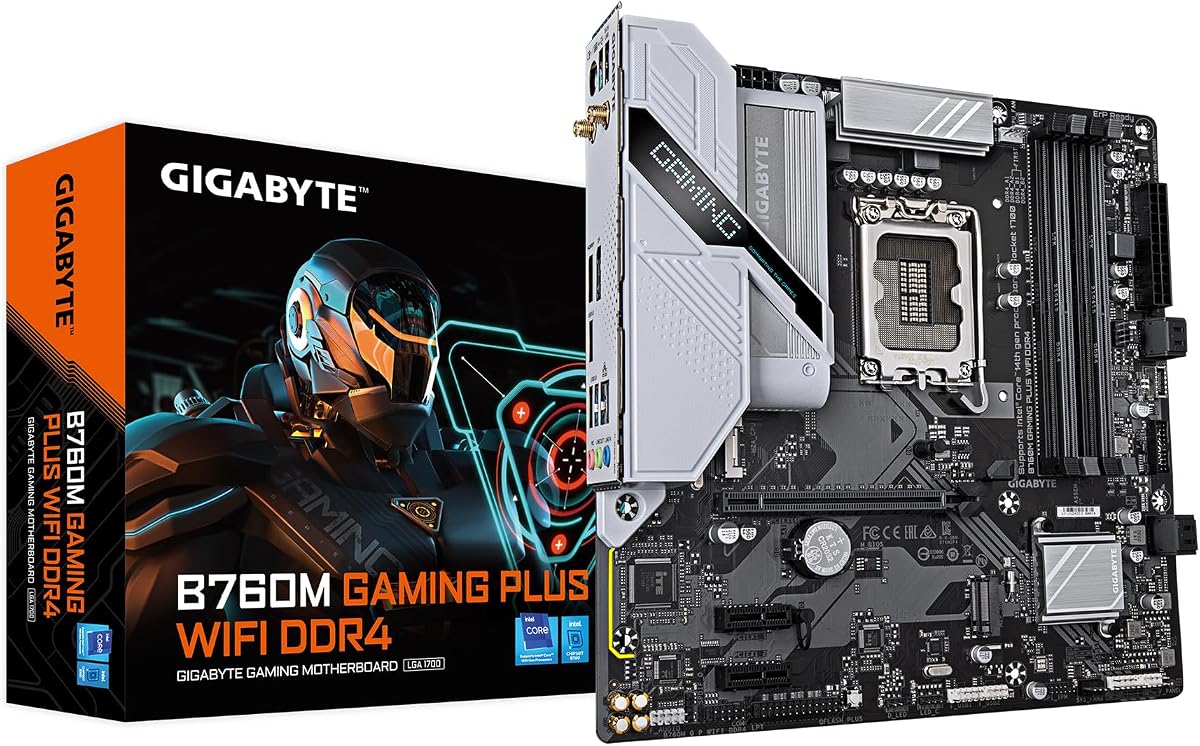
This compact board fits small cases while supporting 14th Gen Intel CPUs. It offers WIFI and DDR4 support at a very low price. The rating is good for a budget option.
We may earn a commission when you buy through this link, at no additional cost to you.
It supports two M.2 slots and includes a front USB-C port for convenience. The hybrid digital power phase is decent for basic gaming builds. It works well in small ITX or mini tower cases.
The VRM is not strong enough for heavy overclocking or top CPUs. It uses DDR4 which is cheaper but older than DDR5. This limits performance for high-end workstation applications.
Select this if you need a small budget system with modern Intel features. It is perfect for entry-level builds where space is tight. You save money without losing essential connectivity.
The M-ATX layout fits smaller cases without sacrificing essential features.
Supports DDR4 memory to keep overall system build costs low and efficient.
We may earn a commission when you buy through this link, at no additional cost to you.
This is our top budget pick for AMD builders who want solid value. It supports Ryzen 5000 CPUs and includes modern PCIe 4.0 slots. The rating highlights its reliability for entry-level systems.
We may earn a commission when you buy through this link, at no additional cost to you.
You get two M.2 slots and a decent VRM for mid-range chips. Q-Flash Plus allows easy BIOS updates without installing the CPU first. It fits well in many standard ATX cases.
It lacks advanced connectivity like USB4 or high-end wireless options. DDR4 memory support keeps costs down but limits future upgrades. This is a trade-off many budget builders accept.
Choose this if you want a reliable base for a budget gaming PC. It is perfect for upgrading an older system affordably. You save cash while still getting a quality platform.
Offers essential AM4 features at one of the lowest market prices available.
Q-Flash Plus simplifies BIOS updates for better CPU compatibility and features.
We may earn a commission when you buy through this link, at no additional cost to you.
Selecting the right Gigabyte Motherboard depends on your CPU choice budget and feature needs. Consider the following factors to make an informed decision for your build.
Ensure the board matches your CPU socket such as AM5 for Ryzen 9000 or LGA 1851 for Intel Ultra. A mismatch will prevent the CPU from fitting or functioning properly.
Always verify the CPU socket before buying to ensure compatibility with your processor.
Check if the board supports DDR5 or DDR4 based on your needs. DDR5 offers higher speeds but costs more than DDR4 memory.
Choose DDR5 for new builds to future-proof your system.
Look at the VRM phases such as 14+2+1 or 16+2+2 to ensure stable power. Higher phase counts help with overclocking and high-end CPUs.
Select a board with enough power phases for your CPU choice.
Count the M.2 slots to see how many NVMe SSDs you can install. Some boards offer four or five slots for massive storage capacity.
Pick a board with enough M.2 slots for your storage needs.
Decide if you need built-in WIFI like WIFI6E or WIFI7. This saves space and adds value compared to external adapters.
Include WIFI on your list if you do not use wired internet.
Choose between ATX and M-ATX based on your case size. M-ATX boards are smaller and fit compact cases.
Ensure the board size matches your case specifications.
Check for heatsinks and thermal guards to keep components cool. Good thermal design helps maintain performance during long sessions.
Prioritize boards with covered heatsinks for better stability.
Review PCIe slots for GPUs and extra cards. Ensure you have enough space for your graphics card.
Check slot spacing to avoid clearance issues with large GPUs.
Always install the board on an anti-static mat to prevent damage. Connect the 24 pin and CPU power cables securely.
Update the BIOS as soon as possible using Q-Flash to ensure compatibility. This allows you to use the latest CPU generations without issues.
Keep your system clean by removing dust from the heatsinks. Good airflow ensures your motherboard stays cool over time.
Models like the B650 AORUS Elite AX and X870 AORUS Elite support Ryzen 9000 CPUs. These boards use the AM5 socket and offer DDR5 memory support for top performance.
No AM5 boards require DDR5 memory. If you want to reuse DDR4 you need an AM4 board like the B550 AORUS Elite AX V2.
The Z890 AORUS Master offers five M.2 slots for maximum storage. The X870 AORUS Elite also supports four slots for extensive storage arrays.
It depends on your setup. Built-in WIFI saves space and offers convenience for wireless networks. Wired connections are faster but require a cable to your PC.
Q-Flash Plus lets you update BIOS using a USB stick without CPU RAM or GPU. This feature makes it easy to get support for new CPUs before installation.
The B550 Gaming X V2 is the best budget choice offering solid AM4 support. For AM5 the B650 Eagle AX provides great value without the premium price.
We have reviewed ten top Gigabyte Motherboard options for AMD and Intel builders. Our top pick remains the B650 AORUS Elite AX for its balanced features and strong performance.
Focus on your CPU socket first then look at VRM and memory support. Ensure the board matches your budget and desired connectivity like WIFI or Thunderbolt.
Prices change often so check current listings before you buy. Always read the latest reviews to confirm the board works well with your chosen parts.