
THUSTAR 8MP Document Camera & Webcam 4K with Dual Microphones
4.4Editor score
Adjustable image reversal function
3 level LED brightness
Foldable design for storage
Modern classrooms require clear visual aids to engage students effectively. A document projector allows teachers to display physical materials live. This technology enhances lessons by making text and images visible to the entire class.
We evaluated ten top-rated models based on resolution, connectivity, and ease of use. Our analysis considers features like wireless options, camera quality, and compatibility with educational software. This list helps you choose the right tool for your teaching environment.
Each pick highlights key strengths and ideal use cases for different classroom needs. Prices and availability may change over time so check current listings. Use this guide to find the perfect visual aid for your students and lessons.
4.4Editor score

4.5Editor score
4.4Editor score
As an Amazon Associate we earn from qualifying purchases.
Compare all ten models side by side to see their key specifications. This table highlights resolution, connectivity, and special features to help you decide which model fits your classroom budget and needs best.





The IPEVO V4K is a top choice for educators needing high resolution live images. With an 8 Megapixel camera it captures ultra high definition content up to 3264 by 2448 pixels. It stands out for its reliable performance and broad compatibility.
We may earn a commission when you buy through this link, at no additional cost to you.
Its Sony CMOS image sensor ensures exceptional noise reduction and color reproduction which is vital for teaching materials. The high frame rate allows lag-free live streaming at up to 30 fps at full HD. This ensures smooth transitions between documents during lessons.
While it requires a computer connection and does not offer wireless options the stability of the USB link is a benefit for consistent classroom use. The multi-jointed stand is designed to handle heavy daily use though loose joints may require tightening over time.
Teachers who prioritize image quality and reliability over wireless mobility should choose this model. It works seamlessly with Mac PC and Chromebook software making it a versatile tool for digital lessons and distance learning.
Captures crisp details in text and diagrams making small print visible to the entire class.
Designed to work with various operating systems and educational software for seamless integration.
We may earn a commission when you buy through this link, at no additional cost to you.
The Apollo Overhead Projector brings a classic approach to classroom presentations. It features a 2000 Lumen output ensuring bright visibility for documents and materials. This model is suitable for teachers who prefer traditional projection methods over digital cameras.
We may earn a commission when you buy through this link, at no additional cost to you.
Its open head design allows for easy placement of transparencies or objects. The unit includes VGA and USB ports along with an LCD display for control. This makes it compatible with various input sources for flexible lesson planning.
However the physical size and traditional technology mean it may lack the portability of modern document cameras. It is best suited for permanent installations in classrooms where space is not a primary constraint.
Schools looking for a reliable and straightforward projection tool will find this projector useful. It provides consistent performance for displaying overhead materials clearly to large groups of students.
Ensures clear visibility even in rooms with moderate ambient light conditions.
Ideal for educators accustomed to standard overhead projection workflows.
We may earn a commission when you buy through this link, at no additional cost to you.
The IPEVO VZ-X offers exceptional freedom with its wireless capabilities. It supports Wi-Fi HDMI and USB connectivity allowing use with computers or devices directly. This makes it ideal for dynamic teaching environments where mobility is key.
We may earn a commission when you buy through this link, at no additional cost to you.
Its 8MP sensor captures images in high definition or near 4K quality via USB. The battery provides 9-12 hours of life ensuring a full class session without needing a power outlet. The swiveling head allows capturing objects from various angles.
The main trade-off is the higher cost compared to wired cameras. Users must also manage battery charging though the long life minimizes interruptions. This model requires careful setup to ensure stable wireless connections in crowded classrooms.
Educators who need to move around the room or present wirelessly will value this device. It bridges the gap between traditional cameras and modern smart classroom needs effectively.
Allows teachers to walk around while presenting using a wide wireless range.
Supports continuous use for extended periods without plugging into power.
We may earn a commission when you buy through this link, at no additional cost to you.
The THUSTAR 8MP delivers strong performance at a budget-friendly price. It offers an 8MP resolution with 30fps for live streaming making it great for distance education. This camera includes dual microphones for audio which adds value for online classes.
We may earn a commission when you buy through this link, at no additional cost to you.
Its adjustable image reversal and brightness controls provide flexibility for different teaching scenarios. The foldable design saves space on crowded teacher desks. The three level LED lights help in various lighting conditions ensuring clear visibility.
While the build may feel less premium than higher end models it remains functional and reliable. The lack of advanced autofocus means manual adjustments might be needed sometimes. However the value it provides is excellent for schools with tight budgets.
New teachers or those on a strict budget should consider this option first. It covers the essential features needed for effective visual teaching without a high investment cost.
Built-in dual microphones allow for clear sound during virtual lessons.
Folds down to a small footprint for easy storage and portability.
We may earn a commission when you buy through this link, at no additional cost to you.
The INSWAN INS-2 is designed for educators who need to display large documents. It captures clear 4K Ultra HD images using a 13MP Sony sensor. This resolution is excellent for detailed artwork or complex diagrams that require precision.
We may earn a commission when you buy through this link, at no additional cost to you.
The multi-joint arm allows flexible angle adjustments for documents up to A3 size. Built-in LED and mic deliver clear presentations without extra accessories. The included Documate software offers zoom annotation and whiteboard tools for enhanced teaching.
While it offers great resolution the system requirements are specific especially for iPad compatibility. Users need to ensure their devices meet the OS versions for seamless plug-and-play use. It may require more setup than simpler USB cameras.
Art instructors and professionals requiring large format display will find this camera ideal. The combination of hardware and software makes it a complete solution for detailed visual teaching.
Provides crisp clarity for fine details in art and technical drawings.
Documate software adds interactive features directly to the camera system.
We may earn a commission when you buy through this link, at no additional cost to you.
The Lumens DC166 offers optical zoom capabilities that stand out among standard cameras. It supports UXGA SXGA and XGA resolutions with a 6x optical zoom for detailed inspection. This allows educators to zoom in without losing image quality.
We may earn a commission when you buy through this link, at no additional cost to you.
It features one-touch video recording and playback with internal memory for 120 JPEG images. An SD card slot supports up to 32 GB for additional storage. This independence from a computer makes it useful in setups without PCs.
However the resolution standards are older compared to modern 4K options. The user interface may feel less intuitive for newer users. It serves specific needs for optical zoom but might lack versatility for modern classrooms.
Users needing optical zoom and standalone functionality will appreciate this model. It is a solid choice for environments where computer connectivity is limited.
Provides lossless zooming for detailed examination of small objects.
Records directly to memory without needing a host computer.
We may earn a commission when you buy through this link, at no additional cost to you.
The Epson PowerLite 118 provides vibrant visuals through 3LCD technology. It offers a long lamp life of 17000 hours reducing replacement costs for schools. This projector is designed for ceiling mounting which saves desk space in classrooms.
We may earn a commission when you buy through this link, at no additional cost to you.
It connects via HDMI for smooth video and audio transfer. The built-in speaker enhances presentations without external sound systems. It is ideal for projecting slides and video content directly from a laptop.
Since it is a standard projector rather than a camera it does not project physical documents live. It is best used for digital content playback. The 4:3 aspect ratio suits legacy content but may not match modern widescreen needs.
Educators needing a durable ceiling mounted projector for standard media will find it reliable. Its long life and easy setup make it a practical choice for permanent installations.
Reduces maintenance and replacement costs over time with 17000 hour life.
Delivers vivid colors for engaging visual presentations.
We may earn a commission when you buy through this link, at no additional cost to you.
This DLP Business Projector delivers 3300 Lumens of brightness for clear office and classroom viewing. It is designed for everyday indoor use with natural color presentation. This makes it suitable for displaying slides and charts clearly during daytime.
We may earn a commission when you buy through this link, at no additional cost to you.
The fast startup design reduces waiting time before lessons begin. Users can connect via simple wired setups without complicated installation. It supports wide display sizes for group presentations ensuring everyone can follow the content.
While it excels at brightness it lacks the camera features of document projectors. It works best as a traditional display screen for laptops. Users looking for a bright projector for mixed lighting will find it valuable.
Schools needing a bright reliable projector for regular presentations should consider this model. Its high lumens ensure visibility even with curtains open or lights on.
High brightness ensures clear images even in well-lit rooms.
Fast startup saves time during busy class schedules.
We may earn a commission when you buy through this link, at no additional cost to you.
The Epson PowerLite E20 is a ceiling mountable projector with 3LCD technology. It produces vibrant true-to-life images that engage students effectively. This model is compact and white fitting well into modern classroom aesthetics.
We may earn a commission when you buy through this link, at no additional cost to you.
Its durable design provides a lamp life of 12000 hours which reduces maintenance frequency. The 5 watt speaker ensures audio is present during displays. HDMI connectivity transfers video and audio through a single cable for simplicity.
While the lamp life is slightly less than the 118 model it remains robust for daily use. The 4:3 aspect ratio suits standard presentations. It is a reliable choice for schools needing permanent ceiling installations.
Educators requiring a clean and easy-to-install projector will appreciate this unit. It balances performance and practicality for routine classroom projection needs.
White finish and compact size blend well with classroom decor.
Built-in speaker provides clear sound for presentations without extra gear.
We may earn a commission when you buy through this link, at no additional cost to you.
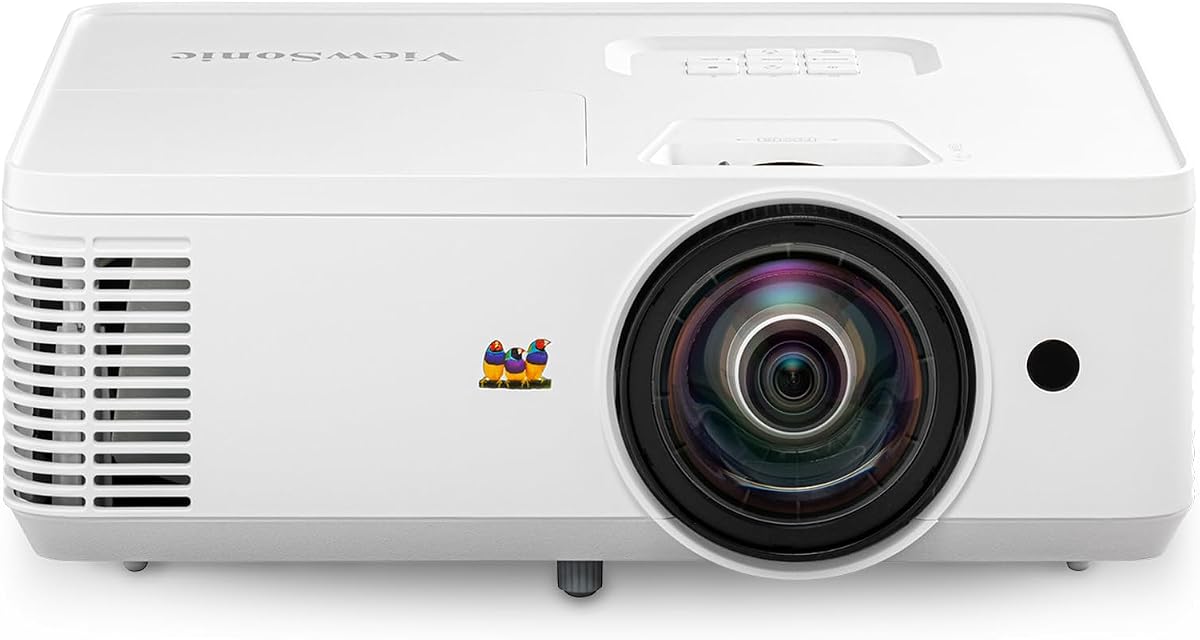
The ViewSonic PS502W is a short throw projector ideal for tight spaces. With a 0.5 throw ratio it projects large clear images without shadows. This makes it perfect for classrooms where space is limited but visibility is crucial.
We may earn a commission when you buy through this link, at no additional cost to you.
Its 4000 ANSI lumens ensure punchy images against moderate ambient lighting. The SuperColor technology provides vibrant cinematic colors for lifelike visuals. Auto-keystone correction ensures a squared display without complex manual adjustments.
While it commands a premium price the flexibility and brightness are unmatched. Users can project a 100-inch image from just 4.5 feet away. It supports dual HDMI for easy switching between devices.
Schools with small rooms needing large visuals should prioritize this model. It combines high performance with installation flexibility for modern education needs.
Short throw ratio allows large screen viewing in narrow rooms.
Proprietary color tech ensures vivid and true presentations.
We may earn a commission when you buy through this link, at no additional cost to you.
Selecting the right document projector requires understanding key factors that impact teaching quality. This guide breaks down the most important features to consider for your specific classroom needs.
Resolution determines how clear your text and images appear on the screen. Look for at least 8MP resolution for sharp details in books or diagrams. Higher resolution like 4K ensures small print is legible from the back of the room.
Prioritize models with high megapixel counts and good sensor quality for clear visuals.
Connectivity affects how easily you can integrate the projector with your devices. USB cameras work with PCs and Macs while HDMI options connect to projectors directly. Wireless models offer mobility but require stable network support.
Choose a model that matches your existing classroom technology setup.
Built-in lights or brightness are crucial for visibility in various room conditions. LED rings or high lumen outputs help display content even with windows open. Adjustability is key to avoiding glare or washed-out images.
Ensure the projector can handle the ambient lighting of your specific classroom.
For teachers who move around, battery life and wireless range are vital. Long battery allows for full class sessions without unplugging. Portability and weight matter if you move between classrooms regularly.
Opt for wireless models if mobility is a priority over static desk use.
Software adds value through features like annotation or video recording. Check if the projector supports your operating system like Windows or macOS. Compatibility with tools like Zoom or Teams is essential for distance learning.
Verify software requirements before purchasing to ensure seamless integration.
School budgets vary so consider cost versus long-term value. Durable stands and components withstand daily use in busy environments. Entry models save money while premium models offer advanced features.
Balance upfront costs with expected usage and longevity needs.
The physical size determines how much space the device occupies on a desk. Foldable designs are convenient for storage and transport. A stable base prevents accidents in active classrooms.
Measure your workspace to ensure the projector fits comfortably.
Optical or digital zoom allows closer inspection of small details. Fast focusing speed reduces interruptions during lessons. Macro capabilities are useful for scientific samples or small objects.
Look for flexible zoom options to adapt to different content sizes.
Set up the projector on a stable flat surface to ensure consistent images. Connect it to your computer or display using the appropriate cable or wireless network. Adjust the camera height and angle to frame your document or object correctly.
Clean the lens and lights regularly to prevent dust from affecting image quality. Store the device in a cool dry place when not in use to extend its life. Follow manufacturer guidelines for any specific maintenance requirements.
Calibrate brightness and focus settings at the start of each term for best results. Avoid touching the lens with bare hands to prevent smudges. Test the setup before class to avoid delays during lessons.
Ideally, you should look for at least 8MP resolution to ensure text and diagrams are sharp. Higher resolutions like 4K provide better detail for large formats. This ensures students can read small print from a distance.
Some models like standalone projectors work independently with SD cards or HDMI. However most document cameras require a computer to process the image. Check specific connectivity options before buying.
Ensure your classroom has a stable Wi-Fi network. Follow the device pairing instructions to connect to your computer or smartboard. You may need to install specific drivers or apps first.
Document cameras offer higher resolution and flexibility for digital integration. They are generally easier to maintain and provide clearer images. Overhead projectors are simpler but lack modern connectivity features.
Choose a projector with high lumen output to combat glare. Use shades or curtains to reduce natural light. High brightness ensures content remains visible during the day.
Most models work with standard webcam software, but dedicated apps add features like annotation. Check compatibility with your operating system. Some brands offer free suites for education.
Selecting the right visual tool enhances student engagement and lesson quality. Whether you choose a camera or projector, clarity and compatibility are paramount.
Prioritize features that match your teaching style such as mobility or resolution. Budget models offer great value while premium ones provide advanced capabilities.
Always verify current prices and availability before purchasing. With the right choice you can create more dynamic and inclusive learning environments.