
HDMI Tester Portable High Definition Network Cable Tester Checker
4.4Editor score
Tests HDMI and RJ45 cables
Compact main and remote units
Powered by AAA battery or USB
This guide compares the best HDMI cable and port testers for diagnosing connectivity issues, signal integrity, and cable faults across various HDMI versions.
Finding the right HDMI cable and port tester ensures your video setups work flawlessly without signal drops or image artifacts. These tools help technicians and hobbyists quickly identify faults like shorts or open circuits in cables.
We evaluated ten top-rated testers based on their accuracy, portability, and support for different HDMI versions. Each product offers unique features for detecting connectivity problems efficiently during installation or maintenance tasks.
Every pick below highlights key strengths and ideal use cases for your specific needs. Please note that product availability and pricing may change over time so verify current details before purchasing online.
4.4Editor score

4.8Editor score

4.5Editor score
This side-by-side comparison highlights the unique capabilities of each tester to help you choose the right tool for your specific cabling needs and budget constraints.


This portable HDMI tester offers rapid analysis and supports multiple HDMI versions for high definition verification. With a high rating it stands out for its ability to identify short circuits and mis-sequence faults efficiently.
We may earn a commission when you buy through this link, at no additional cost to you.
The device scans 19 wires quickly and uses LED indicator zones to show abnormal points clearly. It operates in two modes including a boot state scanning mode that simplifies troubleshooting during installation.
While it lacks network cable testing its intelligent power consumption alerts you when battery voltage drops below 7.2V. The weight is about 175 grams which makes it easy to carry around.
It is ideal for technicians needing a single person solution for field testing. The temperature domain tolerance ensures it works in various conditions from cold to hot environments.
LED zones highlight abnormal points instantly so you spend less time searching for issues.
Compatible with Type A and Type C interfaces to handle diverse cable types effectively.
We may earn a commission when you buy through this link, at no additional cost to you.
This dual function tester is perfect for users needing both HDMI and network cable checks at a low cost. It allows you to test up to 19 wires and identifies faults like short circuits quickly.
We may earn a commission when you buy through this link, at no additional cost to you.
The remote unit stores conveniently on the side of the main unit which saves space during transport. You can power it with a single AAA battery or connect a USB charger for flexibility.
Although it lacks advanced features like full display modes the LED rotation flash confirms proper connections reliably. It is suitable for basic home or office network and video setups.
It serves as an entry level tool for those new to cable testing. The simple operation ensures you can verify connectivity without needing extensive technical knowledge.
Test both HDMI and RJ45 cables with one device to save on equipment costs.
Use a AAA battery or USB supply to keep testing going in remote locations.
We may earn a commission when you buy through this link, at no additional cost to you.
This handheld device features an HD LCD screen to check set-top boxes without a TV. It offers full color audio and video display plus continuity checks to ensure cabling is installed correctly.
We may earn a commission when you buy through this link, at no additional cost to you.
The tempered glass display resists scratches and shattering while the housing protects against dirt and water. With three HDMI ports it allows for complex continuity tests efficiently.
It includes a 2300mAH battery providing up to four hours of use time for technicians. The auto scale resolutions ensure you see the correct image format during testing.
Ideal for professionals needing a standalone visual confirmation tool it justifies the cost with durability. The dual layer silicone rubber ensures it survives drops in demanding environments.
Verify set-top box installation without needing an external TV for visual feedback.
Built to withstand dust water and shock for long term field use reliability.
We may earn a commission when you buy through this link, at no additional cost to you.
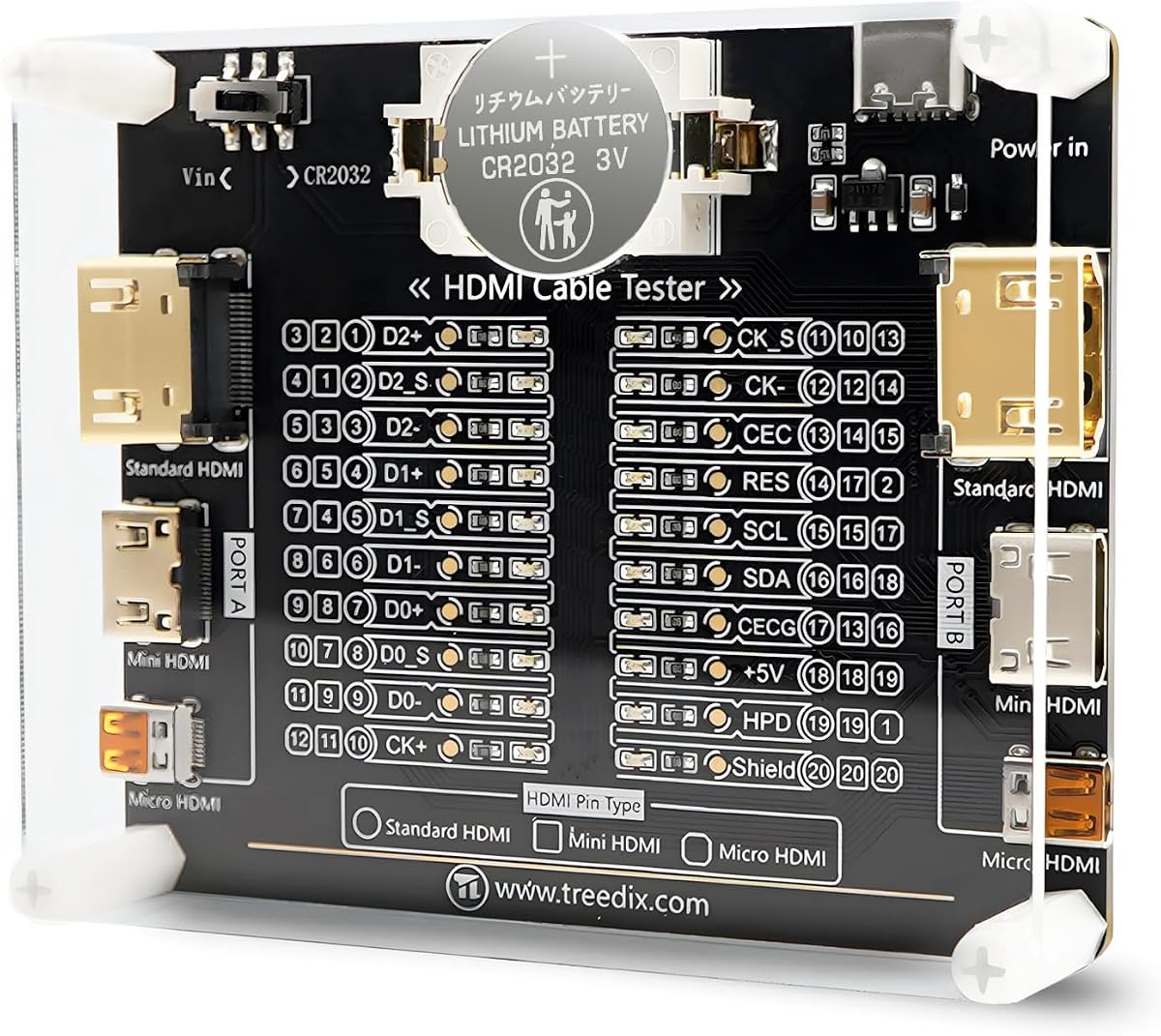
This test board detects abnormality for HDMI cables and helps identify short or open circuits accurately. It supports HDMI versions from 1.0 to 2.1 with multiple interface types like Type A and D.
We may earn a commission when you buy through this link, at no additional cost to you.
Each pin corresponds to one LED light so users understand the cable function clearly. The product uses battery or external power supply with reverse connection protection to prevent damage.
It comes with an acrylic housing to protect the tester from damage during transport. Its small size makes it easy to carry in a toolkit for on site maintenance.
Best for detailed maintenance tasks where pin level inspection is needed. The wide application supports cables of any length which increases its utility in various setups.
Twenty LEDs map each pin so you can pinpoint exact connection issues accurately.
Handles Type A C and D interfaces covering nearly all consumer HDMI cable types.
We may earn a commission when you buy through this link, at no additional cost to you.
This tester evaluates HDMI cables for shorts open circuits or incorrect wire pairings with precision. It is perfect for Mini HDMI cables and versions like 1.2V and 2.0V for diverse setups.
We may earn a commission when you buy through this link, at no additional cost to you.
The remote can be detached from the main unit to allow testing of installed or long cables. You can see individual connections in scan mode or all connections in full display mode.
It supports testing up to 500 meters which is useful for industrial or long run installations. However it requires a 9V battery to operate which must be bought separately.
Ideal for professional use where accuracy and distance matter most. The ability to detach the remote simplifies troubleshooting in difficult to reach locations.
Test cables up to 500 meters with the detachable remote unit for flexibility.
Evaluates each wire pair to identify specific faults in the cable assembly.
We may earn a commission when you buy through this link, at no additional cost to you.
This unit is used as a signal generator or display emulator for analyzing video outputs. It supports 4K resolution outputs and provides 4 pin DIP switches for setting resolution and content.
We may earn a commission when you buy through this link, at no additional cost to you.
You can control HDCP outputs which is useful for testing digital rights management on displays. It offers four different test patterns to check the integrity of the signal flow.
Unlike continuity testers it focuses on generating signals to verify display compatibility rather than checking wires. This makes it a specialized tool for video engineers rather than simple cable checks.
Best for professionals needing to validate signal generation and content support on devices. It ensures that your source hardware is correctly producing the required video formats.
DIP switches allow precise configuration of video resolution and HDCP settings easily.
Four patterns help you verify color and signal stability across different setups.
We may earn a commission when you buy through this link, at no additional cost to you.
This tester offers an auto shut-down function to save battery life after ten minutes of inactivity. It supports HDMI versions from 1.1 to 2.0 and also handles RJ45 connectors for network cables.
We may earn a commission when you buy through this link, at no additional cost to you.
You can choose between fast scan mode and full display mode for more comprehensive testing results. It scans up to 19 wires to detect short circuits or wrong orders quickly.
The superior compatibility makes it a great choice for all your devices needing connectivity checks. It is designed to save time and money by identifying cable faults before installation.
Good for general users who need a reliable multi tool for various cables. The energy efficiency ensures you get more use time from the battery in the unit.
Automatic shut-down preserves energy so you can test multiple cables without frequent changes.
Choose scan or full display to see connections as needed for your specific task.
We may earn a commission when you buy through this link, at no additional cost to you.
This professional tester features a 10-way switch and LED indicators for comprehensive diagnostics across audio video and network cables. It supports many ports including HDMI USB RCA BNC and Type-C for extensive compatibility.
We may earn a commission when you buy through this link, at no additional cost to you.
The detachable design allows split testing of cables in different locations without moving the unit. This dual operation mode increases efficiency for technicians working in large facilities.
Its durable metal housing ensures it withstands daily wear and tear in professional environments. The ports are clearly labeled which helps avoid mistakes during complex testing procedures.
Best for professionals who need one device to handle multiple cable types. The extensive interface support reduces the need to carry multiple testers for different tasks.
Test HDMI USB and BNC cables with one tool to simplify your workflow significantly.
Detach the unit to test ends in different locations for faster large scale checks.
We may earn a commission when you buy through this link, at no additional cost to you.
This tester is easy to use and simply requires plugging cables into the DVI-F and HDMI-F connectors. It diagnoses the cause of color shift sparkle or missing picture issues efficiently.
We may earn a commission when you buy through this link, at no additional cost to you.
The unit can be located at the source or display end of the system for flexible troubleshooting. It displays the status of each HDMI signal component to show where faults lie.
Its compact and portable design makes it a great addition to any tool bag for quick checks. It helps pinpoint video issues without needing a full setup or additional hardware.
Best for simple troubleshooting tasks in home or small business environments. The straightforward operation ensures you get results quickly without a steep learning curve.
Pinpoint color shift and sparkles easily to fix video display problems effectively.
Locate the tester at source or display ends to test cables in various scenarios.
We may earn a commission when you buy through this link, at no additional cost to you.
This tool supports HDMI cables up to version 2.1 and network cables including Cat5e and Cat6. It features a main and remote unit with the remote storing conveniently on the side.
We may earn a commission when you buy through this link, at no additional cost to you.
The main unit can be powered by a single 9V battery or using your phone's USB charger power supply for convenience. The LED lights flash in rotation to show proper connections clearly.
It is perfect for high definition multimedia interface needs and ethernet LAN wire continuity checks. The 5.0 rating indicates users find it very reliable for their testing needs.
Ideal for professionals needing to check both video and network lines simultaneously. Its support for newer HDMI versions ensures it stays relevant as technology advances.
Test HDMI and Ethernet cables in one device to save time on multi cable tasks.
Use battery or USB supply to test anywhere without worrying about power sources.
We may earn a commission when you buy through this link, at no additional cost to you.
Choosing the right tester depends on your specific needs including supported versions and port types. Here are key factors to consider before making a purchase.
Ensure the tester supports the HDMI versions you use such as 1.4 2.0 or 2.1. This ensures it can accurately test the cables you install without compatibility issues.
Look for testers that cover the range of versions you encounter in your daily work to avoid obsolescence.
Check if the device supports Type A Mini C or Micro D connectors to match your cable types. Some models also include RJ45 network ports for dual function testing.
Select a unit with the right ports to handle both your video and potential network cable tasks.
Look for devices with scan modes that show individual connections or full display modes that show all at once. These modes help you pinpoint faults faster in long cables.
Choose the mode that fits your workflow to reduce time spent on troubleshooting tasks.
Consider testers that can run on batteries or USB power to ensure they work in different environments. Flexible power sources mean you won't get stuck due to battery drain.
Opt for units with auto shut down features to conserve energy during long testing sessions.
Look for ruggedized housing or protective cases if you use the tester in harsh environments. A compact design makes it easier to carry around in a toolkit.
Choose durable materials that withstand drops and heat to ensure long term use.
Some devices offer signal generation to test video output quality while others focus on continuity. Decide if you need simple wire checks or deep signal analysis.
Prioritize units with signal generation if you need to test display compatibility.
Clear LED lights help you see faults at a glance without reading complex screens. Indicators should map clearly to pin numbers for quick diagnosis.
Choose models with intuitive LED layouts to speed up your testing workflow.
Entry level testers offer basic continuity checks while premium units provide signal verification. Match the price to the value you gain from advanced features.
Avoid overspending on features you don't need but ensure it covers your basic tasks.
Plug the HDMI cable into the main and remote units of the tester and ensure both ends are securely connected. Power on the device to activate the LEDs that show the connection status.
Observe the LED lights to check if they flash in rotation indicating a continuous path. If a light stays off it identifies a fault such as a short circuit or broken wire.
Store the tester in a dry case to protect the ports and screen from dust and water. Clean the connectors regularly to maintain accurate contact during testing.
An HDMI cable and port tester checks for faults in video cables like shorts or breaks. It ensures your connection is intact before installation to avoid issues like no signal.
Some high end testers support HDMI 2.1 but many are limited to 2.0. Check the specs to confirm if it matches your cable versions before buying.
Basic continuity testers check wires but not signal quality. For signal verification look for units with signal generation features or HD LCD displays.
Scan mode tests connections one by one while full display mode shows all at once. Use full display for quick checks and scan for detailed fault finding.
Most use standard AAA or 9V batteries but some accept USB power. Choose one with options that suit your available power sources easily.
Replace batteries when the LEDs dim or the device warns of low voltage. Regular use requires frequent changes so keep spares handy for uninterrupted work.
The UT681 HDMI Cable Tester offers a balanced mix of speed and versatility making it an excellent choice for many users. It handles multiple HDMI versions and identifies faults quickly.
Budget models like the HDMI Tester Portable provide solid dual cable testing at an affordable price. For high end needs the STEREN Handheld device offers visual confirmation.
Remember to check current prices and availability on Amazon before buying to get the best deal. Investing in the right tool saves time and ensures reliable video connections.