
acer Nitro V 15.6
4.3Editor score
165Hz FHD IPS Display
8GB GDDR7 VRAM
Thunderbolt 4 Support
Finding the right gaming laptop requires balancing power, portability, and price. The new RTX 5050 GPUs offer significant AI acceleration and ray tracing improvements over previous generations. This guide helps you navigate the latest models to find the perfect fit for your needs.
We evaluated ten distinct laptops featuring the RTX 5050 across various price points and form factors. Our analysis focuses on real-world performance metrics, thermal management systems, display quality, and overall build durability. Each model brings unique strengths tailored to specific user priorities.
Every selection includes detailed breakdowns of specifications, pros, cons, and real-world usage scenarios. Prices and availability fluctuate frequently, so verify current details before purchasing. Use this guide to make an informed decision that aligns with your gaming and productivity goals.
4.3Editor score

4.6Editor score

4.0Editor score
As an Amazon Associate we earn from qualifying purchases.
Compare the top ten laptops side by side to see how they stack up on critical specifications like refresh rates, memory types, and processing power. This table provides a quick overview of what each machine offers for gamers and creators in 2026.




The Acer Nitro V stands out as a balanced option for gamers seeking high refresh rates and strong AI capabilities. With a 4.6 rating, users praise its ability to handle modern titles smoothly while offering excellent value for money. The 180Hz display makes gameplay incredibly fluid.
We may earn a commission when you buy through this link, at no additional cost to you.
At its core, the Intel Core 7 240H paired with the RTX 5050 delivers exceptional performance through NVIDIA Blackwell architecture. DLSS 4 and fourth-gen RT Cores provide cinematic visuals and high frame rates. The 16GB DDR5 memory ensures seamless multitasking during intensive creative workflows.
While the build is primarily plastic, the dual-fan cooling system effectively manages heat during extended sessions. Users note that the NitroSense AI tracking helps optimize fan speeds. Some may find the battery life average, but this is typical for this performance tier.
Buy this if you want a versatile machine that excels at both gaming and content creation without breaking the bank. The 1TB SSD offers ample space for your library. It is a top recommendation for students and enthusiasts needing a reliable workhorse.
The 180Hz refresh rate minimizes motion blur, making fast-paced shooters and action games look exceptionally smooth and responsive during play.
The quad-intake and quad-exhaust cooling architecture pushes heat out efficiently, maintaining stable performance even during long gaming marathons.
We may earn a commission when you buy through this link, at no additional cost to you.
The Alienware 16 Aurora brings premium aesthetics and advanced thermal engineering to the RTX 5050 category. Users appreciate the unique Cryo-Chamber structure that focuses airflow precisely where it is needed most. Its 4.1 rating reflects satisfaction with its innovative approach to cooling.
We may earn a commission when you buy through this link, at no additional cost to you.
The 16-inch WQXGA display offers deep immersion with 300 nits brightness, enhancing the visual fidelity of modern games. Powered by the Intel Core 7 240H, it handles demanding tasks effortlessly. The design eliminates the need for a rear thermal shelf, maintaining a sleek profile.
While the price is higher than average, the included one-year onsite service adds significant peace of mind for business and home users. Some users may find limited internal upgrade options due to the streamlined chassis. This is a trade-off for its compact thermal solution.
Choose this laptop if you prioritize premium build quality and advanced cooling in a sleek chassis. It is ideal for professionals who need reliable onsite support. The combination of performance and service makes it a standout luxury option.
The newly designed Cryo-Chamber structure directs airflow directly to core components, ensuring optimal temperatures without bulky external shelves.
Dell provides one year of onsite service, sending technicians to your home or office to resolve hardware issues quickly.
We may earn a commission when you buy through this link, at no additional cost to you.
The acer Nitro V 15.6 delivers impressive performance at a budget-friendly price point. With an 8GB GDDR7 VRAM GPU, it outperforms expectations for its class. Users rate it 4.3 stars for its excellent balance of cost and gaming capability.
We may earn a commission when you buy through this link, at no additional cost to you.
It features a 165Hz FHD IPS display that ensures fluid gameplay. The Intel Core i5-13420H processor handles multitasking and content creation. Thunderbolt 4 support adds future-proof connectivity options that are rare in this price segment.
While it uses DDR4 memory and offers 512GB of storage, these limitations are acceptable given the aggressive pricing. Some users might need to upgrade storage later. However, the included mouse pad adds immediate value to the package.
This is the ideal choice for students or first-time gamers looking for performance without overspending. The combination of VRAM and connectivity makes it a smart buy. It offers the best bang for your buck in 2026.
The 8GB GDDR7 VRAM allows for smoother texture handling and future game compatibility compared to standard VRAM limits.
Thunderbolt 4 support provides versatile connection options for high-speed data transfer and external displays.
We may earn a commission when you buy through this link, at no additional cost to you.
The msi Cyborg A15 AI focuses on portability with a lightweight chassis of around 4.3 lbs. Users appreciate the unique translucent keyboard design that offers a modern aesthetic. Its rating of 3.9 indicates good performance but mixed reliability experiences.
We may earn a commission when you buy through this link, at no additional cost to you.
Powered by the Ryzen 7 260, it handles schoolwork and gaming efficiently. The 16GB DDR5 memory ensures smooth operation for multitasking. The 1TB SSD provides ample space for large games and creative files without external drives.
Portability comes with trade-offs in battery endurance and structural rigidity. Some users report the build feels lighter than premium competitors. This is typical for thin laptops aiming for maximum mobility in a backpack.
Choose this if you need to carry your machine frequently between classes or offices. The included Wi-Fi 6E ensures fast connectivity on the go. It is perfect for students prioritizing weight and style over ruggedness.
The signature translucent keycaps and backlighting provide a unique look that stands out in gaming setups and professional spaces.
The slim and lightweight chassis makes it easy to bring between home, class, work, and gaming setups without fatigue.
We may earn a commission when you buy through this link, at no additional cost to you.
The ASUS ROG Strix G16 brings premium ROG features like the MUX Switch and Wi-Fi 7 to the RTX 5050 lineup. It includes 2 months of Xbox Game Pass Premium. Users value the tool-free access for upgrades and the high-speed DDR5-5600 memory.
We may earn a commission when you buy through this link, at no additional cost to you.
Its Intel Core i5 14450HX paired with DLSS 4 delivers next-level performance. The FHD+ display features a new AGLR film that reduces glare significantly. Dolby Vision HDR ensures visuals look vibrant and accurate from wide angles.
The 512GB storage might require an upgrade for large libraries. However, the tool-free bottom access makes adding more SSD easy. The RGB light bar adds flair, though it can be turned off for professional settings.
Buy this for its advanced thermal and connectivity features. It is best for gamers who want to upgrade hardware easily. The combination of MUX switch and Wi-Fi 7 future-proofs the device effectively.
The MUX Switch boosts gaming performance by routing frames directly from the dGPU, improving efficiency and speed.
The AGLR film significantly reduces glare while enhancing contrast, ensuring clear visuals even in bright environments.
We may earn a commission when you buy through this link, at no additional cost to you.
The Lenovo IdeaPad Pro 5 offers a stunning 16 OLED 2.8K display perfect for color-accurate creative work. With a 4.0 rating, users love the vivid panel and powerful Ryzen AI 7 processor. It balances creator needs with discrete RTX 5050 power.
We may earn a commission when you buy through this link, at no additional cost to you.
The 120Hz OLED panel with VRR support is ideal for design work and media consumption. The Ryzen AI 7 350 delivers strong CPU power alongside AI-accelerated features. It includes MIL-STD-810H durability for professional travel environments.
While it lacks some hardcore gaming tuning, the RTX 5050 handles modern titles well. Business users appreciate the IR webcam and TPM security. This model targets professionals who need high-end visuals without sacrificing portability.
Select this if you are a creative professional needing accurate colors. The OLED screen and USB4 ports make it versatile. It is the premium choice for those who value display quality above all else.
The 2880 x 1800 OLED panel provides stunning vivid details and accurate colors perfect for design and video editing work.
The AMD Ryzen AI Series processor delivers strong CPU power plus AI-accelerated features ideal for creative workloads.
We may earn a commission when you buy through this link, at no additional cost to you.
The GIGABYTE Gaming A16 introduces GiMATE, a smart AI interface that personalizes your interaction with the system. Users appreciate the powerful i7-13620H processor for multitasking. The 3.8 rating reflects a solid but not exceptional experience.
We may earn a commission when you buy through this link, at no additional cost to you.
The 180-degree hinge allows for flexible viewing angles in collaborative settings. The thin chassis of 19.45mm fits easily into bags. RTX 5050 GPU ensures that you can create and game with full ray tracing capabilities.
While the build quality is average, the hinge design adds functional versatility. GiMATE helps optimize workflows without manual tweaking. Some users might miss more extensive port options on the sides.
Choose this for its AI-driven workflow management and portable design. It suits users who want a slim chassis with strong processing power. The hinge feature adds unique utility for shared workspaces.
GiMATE creates an intelligent interface that truly understands your needs, making control more intuitive and personal.
The 180-degree hinge design adapts to various scenarios, allowing the screen to lay flat for different angles.
We may earn a commission when you buy through this link, at no additional cost to you.
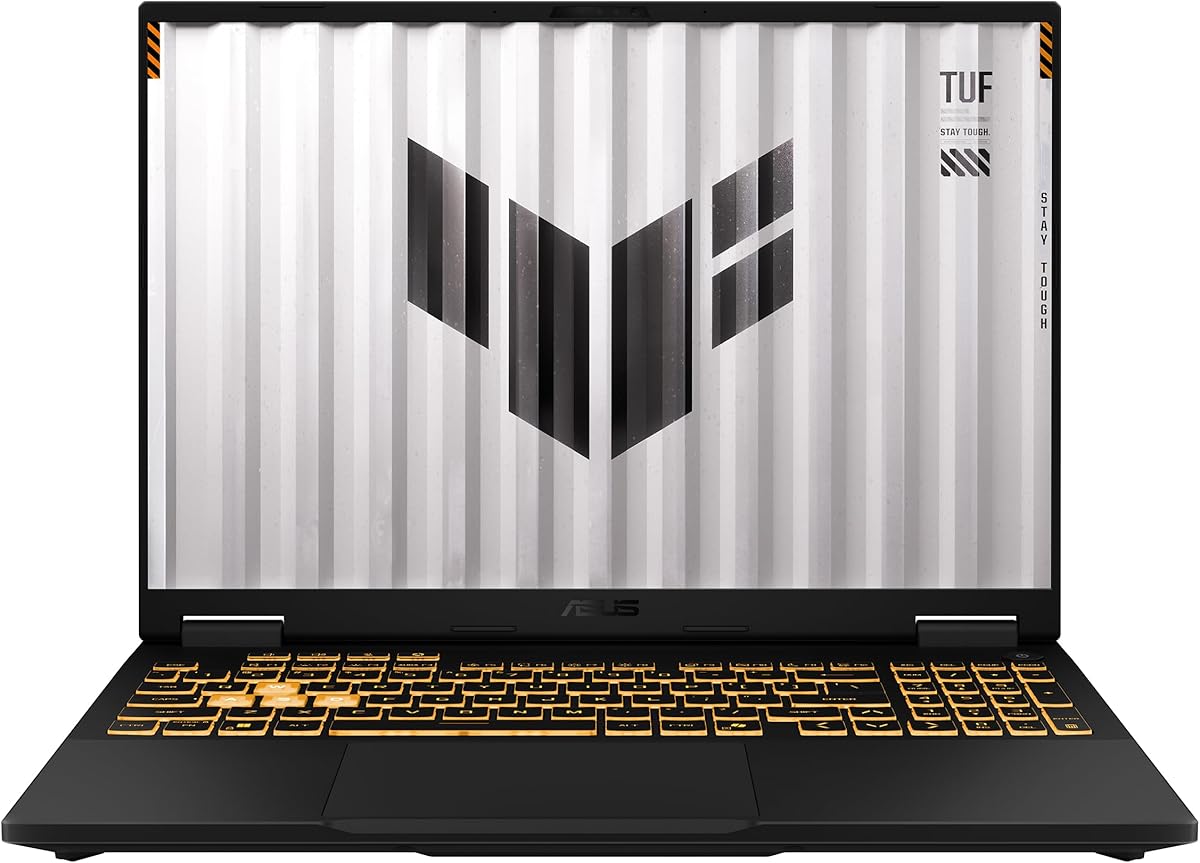
The ASUS TUF Gaming F16 is built for resilience with MIL-STD-810H testing. Users rate it 4.5 stars for its reliability and performance. The 16:10 display offers more vertical space for multitasking and productivity tasks.
We may earn a commission when you buy through this link, at no additional cost to you.
It features Adaptive-Sync technology that reduces lag and stuttering during intense gameplay. The 2nd Gen Arc Flow Fans keep the system cool without excessive noise. With Wi-Fi 6E, connection speeds are fast and stable.
The build quality is robust but adds to the overall weight. Some users might find the 512GB storage insufficient for large libraries. However, the durability ensures it handles travel and rough conditions better.
This laptop is perfect for rugged gaming environments or fieldwork. It balances durability with modern gaming features. If you need a machine that can take a beating, this is a safe choice.
The laptop has been rigorously tested to meet Military Grade testing standards ensuring it operates in harsh conditions reliably.
Adaptive-Sync technology reduces lag, minimizes stuttering, and eliminates visual tearing for ultra-smooth gameplay.
We may earn a commission when you buy through this link, at no additional cost to you.
The Lenovo LOQ AI-Powered features Lenovo AI Engine+ for automatic performance tuning. Users praise its G-Sync support and 1TB storage capacity. The 4.4 rating reflects a solid gaming experience with reliable thermal performance.
We may earn a commission when you buy through this link, at no additional cost to you.
It includes Rapid Charge Pro to reach 70% in under 30 minutes. The aerospace-grade aluminum cover keeps it lightweight yet durable. The FHD IPS display ensures clear visuals for gaming and streaming.
The AI engine dynamically adjusts CPU and GPU settings for better FPS. While battery life is average, the quick charging mitigates this issue. Some users may find the display basic compared to OLED options.
Choose this if you want automatic optimization and quick charging. It is ideal for gamers who need a reliable backup device. The AI features make it easy to use without technical tweaking.
NVIDIA G-Sync technology eliminates screen tearing, stuttering, and input lag ensuring silky-smooth frame rates.
Rapid Charge Pro powers the battery to 70% in under 30 minutes for quick top-ups between sessions.
We may earn a commission when you buy through this link, at no additional cost to you.
The msi Katana 15.6 delivers strong performance with the Intel Core i7-14650HX. Users rate it 3.9 for its raw processing power and battery life. It features a 75Wh battery for extended usage away from outlets.
We may earn a commission when you buy through this link, at no additional cost to you.
The RTX 5050 GPU with 8GB GDDR7 VRAM handles modern games well. It supports WiFi 6E and Bluetooth 5.3 for fast reliable wireless connections. The design is simple but functional for gaming needs.
While the display is standard FHD, the performance compensates for many users. Some may find the aesthetics plain compared to rivals. The long battery life is a major plus for mobile work sessions.
Buy this for its processing power and battery efficiency. It suits users who prioritize speed and mobility over flashy screens. A solid choice for general computing and gaming.
The 75Wh Lithium-Polymer battery powers extended usage sessions away from a wall outlet.
The Intel Core i7-14650HX processor ensures smooth and responsive performance for demanding applications.
We may earn a commission when you buy through this link, at no additional cost to you.
Selecting the right RTX 5050 laptop requires evaluating several critical components that define performance and usability. This guide breaks down what to look for when comparing models.
The RTX 5050 comes with 8GB GDDR7 VRAM in many models, which is crucial for modern high-resolution gaming. Ensure the GPU supports AI features like DLSS 4 for improved frame rates.
Always check the VRAM type as newer GDDR7 memory offers better bandwidth than older generations.
A high refresh rate like 144Hz or 180Hz is vital for competitive gaming to reduce motion blur. Look for panels with high color accuracy if you do creative work.
Prioritize displays with anti-glare coatings for better visibility in varied lighting environments.
DDR5 memory is becoming standard and offers faster processing speeds for multitasking. Aim for at least 16GB to run modern games and creative software smoothly.
Check storage capacity since games are large; 512GB SSDs are common but may require upgrades.
Processors like the Intel Core i7 or Ryzen 7 are recommended for heavy multitasking and content creation. They ensure the CPU does not bottleneck the GPU during intense loads.
Opt for newer series processors like 240H or 14650HX for best longevity.
Efficient cooling like dual-fan or Cryo-Chamber designs prevents thermal throttling during long sessions. Look for models with advanced heat pipe technologies.
Good thermal management ensures the laptop stays quiet and cool under pressure.
Verify USB Type-C, HDMI 2.1, and Ethernet ports are available for your peripherals. Thunderbolt support adds significant value for external storage.
Ensure there are enough USB-A ports for mice and controllers.
Battery life varies but typically ranges from 4 to 8 hours depending on usage. Rapid charging features help restore power quickly.
Consider battery capacity in Wh if you plan to work unplugged often.
MIL-STD-810H tested laptops offer better resilience for travel and rough handling. Aluminum or high-quality plastic builds feel more premium.
Check for warranties that cover onsite service for peace of mind.
To maximize performance, keep your drivers updated through the manufacturer software or NVIDIA GeForce Experience. Use dedicated gaming modes or AI tuning features when playing demanding titles.
Ensure good ventilation by using the laptop on hard surfaces. Avoid placing it on soft fabrics that can block air intakes or exhaust fans.
Regularly clean dust from vents using compressed air. Monitor thermal performance with built-in tools and adjust fan speeds if overheating occurs during gaming.
Yes, the RTX 5050 is a capable mid-range GPU that handles modern titles well with ray tracing and DLSS. It delivers solid performance for competitive games and creative tasks.
Most modern laptops come with 16GB DDR5 RAM which is sufficient for gaming and multitasking. Ensure your model has at least this amount for optimal performance.
Yes, most support HDMI 2.1 or USB-C with DisplayPort allowing connection to high-resolution external displays. Check the specific port list for maximum supported resolution.
Battery life typically ranges from 4 to 8 hours for general use but drops significantly during gaming. Always keep the charger handy for extended sessions.
Many models like the ROG Strix allow tool-free upgrades while others may require opening the chassis. Check specific product specs before purchasing to confirm upgradeability.
Yes, models like the IdeaPad Pro 5 and Nitro V balance portability with power making them great for students. Look for lightweight options if you carry the laptop daily.
The Acer Nitro V stands out as the top choice for its balance of speed, display, and cooling features. It offers the best overall package for most gamers and creators.
When choosing, prioritize display refresh rate and cooling efficiency if gaming is your main goal. For creative work, focus on color accuracy and processor speed.
Prices and availability change frequently so check current listings on Amazon before you buy. Verify warranty and service details to ensure your purchase is protected.