
TobenONE DisplayLink Docking Station 3 Monitors with 120W Power Adapter
4.4Editor score
DisplayLink technology support
18 total ports included
120W power adapter
This guide compares the top 10 docking stations for 3 monitors to help you choose the best multi-port hub for productivity and display expansion.
Finding the right docking station for 3 monitors can transform your workspace into a powerful command center. Whether you are a trader, developer, or creative professional, having multiple displays helps you multitask efficiently without constant window switching.
We evaluated ten top-rated models based on port variety, video output quality, charging speed, and overall build. Each option supports triple display setups, though compatibility varies by operating system and laptop model. Our analysis focuses on real-world performance and feature sets.
Each pick below highlights specific strengths like data transfer speeds, power delivery, or unique smart features. Prices and availability change frequently, so verify details before purchasing. This guide ensures you find a dock that matches your specific workflow needs today.
4.4Editor score

4.3Editor score

4.3Editor score
The table below provides a side-by-side view of key specifications for each docking station. Use this to quickly compare port counts, display capabilities, and power features before diving into detailed reviews.


The Selore 17-in-1 docking station stands out as a versatile solution for expanding your laptop into a full workstation. With a solid rating, it delivers reliable triple monitor support alongside extensive connectivity options. Its unique built-in weather screen adds a touch of modern utility to your desk setup.
We may earn a commission when you buy through this link, at no additional cost to you.
This dock excels in connectivity, offering three HDMI and two DisplayPort outputs to support triple displays on compatible Windows systems. The inclusion of high-speed USB ports and SD card slots makes it ideal for creatives who need to move large files quickly. Additionally, the 100W power delivery ensures your laptop remains charged even under heavy loads.
While the feature set is robust, users on Mac should note that independent triple displays are not supported due to system limitations. Furthermore, the power adapter is not included in the box, requiring an extra purchase. These are minor trade-offs given the overall value and performance provided.
If you need a powerful hub that consolidates multiple functions into one sleek unit, this Selore model is an excellent choice. It is particularly suited for Windows users who require multiple screens and fast data access without cluttering their workspace with separate adapters.
The built-in LCD screen syncs weather data directly, allowing you to check conditions without waking your laptop or unlocking your phone.
With 17 ports including HDMI, DisplayPort, USB, and Ethernet, this dock removes the need for multiple dongles and keeps your desk organized.
We may earn a commission when you buy through this link, at no additional cost to you.
The TobenONE 18-in-1 docking station is designed to turn your laptop into a comprehensive workstation with minimal clutter. It features a massive array of ports, including nine USB options, making it perfect for users with many peripherals. The triple 4K display support enhances productivity for tasks like video editing or data analysis.
We may earn a commission when you buy through this link, at no additional cost to you.
This model focuses heavily on efficiency, offering 100W power delivery to keep your laptop charged while driving multiple screens. The sheer number of ports means you rarely need to unplug devices to connect new ones. It is especially useful for home offices where multiple devices need constant connectivity.
However, the design is optimized for Windows and Chrome OS systems, meaning Mac users may find it less compatible. The power adapter is also not included, which adds to the initial setup cost. Despite this, the value proposition remains strong for those needing extensive connectivity.
For users managing a complex workspace with many peripherals, this dock offers the necessary expansion without compromising on performance. It is a practical choice for remote workers who need reliable, high-speed connections for all their devices.
With nine USB ports available, you can connect keyboards, mice, drives, and other accessories simultaneously without swapping cables.
Supporting triple 4K@60Hz displays ensures crisp visuals and smooth workflows for intensive graphics work or multitasking.
We may earn a commission when you buy through this link, at no additional cost to you.
Plugable offers a premium docking solution designed for business environments that demand reliability. This 13-in-1 unit supports triple monitors through DisplayLink technology, which is a key advantage for Mac users who typically face limitations with external displays. The build quality and support structure make it ideal for professional deployments.
We may earn a commission when you buy through this link, at no additional cost to you.
A standout feature is the DisplayLink support, allowing expanded displays on macOS without relying on native hardware limits. The dock provides robust connectivity with HDMI ports and USB options, plus a 100W charging port to power your host. Lifetime support ensures help is available if technical issues arise during use.
The requirement to install drivers on certain systems can be a hurdle for users who prefer plug-and-play simplicity. Additionally, the higher price reflects its enterprise features, which might not be necessary for casual home use. Still, for critical work environments, this investment pays off in stability.
Businesses and professionals needing dependable multi-monitor setups on mixed fleets will find this dock exceptionally useful. Its focus on compliance and support makes it a trustworthy choice for organizations prioritizing long-term reliability.
DisplayLink technology enables multiple extended displays on Apple Silicon Macs, overcoming typical OS restrictions effectively.
The dock meets TAA and NDAA standards, ensuring it is suitable for government and secure enterprise deployments.
We may earn a commission when you buy through this link, at no additional cost to you.
This Plugable model is engineered for hybrid teams needing consistent performance across different devices. It supports up to three HDMI monitors, enabling extended workspace on laptops that might otherwise only support one. The 100W power delivery ensures your laptop stays powered even with multiple screens active.
We may earn a commission when you buy through this link, at no additional cost to you.
Designed with Apple Silicon compatibility, this dock bridges the gap for Mac users needing extra screens without complex workarounds. DisplayLink technology handles the additional outputs efficiently, while the native USB-C video mode supports the first monitor at high resolutions. It is optimized for enterprise use cases like data analysis and conferencing.
One limitation is the lack of HDCP support, meaning you cannot play protected streaming content like Netflix through the dock. Additionally, macOS users must install drivers to enable all display ports, which can add setup time. These factors are manageable for business workflows focused on productivity.
For organizations managing a mix of Windows and Mac laptops, this dock provides a standardized solution for connecting monitors and peripherals. It reduces IT complexity by consolidating connectivity options into a single, reliable device.
Optimized for M1 and newer Macs, this dock allows multi-monitor expansion where native ports would usually fail.
Supporting three HDMI monitors simultaneously helps maximize screen real estate for complex tasks and multitasking.
We may earn a commission when you buy through this link, at no additional cost to you.
This USB C docking station offers an accessible entry point for users needing multiple monitors without breaking the bank. It features multiple video output options, including HDMI, DisplayPort, and VGA, allowing flexible connections to various monitor types. The 100W charging port ensures your laptop remains powered during extended use.
We may earn a commission when you buy through this link, at no additional cost to you.
The ability to use VGA alongside HDMI provides backward compatibility for older displays, which is helpful for budget-conscious setups. It is particularly compatible with many HP and Dell laptops, though users should check their specific model. The simplicity of the design makes it easy to set up quickly.
USB 2.0 ports limit data transfer speeds, which may not be ideal for high-performance external drives. Mac users will also face restrictions on extended desktop modes due to system limitations. However, for basic productivity tasks, these constraints are often acceptable.
For those needing a straightforward and inexpensive way to add a second or third screen, this hub delivers solid value. It is best suited for general office work where top-tier data speeds are not critical.
Including VGA alongside HDMI and DisplayPort allows you to mix old and new monitors without needing extra adapters.
The compact form factor and lower price make it an easy choice for users testing multi-monitor workflows.
We may earn a commission when you buy through this link, at no additional cost to you.
Acer presents a premium aluminum docking station that combines robust build quality with practical security features. It supports triple independent screens on Windows, and importantly, includes an 110W power adapter in the box. This eliminates the need for extra purchases and ensures immediate readiness for a full setup.
We may earn a commission when you buy through this link, at no additional cost to you.
The inclusion of a security slot allows you to lock the dock to your desk, adding physical protection for your equipment in shared spaces. Data transfer is facilitated by multiple USB ports and card readers, supporting SD and microSD cards simultaneously. The aluminum body helps dissipate heat during prolonged use effectively.
Mac users will find that only mirroring is supported, limiting extended desktop options. Additionally, triple 4K output on Windows depends on Display Stream Compression support from your laptop's GPU. These caveats are minor compared to the benefits of the included power supply.
If you value a secure, ready-to-use workstation that comes with everything you need, this Acer dock is a strong contender. It is particularly suited for office environments where security and reliability are priorities.
The integrated security slot provides physical protection for the dock and laptop in shared office or public environments.
Having the power adapter included simplifies the purchase process and ensures you have all necessary components from day one.
We may earn a commission when you buy through this link, at no additional cost to you.
This Selore hub transforms laptops into triple monitor setups using three HDMI ports, offering a straightforward path to expanded screens. It features 10Gbps data transfer for rapid file movement and a 100W power delivery port to keep your system charged. The design includes a dedicated screen control button for easy switching between modes.
We may earn a commission when you buy through this link, at no additional cost to you.
The combination of HDMI ports allows flexibility in connecting monitors without relying on specific adapters. It supports high-speed storage and SD card transfers, making it useful for photographers or videographers. The compact footprint helps maintain a tidy desk area even with multiple connections.
Windows users benefit from full triple extend mode, but macOS is restricted to mirroring. Also, your laptop must support DisplayPort Alt Mode or Thunderbolt for these features to work correctly. Verifying compatibility before purchase is essential to avoid functionality issues.
For Windows users seeking a clean and powerful docking solution, this hub delivers excellent value. It balances performance with simplicity, making it easy to manage a multi-monitor workspace.
A dedicated button allows quick toggling between mirror and extend modes without navigating through system settings.
Using three HDMI ports simplifies cabling for most modern monitors and reduces the need for dongles or adapters.
We may earn a commission when you buy through this link, at no additional cost to you.
The TobenONE DisplayLink docking station is built for power users who need to push display limits without hardware constraints. Supporting up to four 4K@60Hz displays on compatible systems, it enables serious multitasking for traders or creators. A 120W power adapter is included, ensuring enough power for demanding loads.
We may earn a commission when you buy through this link, at no additional cost to you.
DisplayLink technology ensures that even laptops with limited native video output can drive multiple external monitors. The 18 ports provide ample connectivity for peripherals and storage, allowing for a fully integrated workstation. The included power adapter simplifies setup by eliminating the need for separate purchases.
Setting up requires downloading drivers, which might deter users wanting instant plug-and-play functionality. Linux systems are not supported, limiting the appeal for some open-source enthusiasts. However, for Windows and Mac environments, it is a robust tool for high-end workflows.
If your work requires massive screen real estate and high performance, this dock is worth the investment. It stands out as a top choice for professionals who rely on multi-monitor setups daily.
Supporting four 4K displays simultaneously offers unmatched workspace for complex data visualization or content creation.
The 120W adapter ensures stable power delivery even when multiple monitors and devices are connected and active.
We may earn a commission when you buy through this link, at no additional cost to you.
This Plugable model is designed for Windows users who want plug-and-play simplicity without managing drivers. It supports triple extended displays via MST, delivering crisp visuals for data analysis or trading. The 2.5GbE Ethernet port provides faster network speeds than standard Gigabit options.
We may earn a commission when you buy through this link, at no additional cost to you.
The 15 ports offer extensive connectivity, including SD card slots and multiple USB options for storage and accessories. It supports 100W power delivery to keep your laptop running all day. The driverless nature ensures a smooth setup process right out of the box for compatible systems.
Mac users are not recommended for this device, as the MST protocol has limited support on macOS. While it excels on Windows and ChromeOS, this limits its versatility across different device types. Still, it is highly effective for standardized environments.
If you use a Windows laptop and need a reliable, driver-free docking solution with fast networking, this is an excellent choice. It simplifies the user experience by handling video and connectivity needs efficiently.
By eliminating the need for drivers, this dock simplifies setup and reduces potential compatibility issues.
The 2.5GbE port offers faster data transfer and lower latency compared to standard wired connections.
We may earn a commission when you buy through this link, at no additional cost to you.
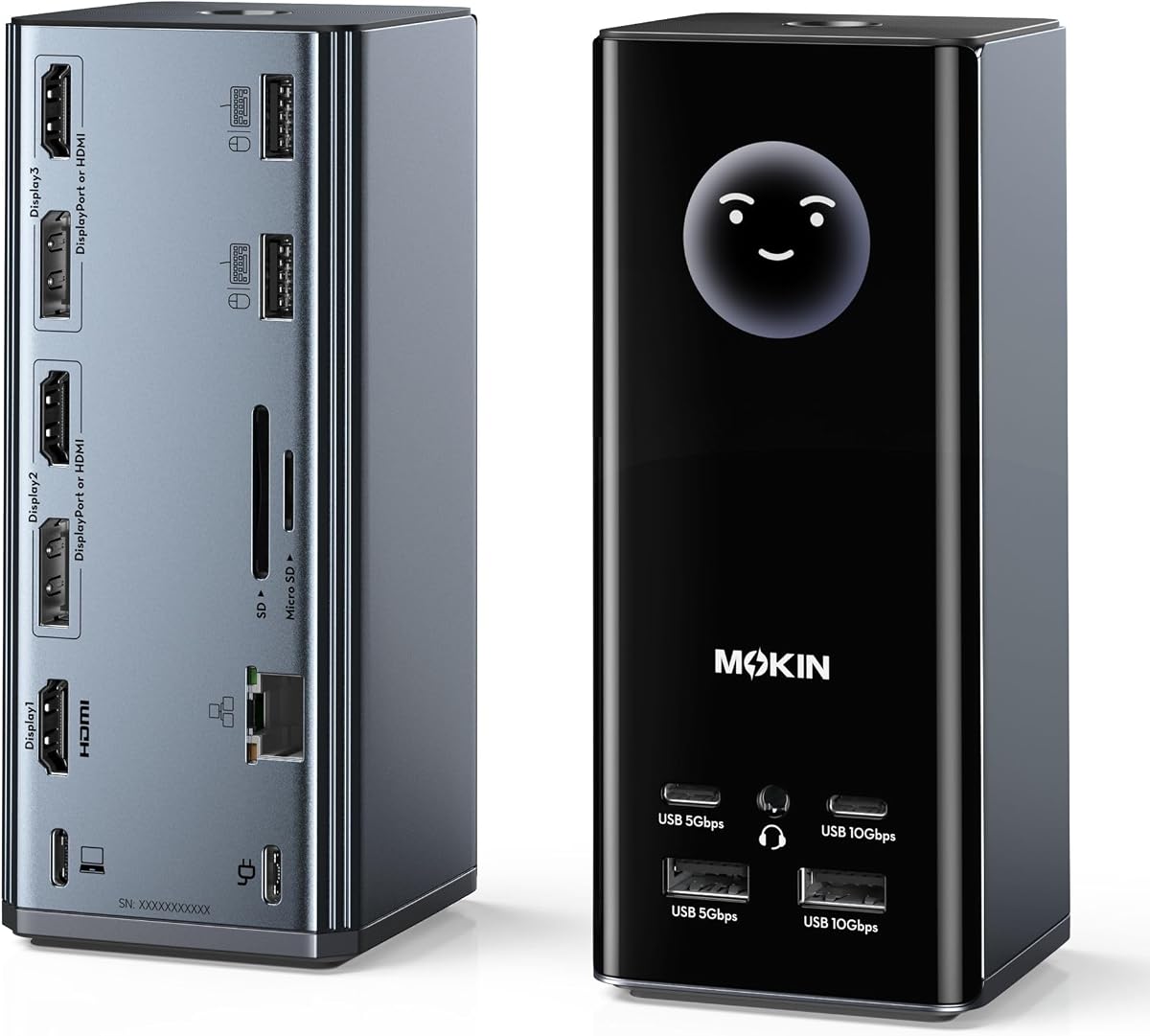
The MOKiN docking station combines standard connectivity with unique smart features like a weather display. It supports triple screens and offers multiple HDMI and DP options for flexibility. The privacy lock button allows you to quickly turn off external monitors when needed for confidentiality.
We may earn a commission when you buy through this link, at no additional cost to you.
The integrated weather LCD provides real-time updates without interrupting your workflow, adding convenience to your desk. The silicone suction base keeps the dock stable during use. Additionally, 100W power delivery ensures your system remains charged under load.
Some settings require firmware updates via support, which might complicate initial setup. Mac users also face display limitations similar to other docks. However, the combination of features offers a modern and functional workstation upgrade.
If you appreciate smart tech features in your hardware, this dock offers a unique blend of utility and connectivity. It is well suited for users who value convenience and privacy in their workspace.
A quick double-tap turns off external screens instantly, protecting sensitive information when you step away.
Syncs real-time weather data to a small LCD screen for a quick glance before heading out.
We may earn a commission when you buy through this link, at no additional cost to you.
Selecting the right docking station involves considering your operating system, laptop capabilities, and specific workflow needs. This guide outlines key factors to ensure compatibility and performance.
Most docking stations rely on specific protocols like MST or DisplayLink. Windows users typically have more flexibility with extended displays compared to Mac users. macOS often restricts multiple screens to mirroring unless DisplayLink technology is used.
Check the number of HDMI and DisplayPort outputs required for your setup. Some docks support triple displays via HDMI, while others mix HDMI and DP. Ensure the ports match your monitor inputs to avoid using extra adapters.
A good docking station should provide sufficient power to charge your laptop while connected to multiple monitors. Look for at least 100W USB-C Power Delivery to ensure stable performance under heavy workloads without draining your battery.
If you work with large files, consider the USB port speeds offered by the dock. USB 3.1 or USB-C 10Gbps ensures fast transfers. Slower USB 2.0 ports may suffice for keyboards and mice but are inadequate for external drives.
Aluminum or robust plastic builds help dissipate heat, which is crucial for docks handling multiple video streams. A stable base with suction cups or weighted design prevents accidental movement during daily use.
Some docks require software installation to enable all features, especially on Mac. Others offer plug-and-play simplicity. Consider whether you prefer minimal setup or are comfortable managing drivers for advanced display features.
Assess how many devices you need to connect simultaneously. More USB ports mean fewer dongles for keyboards, mice, and drives. Ethernet ports add network stability which is useful for remote work.
Prices vary based on features like included power adapters or smart displays. Higher cost does not always mean better for your specific needs, so balance features against your actual requirements.
Regularly clean the dock and cables to prevent dust accumulation which can affect connectivity. Avoid bending cables sharply near the ports to maintain signal integrity. Proper care extends the lifespan of your docking station and ensures stable performance.
MacBooks typically support only one external display natively. To use three monitors, you need a dock that utilizes DisplayLink technology. Always verify the product specifications state Mac compatibility before purchasing to avoid restrictions.
Many modern docks support triple 4K displays, though refresh rates may vary. Higher resolutions require sufficient bandwidth and graphics power from your laptop. Check if your laptop supports Display Stream Compression for full 4K output.
No, these docks specifically require USB-C ports with video support. If your laptop only has USB-A, you will need an adapter that supports video output. This may affect functionality and stability depending on the model.
Not all docks include a power adapter in the box. Some require you to purchase a high-wattage charger separately. Always check the product listing details to confirm if an adapter is included before ordering.
Some docks support Linux, but others may not due to driver dependencies. For example, DisplayLink models often require specific Linux drivers. Always verify Linux compatibility notes in the product details.
Plug-and-play docks do not require drivers for Windows, but others might for extended displays. Mac users often need to install DisplayLink managers. Check setup instructions to understand any software requirements for your system.
Remember to check current availability and pricing as these vary frequently. A docking station is a long-term investment in your workspace efficiency. Choosing wisely ensures smooth operation and a clutter-free desk environment.