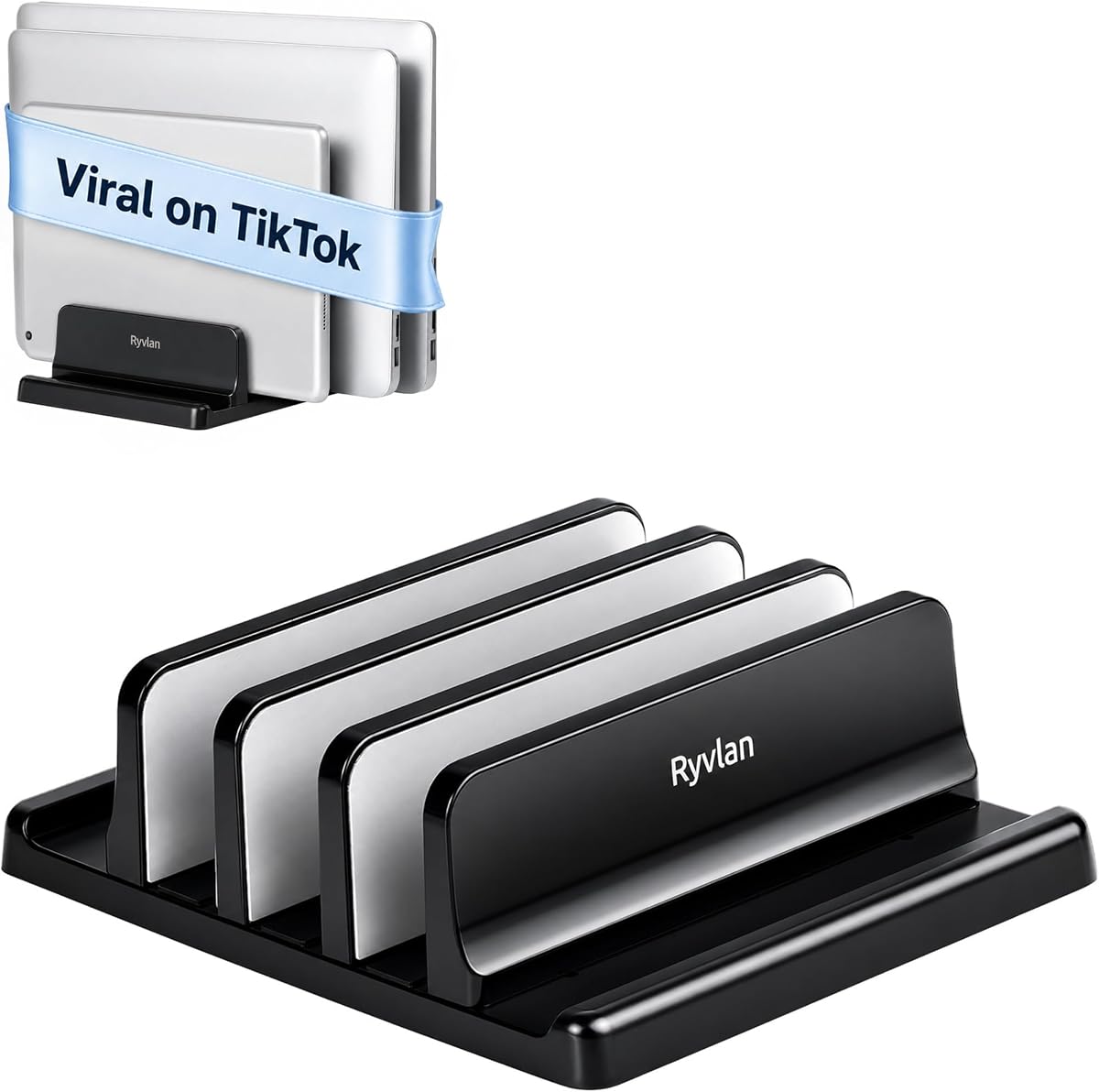
Ryvlan Vertical Laptop Stand for Desk
4.6Editor score
Fits three laptops plus tablets
Impact-resistant ABS material
Adjustable slots for snug fit
This guide compares the top 10 laptop racks for multiple laptops to help you choose the best storage and charging solution for your desk or office.
Finding the right laptop rack for multiple laptops is essential for modern workspaces. clutter and boost productivity. Whether you manage a fleet of devices for a team or simply need space for your personal gadgets, a quality rack keeps everything organized. We review the best options to help you find the perfect fit for your needs.
We evaluated each product based on capacity, build quality, adjustability, and ease of use. Our analysis covers vertical stands, charging stations, and floor models to ensure comprehensive coverage. We looked at materials like aluminum and bamboo to understand durability. Every choice was tested against real-world scenarios for offices and homes.
Each pick highlights unique strengths such as cooling, space savings, or power integration. Prices may fluctuate over time so check current listings before purchasing. You will find detailed reviews and a buying guide to simplify your decision. This resource ensures you invest in a solution that lasts and performs well daily.
4.6Editor score

4.2Editor score

4.5Editor score
This side-by-side comparison highlights key features of all ten racks to help you decide quickly. We focus on capacity materials materials, and special functions like charging or mobility. Use this table to identify which model fits your specific workspace requirements best.




The Ryvlan Vertical Laptop Stand offers an impressive 3-slot design that holds multiple devices at once. With a rating of 4.6 stars it stands out for its versatility in home offices. It acts as a storage rack that clears your desk while keeping devices accessible and organized efficiently.
We may earn a commission when you buy through this link, at no additional cost to you.
Its adjustable width allows slots to fit anything from thin notebooks to thick gaming laptops without wobbling. The silicone padding on all walls grips devices securely to prevent sliding and scratching. The polished black finish adds a minimalist touch that suits modern workspaces and classrooms alike.
While the ABS material is durable it may not feel as premium as aluminum alternatives. You must use the included wrench to adjust slot width which takes about a minute. These trade-offs are minor considering the compact footprint and ability to hold tablets too.
This stand is ideal for users needing a simple solution to organize multiple laptops and tablets on a shared desk. It works well in dorm rooms where space is limited. For a budget friendly option that prioritizes function over flashy materials this is a top recommendation.
The compact footprint of roughly 7.3 inches by 5.9 inches maximizes your desk surface for other essentials.
Slots adjust from 0.47 to 1.2 inches accommodating a wide range of device thicknesses securely.
We may earn a commission when you buy through this link, at no additional cost to you.
The Elestoria 10-Slot Stand provides industry-leading capacity for storing laptops in style. Its 4.2 rating reflects strong performance in space-saving and device safety. The premium aluminum build ensures durability while offering a sleek modern look that elevates any workspace environment significantly.
We may earn a commission when you buy through this link, at no additional cost to you.
You can adjust slots without tools by turning base screws for a customized grip. The open-side design keeps charging ports accessible while the 360-degree airflow prevents overheating. This makes it perfect for docking heavy gaming laptops up to 17.3 inches securely.
The larger footprint compared to smaller stands means you need adequate desk space. The price reflects the higher quality materials and capacity which may not suit tight budgets. These factors are acceptable if you prioritize professional aesthetics and high-density storage capabilities.
Ideal for offices or gaming rooms needing to organize many devices in one spot. The stable base and soft silicone pads protect your hardware effectively. If you want a heavy-duty organizer that combines cooling and storage this premium model is highly recommended.
Passive thermal convection helps devices cool down naturally when stored vertically compared to laying flat.
Turn base screws clockwise to tighten dividers for a firm hold on any device thickness.
We may earn a commission when you buy through this link, at no additional cost to you.
The Elestoria 5-Slot Stand balances affordability with premium aluminum construction effectively. Rated 4.6 stars it offers a robust solution for storing multiple devices without excessive cost. Its design prioritizes stability and device protection in shared or busy workspaces daily.
We may earn a commission when you buy through this link, at no additional cost to you.
Adjustable brackets let you secure different laptop thicknesses from 0.5 to 1.5 inches easily. The heavy base and polished edges ensure devices stand upright without wobbling or sliding. This is perfect for docking laptops to external monitors for a full desktop experience comfortably.
Accessing the bottom screws for adjustment can be slightly awkward during setup. The silver finish might show fingerprints or dust more than darker options. These issues are minor compared to the value and build quality offered at this price point.
Buy this if you want metal durability without the highest price tag of other options. It works well for small offices or students needing reliable storage. For a durable organizer that keeps devices cool and upright this stands out as a great value pick.
Three sliding brackets allow you to secure up to four laptops of different sizes simultaneously.
Vertical storage allows easy access to ports for connecting external screens and keyboards.
We may earn a commission when you buy through this link, at no additional cost to you.
The Unittype Bamboo Organizer brings natural elegance to your tech storage needs. With a 4.1 rating it appeals to those seeking warm aesthetics alongside functionality. Its bamboo construction minimizes space usage while enhancing the visual appeal of your workspace environment significantly.
We may earn a commission when you buy through this link, at no additional cost to you.
The removable 6-slot design accommodates smartphones tablets and laptops with case ready at hand. Non-slip rubber feet protect your desktop from scratches and keep the stand stable. You can even use it for mail folders adding to its versatile storage options easily.
Bamboo requires care to avoid warping in humid conditions compared to metal options. The fixed slot gaps may not fit very thick cases securely. These limitations are acceptable if you prioritize looks and moderate device sizes for home use.
Choose this for a cozy home office or studio where style matters. It keeps daily tech essentials organized and accessible. For a comprehensive solution that blends wood warmth with tech storage this is a unique and practical choice.
Natural wood color complements modern desktops without looking like standard plastic gear.
Use as a mail organizer or laptop stand to maximize utility in small spaces.
We may earn a commission when you buy through this link, at no additional cost to you.
The 10-Device Charging Station combines storage with essential power management features. Its 4.5 rating highlights success in organized multi-device charging scenarios. This is designed for environments where keeping many devices powered and neat is a priority task.
We may earn a commission when you buy through this link, at no additional cost to you.
It includes six AC outlets and four USB ports to support laptops phones and accessories. Integrated cable routing helps reduce clutter on desks counters and workstations. The open rack design allows quick insertion and removal without doors or complicated steps.
You must place it near an outlet which may limit placement options in some rooms. The size is larger than a simple stand which needs enough room. These factors are expected given the power capabilities and professional utility it offers users.
Ideal for schools offices or reception areas needing systematic charging solutions. It simplifies daily workflow by handling both storage and power needs. For a complete device ecosystem solution this is a highly functional and reliable choice.
Pre-installed surge-protected strip rated for 110V ensures safer everyday charging for devices.
Compact vertical layout helps maximize device storage while minimizing countertop usage.
We may earn a commission when you buy through this link, at no additional cost to you.
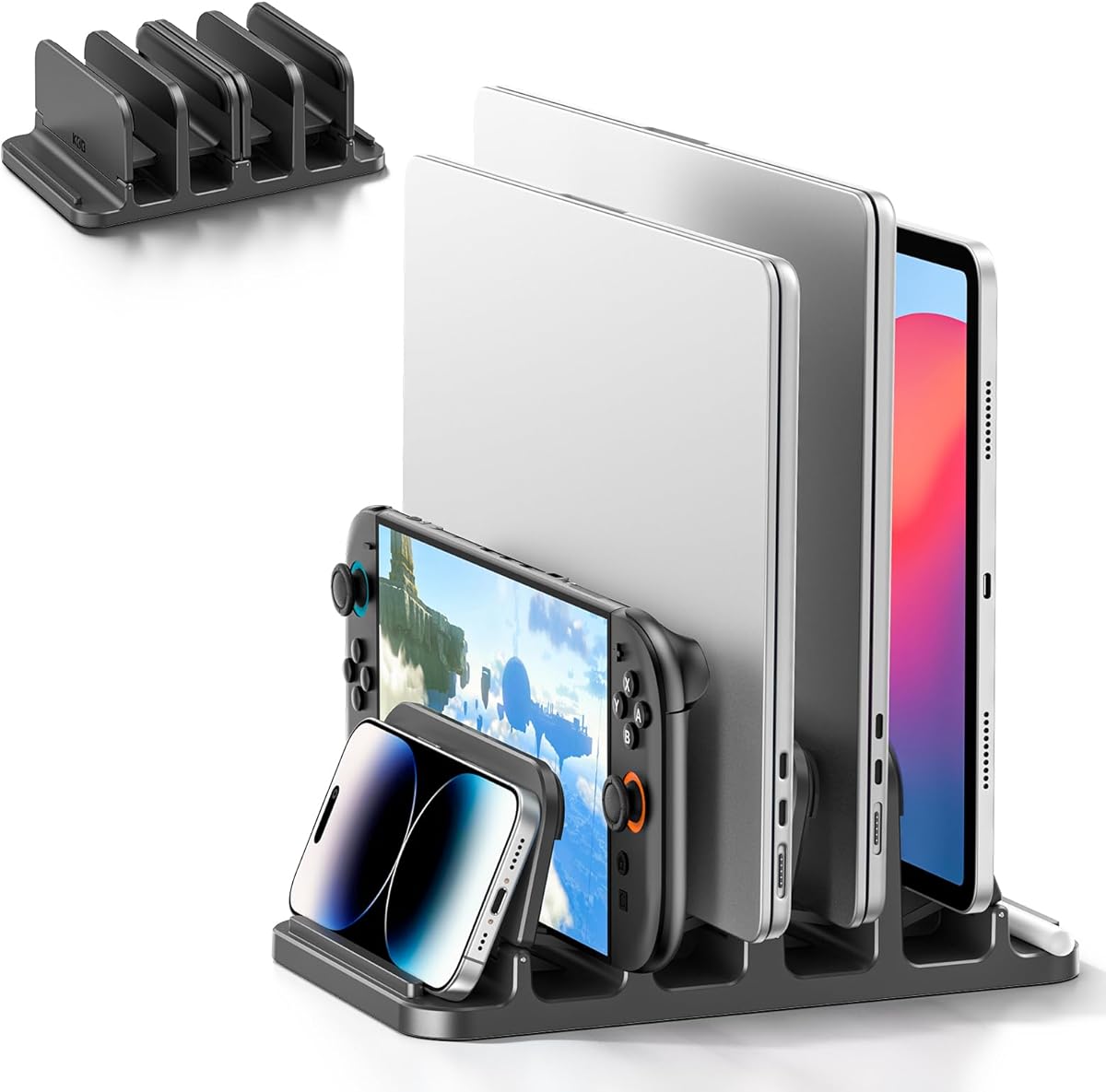
The KDD 4-Slot Stand introduces a gravity locking design for added security. It holds a 4.6 rating for its stability and multifunctional approach. You can store laptops tablets and even game consoles in one upright position easily.
We may earn a commission when you buy through this link, at no additional cost to you.
Simply place your device and the mechanism locks it without extra clamps. Silicone pads on both base and slots prevent sliding and protect surfaces. This user-friendly feature makes it reliable for daily use in active environments.
Lighter devices might not engage the gravity lock as firmly as heavier ones. The plastic body is durable but less premium than aluminum. These trade-offs are worth noting if you prioritize ease of access and security.
Choose this for a tidy workspace where quick access matters. It works well for home offices or shared areas needing order. For a simple secure way to organize up to six devices this is a solid option.
No extra locks needed; gravity secures devices as you place them into slots.
Six slots support phones books switches and more for total desktop organization.
We may earn a commission when you buy through this link, at no additional cost to you.
The 5-Slot Aluminum Stand offers a premium look with brushed and CNC-machined anodized alloy. Rated 4.6 it matches the texture of major laptop brands. This design not only looks great but increases airflow to prevent overheating when storing devices.
We may earn a commission when you buy through this link, at no additional cost to you.
Slots adjust to fit devices from the thinnest to thickest up to 17.3 inches. Non-slip silicone on all slots protects against scratches and damage. The weight-balancing base keeps electronics safe and upright on your desk reliably.
You need to keep the included hex key handy for adjustments. The price is higher than basic options due to material quality. These aspects are acceptable if you value durability and seamless design integration with your tech.
This is perfect for professionals and students needing a tidy organized desk. It keeps devices cool and secure without taking up much space. For a reliable laptop dock that balances style and function this stands out well.
Anodized aluminum alloy matches the look of Apple and Microsoft hardware perfectly.
Use hex key to easily adjust width to match your specific devices.
We may earn a commission when you buy through this link, at no additional cost to you.
The POCHAR 8-Device Charging Station offers a wide-angle design suitable for Chromebooks and iPads. It holds a 4.6 rating for reliability in daily use environments. The durable build ensures long-lasting performance in high-demand classrooms or offices easily.
We may earn a commission when you buy through this link, at no additional cost to you.
Unlike limited racks this model fits screens up to 14 inches and 1.4 inches thick. This makes it versatile for classrooms needing to organize various device types. You can unbox and use it immediately without any complicated assembly steps.
The footprint is substantial so it needs adequate desk or table space. It lacks USB ports compared to some other charging stations which may limit flexibility. These trade-offs are minor if your focus is on storing thick laptops securely.
Select this for schools or shared workspaces needing a ready-to-use solution. It provides safe storage with surge protection to protect expensive devices. For a robust charging dock that handles diverse laptop sizes this is a strong pick.
Wide-angle slots are designed for thick cases up to 1.4 inches easily.
No assembly needed so you can start using it out of the package.
We may earn a commission when you buy through this link, at no additional cost to you.
The 10 Device Storage Rack offers a robust steel floor-standing solution for high capacity. With a 5.0 rating it excels in durability and organization. This model is built to withstand wear and deformation in busy environments like libraries.
We may earn a commission when you buy through this link, at no additional cost to you.
Its open design facilitates rapid device access and allows unrestricted air circulation. Movable wheels with brakes let you reposition it easily as needed. The bottom shelf provides extra space for printers or accessories adding to utility.
Floor space might be limited in some home setups compared to desktop stands. Assembly is simple but the size may require two people. These factors are acceptable if you need to store many devices off the main desk.
Ideal for offices with heavy device counts needing a dedicated charging station. It keeps devices cool and accessible while keeping floors organized. For a long-lasting and movable storage solution this is highly effective and reliable.
Baked painting finish on steel ensures rust resistance and long-lasting durability.
Stable handles and lockable wheels make moving it between spaces easy.
We may earn a commission when you buy through this link, at no additional cost to you.
The MobileVision Bamboo Organizer provides a neat solution for storing up to five devices. It holds a 4.7 rating for its stability and compact design. Crafted from sturdy bamboo it offers a secure platform that keeps devices accessible and clutter-free.
We may earn a commission when you buy through this link, at no additional cost to you.
Measuring 10 inches long by 7 inches tall it saves space on crowded desks. Integrated rubber feet prevent sliding and protect your surfaces from scratches. This makes it ideal for conference rooms and home workspaces needing tidy organization.
Fixed 1-inch slot gaps may exclude very thick protective cases. Bamboo requires maintenance to stay pristine over long periods. These limits are manageable if you use standard sized devices without bulk covers.
Buy this for a small professional look that fits well in tight spaces. It keeps devices organized without taking up excessive desktop area. For a versatile device manager that blends function with style this is a great choice.
Offers efficient storage without taking up excessive desktop space compared to larger stands.
Four integrated rubber feet prevent sliding and protect your desk surfaces.
We may earn a commission when you buy through this link, at no additional cost to you.
Selecting the right rack depends on several key factors including capacity and build. This guide breaks down what to look for to ensure you get a product that meets your needs effectively.
Determine how many devices you need to store at once. Some racks hold three or four while others offer up to ten slots for heavy usage environments.
Choose a rack with enough slots to accommodate your current devices and potential future additions.
Materials like aluminum offer premium looks and long durability while bamboo provides natural aesthetics. Plastic options are budget friendly but may feel less sturdy over time.
Select a material that fits your environment and usage intensity for reliable protection.
Adjustable slots allow you to fit devices of varying thickness securely. Look for models with tool-free or easy adjustment mechanisms for convenience.
Ensure the range of adjustment covers both thin laptops and thicker gaming machines.
Vertical storage naturally improves airflow around devices preventing overheating. Some models include specific design features like open sides for better thermal management.
Prioritize racks that allow 360-degree airflow for device safety during storage.
Check for non-slip pads on the base and slots to prevent sliding and scratches. A weighted base helps keep tall racks stable against accidental bumps.
Look for silicone or rubber padding to safeguard your hardware from physical damage.
Some racks include built-in power strips or USB ports for charging. This reduces cable clutter and ensures devices stay powered while stored.
Consider models with surge protection if you plan to charge devices overnight regularly.
Measure your available desk or floor space before purchasing. Compact desktop stands save room while floor units offer higher capacity without using desk space.
Choose a footprint that fits your workspace layout without causing clutter or obstruction.
The rack should match your existing tech gear and decor. Options range from sleek grey aluminum to natural wood finishes.
Select a finish that complements your workspace style for a professional look.
To use your rack effectively place it on a flat stable surface. Adjust slots to fit your devices securely before inserting them to prevent movement.
Keep slots clean by wiping them with a soft dry cloth regularly. This prevents dust buildup that could scratch device surfaces or block airflow.
For bamboo models avoid exposure to high humidity or extreme heat to prevent warping. Check stability periodically and tighten screws if the base feels loose.
The best rack depends on your specific needs. For high density storage the Elestoria 10-Slot Stand offers premium build and capacity. For a budget option the Ryvlan Vertical Stand provides great value and versatility for home offices.
Yes vertical racks improve cooling by allowing natural airflow around devices. Models with open sides further enhance this effect preventing overheating compared to stacking them flat.
Many models support thick devices up to 17.3 inches and 1.4 inches thick. Check the adjustable range of slots to ensure your specific gaming machine fits securely.
Use a damp cloth to wipe dust and grime off the surface. Avoid harsh chemicals or soaking the wood. Keep it in a dry area to prevent warping.
Some models include an included wrench while others use screws for tool-free adjustment. Review the product details to know if you need extra tools before setup.
Yes racks like the 10-Device Charging Station are designed for classrooms and offices. They keep devices organized and accessible while protecting them from damage.
A stand focuses on storage and space saving while a charging station includes power outlets. Choose based on whether you need integrated power management or just organization.
Look for models with heavy weighted bases and non-slip pads. Ensure the rack is placed on a level surface and adjust slots evenly to keep balance.
We have reviewed the top options from the Ryvlan budget pick to the Elestoria premium model. Each offers unique strengths whether you need power integration or simple organization.
Prioritize capacity and material based on your specific usage. If you manage many devices for a team choose a high-capacity charging station. For personal use a compact adjustable stand may suffice.
Always check current prices and availability before purchasing as these may change over time. Use this guide to find the solution that keeps your workspace organized and efficient.