
Audio Express AXHDCAP
4.4Editor score
Affordable price point
1080p30fps output
Plug and play setup
HDMI recorders are essential tools for capturing high-definition video from consoles cameras and other sources. They allow users to preserve memories create content or archive broadcasts without relying on a computer. Choosing the right model depends on your specific needs and technical requirements.
We evaluated ten leading HDMI recorders based on video quality connectivity options ease of use and overall performance. Each product was assessed for its ability to handle different input types support various resolutions and integrate with common streaming software. This list covers both standalone units and capture cards.
Each pick highlights key features pros and cons to help you make an informed decision. Prices and availability change frequently so always verify the latest details on the product page before purchasing. We aim to provide accurate and up-to-date information for all listed items.
4.4Editor score
4.0Editor score

4.1Editor score
As an Amazon Associate we earn from qualifying purchases.
This table provides a side-by-side comparison of all ten HDMI recorders to help you quickly identify the best fit for your setup and requirements.





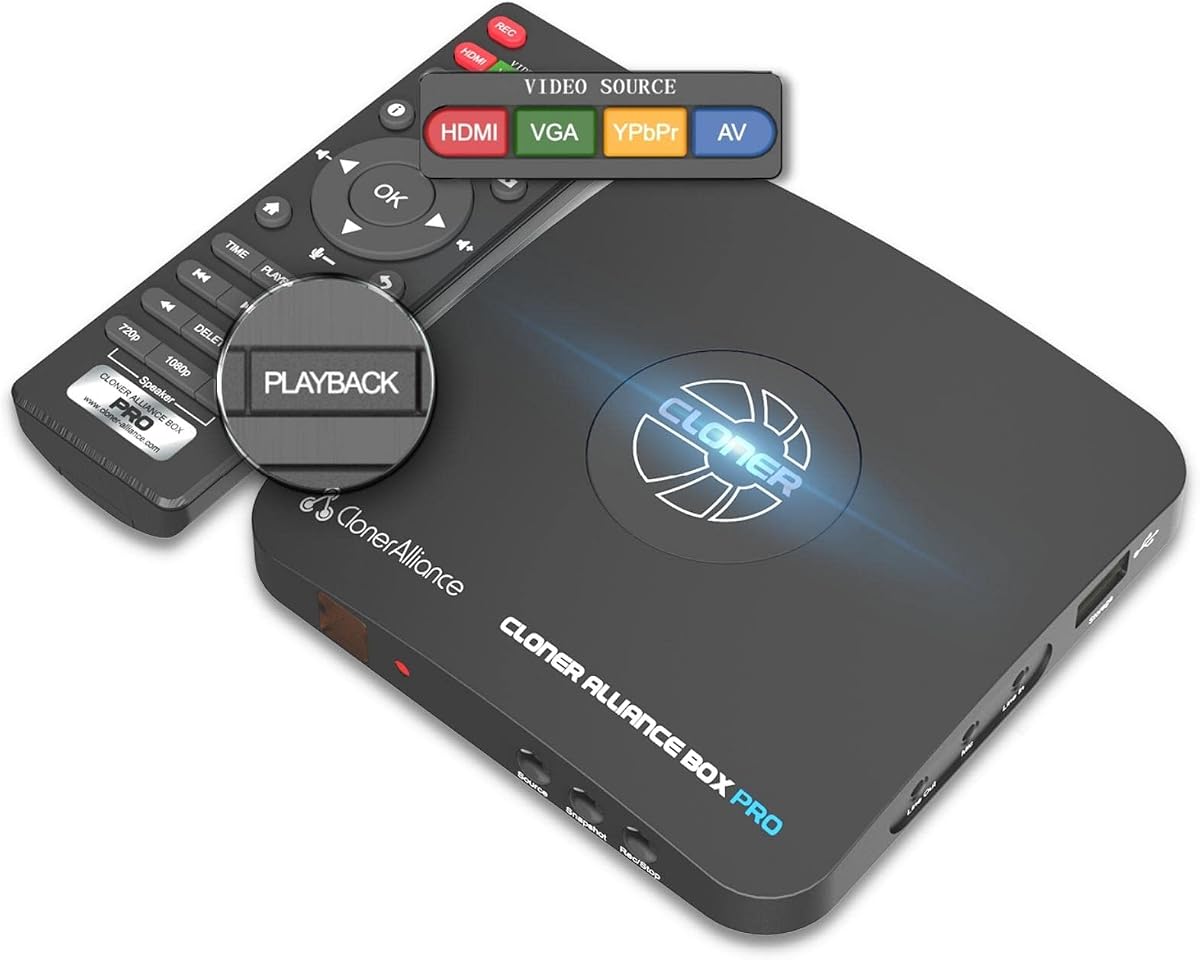
The ClonerAlliance Box Pro stands out as a reliable standalone video recorder capable of capturing 1080p at 60 frames per second. It is designed to work independently without needing a computer making it ideal for archiving analog footage or recording gameplay from consoles. The device supports various input types including HDMI RCA and VGA offering great flexibility for different sources.
We may earn a commission when you buy through this link, at no additional cost to you.
Its ability to record directly to a USB storage device while displaying the output on a TV is a significant advantage for users who want real-time monitoring. The included remote control simplifies playback and navigation on the TV screen. Additionally the schedule recording feature allows you to set up automated captures for specific times which is useful for TV shows or long sessions.
While it lacks support for HDCP protected content which limits its use with some modern streaming devices the trade-off is acceptable for legacy analog archiving. The file systems supported ensure compatibility with most modern PCs for easy file transfer. Overall it balances functionality and ease of use effectively for its target audience.
This recorder is best suited for gamers looking to capture console gameplay without a PC or for those digitizing old VHS tapes. If you need a simple plug-and-play solution that handles both digital and analog inputs efficiently the Box Pro is a strong recommendation. It delivers consistent performance for its intended use cases.
The device supports RCA YPbPr and VGA inputs allowing you to digitize footage from older camcorders and VCRs easily.
You can record and playback without connecting to a computer saving you time and hardware resources during use.
We may earn a commission when you buy through this link, at no additional cost to you.
The Guermok Video Capture Card is a compact device designed to bring high-speed video capture to your computer setup. With its USB 3.0 interface it supports inputs up to 4K at 30Hz and outputs up to 1080p at 60Hz ensuring smooth and detailed recordings. The card is built with an aluminum alloy body which aids in heat dissipation during extended use.
We may earn a commission when you buy through this link, at no additional cost to you.
It supports a wide range of operating systems including Windows Mac and Linux making it versatile for different user environments. The plug and play design means you do not need to install drivers to get started. This convenience is perfect for content creators who need to set up quickly for live streams or gaming sessions on platforms like Twitch and YouTube.
While it does require capture software like OBS to function properly this is standard for USB capture cards. Users should ensure they connect to a USB 3.0 port to avoid bandwidth limitations that could reduce resolution or frame rate. The low latency performance ensures that what you see on screen matches your actions in real time.
This card is an excellent choice for gamers and streamers who want reliable performance without a bulky setup. Its portability allows you to take it to different locations for events or travel. If you need a straightforward capture solution that delivers high-quality results the Guermok card is worth considering.
Works seamlessly with Windows Mac and Linux ensuring you can use it regardless of your operating system.
The aluminum alloy design helps keep the device cool during long recording sessions to maintain performance.
We may earn a commission when you buy through this link, at no additional cost to you.
The ClonerAlliance UHD Pro elevates standalone recording with its ability to handle 4K Ultra HD content. It supports H.264 and H.265 codecs which ensure efficient file sizes without compromising quality. The device allows for 4K at 60fps passthrough so you can view content on your TV while recording to a USB or TF card without lag.
We may earn a commission when you buy through this link, at no additional cost to you.
Features like pause resume recording give you precise control over what gets captured which is helpful for creating clean content without extra editing. The cinematic 24fps recording option caters to those looking for a movie-like look in their captured footage. Schedule recording tasks let you automate captures for specific events or shows.
While the price is higher than standard capture cards the standalone capability justifies the cost for users who want to record without a PC. It works well with various devices including consoles camcorders and set-top boxes. Note that like many standalone units it does not support HDCP protected content which limits some modern streaming uses.
This recorder is ideal for content creators who prioritize 4K quality and need independent operation for recording sessions. If you value the flexibility of H.265 encoding and cinematic frame rates the UHD Pro offers a premium experience. It is a robust tool for high-quality video archiving and capture.
Support for H.265 reduces file sizes while maintaining high quality making storage management easier.
The 24fps option allows you to create footage with a film-like aesthetic for professional looks.
We may earn a commission when you buy through this link, at no additional cost to you.
This HDMI to USB 3.0 capture card offers a reliable way to bring video signals into your computer for streaming or recording. It captures video at up to 1080p at 60 frames per second and accepts inputs up to 4K at 30Hz. The device is designed to work as a webcam automatically when connected which simplifies setup for most users.
We may earn a commission when you buy through this link, at no additional cost to you.
A standout feature is the microphone input which allows you to add commentary directly into the stream without extra adapters. The HDMI loop-out ensures that you can play games or view content on a monitor with zero delay while the capture happens. This makes it perfect for competitive gaming or live broadcasting.
The card is compatible with Windows and Mac operating systems and works with popular software like OBS and VLC. Since it does not require drivers or external power it is easy to use anywhere. While it does not support 4K at 120Hz or 144Hz it covers most standard needs for gamers and streamers.
If you need a straightforward capture card that handles 1080p smoothly and offers mic-in convenience this is a solid choice. It balances cost and performance well for those starting their streaming journey. The reliability and ease of use make it a strong contender in the mid-range category.
The built-in mic jack lets you add voice commentary directly to the captured video stream.
Monitor gameplay with no lag on your main screen while recording or streaming simultaneously.
We may earn a commission when you buy through this link, at no additional cost to you.
The Audio Express AXHDCAP is a budget-friendly capture card that brings HDMI video into your computer via USB 2.0. While it limits output to 1080p at 30Hz it supports input up to 4K at 30Hz. This makes it a great choice for video conferences teaching or casual streaming where high frame rates are not critical.
We may earn a commission when you buy through this link, at no additional cost to you.
Its anti-static design and low latency technology ensure stable real-time previews so you can see what you are capturing clearly. The plug and play functionality means no drivers are needed to get started. This simplicity is helpful for users who need a quick setup for presentations or educational content.
While the USB 2.0 bandwidth limits higher frame rates it keeps the device accessible and affordable. It is suitable for DSLRs camcorders and other devices where you do not need 60fps performance. The device is small and portable allowing you to carry it in a bag for travel.
If you are looking for an affordable way to capture video for basic streaming or recording this card is a strong option. It offers good value for money and works well with common software like OBS or VLC. For non-professional needs it provides the essential features without a high price tag.
Designed to handle video conferences and teaching needs with reliable real-time transmission.
Its small size allows you to easily transport it for use on the go.
We may earn a commission when you buy through this link, at no additional cost to you.
This USB 3.0 capture card is designed for gamers and creators who need 1080p at 60fps streaming capabilities. It connects directly to your computer and is recognized as a webcam which simplifies setup. The device supports HDMI input up to 4K at 30Hz and offers seamless passthrough for uninterrupted gameplay monitoring.
We may earn a commission when you buy through this link, at no additional cost to you.
Its compact design makes it highly portable so you can use it at LAN parties or while traveling. The low latency performance ensures that there is no delay between your actions and the broadcast which is essential for competitive gaming. It works with popular software like OBS and Streamlabs for flexible streaming options.
The device does not require drivers or external power which adds to its convenience. You can start capturing as soon as you plug it into a USB 3.0 port. This makes it ideal for those who want to switch setups quickly or need a backup capture device for events.
If you need a reliable and portable capture solution that delivers smooth 1080p recording this card is a great fit. It balances performance and portability well for various content creation scenarios. The ease of use and broad compatibility make it a solid choice for streamers on the move.
Recognized as a webcam on connection it works instantly with your streaming software.
Its lightweight form factor allows you to pack it easily in your bag for on-the-go use.
We may earn a commission when you buy through this link, at no additional cost to you.
This capture box stands out with its dual HDMI input capability allowing you to switch between sources easily. It features a built-in 7-inch screen so you can preview or playback content without a monitor. The device supports PIP/POP/PMP functions which enable multi-screen management for professional looking video production.
We may earn a commission when you buy through this link, at no additional cost to you.
You can save captured videos to USB flash disks or hard drives making file transfer simple. The option to power it with batteries offers flexibility for field recordings or events where power outlets are limited. It supports exFAT FAT32 and NTFS formats which covers most modern storage needs.
While the rating is lower than some other models its feature set offers unique value for specific use cases like live presentations. The device allows real-time playback and picture-in-picture effects which are useful for tutorials or interviews. However it does not handle HDCP protected content which is a standard limitation for standalone units.
If you need a standalone recorder that can mix two video sources and display them locally this is a practical choice. It is well suited for users who want to avoid computer setups for recording live events. The battery option adds a layer of versatility for mobile use cases.
With two HDMI inputs you can switch or mix video sources easily during your recording sessions.
Support for external batteries lets you record on location without needing a power outlet.
We may earn a commission when you buy through this link, at no additional cost to you.
The ZowieREC 4K HDMI Recorder features a premium aluminum casing that looks good and offers durability. It allows you to record up to 4K at 30fps without needing a computer which makes it convenient for quick captures. The schedule recording feature helps you automate sessions so you never miss important content.
We may earn a commission when you buy through this link, at no additional cost to you.
Pause and resume capabilities give you control over your recording timeline which is useful for editing later. It supports storage on both TF cards and USB drives offering flexibility for capacity needs. The device supports HDMI pass-through so you can watch content while recording without interruption.
While it has a lower rating than some competitors its standalone functionality remains a strong selling point. The design is compact and stylish fitting well in home or office setups. Note that it does not support protected content which limits use with some streaming services.
If you value design and standalone functionality for capturing gameplay or conferences this recorder is worth considering. It provides the tools to record and manage videos without the complexity of a PC setup. The features are robust for those who need reliable independent recording.
Set up scheduled tasks to ensure your device records at the right time without your presence.
The premium aluminum build gives it a sleek look that blends well with modern tech setups.
We may earn a commission when you buy through this link, at no additional cost to you.
The ViewPro combines video recording and playback into a portable unit with a 7-inch LCD screen. This eliminates the need for an external TV when you want to preview or review your content. It records at 1080p at 60 frames per second and supports schedule recording for automated capture of events.
We may earn a commission when you buy through this link, at no additional cost to you.
Analog inputs like AV VGA and YPbPr allow it to work with older cameras and VCRs easily. The included remote control simplifies navigation making it user-friendly for all ages. You can save videos to USB storage or SD cards for easy transfer to other devices.
Its ability to stream live to platforms like YouTube adds versatility for creators who need to broadcast from the field. The device supports 4K input though it records at 1080p which balances quality and file size. It is a solid choice for medical imaging or field recording scenarios.
If you need a portable recorder with a built-in screen to manage captures on the go the ViewPro is an excellent tool. It bridges the gap between analog archiving and modern streaming needs. The combination of features makes it a strong option for versatile video capture.
The 7-inch LCD lets you view and playback content without needing a separate monitor.
An included IR remote makes navigation and playback easy from a distance.
We may earn a commission when you buy through this link, at no additional cost to you.
The Blackmagic Design UltraStudio Express is a professional capture device designed for high-quality video production. It uses SDI video inputs which are standard in professional broadcast and film settings. The device supports 3G speed and offers a loop output for easy integration into live setups.
We may earn a commission when you buy through this link, at no additional cost to you.
Its robust build quality ensures reliability during critical recording sessions. The SDI interface supports audio inputs and outputs which simplifies connections in professional environments. While it is less common than HDMI capture cards it is essential for broadcast workflows.
This recorder is not suitable for casual home use due to its specialized interface. It is designed for users who need high fidelity and stable transmission for live events or post-production. The hardware is built to perform under demanding conditions without dropouts.
If you are working in a professional environment that requires SDI connections this is a top-tier choice. It provides the stability and quality needed for broadcast standards. For non-professional needs a standard HDMI recorder is more practical and cost-effective.
The SDI connection ensures stable high-quality transmission suitable for broadcast environments.
A loop output allows you to route the signal to other monitors or recorders easily.
We may earn a commission when you buy through this link, at no additional cost to you.
Choosing the right HDMI recorder depends on your specific needs and setup requirements.
Consider the resolution and frame rate you need for your videos. Most recorders support up to 1080p at 60fps which is standard for gaming and streaming. Some premium models offer 4K support which is essential for high-quality footage.
Select a device that meets your quality needs without paying for features you will not use.
Check the input options supported by the recorder. HDMI is standard but some units also support RCA VGA or YPbPr for analog devices. Ensure the device has the right ports for your sources.
Verify that the output interface matches your computer or display setup for seamless integration.
Decide whether you need a standalone recorder that works without a computer or a capture card that requires a PC. Standalone units are better for archiving or field recording. Capture cards are ideal for live streaming.
Choose based on whether you want to record directly to storage or process the video on a computer.
Look at the storage options supported by the device. Some use USB drives others use SD cards or TF cards. Ensure the capacity and format support match your file size needs.
Check if the recorder supports common file systems like exFAT or NTFS for compatibility with your computer.
Evaluate how the device handles audio. Some capture cards have mic-in ports for commentary while others pass through audio from HDMI. For streaming audio quality is important for clear commentary.
Ensure the recorder supports audio formats that are compatible with your recording software and platforms.
Low latency is critical for live streaming and gaming. USB 3.0 capture cards generally offer lower latency than USB 2.0. Check reviews and specs for any reported delays.
Test the device if possible to ensure there is no noticeable lag between the video source and the output.
Consider how easy the device is to set up and use. Plug and play models do not require drivers making setup faster. Features like remote controls or built-in screens add convenience.
Look for models with clear menus and user-friendly interfaces if you are not tech savvy.
Be aware of HDCP support which is restricted on most standalone recorders. This means you cannot record from certain streaming devices or services. If you need to record from protected sources check compatibility first.
For standard HDMI devices from consoles or cameras this limitation usually does not apply.
Connect your video source to the recorder using the appropriate cable. Ensure the connections are secure and the device is powered on. For standalone recorders insert a USB drive or SD card with sufficient space.
Navigate the menu to select the recording mode or schedule settings. For capture cards open your streaming software and select the device as the video source. Verify that audio is recognized correctly before starting.
After recording safely eject storage devices by using the menu options. Keep the device clean and avoid exposing it to extreme heat or moisture. Update firmware if available to maintain optimal performance.
Not always. Standalone recorders like the ClonerAlliance Box Pro do not require a computer. They save directly to USB drives. Capture cards typically require a computer to function. Choose based on your workflow needs.
Some models like the ClonerAlliance UHD Pro support 4K recording. Most budget capture cards support 4K input but output 1080p. Check the specs of each device to confirm its recording capabilities before buying.
This is likely due to HDCP content protection. Standalone recorders usually do not support HDCP which causes black screens when recording from protected sources. This is a limitation not a defect.
MP4 is the most compatible format supported by most recorders. It works well with modern PCs and editing software. Ensure your storage device is formatted to FAT32 exFAT or NTFS for compatibility.
Use a capture card with a microphone input to add commentary directly. Alternatively use separate recording software to capture audio and sync it later. Ensure your mic is properly configured in your streaming settings.
Yes capture cards are designed for live streaming to platforms like Twitch and YouTube. Standalone recorders can capture video but may require additional tools for live output. Check device capabilities before using for streaming.
Try reconnecting the USB cable or switching to a USB 3.0 port. Restart the recording software and check the device settings. Ensure the device has the necessary drivers if required by your operating system.
This depends on resolution and duration. A 1080p video may use around 4GB per hour. For 4K plan for significantly more space. Use large capacity USB drives or SD cards to accommodate long sessions.
We reviewed ten top HDMI recorders ranging from affordable capture cards to premium standalone units. Each offers unique features suited for different use cases like gaming streaming or archiving.
Prioritize your needs such as resolution standalone capability or connectivity when making your choice. Ensure the device supports the inputs and outputs required for your setup.
Prices and availability change so always check the product page for the latest information. We hope this guide helps you find the perfect recorder for your video capture needs.