
2 in 2 Out USB 3.0 Switch
4.6Editor score
5Gbps data transfer speed
One-button switch with LED
Includes two USB 3.0 cables
This guide compares the top ten keyboard and mouse switches for two computers, evaluating speed, port counts, and compatibility to help you choose the right
Managing multiple computers often means constantly swapping cables for your essential peripherals like keyboards and mice. A dedicated switch allows you to control two systems with one set of inputs, saving desk space and reducing clutter significantly.
We analyzed ten top-rated USB switches based on data transfer speeds, port configurations, and user feedback. Our selection covers everything from basic two-port models to advanced seven-port units with power adapters for stable performance.
Each review highlights specific strengths and limitations to help you find the perfect match for your workspace. Please note that product availability and pricing can fluctuate, so always verify details on the retailer site before purchasing.
4.6Editor score

4.0Editor score

4.3Editor score
The following table provides a side-by-side comparison of all ten products selected for this guide, highlighting key specifications and features to help you make an informed decision quickly.


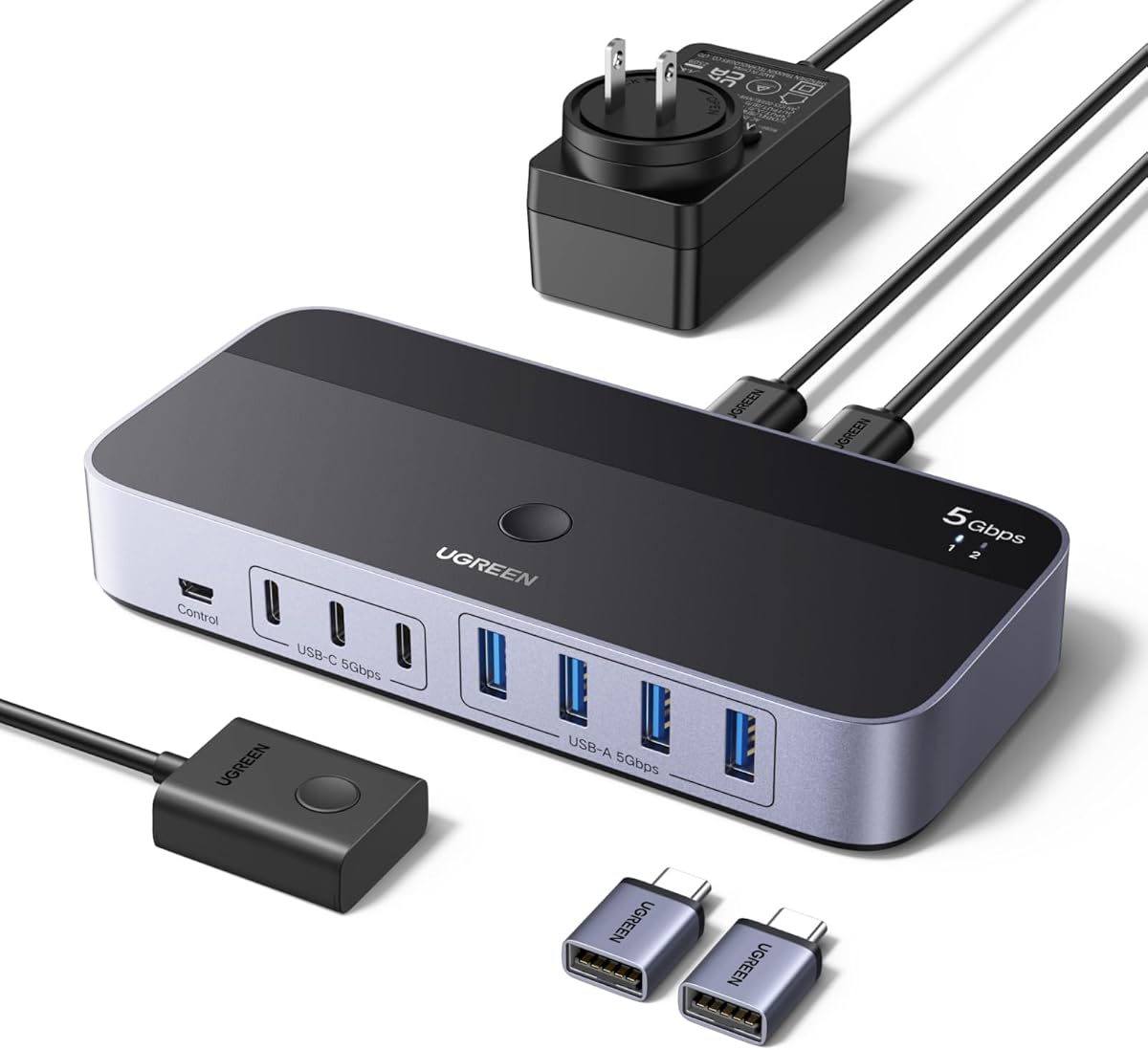

The UGREEN USB 3.0 Switch stands out as a versatile solution for sharing peripherals between two computers. With a strong rating from users, it delivers reliable performance for those who need to switch between a work and personal setup efficiently.
We may earn a commission when you buy through this link, at no additional cost to you.
Its standout quality is the ability to support both USB C and USB A devices, making it future-proof for modern laptops and traditional desktops. The included power supply ensures stable operation even when connecting high-demand devices like external hard drives or printers.
While it is not a KVM switch and does not support video transmission, this limitation is acceptable for users focused solely on peripheral sharing. The separate controller button allows for neat desktop management without reaching behind the unit.
This switch is ideal for professionals who need to manage multiple devices across two systems without the complexity of a full KVM setup. We recommend it for its robust port selection and reliable data transfer capabilities.
The inclusion of USB C support ensures compatibility with newer devices without requiring additional dongles or adapters.
The optional power supply port prevents disconnections when using power-hungry peripherals like external storage or webcams.
We may earn a commission when you buy through this link, at no additional cost to you.
The BENFEI USB 3.0 Switch offers an excellent entry point for users looking to share peripherals without breaking the bank. With a solid user rating, it proves that budget-friendly options can still deliver reliable performance for daily tasks.
We may earn a commission when you buy through this link, at no additional cost to you.
Its key strength lies in the high-speed data transfer capabilities that match more expensive models. The design includes a slot for external power, which is crucial for maintaining stability when multiple devices are active simultaneously.
One trade-off is the need for a specific USB A to USB A cable and a separate power adapter for optimal performance. These are minor inconveniences given the low cost and the convenience of seamless switching between computers.
This model is perfect for home users or small offices that need a straightforward sharing solution. We suggest it for anyone prioritizing value and performance over advanced features like video output.
Users can share multiple peripherals at a fraction of the cost of a full KVM switch system.
The unit supports fast file transfers which keeps productivity high even when moving data between systems.
We may earn a commission when you buy through this link, at no additional cost to you.
The 2 in 2 Out USB 3.0 Switch earns a top rating from users who appreciate quality and simplicity. It is designed for those who need a straightforward way to share a keyboard and mouse between two computers without extra complexity.
We may earn a commission when you buy through this link, at no additional cost to you.
Its standout quality is the sturdy aluminum alloy build which ensures durability and better heat dissipation compared to plastic models. The high-speed data transfer capability means files move quickly between computers when sharing storage devices.
The limitation to two ports means it may not be suitable for setups with many peripherals. However, this simplicity is often preferred by users who want a clean desk setup without unnecessary cables or ports.
We recommend this switch for professionals who prioritize build quality and reliability. It is an ideal choice for standard office setups where only a few devices need to be shared.
The aluminum casing provides a sleek look and protects internal components from wear and tear.
One-button control makes toggling between computers instantaneous and intuitive for daily use.
We may earn a commission when you buy through this link, at no additional cost to you.
The UGREEN 2 in 2 Out Switch provides a compact solution for sharing essential peripherals between two systems. With a solid user rating, it offers a reliable experience for users who want to avoid cable clutter on their desks.
We may earn a commission when you buy through this link, at no additional cost to you.
Its key strength is the high-speed data transfer which ensures efficient file sharing. The simple one-button switch design allows users to toggle between computers quickly, which is essential for dynamic work environments.
This unit does not support video transmission, limiting it to peripheral sharing only. For most users, this is a fair trade-off given the compact size and ease of setup.
We recommend this switch for small home offices or users with limited desk space. It is an excellent choice for those who need a simple, reliable way to share a keyboard and mouse.
USB 3.0 speeds allow for quick transfers of documents and media between connected computers.
The small footprint ensures the switch does not take up valuable room on your workspace.
We may earn a commission when you buy through this link, at no additional cost to you.
The Hearvo USB 3.0 HDMI KVM Switch is a comprehensive solution for users who need to share both peripherals and a monitor between two computers. Its strong rating indicates satisfaction with its performance in demanding multimedia environments.
We may earn a commission when you buy through this link, at no additional cost to you.
Its standout quality is the support for 4K resolution at 60Hz which ensures clear visuals for high-end displays. The inclusion of a wired remote switch allows for convenient control without reaching for the main unit.
The higher price reflects the added complexity and features like video transmission. For users who only need to share USB devices, a standard USB switch might be more cost-effective.
We recommend this KVM for creatives or professionals who need to use a single monitor for multiple systems. It is the best choice for users seeking a complete sharing solution.
The 4K support ensures that graphics work or video editing is not hindered by signal limitations.
The included remote allows you to switch computers with a button press on your desk.
We may earn a commission when you buy through this link, at no additional cost to you.
The UGREEN USB Switch Selector offers a reliable option for basic sharing needs at a competitive price. With a high user rating, it proves that older USB 2.0 technology can still serve everyday tasks well.
We may earn a commission when you buy through this link, at no additional cost to you.
Its key strength is the robust stability and wide compatibility with various operating systems. The external power port helps maintain consistent performance even when connecting multiple devices like printers or scanners.
The main trade-off is the slower USB 2.0 data transfer speed which may not suit high-speed storage needs. However, for keyboards and mice, this limitation is virtually imperceptible in daily use.
We recommend this switch for users with older systems or those who only need to share low-speed peripherals. It is an excellent choice for basic office environments where cost and reliability are key.
Users report consistent performance without the need for additional software or drivers.
The one button switch makes toggling between computers fast and straightforward.
We may earn a commission when you buy through this link, at no additional cost to you.
The UGREEN USB 3.0 Switch Selector offers a generous port count for sharing peripherals between two computers. With a strong user rating, it provides a reliable experience for those needing multiple connections for their devices.
We may earn a commission when you buy through this link, at no additional cost to you.
Its standout quality is the ability to support four USB devices simultaneously at high speeds. This makes it ideal for complex setups that include keyboards, mice, printers, and external drives all at once.
The main trade-off is the lack of an included power adapter for high-demand devices. Users may need to source this separately to ensure stable performance under heavy loads.
We recommend this switch for users with multiple peripherals who want a single reliable hub. It is a great choice for professionals who need flexible connectivity options.
Four ports allow you to connect a wide range of peripherals without constant unplugging.
USB 3.0 speeds ensure that data transfers remain fast and efficient across both systems.
We may earn a commission when you buy through this link, at no additional cost to you.
The UGREEN 2-in 7-Out Switch provides extensive connectivity options for power users who need to share many devices. Its strong user rating reflects satisfaction with its ability to handle diverse peripheral requirements seamlessly.
We may earn a commission when you buy through this link, at no additional cost to you.
Its key strength is the mix of USB A and C ports which eliminates the need for adapters. The included power adapter ensures that all connected devices receive stable power for consistent performance.
The larger size and higher price may be unnecessary for users with only two or three devices. However, for complex setups, this unit offers unmatched versatility and convenience.
We recommend this switch for users with modern laptops and multiple peripherals. It is the best choice for those who need a future-proof solution for all their devices.
The mix of port types ensures compatibility with almost any USB device you might own.
The included power adapter prevents interruptions even when running multiple high-power devices.
We may earn a commission when you buy through this link, at no additional cost to you.
The USB Switch 2 in 2 Out offers a straightforward solution for sharing basic peripherals between two systems. With a solid user rating, it provides reliable performance for users who prioritize simplicity over advanced features.
We may earn a commission when you buy through this link, at no additional cost to you.
Its standout quality is the external desktop switch controller which allows for a tidy workspace without reaching behind the unit. The single button operation makes switching fast and effortless for daily tasks.
The limitation to basic ports and lack of USB 3.0 speeds means it is best suited for standard keyboards and mice. Users needing high-speed data transfer should look at other options in this guide.
We recommend this switch for users with basic setups who want a clean, uncluttered desk. It is an excellent choice for those who need a simple, reliable sharing solution.
The external controller keeps your main workspace clean and organized.
Plug and play operation means you can start using it immediately without software.
We may earn a commission when you buy through this link, at no additional cost to you.
The UGREEN 2-in 7-Out USB 3.2 Switch represents the cutting edge of peripheral sharing technology. With a strong user rating, it delivers exceptional performance for users who need to move large files between systems quickly.
We may earn a commission when you buy through this link, at no additional cost to you.
Its key strength is the 10Gbps transfer speed which is double the speed of standard USB 3.0 switches. This ensures that data transfers are completed in seconds rather than minutes for large datasets.
The higher price point may be unnecessary for users who only share basic peripherals like keyboards. However, for power users with modern hardware, this unit offers unparalleled speed and versatility.
We recommend this switch for professionals and creatives who need maximum speed and connectivity. It is the best choice for those who need a high-performance solution for their workspace.
10Gbps speeds ensure that even large video files transfer instantly between computers.
Seven ports give you all the room you need to connect every device in your setup.
We may earn a commission when you buy through this link, at no additional cost to you.
Selecting the right switch involves balancing port count, speed, and power needs to ensure a smooth experience.
The number of ports determines how many peripherals you can share at once. Basic models offer two ports while advanced ones support up to seven or more devices.
USB 3.0 and 3.2 switches offer faster file transfers than older USB 2.0 models. Consider your storage needs when choosing a speed tier.
External power adapters ensure stable performance for high-demand devices like external hard drives. Units without this may struggle with multiple active peripherals.
Most switches work with Windows Mac and Linux without drivers. Always check the specific OS requirements before purchasing to avoid setup issues.
Buttons on the unit or external remotes allow you to toggle between computers. Choose the method that fits your desk layout best.
Metal casings offer better heat dissipation and durability than plastic ones. A sturdy build ensures longevity in busy office environments.
Included cables should match the speed rating of the switch. High-quality cables ensure reliable connections without signal loss.
A longer warranty period often indicates manufacturer confidence in the product. Check customer support availability to ensure help is there if needed.
Keep the switch in a well-ventilated area to prevent overheating. Avoid pulling on cables when unplugging to maintain longevity.
Most standard USB switches do not support video output. They only transfer keyboard mouse and data signals. For video sharing you need a dedicated KVM switch with HDMI or DisplayPort.
Yes most modern switches are compatible with macOS without needing additional drivers. Always verify system requirements on the product page before purchasing.
Yes but high power devices often require an external power adapter. The included USB power may not be enough for stable performance.
No most switches are plug and play devices. They work automatically once connected without any driver installation required.
USB 3.0 switches offer faster data transfer speeds than USB 2.0 models. This is noticeable when moving large files between computers.
Yes that is the primary purpose of these switches. You can control two systems with a single set of input devices.
Always check current pricing and availability before buying. These devices improve workflow significantly and are a worthy investment for any dual computer setup.