
Samsung T7 Portable SSD
4.7Editor score
Compact aluminum design
High speed transfer rates
Shock resistant build
Discover the top external SSD for Mac Mini M4 with fast speeds and compatibility for storage expansion and workflow efficiency.
The Mac Mini M4 delivers powerful performance but limited internal storage. An external SSD expands capacity while maintaining speed for creative workflows and daily tasks efficiently.
We evaluated ten drives based on speed, durability, and Mac compatibility. Each option offers unique features for professionals and casual users seeking reliable storage solutions today.
Each pick highlights key strengths and trade-offs for informed decisions. Prices fluctuate frequently so verify current listings before purchasing your preferred drive model now.
4.7Editor score
4.8Editor score

3.9Editor score
This side-by-side comparison highlights key specifications across ten top drives to help you select the ideal external storage solution for your Mac Mini M4 setup today.






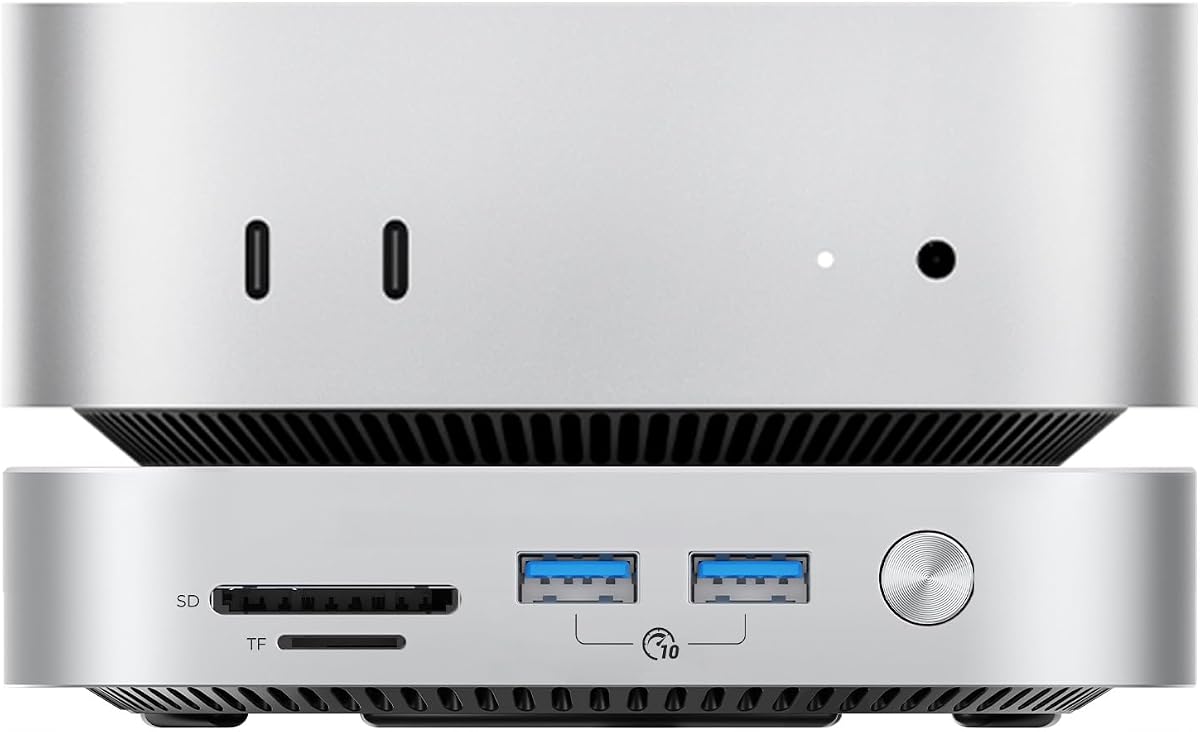
The ORICO drive ranks first for its purpose-built design for Mac Mini M4 and M5 Pro systems with exceptional speed and compatibility ratings.
We may earn a commission when you buy through this link, at no additional cost to you.
It offers a dual-SSD expansion setup that maintains desktop elegance while doubling storage capacity for 4K and 8K video editing workflows effectively.
While more expensive than standard portable drives its dedicated multi-port hub and optimized cooling justify the investment for professional users needing stability.
This bundle is ideal for developers and creators seeking a complete expansion solution that integrates seamlessly with Apple ecosystem requirements out of the box.
Certified for macOS Sonoma and M-series chips ensuring plug-and-play setup with Time Machine compatibility right from the start.
Aerospace-grade aluminum body with thermal channels sustains peak speeds while smart sleep mode cuts power use when idle.
We may earn a commission when you buy through this link, at no additional cost to you.
The Samsung T7 offers excellent value for users needing reliable high-speed storage without breaking the bank for their Mac Mini M4 setup.
We may earn a commission when you buy through this link, at no additional cost to you.
Its compact design with massive capacity and embedded PCIe NVMe technology delivers read and write speeds nearly twice as fast as previous models.
Despite being budget-friendly the sturdy aluminum unibody construction withstands drops up to six feet ensuring durability for everyday travel and office use.
Ideal for students or casual creators this drive balances performance and portability making it the top affordable choice for expanding Mac Mini storage.
Transfer files and record 4K videos directly onto the drive thanks to fast read and write speeds up to 1050MB/s.
Performance and reliability from the world's top flash memory brand with in-house produced DRAM and NAND components.
We may earn a commission when you buy through this link, at no additional cost to you.
The SanDisk PRO-G40 is engineered for professionals demanding the fastest speeds and toughest durability for extreme workflows with Mac Mini M4 systems.
We may earn a commission when you buy through this link, at no additional cost to you.
It delivers super-fast speeds up to 3000MB/s and supports dual-mode compatibility with both Thunderbolt 3 and USB-C interfaces for broad connectivity.
Its ultra-rugged design includes IP68 dust and water resistance plus 4000lb crush resistance ensuring data safety in harsh field environments.
Best suited for high-end production teams this drive justifies its cost with unmatched speed capacity and durability for critical data handling needs.
High-level IP68 dust water resistance and 4000lb crush resistance keep your data safe in challenging conditions.
Thunderbolt 3 interface capable of moving 50GB in one minute or less for efficient workflow management.
We may earn a commission when you buy through this link, at no additional cost to you.
The Lexar ES3 2TB drive delivers fast speeds and large capacity at a reasonable price for Mac Mini M4 users needing extra space.
We may earn a commission when you buy through this link, at no additional cost to you.
Built-in double layer graphite sheets quickly conduct heat enhancing dissipation to keep the drive cool during blazing fast transfers and heavy workloads.
While sturdy and capable this model offers fewer advanced features than premium options but remains reliable for general creative and office use.
This drive is perfect for users needing a balance of capacity performance and durability without the high cost of Thunderbolt solutions.
Double layer graphite sheets quickly conduct heat ensuring the drive stays cool even during blazing fast transfers.
Drop-resistant up to two meters providing protection for everyday and office use.
We may earn a commission when you buy through this link, at no additional cost to you.
The SanDisk Extreme Portable SSD stands out with nearly twice the speed of previous generations making it ideal for rapid file transfers.
We may earn a commission when you buy through this link, at no additional cost to you.
Its IP65 rating and 3M drop protection ensure resilience against spills and drops while the pocket-sized design fits easily in bags.
Security features like 256-bit AES encryption help keep private files secure with password protection for sensitive data storage needs.
Great for photographers and videographers this drive offers speed and reliability in a compact package ready for on-the-go professional work.
Move 1000 high-res photos in under 60 seconds with up to 2000MB/s transfer speeds.
IP65 rating protects against spills while up to 3M drop protection ensures durability.
We may earn a commission when you buy through this link, at no additional cost to you.
This Lexar ES3 1TB model is perfect for users prioritizing portability and sleek design while maintaining fast transfer rates for Mac Mini M4.
We may earn a commission when you buy through this link, at no additional cost to you.
Weighing just 42g and only 10.5mm thick it fits easily in your pocket and comes with a Type-C cable for plug-and-play convenience.
Included Lexar DataShield software protects files with 256-bit AES encryption ensuring your data remains secure across devices and networks.
Ideal for travel and light creative work its thin design and high compatibility make it a flexible choice for mobile professionals.
Thin stylish and durable design makes it smaller than a card and easily fits in your pocket.
Lexar DataShieldTM 256-bit AES encryption software helps protect your files securely.
We may earn a commission when you buy through this link, at no additional cost to you.
The SSK Portable SSD weighs just 36.6g and offers blazing-fast 10Gbps speeds making it one of the lightest options available today.
We may earn a commission when you buy through this link, at no additional cost to you.
Solid state drives S.M.A.R.T. health diagnostics and adaptive TRIM optimizing data block management ensures consistent write speeds and longevity over time.
An included 2mm thick aluminum alloy case brings superior heat dissipation and premium touch while staying cool during intense usage scenarios.
This drive is best for travelers and mobile users seeking maximum portability without sacrificing performance or connectivity options for Mac Mini M4.
Impressive external solid state drive weighs just 36.6g for unparalleled convenience on the go.
SLC caching delivers steady 10Gbps for transfers within the cache capacity without slowdowns.
We may earn a commission when you buy through this link, at no additional cost to you.
The Crucial X10 delivers ultra-fast speeds and broad compatibility for students students gamers and professionals needing reliable external storage solutions.
We may earn a commission when you buy through this link, at no additional cost to you.
Built to last with IP65 dust and water resistance plus 3 meters drop protection it is perfect for travel and all types of weather.
Includes bonus software like Mylio Photos plus and Acronis True Image enhancing value for users needing organized storage and backup tools.
This drive suits versatile users requiring high capacity and speed while maintaining portability for both home and travel use cases.
Delivers fast data access with up to 2100MB/s read speeds for creators students and gamers.
Enjoy three months of Mylio Photos plus and Acronis True Image when purchasing your external drive.
We may earn a commission when you buy through this link, at no additional cost to you.
The Samsung T9 offers sustained read and write speeds up to 2000MB/s ensuring projects race through editing and transfers without slowdowns.
We may earn a commission when you buy through this link, at no additional cost to you.
Dynamic Thermal Guard maintains ideal temperatures even during heavy use keeping performance stable when you are elbow-deep in passion projects.
Magician Software keeps firmware up to date with extra encryption and drive health monitoring ensuring longevity and reliability over time.
Best for professionals using multiple devices this drive supports iPhone ProRes recording and works across desktops cameras and gaming consoles easily.
Race through projects with read and write speeds of up to 2000MB/s even during longer processes.
Advanced thermal solution withstands and controls heat to keep the SSD at ideal temperatures even in heavy use.
We may earn a commission when you buy through this link, at no additional cost to you.
The SABRENT Rocket Nano XTRM delivers uninterrupted 4K and 6K video editing speeds with Intel Thunderbolt 3 interface support for Mac Mini M4 users.
We may earn a commission when you buy through this link, at no additional cost to you.
It features a compact aluminum body with included silicone sleeve for drop and scratch protection making it ready for travel and studio work.
Both Thunderbolt and USB-C to USB-A cables are included ensuring no extra purchases are needed for versatile connectivity across devices.
This drive is ideal for professionals needing maximum speed in a portable format with reliable warranty coverage and durable build quality.
Intel Thunderbolt 3 delivers up to 2700 MB/s for uninterrupted 4K and 6K video editing.
Comes with both a Thunderbolt and USB-C cable and a USB-C to USB-A cable ready out of the box.
We may earn a commission when you buy through this link, at no additional cost to you.
Choosing the right external SSD for Mac Mini M4 requires careful evaluation of speed capacity and build quality to match your specific workflow needs.
Ensure your drive matches your Mac Mini M4 ports such as USB-C or Thunderbolt for optimal speed. Older ports may limit performance significantly.
Prioritize USB 3.2 Gen 2 or Thunderbolt models to fully utilize the Mac Mini M4 capabilities.
Select drives with read speeds of at least 1000MB/s for smooth video editing and file transfers. Faster speeds reduce wait times during projects.
Look for NVMe technology to achieve maximum transfer rates for your workflow needs.
Assess your current file needs to choose between 1TB 2TB or 4TB options. Larger drives reduce the need for multiple connections over time.
2TB is often the sweet spot for balance of capacity and affordability for most users.
Opt for aluminum bodies and shock resistance ratings if you transport drives often. IP65 or IP68 ratings add protection against dust and water.
Solid build quality ensures longevity and protects your valuable data from physical damage.
Verify macOS support and plug-and-play features for easy setup. Drives formatted for APFS work best with Mac systems.
Check Time Machine compatibility for automated backups without additional configuration.
Consider drives with encryption or backup software included for added security and convenience. Some brands offer proprietary apps for drive management.
Encryption software protects sensitive files from unauthorized access across devices.
Look for aluminum chassis or cooling technologies to prevent heat buildup. High speeds generate heat which can slow performance.
Effective thermal design ensures consistent speeds during long data transfer sessions.
Choose brands offering at least three years warranty coverage. Some extend coverage if registered within specific timeframes.
Strong warranty policies provide peace of mind and reliable customer support when needed.
Connect your drive directly to a USB-C or Thunderbolt port on the Mac Mini M4 using the included cable. Wait for Finder to detect the drive before transferring files.
Eject the drive safely using Finder before unplugging it to avoid data corruption. Avoid forcing cables or bending ports during daily connections.
Keep the drive in a cool dry place when not in use. Regularly check for firmware updates from the manufacturer to ensure optimal performance and security.
The ORICO 2TB External SSD is top rated for seamless expansion and optimized macOS compatibility. Samsung T7 offers excellent budget friendly speeds for general use.
Yes they expand limited internal storage and improve workflow speed for video editing and large file transfers significantly compared to internal limits.
Ideally aim for 1000MB/s to 3000MB/s speeds. USB 3.2 or Thunderbolt interfaces provide the fastest performance for professional creative tasks.
1TB suits casual users while 2TB to 4TB is better for video editors or developers storing large projects. Consider future storage needs when buying.
Most modern external SSDs support Time Machine after formatting to APFS or Mac OS Extended. Plug and play setup ensures seamless backups.
Yes many models feature shock resistance up to 2 to 3 meters. Aluminum bodies and IP65 ratings ensure reliable performance during transport.
We reviewed ten top external SSD options including ORICO Samsung and SanDisk to meet Mac Mini M4 storage and speed requirements effectively.
Prioritize speed capacity and durability based on your workflow needs. Budget picks like Samsung T7 offer great value while premium choices deliver extreme speeds.
Always verify current prices and availability before purchasing. Prices fluctuate frequently so check listings to ensure you get the best deal today.