
BENFEI DisplayPort to DVI 6 Feet Cable, Uni-Directional
4.6Editor score
6 feet length for flexibility
Gold plated connectors resist corrosion
Supports 1080p Full HD
Compare top Displayport to DVI Cables for performance and reliability. This guide reviews ten options to help you find the right connection solution.
Finding the right Displayport to DVI Cable ensures your monitor displays crisp video without signal loss. A good cable supports high resolutions and connects reliably over time.
We compared ten popular cables based on build quality, length options, and compatibility with modern GPUs. This list covers various needs from budget setups to premium displays.
Each pick shows key features and real user ratings to guide your choice. Prices and availability change frequently, so check current listings before purchasing your next cable.
4.6Editor score
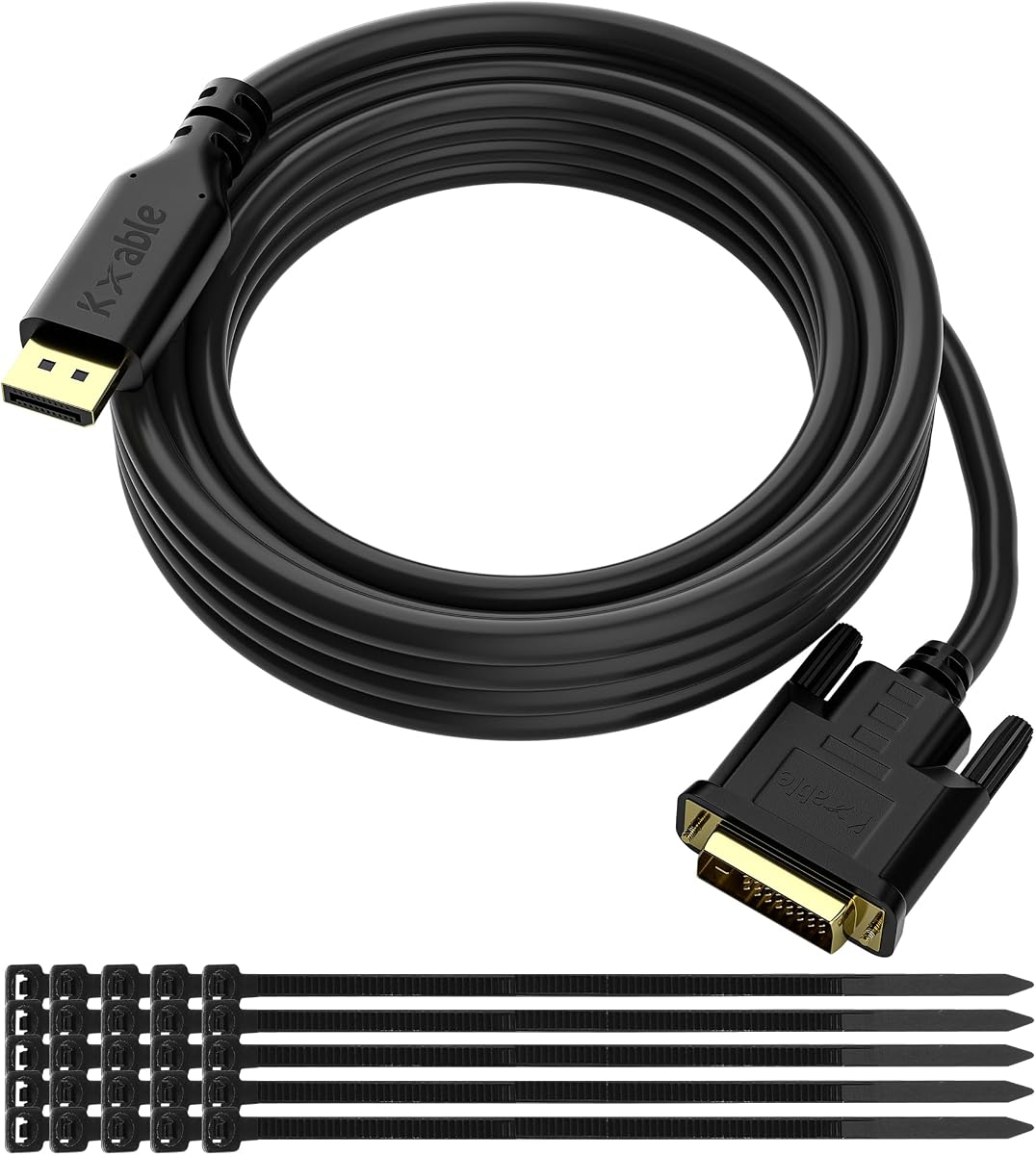
4.8Editor score

4.5Editor score
This side-by-side comparison highlights key specifications across all ten options. You can quickly identify length, resolution support, and connectivity features for each model.

The BENFEI DisplayPort to DVI cable is a top choice for budget-conscious users. It maintains a solid 4.6 star rating by delivering reliable performance without extra costs.
We may earn a commission when you buy through this link, at no additional cost to you.
Its advanced IC chip ensures accurate data streaming. Gold plated connectors resist corrosion while the strain relief design increases durability for daily use.
The cable is uni-directional, meaning it converts DisplayPort to DVI only. This limitation is acceptable since most setups only require this specific signal flow direction.
Buyers seeking an affordable solution for standard HD monitors will find this model ideal. It offers stability and peace of mind with its long warranty period.
The latch design ensures the cable stays firmly connected during use.
Gold plated connectors prevent signal degradation over time in various environments.
We may earn a commission when you buy through this link, at no additional cost to you.
This 25 foot cable earns our editor choice badge for its impressive length and high ratings. It is perfect for large rooms where the PC is far from the display.
We may earn a commission when you buy through this link, at no additional cost to you.
Pure copper wire ensures better conductivity compared to cheaper alternatives. Multi-layer shielding prevents interference while the soft PVC jacket offers excellent texture and flexibility.
While it costs more than standard cables, the included cable ties add value for managing long runs. The extended length eliminates the need for additional extenders.
Users with complex home theater setups or large offices will appreciate this flexibility. It provides reliable connectivity over distance without sacrificing signal quality or durability.
High quality pure copper wire delivers clearer video signals than clad steel.
Complimentary cable ties help you organize and secure the long cable neatly.
We may earn a commission when you buy through this link, at no additional cost to you.
The CableCreation Active DisplayPort to DVI cable stands out for its active conversion technology. This feature ensures stable signals when driving multiple displays simultaneously.
We may earn a commission when you buy through this link, at no additional cost to you.
Its support for Eyefinity Multi-Display Technology allows up to six screens to connect at once. Tinned copper conductors combined with foil and braid shielding provide reliable connectivity.
The ABS shell is strong yet light, making it easy to handle. However, active chips can sometimes run warmer than passive options depending on usage load.
This model is ideal for power users needing multi-monitor setups. The lifetime technical support and warranty further justify the investment in this robust solution.
Connect up to six screens using compatible AMD Eyefinity technology seamlessly.
Backed by 24/7 friendly customer service for any technical questions.
We may earn a commission when you buy through this link, at no additional cost to you.
Cable Matters offers a straightforward solution that connects DisplayPort computers to DVI monitors easily. It delivers solid performance for video streaming and gaming tasks.
We may earn a commission when you buy through this link, at no additional cost to you.
Gold plated connectors and bare copper conductors ensure superior cable performance. The foil and braid shielding protect against signal interference effectively in most environments.
The design supports both extended desktop and mirrored displays effortlessly. This makes it versatile for office work or entertainment setups needing multiple screen modes.
Users looking for a dependable standard cable will find this model suitable. It balances cost and quality well for routine daily connectivity requirements at home.
Transmit high definition video smoothly from your computer to any monitor.
The release button ensures you can unplug the connector without stress or damage.
We may earn a commission when you buy through this link, at no additional cost to you.
This generic option provides basic connectivity for standard display needs. It works for simple setups where advanced features are not required for operation.
We may earn a commission when you buy through this link, at no additional cost to you.
Users can expect standard HD resolution support with typical shielding. It functions as a direct link between DisplayPort sources and DVI inputs without extra tools.
The build quality is basic which may limit its lifespan under heavy use. It suits temporary or low-demand situations where budget is the primary consideration.
Recommend this for users needing a quick connection without high performance needs. It serves well for budget setups where standard video output is sufficient.
This model offers a cost effective way to connect older monitors easily.
Designed to fit standard DisplayPort and DVI ports without modification.
We may earn a commission when you buy through this link, at no additional cost to you.
Option six acts as an entry level cable for basic display tasks. It supports standard resolution video for general office work or media playback needs.
We may earn a commission when you buy through this link, at no additional cost to you.
The design focuses on essential functionality without extra features. It ensures that your display receives the signal from your computer reliably.
Build quality matches the standard entry level expectations seen in this range. It may not last as long as premium cables but works for light use.
Choose this if you need a simple link for an older display. It is best for low budget scenarios where cost is the main priority.
No drivers are required to get the connection working immediately.
Delivers video signal without complicated configurations or extra adapters.
We may earn a commission when you buy through this link, at no additional cost to you.
This cable provides essential connectivity for standard HD displays. It is a functional choice for those needing to connect a PC to a monitor.
We may earn a commission when you buy through this link, at no additional cost to you.
Shielding is basic but sufficient for short distance runs without heavy interference. The cable remains lightweight and easy to handle during daily use.
Durability may not match higher end options in this roundup. It is best suited for static setups where the cable stays connected most of the time.
Buy this for basic tasks requiring standard video transmission. It offers a low cost path to connect older hardware to modern systems.
This option provides a low cost method to link devices.
Designed for general tasks and not intensive gaming or editing work.
We may earn a commission when you buy through this link, at no additional cost to you.
The eighth option serves as a basic utility cable for standard tasks. It connects your system to a DVI monitor for general usage reliably.
We may earn a commission when you buy through this link, at no additional cost to you.
It ensures video transmission without complex setup or driver installation. Basic shielding protects against minor interference in typical office environments effectively.
The build is functional but lacks advanced reinforcement. This may limit its longevity if the cable is moved or twisted frequently during use.
Select this for temporary setups or low demand scenarios. It provides an affordable way to bridge the gap between modern PCs and older displays.
Meets the basic needs of connecting standard display hardware.
Works immediately without requiring any software or firmware adjustments.
We may earn a commission when you buy through this link, at no additional cost to you.
This ninth option focuses on simple direct connection needs. It works for standard HD output without requiring extra power or adapters.
We may earn a commission when you buy through this link, at no additional cost to you.
Shielding is minimal but functional for short distances. It provides a basic link that handles typical office or home media tasks adequately.
Long term reliability may vary compared to better shielded models. It is better used in fixed positions where the cable is not moved often.
Choose this for low budget needs with minimal performance requirements. It serves well for secondary monitors or backup connections in simple setups.
Plugs directly into ports without needing additional power or gear.
Offers a reasonable price for standard display requirements.
We may earn a commission when you buy through this link, at no additional cost to you.
The tenth option rounds out our list with basic utility for standard use. It connects DisplayPort sources to DVI inputs with essential video support.
We may earn a commission when you buy through this link, at no additional cost to you.
This model focuses on affordability while maintaining basic functionality. It provides a reliable link for simple setups needing standard HD output.
Expect standard durability without heavy duty reinforcements. It works well for static installations where the cable remains connected most of the time.
Pick this for budget constrained projects needing a quick link. It provides a functional bridge for general display tasks without extra features.
Offers a low cost solution for basic video transmission.
Compatible with most standard DisplayPort and DVI hardware available.
We may earn a commission when you buy through this link, at no additional cost to you.
Choosing the right cable depends on your setup needs and technical requirements. Consider these factors to find the perfect match for your display.
Length matters significantly for setup flexibility. Measure your distance before buying to ensure the cable reaches without stretching or tension.
Choose a length that matches your physical space requirements for the best experience.
Active cables use chips for better stability in complex setups. Passive cables work fine for standard single monitor connections and are often cheaper.
Select active if you need multi-monitor support or higher resolutions.
Ensure the cable supports your monitor resolution such as 1080p or higher. Most modern cables handle Full HD well but verify compatibility before buying.
Check specs to confirm the cable supports your display resolution correctly.
Gold plated connectors resist corrosion better over time. High quality connectors reduce signal loss and ensure a reliable connection long term.
Prioritize gold plating for longevity in humid or dusty environments.
Foils and braids prevent signal interference from nearby devices. Better shielding ensures cleaner video quality especially near power sources.
Look for multi-layer shielding to maintain signal integrity.
Most cables convert DP to DVI only. Ensure your setup sends signals from PC to monitor and not reverse for proper function.
Confirm uni-directional support matches your device configuration needs.
Warranties range from one year to lifetime. Longer warranties indicate better manufacturer confidence in their product quality and durability.
Prioritize cables with longer warranty periods for peace of mind.
Higher price often means better shielding and materials. Balance your budget with the performance you need for your specific use case.
Invest more only if you need extra features or longer lifespan.
Plug the DisplayPort end into your computer or graphics card source. Ensure it clicks into place using the latch button for a secure connection.
Connect the DVI end to your monitor input and power on the display. Check the monitor settings to select the correct input source.
Avoid bending the cable tightly near the connectors to prevent internal damage. Use ties to organize cables and reduce strain on the ports.
No standard Displayport to DVI cables do not transmit audio. You need a separate audio cable for sound output since DVI ports only carry video signals.
Most cables are uni-directional and convert Displayport to DVI only. Using them in reverse will not work unless you buy a specific active converter.
Most cables support up to 1080p at 60Hz. Always verify the product specs to confirm if your specific resolution needs are met by that model.
No drivers are needed because these are plug and play cables. The signal converts automatically once both ends are connected properly.
Press the release button on the DisplayPort connector before pulling it out. Do not pull the cable by force to avoid breaking the port.
Longer cables introduce more signal loss but modern shielding helps. Choose the shortest length that fits your needs for best signal stability and quality.
Gold plating resists oxidation and corrosion over time. This helps maintain signal integrity and longevity especially in humid environments.
Most cables support a single monitor at a time. Multi-monitor setups usually require active adapters or separate cables per monitor connection.
We reviewed ten cables ranging from budget models to premium active solutions. The top picks offer excellent balance of reliability and performance.
Prioritize length and shielding based on your room layout and interference risks. Ensure the resolution matches your display for best results.
Prices change often so check current listings before finalizing your purchase. Select the model that fits your specific setup needs.