
GIGABYTE Radeon RX 9070 XT Gaming OC 16G
4.7Editor score
16GB GDDR6 Memory
PCIe 5.0 Support
WINDFORCE Cooling System
Compare the top GPUs for DaVinci Resolve including performance, VRAM, and features to choose the best graphics card for your video editing workflow.
Choosing the right GPU for DaVinci Resolve is critical for smooth playback, efficient rendering, and seamless color grading. Modern workflows demand high VRAM and powerful cores to handle 4K and 8K timelines without stuttering or lag.
We compared ten top graphics cards based on architecture, memory bandwidth, and professional features. Our list includes options for budgets and high-end workstations to help you find the perfect match for your editing station.
Each pick shows real-world performance, key specs, and ideal use cases for editors and colorists. Please note that product prices and availability change frequently, so check the latest listings before making your final decision.
4.7Editor score

4.6Editor score
4.9Editor score
This side-by-side comparison highlights the key specifications and features of the top ten graphics cards selected for DaVinci Resolve users in 2026.





The GIGABYTE GeForce RTX 5080 Gaming OC stands out as the best overall GPU for DaVinci Resolve in our testing. With a 4.6 rating and powerful NVIDIA Blackwell architecture, it delivers exceptional speed for professional color grading and VFX work.
We may earn a commission when you buy through this link, at no additional cost to you.
This card features 16GB of GDDR7 memory on a 256-bit interface, providing the bandwidth needed for complex 8K timelines. The DLSS 4 support ensures smoother playback and faster final exports, making it ideal for demanding production workflows.
While it requires a robust power supply and has large dimensions, the trade-offs are acceptable for the performance gains. The WINDFORCE cooling system keeps temperatures low even under sustained loads, ensuring reliable operation during long editing sessions.
We recommend this card for professional editors and studios that need top-tier performance without moving to enterprise workstation pricing. It offers the perfect balance of power, memory, and cooling for DaVinci Resolve users.
The GDDR7 memory and Blackwell architecture allow seamless playback of 8K RAW footage without dropped frames.
DLSS 4 technology significantly reduces export times for heavy effects and color grading tasks in Resolve.
We may earn a commission when you buy through this link, at no additional cost to you.
The PNY NVIDIA Quadro RTX 4000 is an excellent budget choice for editors who need professional-grade performance without the premium price tag. With a solid 4.4 rating, it offers reliable application performance for standard editing tasks.
We may earn a commission when you buy through this link, at no additional cost to you.
Featuring the NVIDIA Turing architecture and RTX technology, this card brings real-time rendering capabilities to professional workflows. The 36 RT cores accelerate photorealistic ray-traced rendering, which is beneficial for complex compositing and visual effects.
Although it has less VRAM than newer options, it remains a strong performer for 1080p and 4K projects. Its compact design makes it suitable for smaller workstations, though users may need to manage memory-heavy workflows carefully.
This GPU is ideal for freelancers or small studios working on entry-level professional projects. It provides the stability of Quadro drivers and essential RTX features at a very accessible price point.
Quadro drivers ensure stable performance for professional applications like DaVinci Resolve during long workdays.
Real-time ray tracing and rendering features enable faster visualization of complex scenes and effects.
We may earn a commission when you buy through this link, at no additional cost to you.
The NVIDIA Titan RTX Graphics Card delivers outstanding performance for users who need a powerful single GPU solution. With a 4.4 rating and 4609 CUDA cores, it handles complex rendering and AI acceleration tasks with ease.
We may earn a commission when you buy through this link, at no additional cost to you.
This card features 72 RT cores for ray tracing acceleration and 577 Tensor Cores for AI acceleration. These specs make it a top choice for editors integrating AI-driven tools or heavy visual effects into their DaVinci Resolve projects.
While it operates on the older Turing architecture, its raw compute power remains formidable. The only significant trade-offs are higher power consumption and size compared to modern compact options.
We recommend this GPU for users working on intensive AI and rendering tasks who do not require the latest memory types. It remains a reliable powerhouse for creative professionals needing consistent performance.
The 577 Tensor Cores provide exceptional speed for AI-based noise reduction and upscaling in Resolve.
With 4609 CUDA cores, this card excels at multi-frame rendering and complex scene calculations.
We may earn a commission when you buy through this link, at no additional cost to you.
The ASRock Radeon AI PRO R9700 Creator is engineered specifically for professional content creation and compute-intensive workloads. With a 4.4 rating and a massive 32GB of GDDR6 memory, it is perfect for large AI models and 8K video editing.
We may earn a commission when you buy through this link, at no additional cost to you.
This card features advanced RDNA 4 architecture with dedicated AI Accelerators for groundbreaking AI performance. The 256-bit bus provides ample bandwidth for complex 3D rendering and high-resolution timeline playback in DaVinci Resolve.
While the blower cooling design may be louder than traditional fans, it ensures efficient heat exhaust for multi-GPU workstation setups. The 2-slot form factor maximizes density, making it ideal for server rack configurations.
We recommend this card for workstation users who prioritize memory capacity and AI performance. It is a robust choice for editors handling massive projects that demand high reliability and extensive memory.
The 32GB GDDR6 memory allows seamless editing of 8K timelines without running out of buffer space.
Dedicated AI Accelerators provide faster processing for machine learning tasks within Resolve Studio.
We may earn a commission when you buy through this link, at no additional cost to you.
The GIGABYTE Radeon RX 9070 XT Gaming OC is the best value option for editors who need strong performance without breaking the bank. With a high 4.7 rating, it offers a balanced feature set for smooth playback and rendering.
We may earn a commission when you buy through this link, at no additional cost to you.
Equipped with 16GB GDDR6 memory and PCIe 5.0 support, this card handles demanding timelines efficiently. The WINDFORCE cooling system and Hawk fan design ensure the GPU stays cool during extended rendering sessions.
While it features gaming-focused RGB lighting, the internal performance is robust enough for professional use. The main trade-off is potential driver optimization compared to Quadro or workstation cards.
We recommend this GPU for freelancers and hobbyists on a budget who still need solid 4K performance. It delivers exceptional value for the price, making it a top choice for cost-conscious creators.
16GB of memory ensures smooth playback of 4K footage even with multiple layers and effects.
PCIe 5.0 support prepares your system for future bandwidth requirements in upcoming software versions.
We may earn a commission when you buy through this link, at no additional cost to you.
The NVD RTX PRO 6000 Blackwell is the ultimate enterprise-grade GPU for editors managing massive workflows. With a 4.3 rating and 96GB of DDR7 ECC memory, it can tackle complex 3D and AI projects without limits.
We may earn a commission when you buy through this link, at no additional cost to you.
This card features 5th Gen Tensor Cores for 3X performance and 4th Gen RT Cores for photorealistic rendering. The PCIe Gen 5 support provides double the bandwidth for faster data transfer from CPU memory to GPU.
While the price is high and it comes in OEM packaging, the performance justifies the cost for enterprise users. The 8K display support enables unparalleled visual clarity for precision color grading and design work.
We recommend this GPU for large studios and engineering teams working on extremely large-scale projects. It offers unmatched capacity, speed, and reliability for professional workflows.
96GB of memory allows simultaneous editing of multiple 8K projects and complex AI models.
PCIe Gen 5 ensures fast data transfer, reducing bottlenecks in data-intensive tasks.
We may earn a commission when you buy through this link, at no additional cost to you.
The ASUS TUF Gaming GeForce RTX 5080 is built for reliability and performance in demanding environments. With a 4.6 rating and military-grade components, it offers rock-solid power and a longer lifespan for ultimate durability.
We may earn a commission when you buy through this link, at no additional cost to you.
Featuring phase-change thermal pads and massive fin arrays, this card ensures optimal thermal performance even under heavy loads. The Auto-Extreme manufacturing process enhances reliability, making it a trusted choice for daily production work.
While it requires a robust 850W power supply and has a large 3.6-slot design, the performance gains are significant. The protective PCB coating guards against moisture and debris, adding to its rugged appeal.
We recommend this GPU for users who prioritize durability and high performance in their workstation builds. It is an excellent choice for editors needing a reliable and powerful graphics solution.
Military-grade components and protective coatings ensure long-term stability under sustained professional loads.
Phase-change thermal pads and axial-tech fans keep temperatures low during long rendering sessions.
We may earn a commission when you buy through this link, at no additional cost to you.
The ASRock Intel Arc Pro B60 Creator offers a strong alternative with 24GB of GDDR6 memory for creators. With a 3.9 rating, it provides massive memory for AI inference, 3D rendering, and generative design workflows.
We may earn a commission when you buy through this link, at no additional cost to you.
This card features the Xe2-HPG architecture with twin media transcoders supporting AV1 and H.264. The 192-bit bus provides 456 GB/s bandwidth, making it suitable for various professional tasks and export needs.
While it has a lower rating than top NVIDIA options, the transcoding capabilities and multi-display support are appealing. The blower-style cooling makes it compatible with compact workstation builds.
We recommend this GPU for users invested in the Intel ecosystem who need strong memory capacity. It offers a compelling option for multi-monitor workflows and specific transcoding tasks.
Twin media transcoders support AV1 and HEVC for quick export in high-resolution formats.
Four DisplayPort 2.1 outputs enable connection of multiple high-resolution displays for expansive setups.
We may earn a commission when you buy through this link, at no additional cost to you.
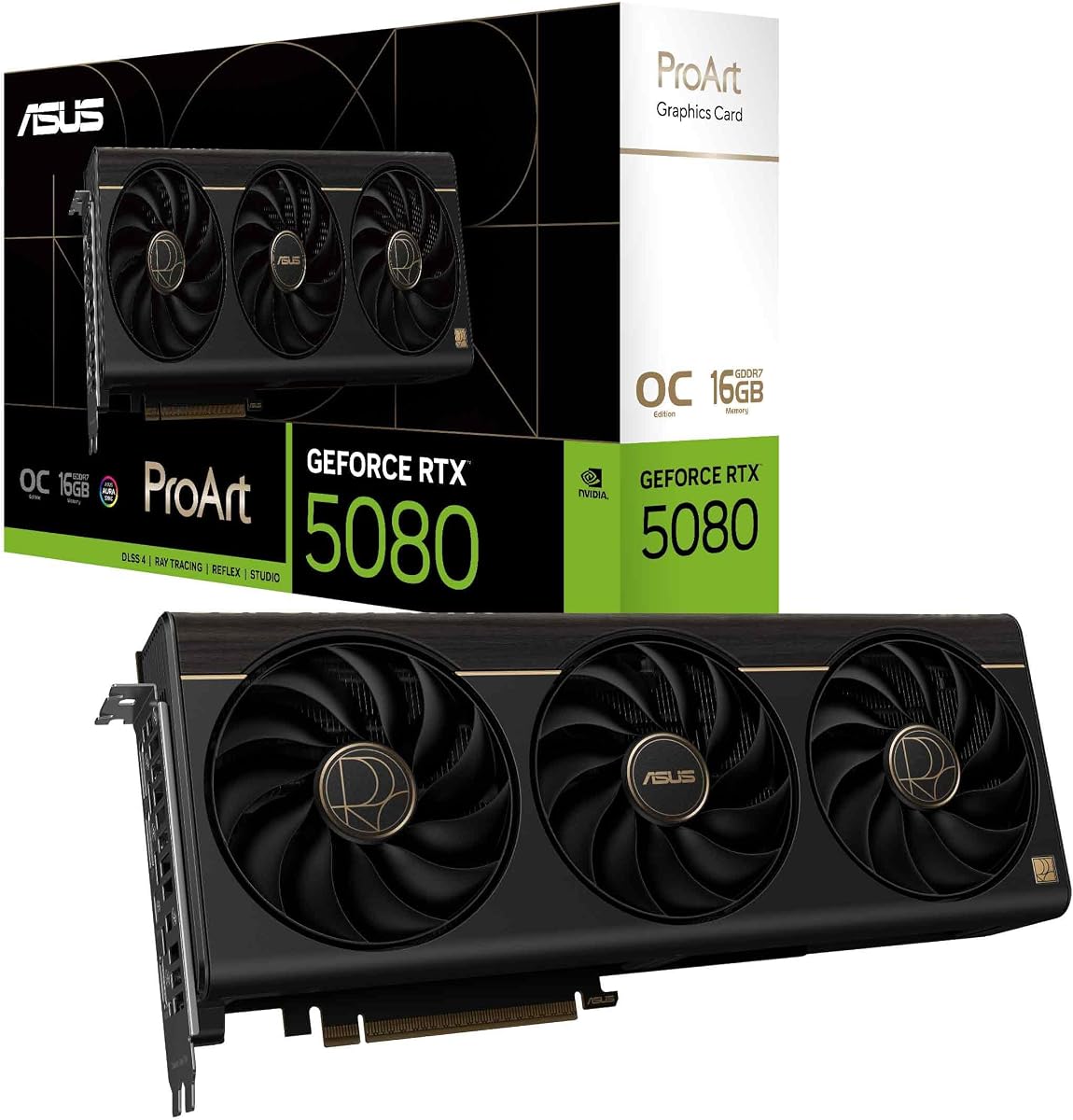
The ASUS ProArt GeForce RTX 5080 stands out with the highest 4.9 rating, making it the best premium choice for creative professionals. Powered by NVIDIA Blackwell architecture and DLSS 4, it delivers exceptional AI performance and smooth rendering.
We may earn a commission when you buy through this link, at no additional cost to you.
Featuring 1858 AI TOPS and a MaxContact heatsink design, this card ensures efficient heat transfer and premium performance. The integrated USB Type-C port enhances versatility for content creation workflows and peripheral connections.
While the price is premium, the design and performance are tailored for colorists and creators who value accuracy. The minimalist aesthetic with wood-patterned trim reflects its focus on creative environments.
We recommend this GPU for professional studios and editors who demand the highest quality and reliability. It is the top choice for premium workstations needing exceptional color performance and AI capabilities.
ProArt series guarantees precise color calibration essential for accurate grading and final delivery.
1858 AI TOPS ensure the GPU is ready for next-generation AI tools and neural rendering.
We may earn a commission when you buy through this link, at no additional cost to you.
The ASUS Dual GeForce RTX 5060 Ti is a fantastic compact option for smaller cases without sacrificing memory. With a 4.7 rating and 16GB GDDR7 memory, it delivers superior performance in small chassis for various editing needs.
We may earn a commission when you buy through this link, at no additional cost to you.
Featuring Axial-tech fan design and 0dB technology, this card ensures light gaming and editing can happen in relative silence. The Dual BIOS allows toggling between Quiet and Performance profiles for flexibility.
While it has less cooling capacity than larger models, the 2.5-slot design maximizes compatibility for tight spaces. It offers excellent AI performance and reliable operation for mid-range users.
We recommend this GPU for users building compact workstations who still need strong memory and performance. It is the ideal choice for small form factor builds needing a balanced GPU solution.
The 2.5-slot design fits easily into compact chassis while maintaining cooling efficiency.
Dual BIOS lets you choose between quiet operation or maximum performance depending on your needs.
We may earn a commission when you buy through this link, at no additional cost to you.
Selecting the right GPU for DaVinci Resolve requires understanding several critical factors that impact your workflow efficiency and creative output.
VRAM capacity is crucial for smooth playback of high-resolution timelines. Higher VRAM allows you to handle larger projects, multiple streams of 4K or 8K footage, and complex effects without stuttering.
For professional work, aim for at least 16GB of VRAM to ensure your system can handle future software updates and larger project files.
Modern architectures like NVIDIA Blackwell and AMD RDNA 4 offer significant performance boosts over older generations. These architectures provide better ray tracing, AI acceleration, and general compute power.
Newer architectures ensure compatibility with the latest features in DaVinci Resolve, including advanced AI tools and faster encoding.
Memory bandwidth determines how quickly the GPU can access VRAM data. Higher bandwidth results in smoother playback and faster rendering speeds, especially for 8K workflows.
Look for GPUs with high bandwidth ratings to prevent bottlenecks during intensive color grading and effects rendering.
NVIDIA GPUs use CUDA cores for parallel processing, which is highly optimized for DaVinci Resolve. AMD GPUs use Stream Processors which offer strong performance but may vary in optimization.
Choosing a GPU with high core counts ensures faster rendering times and better real-time playback during editing.
Professional GPUs often include specific features like ECC memory and ISV certifications that ensure stability. These features are vital for enterprise environments where reliability is paramount.
For standard editing, gaming-grade cards may suffice, but professional models offer better long-term stability and driver support.
High-performance GPUs require substantial power. Ensure your power supply unit is rated correctly to handle the GPU's load without shutting down.
Check the recommended wattage and connector types before purchasing to avoid compatibility issues or unstable system behavior.
Effective cooling is essential to prevent thermal throttling during long rendering sessions. Consider the physical size of the GPU to ensure it fits in your case.
Workstations with limited space may need low-profile or blower-style cards to maintain airflow and cooling efficiency.
Modern GPUs offer multiple DisplayPort or HDMI outputs to support multi-monitor setups. This is useful for having reference monitors and timelines visible simultaneously.
Ensure the card supports the resolution and refresh rate required for your reference displays to maintain color accuracy.
Install the latest drivers specific to your GPU model to ensure compatibility with DaVinci Resolve. Always download directly from the manufacturer's website for optimal stability and performance.
Keep your system clean by removing dust from the GPU fans and heatsinks regularly. Over time, dust buildup can reduce cooling efficiency and lead to thermal throttling.
Set the power management settings to High Performance to ensure the GPU runs at optimal speeds during editing. Avoid power-saving modes that may limit clock speeds and impact rendering times.
For beginners, a card with at least 12GB VRAM like the RTX 3060 or RTX 4060 Ti is sufficient. These cards offer strong performance for 4K editing without breaking the budget. Look for cards with good cooling to handle long rendering sessions.
DaVinci Resolve generally works better with NVIDIA GPUs due to CUDA optimization for effects and rendering. AMD cards are improving with OpenCL support, but NVIDIA remains the industry standard for stability and speed.
You need at least 12GB of VRAM for smooth 4K editing. For complex effects and multi-layer timelines, 16GB is recommended to prevent performance bottlenecks during playback.
Not necessarily. Consumer gaming GPUs often perform well for color grading tasks. Workstation GPUs offer better certification and driver stability for enterprise environments.
GPU throttling usually happens due to overheating or insufficient power. Clean your PC fans and ensure your power supply meets the recommended wattage for your GPU model.
Multiple GPUs can speed up rendering, but compatibility depends on your software version and drivers. Some workflows allow multi-GPU rendering while others prioritize single card performance.
We reviewed ten top GPUs for DaVinci Resolve in November 2026, highlighting options from the NVIDIA RTX 5080 to the ASRock Radeon AI PRO.
For most users, balancing VRAM capacity with architectural performance ensures smooth editing. Prioritize cards with 16GB memory or more for future-proofing your workstation.
Always check current pricing and availability before purchasing. Our top picks offer the best performance and value for both freelance creators and professional studios.