
Kingston IronKey Vault Privacy 50
4.5Editor score
Brute Force Attack Protection
Multi-Password Option
Dual Read-Only Settings
This guide compares the top encrypted USB flash drives for 2026, evaluating hardware security, FIPS certification, and performance for secure data storage
In an era where data breaches are commonplace, securing sensitive information is paramount. Encrypted USB flash drives offer a robust solution by protecting your files with advanced hardware encryption, ensuring that only authorized users can access your data. These devices are essential for professionals, businesses, and individuals who prioritize privacy and security above all else.
We have meticulously analyzed the market to bring you a curated list of the most reliable encrypted USB flash drives available today. Our evaluation process considers factors such as encryption standards, build quality, ease of use, and overall performance. This ensures that you receive a comprehensive overview of the best options to meet your specific security requirements.
Each pick in this guide highlights unique features and benefits, helping you make an informed decision based on your needs. Whether you require military-grade security or a budget-friendly option, there is a drive here for you. Please note that prices and availability are subject to change, so verify details before purchasing to ensure you get the best value.
4.5Editor score
4.6Editor score

4.1Editor score
The following table provides a side-by-side comparison of the top encrypted USB flash drives, highlighting key specifications and features to help you quickly identify the best option for your secure storage needs.


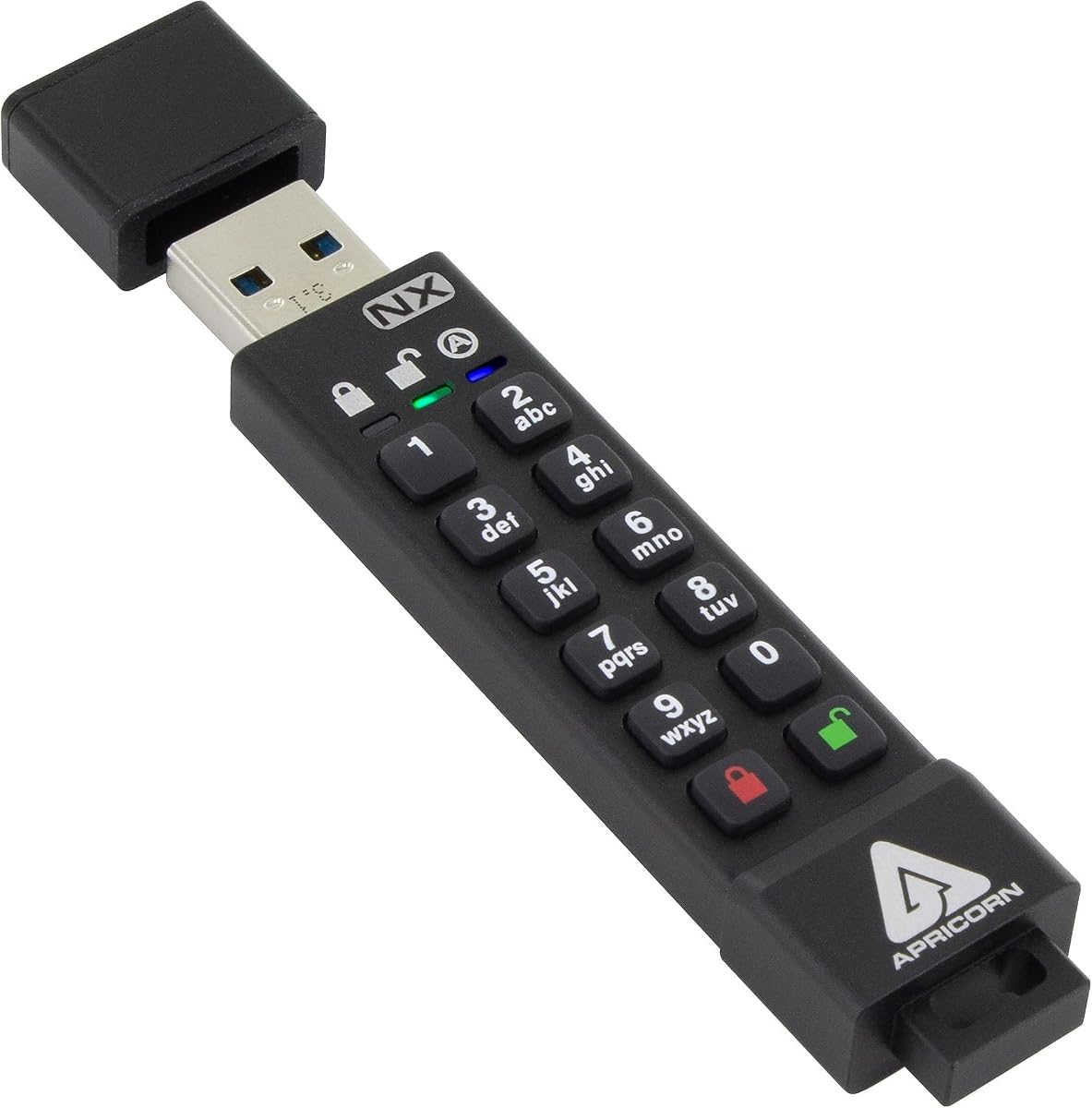
The Apricorn 8GB Aegis Secure Key 3 NX stands out as a top choice for those needing robust security. With FIPS 140-2 Level 3 validation, it offers government-grade protection for your data. This drive is designed to be reliable and secure, making it ideal for professionals handling sensitive information.
We may earn a commission when you buy through this link, at no additional cost to you.
Its standout feature is the separation of admin and user modes, allowing for flexible access control. The inclusion of data recovery PINs ensures you won't lose access if you forget your main PIN. Additionally, the two read-only modes provide extra layers of protection against unauthorized modifications to your files.
While the storage capacity is limited to 8GB, this is often sufficient for critical documents and keys rather than large media files. The higher price point is justified by the high level of security and compliance it offers. For users prioritizing security over storage space, this drive is an excellent investment.
This drive is best suited for government employees, corporate security teams, and anyone handling confidential data. The rigorous validation and hardware-based encryption provide peace of mind. We recommend it for those who need a secure, reliable, and compliant solution for portable data storage.
The FIPS 140-2 Level 3 validation ensures that this drive meets stringent security standards required by many government and enterprise environments.
Separate admin and user modes allow administrators to manage access policies while keeping user data secure and isolated.
We may earn a commission when you buy through this link, at no additional cost to you.
The Kingston IronKey Vault Privacy 50 is a premium option designed for businesses that demand high-level security. It features hardware-based encryption with XTS-AES 256-bit to protect your sensitive data effectively. This drive is built to safeguard against unauthorized access and malicious attacks, making it a robust choice for corporate use.
We may earn a commission when you buy through this link, at no additional cost to you.
Its protection against brute force and BadUSB attacks is a significant advantage. The digitally-signed firmware adds another layer of security, ensuring that the drive itself is not compromised. The multi-password option with complex and passphrase modes offers flexibility, allowing users to create secure yet memorable credentials.
The price is higher than many competitors, reflecting its premium features and compliance with trade agreements. While it may require some technical knowledge to set up fully, the security benefits are well worth the investment. The dual read-only settings prevent accidental data changes, adding to its utility in professional settings.
This drive is ideal for enterprises, government contractors, and professionals handling proprietary data. Its compliance with TAA standards makes it suitable for government procurement. If you need a high-security drive with advanced protection features, the IronKey Vault Privacy 50 is a top-tier choice.
Brute force and BadUSB attack protection ensures that your drive remains secure even when connected to potentially compromised systems.
Multi-password options with complex and passphrase modes allow users to tailor security settings to their specific needs and preferences.
We may earn a commission when you buy through this link, at no additional cost to you.
The Integral 4GB Crypto-197 offers exceptional value for those seeking secure storage without breaking the bank. It is certified to FIPS 197, ensuring a high level of security for your data. This drive is designed to be durable and user-friendly, with features like brute force protection and a waterproof design.
We may earn a commission when you buy through this link, at no additional cost to you.
One of its key strengths is the zero footprint design, meaning no software installation is required. This makes it easy to use across different systems without needing administrative permissions. The waterproof double layer design protects the electronics from physical damage, making it suitable for rugged environments.
While the storage capacity is limited to 4GB, this is often sufficient for critical documents and keys. The auto-lock feature ensures that your data remains secure when the drive is removed from a computer. However, the feature set is more basic compared to premium options, which may limit advanced users.
This drive is perfect for individuals, students, or small businesses needing basic encryption on a budget. Its durability and ease of use make it a reliable choice for everyday secure storage. If you prioritize affordability and essential security features, the Integral Crypto-197 is a strong contender.
No software installation is required, allowing for easy use across various systems without needing administrative permissions or complex setups.
The waterproof double layer design protects the drive from physical damage, making it suitable for use in various environments.
We may earn a commission when you buy through this link, at no additional cost to you.
The Apricorn 128GB Aegis Secure Key 3 NXC is designed for modern devices with USB Type C ports. It offers the same high security as other models in the series, with FIPS 140-2 Level 3 validation. The 128GB capacity provides ample space for storing larger files while maintaining robust encryption.
We may earn a commission when you buy through this link, at no additional cost to you.
Its USB 3.2 Type C connector ensures fast data transfer speeds and compatibility with newer laptops and devices. The software-free authentication simplifies the user experience, as no additional software is needed to access encrypted files. This makes it easy to use across various platforms without configuration issues.
While it is a mid-range option in terms of price, the combination of security, storage, and modern connectivity makes it a great value. Some users with older USB ports may need adapters, which could be an inconvenience. Overall, it is a well-rounded drive for those with modern hardware.
This drive is ideal for professionals using modern laptops and devices who need secure storage. The compatibility with USB C makes it convenient for current tech stacks. If you need a secure drive with good capacity and fast connectivity, this model is a solid choice.
The USB 3.2 Type C connector ensures compatibility with modern devices and provides fast data transfer speeds for efficient workflow.
No additional software is required to authenticate and access files, simplifying the user experience across different platforms.
We may earn a commission when you buy through this link, at no additional cost to you.
The iStorage datAshur PRO is designed for physical durability, with an IP57 certification for dust and water resistance. It features PIN authentication, ensuring that only authorized users can access your data. This drive is suitable for those who work in harsh environments or need extra physical protection.
We may earn a commission when you buy through this link, at no additional cost to you.
Its FIPS 140-2 Level 3 certification provides government-grade security for your data. The USB 3.2 data transfer speeds ensure that you can move files quickly and efficiently. The PIN authentication is easy to use, requiring only a 7-15 digit PIN to access the drive.
While the storage size is limited to 4GB, this is sufficient for critical documents. The durable design makes it a reliable choice for outdoor or rugged use. However, compatibility with all operating systems may vary, so check specifications before purchasing.
This drive is perfect for field workers, travelers, and anyone needing a durable secure storage solution. Its physical resistance and high security make it a reliable choice for challenging conditions. If you prioritize durability and security, the datAshur PRO is an excellent option.
IP57 dust and water resistance ensures that the drive can withstand harsh environments, making it suitable for outdoor or rugged use.
PIN authentication is easy to use, requiring only a 7-15 digit PIN to access the drive, ensuring secure and convenient access.
We may earn a commission when you buy through this link, at no additional cost to you.
The Encrypted USB Drive Secure Flash Drive offers a solid balance of security and usability. It features automatic lock functionality, ensuring that your data is protected when the drive is unplugged. The 64GB capacity provides ample space for storing various files securely.
We may earn a commission when you buy through this link, at no additional cost to you.
Its AES256-bit encryption provides high-level security for your data. The aluminum alloy shell adds durability and a premium feel to the drive. The automatic lock feature is particularly useful for those who may forget to manually lock the drive after use.
While it has basic interface compared to more advanced models, it covers essential security needs well. The reset and wipe function offers additional security by erasing data after multiple incorrect password attempts. This drive is suitable for general users who need reliable encryption.
This drive is ideal for general users who need a secure storage solution without complex features. The automatic lock and good capacity make it convenient for everyday use. If you need a reliable drive with essential security, this model is a good option.
The automatic lock feature ensures that your data is protected when the drive is unplugged, preventing unauthorized access.
The aluminum alloy shell provides durability and a premium feel, ensuring the drive can withstand regular use and handling.
We may earn a commission when you buy through this link, at no additional cost to you.
The Lexar 128GB JumpDrive F35 PRO offers a unique approach to security with fingerprint authentication. This allows for quick and secure access without the need to type a password. The 128GB capacity is ideal for storing large files, while the fast read speeds ensure efficient data transfer.
We may earn a commission when you buy through this link, at no additional cost to you.
Its ultra-fast recognition feature allows you to access your files in less than 1 second. The 256-bit AES encryption provides strong protection for your data. However, the drive may have limited compatibility with some operating systems, so check before purchasing.
While the fingerprint feature is convenient, it may not be as secure as hardware-based encryption for some users. The lack of password backup means you must ensure your fingerprint is registered correctly. This drive is best for those who prioritize speed and convenience.
This drive is ideal for users who want quick access to secure files. The fingerprint authentication and high capacity make it a great choice for modern professionals. If you need a secure drive with fast access, this model is worth considering.
Fingerprint authentication allows for quick and secure access, eliminating the need to type a password each time you use the drive.
Up to 400MB/s read speeds ensure that you can transfer large files quickly and efficiently, saving time during workflows.
We may earn a commission when you buy through this link, at no additional cost to you.
The iStorage datAshur PRO2 is designed for rugged conditions, with an IP68 certification for dust and water resistance. It features PIN authentication, ensuring that only authorized users can access your data. This drive is suitable for those who work in extreme environments or need extra physical protection.
We may earn a commission when you buy through this link, at no additional cost to you.
Its FIPS 140-2 Level 3 certification provides government-grade security for your data. The USB 3.2 data transfer speeds ensure that you can move files quickly and efficiently. The PIN authentication is easy to use, requiring only a 7-15 digit PIN to access the drive.
While the storage size is limited to 32GB, this is sufficient for critical documents. The durable design makes it a reliable choice for outdoor or rugged use. However, compatibility with all operating systems may vary, so check specifications before purchasing.
This drive is perfect for field workers, travelers, and anyone needing a durable secure storage solution. Its physical resistance and high security make it a reliable choice for challenging conditions. If you prioritize durability and security, the datAshur PRO2 is an excellent option.
IP68 dust and water resistance ensures that the drive can withstand extreme environments, making it suitable for outdoor or rugged use.
PIN authentication is easy to use, requiring only a 7-15 digit PIN to access the drive, ensuring secure and convenient access.
We may earn a commission when you buy through this link, at no additional cost to you.
The Kingston Ironkey D500S offers military-grade security with FIPS 140-3 Level 3 certification. It features a dual hidden partition option, allowing you to keep sensitive data separate from regular files. The rugged zinc casing provides additional protection against physical attacks.
We may earn a commission when you buy through this link, at no additional cost to you.
Its XTS-AES 256-bit encryption ensures strong protection for your data. The brute force and BadUSB attack protection safeguard against unauthorized access. The multi-pin option allows for flexible password configuration, meeting various security requirements.
While the price is high and capacity is small, the level of security is unmatched. This drive is best suited for those who need top-tier protection for their data. The dual hidden partition feature is unique and provides extra privacy.
This drive is ideal for government officials, military personnel, and anyone needing maximum security. The rugged design and high protection make it a reliable choice for demanding environments. If you need the highest level of security, this model is a top choice.
The dual hidden partition option allows you to keep sensitive data separate from regular files, providing an extra layer of privacy.
FIPS 140-3 Level 3 certification ensures that the drive meets the highest security standards for military and government use.
We may earn a commission when you buy through this link, at no additional cost to you.
The Kingston 8GB D300S is an affordable option for those seeking secure storage on a budget. It features AES 256 XTS encryption to protect your data effectively. The compact design makes it easy to carry, and it is straightforward to use.
We may earn a commission when you buy through this link, at no additional cost to you.
Its strong encryption ensures that your files are protected from unauthorized access. While the storage capacity is limited, this is often sufficient for critical documents. The drive is reliable and provides a good balance of cost and security.
This drive is ideal for individuals or small businesses that need basic encryption without a high cost. The user-friendly interface ensures that everyone can use it without technical knowledge. It is a solid choice for those prioritizing value.
We recommend this drive for those who need a secure storage solution without breaking the bank. Its encryption and ease of use make it a reliable choice for everyday secure storage. If you need a budget-friendly drive, this model is worth considering.
This drive offers strong encryption at an affordable price, making it a great choice for budget-conscious users seeking secure storage.
The user-friendly interface ensures that everyone can use the drive without technical knowledge, making it accessible to all.
We may earn a commission when you buy through this link, at no additional cost to you.
Selecting the right encrypted USB flash drive involves considering several key factors to ensure it meets your security and performance needs.
The encryption standard determines how secure your data is. Look for drives with AES 256-bit encryption, which is widely recognized as a robust standard for protecting sensitive information.
Choose drives with at least 256-bit encryption to ensure your data remains secure from unauthorized access.
Hardware encryption encrypts data on the drive itself, making it more secure than software encryption. It does not rely on the host computer, reducing the risk of vulnerabilities in the operating system.
Opt for hardware encryption to ensure your data is protected even if the computer you connect to is compromised.
Authentication methods vary from PIN entry to fingerprint recognition. Choose a method that balances security with ease of use. PIN-based systems are common, while biometrics offer quicker access.
Select an authentication method that suits your workflow and security requirements to ensure both convenience and protection.
The physical durability of the drive is important, especially if you plan to carry it regularly. Look for water and dust resistance ratings like IP67 or IP68 for enhanced protection.
Choose drives with high durability ratings to protect your data from physical damage and environmental hazards.
Certifications like FIPS 140-2 Level 3 indicate that the drive meets government security standards. This is crucial for compliance with regulations in various industries.
Ensure the drive is FIPS certified if you need to meet specific regulatory or government security requirements.
Storage capacity varies from 4GB to several hundred gigabytes. Choose a capacity that fits your needs without overspending on unused space.
Select a storage capacity that aligns with the size of files you plan to store to optimize cost and efficiency.
Transfer speed impacts how quickly you can read and write data. Look for USB 3.0 or higher standards to ensure fast data transfer rates.
Choose drives with high transfer speeds to minimize wait times when accessing or backing up your files.
Ensure the drive is compatible with your operating system. Most encrypted drives support Windows and macOS, but some may require additional software for Linux or other systems.
Verify compatibility with all devices you plan to use to ensure seamless integration into your workflow.
To use your encrypted USB flash drive, insert it into a USB port on your computer. Enter the PIN or use your fingerprint if supported. Your files will be visible, and you can use the drive like any other storage device.
Always safely eject the drive before unplugging it to prevent data corruption. This ensures that all transactions are complete and the drive is locked properly. Most drives will auto-lock when removed, but it is good practice to eject safely.
To care for your drive, store it in a cool, dry place away from direct sunlight. Avoid exposing it to water or extreme temperatures. Regularly update any associated firmware if required by the manufacturer to maintain optimal performance and security.
Software encryption relies on the host computer to encrypt and decrypt data, which can be vulnerable if the system is compromised. Hardware encryption handles encryption on the drive itself, making it more secure and independent of the host system. This is generally preferred for sensitive data.
FIPS certified drives are not strictly necessary for personal use but offer enhanced security and compliance with regulatory standards. They are ideal for individuals handling sensitive personal data or those who prefer government-grade security. For typical use, standard encryption may suffice.
If you forget your PIN, most drives offer a recovery process, such as using a recovery PIN or contacting the manufacturer. Some drives may require resetting the drive, which erases all data. It is crucial to keep your recovery options secure and accessible.
Most encrypted drives support Windows and macOS, but compatibility with Linux or other systems may vary. Some drives require additional software or drivers for full functionality on different platforms. Always check the specifications before purchasing to ensure compatibility.
Brute force protection limits the number of incorrect PIN attempts before locking the drive or erasing data. This prevents unauthorized users from guessing your PIN through repeated attempts. It is a critical security feature that protects against systematic attacks.
Some encrypted drives support USB OTG, allowing them to work with smartphones. However, functionality may require specific apps or adapters. Check if the drive is compatible with your smartphone model and operating system before purchasing.
Choosing the best encrypted USB flash drive depends on your specific security needs, budget, and usage patterns. The top picks like the Apricorn Aegis Secure Key 3 NX and Kingston IronKey Vault Privacy 50 offer robust security for professionals.
Prioritize features like FIPS certification, hardware encryption, and build quality based on your environment. For personal use, a reliable option with strong encryption and ease of use may be sufficient without the need for military-grade specs.
Prices and availability can change, so always verify the current details before purchasing. Ensure you select a drive that meets your current and future data security needs to protect your valuable information effectively.