
Cable Matters Punch Down Tool
4.3Editor score
110 Blade Included
Adjustable Impact Force
Spring-Action Design
This guide compares the top Ethernet Punch Down Tools for network installation, featuring expert reviews on blade types, impact settings, and durability for
Finding the right Ethernet Punch Down Tool is crucial for reliable network installations. A quality tool ensures secure wire termination and prevents connection failures in your cabling projects.
We evaluated ten top-rated models based on blade compatibility, impact settings, and ergonomic design. Our comparison covers options for professionals and DIY enthusiasts alike.
Each pick highlights key features and real-world performance. Note that product prices fluctuate regularly, so check current listings before making your final purchasing decision today.
4.3Editor score

4.8Editor score

4.7Editor score
The following table provides a side-by-side comparison of all ten selected tools, highlighting their core specifications and compatibility features.


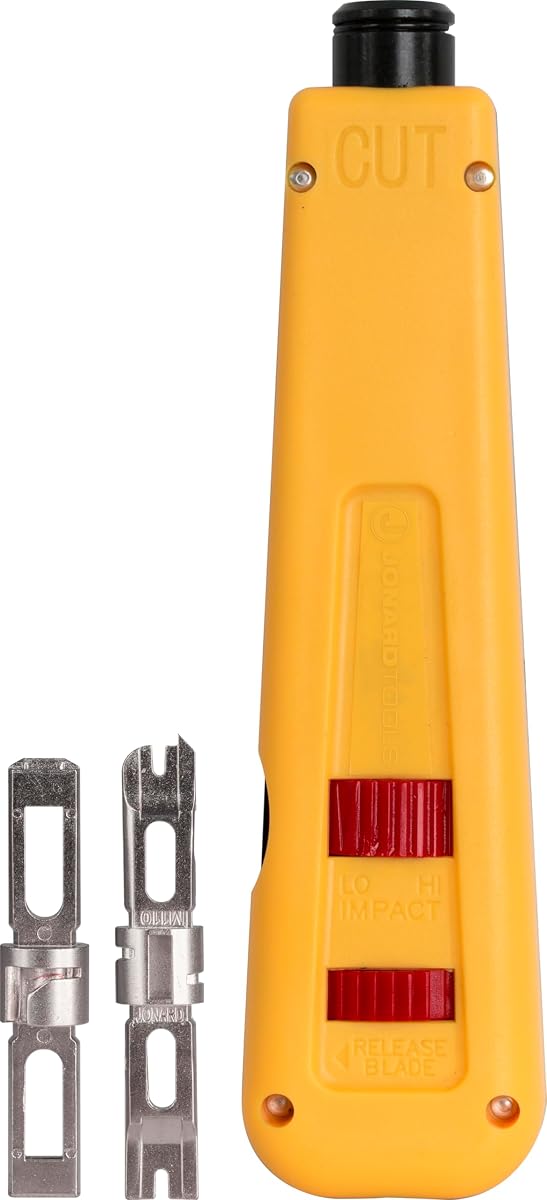
The Cable Matters Punch Down Tool offers an efficient solution for terminating cables into 110 patch panels or keystone jacks. With a solid 4.3 rating, it stands out as a reliable choice for budget-conscious network installers.
We may earn a commission when you buy through this link, at no additional cost to you.
Its removable 110 blade features a twist-and-lock design ensuring secure retention during use. The adjustable impact settings allow for fine-tuned force, making it suitable for both professional and DIY network setups.
While it lacks a 66 blade option, its spring-action design ensures fast and low-effort cable seating. The reversible cut/punch blade adds to its long-lasting precision and overall efficiency.
This tool is perfect for those needing a straightforward termination tool without breaking the bank. It delivers consistent results for Cat 5 through Cat 8 installations effectively.
The twist-and-lock design prevents the blade from loosening during use ensuring stable and consistent punchdowns every time.
Fine-tune the impact force to match specific cable termination needs for jacks blocks or patch panels using 110 IDC terminals.
We may earn a commission when you buy through this link, at no additional cost to you.
The Klein Tools VDV427-300 is a top-tier choice for professional installers needing reliable CAT cable connections. Its 4.8 rating reflects its high performance and user satisfaction across various networking projects.
We may earn a commission when you buy through this link, at no additional cost to you.
Featuring a metal injection molding blade it offers enhanced durability for long-lasting performance. The cushioned handle provides comfort during extended use with a non-slip grip for added convenience.
This tool terminates and cuts wires in CAT3 CAT5e and CAT6/6A cables in a single step. Its spring-loaded mechanism enables fast and effortless seating improving overall efficiency on the job site.
Ideal for pros who prioritize precision and durability this tool delivers reliable connections every time. It is a robust investment for anyone managing complex network setups.
The metal injection molding blade ensures enhanced durability and long-lasting performance even with frequent heavy-duty use.
The traditional punchdown style with a cushioned handle reduces hand fatigue during prolonged installation tasks.
We may earn a commission when you buy through this link, at no additional cost to you.
TRENDnet TC-PDT punch down tool inserts and cuts terminations in one simple operation for various network cables. Its 4.7 rating highlights its reliability and ease of use for installing wires into telephone sockets or patch panels.
We may earn a commission when you buy through this link, at no additional cost to you.
This tool features interchangeable and reversible blades between 110 and Krone standards offering great versatility. The twist and lock holder provides fast easy blade changes and prevents blade loss during transport.
Compliant with NDAA and TAA it is suitable for government customers in the U.S. and Canada. It comes with 3 years of manufacturer protection and reliable tech support for peace of mind.
For those needing specific blade compatibility this tool stands out. Its ergonomic design and precise blade options make it a strong candidate for diverse network projects.
Being NDAA and TAA compliant makes it a valid choice for government customers requiring specific tool standards.
Interchangeable and reversible blades allow for quick switching between 110 and Krone standards without carrying multiple tools.
We may earn a commission when you buy through this link, at no additional cost to you.
The Cable Matters Punch Down Tool with 110 and 66 Blade efficiently cuts and terminates cables into patch panels or keystone jacks. With a 4.4 rating it is a versatile choice for broader application needs.
We may earn a commission when you buy through this link, at no additional cost to you.
It now includes both 110 and 66 blades making it compatible with various punch down blocks. The removable blade with twist and lock sockets can be securely stored within the tool body during transport.
Adjustable impact force settings accommodate different cable termination needs into jacks or patch panels. The spring-action mechanism ensures fast and low-effort seating and termination for enhanced functionality.
This tool is ideal for users who need dual-standard compatibility without a high cost. It delivers secure installations and is a practical addition to any network toolkit.
The twist and lock sockets allow blades to be securely stored within the tool body enhancing usability and safety during transport.
Compatibility with both 110 and 66-style punch down blocks broadens the range of possible installation scenarios significantly.
We may earn a commission when you buy through this link, at no additional cost to you.
VCELINK Punch Down Impact Tool offers cutting and punching down in the same time with a sharp knife edge. Its 4.3 rating indicates good performance for network keystone jacks and patch panel installations.
We may earn a commission when you buy through this link, at no additional cost to you.
The double cutter head design cuts excess cables while punching down for efficiency. It includes a wirepuller and flat blade pull outs on the sides to clean up extra cables easily.
Adjustable impact-force settings for various cable termination applications make it adaptable. The handy hole in the bottom stores an extra blade ensuring you always have a replacement ready.
This tool is a solid choice for those needing additional accessories like a mini wire stripper. It provides good value with multi-function capabilities for network setups.
The package includes a mini wire stripper and wirepuller which add value and convenience to the tool kit.
Precise blades are interchangeable and reversible between 110 and 66 standards offering flexibility for various termination tasks.
We may earn a commission when you buy through this link, at no additional cost to you.
The VCELINK Speed Punch Down Tool is designed for VCE's C265 90 degree keystone jacks. Its 4.6 rating reflects its efficiency in punching down and cutting 8 wires in one smooth operation.
We may earn a commission when you buy through this link, at no additional cost to you.
It is up to 8 times faster than traditional punch-down tools. There is no need to use a separate punch-down stand or cut wires one by one saving significant time and effort.
You can terminate ethernet keystone jacks directly on patch panels without a platform. The replaceable blade head means you do not have to buy the whole tool again when it wears out.
This tool is ideal for VCE keystone users who want to optimize their workflow. Its specialized design offers speed and convenience unmatched by standard tools.
The single-action operation allows for termination up to 8 times faster than traditional methods improving overall productivity.
This tool enables termination directly on patch panels or wall plates without needing a separate surface for support.
We may earn a commission when you buy through this link, at no additional cost to you.
Rapink Speed Keystone Jack Tool is compatible only with Rapink CAT6 90 degree speed termination keystone jacks. With a 4.2 rating it significantly reduces install time and eliminates the risk of finger injuries.
We may earn a commission when you buy through this link, at no additional cost to you.
It combines punching down a perfect connection and cutting excess wires at once. The built-in housing keeps jacks in place for a perfect crimp which is useful in spaces where traditional tools are inconvenient.
The carbon steel body and alloy steel termination head can press 10000+ times with nearly 100% success rate. If trimming depth issues occur you can adjust the nut in the middle of the tool.
For Rapink keystone users this tool offers a reliable solution for fast installation. Its focus on safety and speed makes it a valuable asset for network installers.
The tool is designed to prevent finger injuries when keystone rolls out under traditional 110 punching tools.
Constructed from carbon steel and alloy steel the tool is tested to press 10000+ times ensuring long-term reliability.
We may earn a commission when you buy through this link, at no additional cost to you.
Fluke Networks 10061810 D914S features a rubber handle and special ergonomic design for better grip. With a 4.7 rating it reduces hand fatigue and offers a lifetime warranty for added security.
We may earn a commission when you buy through this link, at no additional cost to you.
Hook and spudger tools are built into the handle for convenience. The automatic spring handle chooses low impact for 24/26 gauge wire or high impact for 22 gauge wire automatically.
The included 66/110 ever sharp blade ensures clean and accurate wire termination into wiring blocks. Replacement blades are available for continued use without buying a new tool.
This tool is a premium choice for professionals valuing precision and warranty coverage. It delivers consistent performance and is worth the investment for quality-focused installers.
The lifetime warranty provides peace of mind ensuring you are protected against defects for the life of the product.
Automatic spring handle technology simplifies operation by adjusting impact force based on the wire gauge automatically.
We may earn a commission when you buy through this link, at no additional cost to you.
Klein Tools VDV026-212 Coax Installation Kit includes all necessary tools to strip crimp and punch down modular cables. With a 4.8 rating it is a complete solution for various networking needs.
We may earn a commission when you buy through this link, at no additional cost to you.
The ratcheting modular crimper/stripper cuts strips and crimps data cables reliably. The precision punchdown tool features Klein's exclusive DuraBlade precision cutting edge for clean and accurate wire termination.
Included RJ45-CAT5e data plugs add convenience for data cable connections. The polyester zipper bag keeps all tools neatly organized and securely stored allowing for easy transportation and storage.
This kit is ideal for those needing a versatile set of tools in one package. It offers value through its comprehensive set of components for modular cabling work.
The kit includes a complete set of tools for stripping crimping and punching down modular cables conveniently stored in a pouch.
The included polyester zipper bag ensures tools remain organized and portable for easy transportation and storage.
We may earn a commission when you buy through this link, at no additional cost to you.
Jonard Tools EPD-91461 Manual Punchdown Tool is sleek and ergonomic with combination hook/spudger stored in the chassis. With a 4.5 rating it is a reliable choice for manual termination tasks.
We may earn a commission when you buy through this link, at no additional cost to you.
The color coded body is half yellow and half blue for ease of use. Blades are made of hardened alloy steel and nickel plated to ensure long life during use.
Tested up to 100,000 cycles at high impact setting it offers high durability. The enlarged blade storage compartment ensures easy storage and organization for your tools.
This tool is suitable for those wanting a durable manual solution. Its color-coding and built-in storage features make it practical for daily use.
Tested up to 100,000 cycles at high impact setting the tool is built to withstand heavy use over time.
The color coded body makes it easy to identify the correct side for use ensuring efficiency and reducing errors.
We may earn a commission when you buy through this link, at no additional cost to you.
Choosing the right tool involves considering compatibility, impact settings, and ergonomics for your specific needs.
Ensure the tool supports 110 or 66 blades based on your panels and jacks. Some tools offer interchangeable blades for versatility.
Check if your specific keystone jacks are compatible with the tool to avoid installation issues.
Adjustable impact settings allow you to fine-tune force for different cable types. This prevents damage to wires and ensures secure connections.
Look for tools with clear high and low force indicators for ease of use during termination.
A comfortable handle reduces fatigue during long installation sessions. Cushioned handles provide better grip and control.
Choose a tool that fits your hand size and usage style for efficient operation.
High-quality materials like metal injection molding extend the tool's lifespan. Blades made of hardened alloy steel resist wear better.
Consider the expected number of cycles and build quality before purchasing.
Features like built-in spudgers or blade storage add convenience. Some tools offer replaceable blades for cost efficiency.
Evaluate which extra features will improve your workflow the most.
Reputable brands often provide warranties and reliable tech support. Reviews can help gauge product reliability and performance.
Choose tools from brands known for quality networking solutions.
Budget-friendly options may lack some features but still perform well. Premium tools offer better warranties and materials.
Balance your budget with the features needed for your projects.
Tools with blade storage compartments keep your kit organized. This prevents loss and ensures blades are ready for use.
Look for compact designs that are easy to transport.
Start by ensuring the blade is securely locked in place. This prevents accidents and ensures precise cuts during termination.
Hold the tool firmly and align the wires with the block or jack. Apply even pressure to seat the wires correctly.
Clean the tool after use to remove dust and debris. Store blades in their compartments to maintain sharpness and safety.
110 blades are standard for modern network installations while 66 blades are used for older telephone systems. Many tools offer both for versatility.
Not all tools are universal. Check compatibility as some specialized tools work only with specific brands or 90-degree jacks.
It ensures the right pressure is applied for different wire gauges. Too much force can damage the cable and too little causes loose connections.
Depends on usage frequency. Worn blades lead to poor termination so inspect them regularly and replace if cuts are not clean.
Yes many budget-friendly options are designed for DIY users. Follow instructions carefully to ensure proper installation and connections.
Always secure the blade when not in use. Use proper gloves to protect hands during installation to avoid injury.
The Klein Tools VDV427-300 stands out as the top choice for professionals needing precision and durability. For budget needs the Cable Matters Punch Down Tool offers solid value with essential features.
Consider the type of cables you are working with and the compatibility required for your panels. Prioritize ergonomic features to ensure comfort during extended use.
Always check current prices and availability before purchasing to ensure you get the best deal for your specific networking project needs.