
HP Everyday Slim Laptop
5.0Editor score
True Vision 720p HD camera
Dual array microphones included
Portable thin and lightweight design
This expert guide compares the top 10 laptops for Zoom Calls based on camera quality microphone performance screen clarity and battery life to help you choose
Finding the right laptop for Zoom calls requires balancing performance display quality and camera capabilities to ensure smooth virtual meetings. Whether you are a remote worker or student you need a device that handles video conferencing without lag or freezing during critical moments.
We have evaluated ten top rated laptops and accessories focusing on their ability to support clear video and audio communication. Our comparison includes detailed analysis of processor speed battery longevity and connectivity options to help you make an informed decision for your specific needs.
Each pick in this list highlights key strengths such as HD webcams noise canceling microphones and reliable Wi-Fi performance. Please note that product availability and pricing can change frequently so verify the latest details before making your final purchase decision online.
5.0Editor score

5.0Editor score

4.5Editor score
The following table provides a side by side comparison of all ten products including their key specifications and features to help you quickly identify the best fit for your video conferencing needs.





The NIMO 15.6 FHD Copilot AI-Laptop stands out as a top choice for virtual meetings due to its robust hardware configuration. It holds a perfect rating indicating high customer satisfaction with its performance reliability and build quality for daily professional use.
We may earn a commission when you buy through this link, at no additional cost to you.
Its Intel N150 processor paired with 16GB of RAM ensures that you can run Zoom alongside multiple browser tabs and documents without experiencing lag. The 512GB SSD provides ample space for files and fast access to applications which keeps your workflow smooth during critical calls.
While the display offers sharp visuals and a large viewing area it lacks touch functionality which some users might prefer for navigation. However the extensive port selection including USB-C and HDMI means you can connect external monitors or peripherals without needing extra adapters.
This laptop is ideal for remote workers and students who need a dependable machine for hours of video conferencing. The combination of strong performance ample storage and long battery life makes it a highly recommended option for anyone prioritizing connectivity and stability.
The 16GB RAM allows you to keep Zoom open while running other essential apps like email and spreadsheets without slowing down.
With up to 8.5 hours of online class usage you can attend meetings throughout the day without searching for a power outlet.
We may earn a commission when you buy through this link, at no additional cost to you.
This ring light is designed specifically to enhance your appearance during video calls by providing even illumination on your face. It has received strong ratings for its ability to eliminate harsh shadows and improve overall video quality in home office settings.
We may earn a commission when you buy through this link, at no additional cost to you.
The adjustable color temperature and brightness settings allow you to match the lighting to your environment ensuring you look professional on camera. The clip on design makes it simple to attach to any monitor or laptop screen without taking up desk space.
Although it relies on USB power which limits placement options the convenience of plugging it into your laptop or power bank is a plus. The lack of advanced app controls might be a drawback for tech savvy users who want more precise adjustments.
If you often struggle with poor lighting during meetings this accessory is a cost effective solution to instantly upgrade your setup. It is perfect for anyone looking to improve their visual presence on Zoom without investing in expensive studio equipment.
Choose from warm natural or cool light to suit different times of day and reduce eye strain during long sessions.
The sturdy clip holds firmly on screen edges preventing the light from falling or shifting during your presentation.
We may earn a commission when you buy through this link, at no additional cost to you.
The HP Everyday Slim Laptop offers exceptional value for users who need a reliable device for virtual meetings. With a perfect rating it is highly praised for its integrated camera and microphone features that ensure clear communication during Zoom calls.
We may earn a commission when you buy through this link, at no additional cost to you.
Its True Vision 720p HD camera with temporal noise reduction helps maintain video clarity even in less than ideal lighting conditions. The dual array microphones capture your voice clearly while reducing background noise which is crucial for professional interactions.
While it has limited RAM and storage compared to higher end models it is perfectly adequate for standard video conferencing tasks. The lightweight design makes it easy to carry around the house or to co-working spaces without adding strain to your backpack.
This laptop is best suited for students or professionals who prioritize portability and audio video quality over heavy processing power. It is an excellent choice for anyone seeking a straightforward and effective tool for daily virtual communication needs.
The dual array microphones focus on your voice and filter out surrounding noise for clearer conversations.
Weighing very little this laptop is easy to transport and use from different locations throughout the day.
We may earn a commission when you buy through this link, at no additional cost to you.
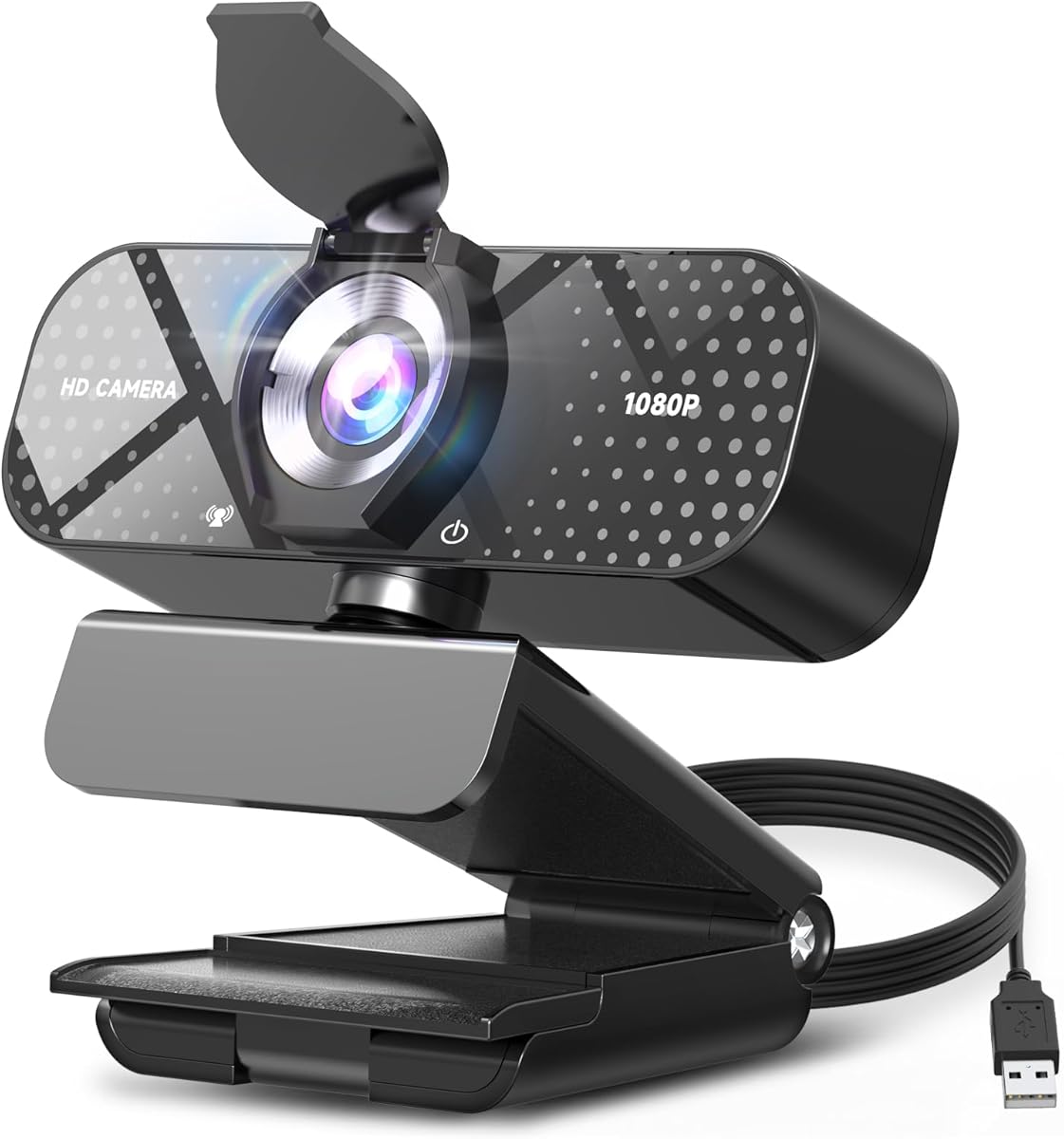
If your laptop camera is underwhelming this external webcam provides a significant upgrade in video clarity and sound quality. It has earned a strong rating for its ability to deliver crisp images and clear audio during video conferencing sessions.
We may earn a commission when you buy through this link, at no additional cost to you.
The 1080P resolution ensures that your face is clearly visible to others while the noise canceling microphone reduces distractions from your environment. Auto light correction technology dynamically adjusts brightness so you look good even in dimly lit rooms.
The included privacy cover gives you peace of mind by physically blocking the lens when not in use which is a critical security feature. Setup is straightforward with no drivers needed allowing you to plug it in and start using it immediately.
This webcam is ideal for anyone who needs better visual fidelity than built-in laptop cameras can offer. It is a practical investment for professionals or teachers who rely on high quality video streams for their daily work.
Slide the included cover over the lens to ensure no one can see you when you are not on a call.
Plug the USB connector into your computer and it works instantly with Zoom Teams and other platforms.
We may earn a commission when you buy through this link, at no additional cost to you.
This desk ring light offers a sophisticated lighting solution that doubles as a reading lamp and a video call enhancer. It is well reviewed for its edge-lit technology that provides uniform light without harsh glare on your screen or face.
We may earn a commission when you buy through this link, at no additional cost to you.
With a high CRI the light renders true-to-life colors making your video look natural and professional. The adjustable height range allows you to position the light exactly where you need it to reduce shadows and eye strain during long hours of use.
While it takes up more desk space than clip-on options the stability of the metal base ensures it stays put. The versatility to use it for reading or work makes it a practical addition to any home office setup.
Investing in this light is beneficial if you want a permanent solution that improves your workspace environment beyond just video calls. It is recommended for users who value high quality lighting and need flexibility in positioning for various tasks.
The high CRI ensures that skin tones and objects appear natural and realistic on camera.
Rotate the head and adjust the height to fit your specific desk layout and lighting needs.
We may earn a commission when you buy through this link, at no additional cost to you.
This clip-on ring light is a cost effective way to improve your video appearance without breaking the bank. Users appreciate its circular design which provides even light distribution that avoids harsh shadows on the face.
We may earn a commission when you buy through this link, at no additional cost to you.
The high CRI ensures accurate color reproduction so you look your best on screen. With three color modes and ten dimming levels you have enough flexibility to adapt to different times of day and room conditions.
Its simplicity is both a strength and a weakness as it is very easy to use but lacks advanced controls. It requires USB power which means you need a free port on your laptop or monitor but this is standard for such devices.
If you are looking for a simple and effective lighting upgrade this option delivers solid performance for its price. It is great for casual users or those just starting to optimize their home office for video meetings.
The circular shape diffuses light evenly to create a flattering look for your video feed.
Switch between warm cool and mixed light to match your environment or mood instantly.
We may earn a commission when you buy through this link, at no additional cost to you.
This laptop is tailored for business users who need a reliable machine for daily tasks and video conferencing. It comes with a year of Office 365 which is essential for professionals managing documents and communications during Zoom calls.
We may earn a commission when you buy through this link, at no additional cost to you.
The Intel N150 processor handles standard workflows and video meetings adequately while the business focused design ensures durability. The full size keyboard and multiple ports make it convenient to connect peripherals and type long reports without external devices.
The screen resolution is modest compared to premium models which might be a limitation for graphic intensive work. However for basic productivity and calls it performs well and offers good value especially with the included software suite.
It is a practical choice for small businesses or freelancers who want a complete package ready for work out of the box. The combination of productivity tools and reliable hardware makes it a solid contender for office environments.
Get a year of Office 365 to manage emails and documents directly from the machine.
Multiple USB and HDMI ports allow you to connect projectors and peripherals easily.
We may earn a commission when you buy through this link, at no additional cost to you.
This model emphasizes cloud integration and modern features like Copilot AI to enhance productivity. It includes a large amount of cloud storage which is useful for storing files and accessing them across devices securely.
We may earn a commission when you buy through this link, at no additional cost to you.
The True Vision camera ensures clear video for Zoom calls while the lightweight design makes it easy to carry. The inclusion of Office 365 adds significant value for students and professionals who need productivity software regularly.
However the limited local storage might be a constraint for users who keep many files offline. The mixed rating suggests varying experiences which indicates it is important to review specific user feedback before purchasing.
If you rely heavily on cloud services and need a portable device this laptop could be a good fit. It is best for users who prioritize storage flexibility and modern AI features over raw local processing power.
Access your files from anywhere using the included cloud storage space for seamless workflows.
Use Copilot AI to assist with writing and scheduling during your work day.
We may earn a commission when you buy through this link, at no additional cost to you.
This lighting kit features two light bars to provide even and bright illumination for video calls. It is designed to offer a professional look with dual lights reducing shadows better than single lamp solutions.
We may earn a commission when you buy through this link, at no additional cost to you.
The inclusion of a remote control adds convenience allowing you to adjust settings without reaching for the device. The dual bars can be positioned flexibly to suit your desk layout and specific lighting requirements during meetings.
Setup involves mounting two separate components which can take more time than a single clip on light. However the enhanced brightness and control options make it worth the effort for those who need higher quality lighting.
If you want a more advanced lighting setup for streaming or frequent high volume video calls this dual lamp system is a strong candidate. It is recommended for users who want control over their lighting environment without investing in professional gear.
Two bars provide balanced light coverage reducing shadows and improving video quality significantly.
Adjust brightness and color modes from your chair using the included remote control.
We may earn a commission when you buy through this link, at no additional cost to you.
This laptop combines modern hardware with extensive cloud storage to support remote work and virtual meetings effectively. The inclusion of 1TB of cloud storage ensures you have plenty of space for files and backups without local constraints.
We may earn a commission when you buy through this link, at no additional cost to you.
The Intel N150 processor handles video calls efficiently while DDR5 RAM provides faster data access for smooth multitasking. The anti-glare display helps reduce eye strain during long sessions making it comfortable to view shared screens.
With only 128GB of local storage you will rely heavily on cloud services which might not suit everyone's workflow. However the value of the included Microsoft 365 subscription offsets this limitation for many users.
This machine is well suited for users who prioritize cloud collaboration and lightweight portability over local storage capacity. It is a practical choice for professionals who work across devices and need reliable video performance.
Faster DDR5 RAM helps applications load quicker for responsive video calls.
Access your documents from anywhere with the included 1TB cloud storage.
We may earn a commission when you buy through this link, at no additional cost to you.
Selecting the right laptop for video conferencing involves evaluating several key factors that directly impact your call quality and productivity.
A high resolution camera is essential for clear video transmission during meetings. Look for devices with at least 720p HD resolution or consider an external 1080p webcam if your laptop camera is poor.
Prioritize laptops with built-in noise reduction and good microphone arrays to ensure your video is crisp.
Video conferencing applications require significant processing power to run smoothly without lag. Aim for a processor with at least four cores and 8GB of RAM or more for seamless multitasking.
Adequate RAM ensures you can have Zoom open alongside other tools without experiencing slowdowns.
Long battery life is crucial for attending meetings without being tethered to a power outlet. Look for laptops that promise at least eight hours of real-world usage to last through your workday.
A battery that lasts all day provides flexibility for remote work and travel.
A clear and bright display helps you see participants and shared content clearly. Consider screens with at least 14 inches and anti-glare coatings to reduce eye strain during long calls.
Brighter screens with good color accuracy make your video feed look more professional.
Multiple ports such as USB-C HDMI and headphone jacks allow you to connect headsets and external monitors easily. Ensure your laptop has enough ports to support your workflow without needing dongles.
Robust connectivity options make it easier to set up your workspace quickly and efficiently.
Clear audio is as important as video for successful meetings. Look for laptops with multiple microphones and noise canceling technology to filter out background distractions.
Good built-in audio quality saves you the need for external headsets in many cases.
Modern operating systems like Windows 11 offer optimized features for video conferencing apps. Ensure your device supports the latest updates and security patches for stable performance.
An up to date OS ensures compatibility with Zoom and other communication tools.
If you move between locations frequently a lightweight and slim design is beneficial. Consider the weight and thickness of the device to ensure it fits comfortably in your bag.
A portable laptop makes it easy to work from anywhere without sacrificing performance.
Keep your software updated to ensure Zoom and your operating system have the latest security patches and performance improvements.
Use a dedicated space for calls to minimize background noise and distractions during meetings.
Regularly clean your screen and camera lens with a microfiber cloth to maintain clear visuals.
For smooth video conferencing without freezing you should look for a laptop with at least 8GB of RAM. This allows you to run Zoom alongside other necessary applications without slowing down your system.
Yes an external webcam often provides better video quality than built-in laptop cameras especially in low light. Look for 1080p resolution and a wide-angle lens to enhance your visibility on screen.
To improve audio use a good headset or external microphone to reduce background noise. Ensure your laptop is not near sources of loud noise and use noise canceling features if available.
Yes tablets can run Zoom and are portable but a laptop offers better multitasking capabilities and keyboard access. For professional meetings a laptop is generally preferred for ease of use.
A good laptop for work should offer at least 8 hours of battery life to last through a workday. This ensures you can attend meetings without worrying about finding a power outlet.
Most modern integrated graphics are sufficient for standard Zoom calls. You only need a dedicated graphics card if you are streaming high definition video or running complex visual applications.
We have reviewed the top ten options including laptops and accessories that excel in video conferencing performance and clarity.
Prioritize processor power camera quality and battery life to ensure a smooth experience during your daily virtual meetings.
Prices and availability can change so check the latest details before finalizing your purchase decision online.