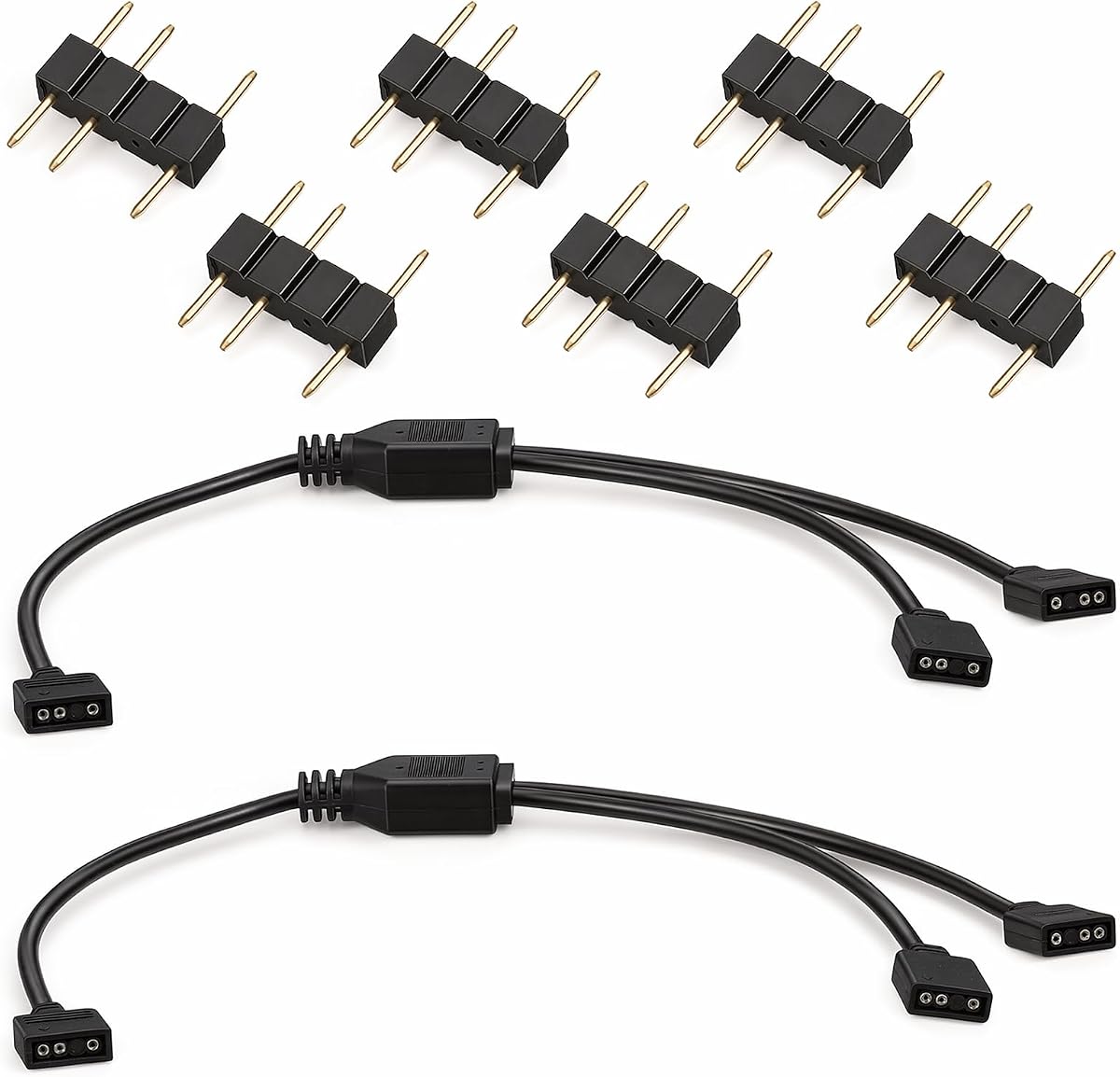
2 Pcs 5V 3 Pin ARGB Splitter Cable
5.0Editor score
Pure Copper Cores
Female to Female Design
30cm Cable Length
This guide compares the top ARGB splitter cables for 2026, evaluating compatibility, durability, length, and ease of installation to help you choose the best
Choosing the right ARGB splitter cable is essential for building a cohesive lighting setup in your PC. These cables allow you to connect multiple fans or LED strips to a single motherboard header, ensuring synchronized color effects without cluttering your build with extra wires.
We have evaluated ten highly rated options based on user feedback, build quality, and compatibility specifications. Each product was reviewed to understand how well it handles signal transmission, connector durability, and overall ease of installation for various PC chassis configurations.
Each pick in this list highlights specific strengths like length, connector count, or material quality to help you find the perfect match for your setup. Keep in mind that availability and pricing can fluctuate over time, so verify details before making your final purchase decision.
5.0Editor score

5.0Editor score

4.9Editor score
The following table provides a side-by-side overview of the top ten ARGB splitter cables available today, highlighting their key specifications and unique features to simplify your selection process.


This 2-pack offers an excellent solution for expanding your ARGB setup with a perfect 1-to-3 splitter design. It holds a top rating for reliability and ease of use, making it a favorite among builders looking for quick expansion.
We may earn a commission when you buy through this link, at no additional cost to you.
The included connectors mean you do not need to buy extras separately, saving time and effort during installation. Each cable is precisely 11.8 inches long, providing enough reach without excessive slack in tight cases.
While it works beautifully for 5V systems, it is important to note that it is not compatible with older 12V headers. This limitation is common among ARGB specific cables but is a trade-off for precision control.
If you need to connect multiple fans or strips to a single header efficiently, this pack delivers consistent performance and simple installation for a polished lighting result.
The inclusion of multiple 3-pin male connectors ensures you have everything needed to connect devices without sourcing additional parts separately.
At 11.8 inches, the cable provides enough reach to route connections neatly across standard PC chassis without cluttering the interior space.
We may earn a commission when you buy through this link, at no additional cost to you.
These white splitter cables are designed to blend seamlessly into light-colored PC builds, offering a cleaner visual appearance than standard black wires. They are well reviewed for their material quality and ease of use.
We may earn a commission when you buy through this link, at no additional cost to you.
The soft PVC material wraps firmly around new copper cores, which helps protect against dust and physical damage over time. This construction ensures reliable signal transmission for your RGB components.
Users might find the 1-to-2 configuration limiting if they need to connect more devices to a single header. However, for setups with fewer components, it provides an effective and tidy connection method.
For anyone prioritizing the look of their internal wiring, these white cables offer a practical way to maintain a pristine aesthetic while keeping your lighting setup synchronized.
The white color choice specifically targets users who want to avoid visible black wiring in white-themed computer cases.
Firmly wrapped copper cores within soft PVC offer a balance of flexibility and protection against common wear and tear.
We may earn a commission when you buy through this link, at no additional cost to you.
This cable stands out for its focus on safety, featuring insulating protective caps on needle interfaces to prevent accidental shorts. It is a solid choice for builders who prioritize secure connections in tight spaces.
We may earn a commission when you buy through this link, at no additional cost to you.
At 13.19 inches, it offers a bit more reach than many standard options, allowing for better routing around obstacles. The simple plug-and-play design ensures quick installation without any tools required.
Buying a single pack might require multiple purchases for larger setups, which could increase the total cost. Despite this, the protective features provide peace of mind regarding electrical safety.
If you are worried about exposed pins contacting the chassis or other components, this model offers a practical solution with built-in protection for a safer build process.
Each needle interface includes a cap to guard against bending and deformation, reducing the risk of electrical shorts during installation.
The 13.19-inch length provides slightly more flexibility for routing cables around tight corners compared to standard 11.8-inch options.
We may earn a commission when you buy through this link, at no additional cost to you.
For those with many components to sync, this 1-to-5 splitter provides unmatched connectivity from a single header. It is ideal for cases with extensive fan arrays or multiple LED strips needing control.
We may earn a commission when you buy through this link, at no additional cost to you.
The 19.6-inch length allows for significant reach, making it easier to manage cables in larger chassis. High-quality copper cores ensure that signals remain consistent across all connected devices.
Longer cables might create more clutter if not managed carefully, requiring additional ties or routing efforts. This is a minor inconvenience given the versatility and reach provided by the design.
If you need to connect a large number of devices without using multiple motherboard headers, this splitter is a robust solution for scaling your lighting system.
The 1-to-5 design allows you to daisy-chain up to five devices, reducing the need for multiple headers on your motherboard.
At nearly 20 inches, these cables provide the length needed to route connections across large cases without strain.
We may earn a commission when you buy through this link, at no additional cost to you.
This 2-pack delivers a perfect balance of length and splitter ratio for typical PC builds. It earns a top rating for its reliability and the convenience of including all necessary connectors in the package.
We may earn a commission when you buy through this link, at no additional cost to you.
The 1-to-3 configuration is ideal for connecting a group of case fans or a small lighting strip efficiently. The included male connectors mean you can start your build immediately without additional purchases.
As with all ARGB cables, this is limited to 5V systems and will not work with older 12V RGB headers. This is a standard specification for addressable lighting but limits compatibility with older setups.
For most modern PC enthusiasts, this pack provides everything needed to achieve synchronized lighting with minimal effort and a clean internal layout.
The package includes eight 3-pin male connectors, ensuring you have spares or extras for complex setups without extra cost.
The 11.8-inch length is the industry standard, fitting most cable management paths without being too short or excessively long.
We may earn a commission when you buy through this link, at no additional cost to you.
These cables are designed primarily for extending connections rather than splitting them, making them ideal for moving a device further from the header. They ensure synchronization across connected series without adding complexity.
We may earn a commission when you buy through this link, at no additional cost to you.
Each cable comes with connectors that allow for easy attachment to fans or strips, maintaining a tidy appearance. The focus is on extending reach while preserving signal integrity for color accuracy.
Since they are 1-to-1, they do not split the signal to multiple devices, which may limit their utility for expanding fan groups. They are best used as straight extensions for specific components.
If your goal is to move a fan or strip to a better location without losing sync, these cables offer a straightforward and effective solution.
The design prioritizes extending existing connections rather than splitting signals, making it perfect for reaching distant motherboard headers.
Each pack includes four connectors to ensure you can easily attach devices to the extension ends without extra hardware.
We may earn a commission when you buy through this link, at no additional cost to you.
This budget-friendly option does not compromise on quality, featuring pure copper cores that ensure stable power and data transmission. It holds a perfect rating for providing excellent value for money.
We may earn a commission when you buy through this link, at no additional cost to you.
The pure copper cores are crucial for maintaining consistent color across your RGB devices. The design is straightforward, with a 1-to-2 splitter setup that fits many standard building needs.
While it is a 1-to-2 splitter, which is less versatile than 1-to-3 models, it remains sufficient for smaller setups. The cost effectiveness makes it a great choice for budget-conscious builders.
If you need a reliable connection without spending much, this pack offers the essential quality and durability required for a functional lighting system.
Using pure copper ensures efficient transmission, reducing resistance and maintaining color accuracy across connected devices.
Despite the low cost, the build quality remains high, offering a durable solution for everyday PC building tasks.
We may earn a commission when you buy through this link, at no additional cost to you.
Buying in bulk often means better value, and this 3-pack is perfect for builds requiring multiple split connections. It allows you to manage lighting across different zones without buying individual cables.
We may earn a commission when you buy through this link, at no additional cost to you.
The 1-to-3 design supports connecting multiple devices to each header. The inclusion of twelve connectors ensures you have enough for all devices included potential backups.
For smaller builds, having three cables might be more than needed at once. However, the price per unit makes it an excellent reserve for future upgrades or larger systems.
If you have a complex lighting scheme requiring several headers, this pack provides the necessary cables and connectors to achieve full synchronization.
Purchasing three units at once often provides a better cost per cable compared to buying single units or smaller packs.
Multiple splitters enable you to separate lighting into zones for different components while maintaining full color synchronization.
We may earn a commission when you buy through this link, at no additional cost to you.
This 2-pack focuses on durability with pure copper cores and soft PVC outer sheaths. It is highly rated for stable signal transmission and resistance to interference in electrically noisy environments.
We may earn a commission when you buy through this link, at no additional cost to you.
The wear-resistant outer layer ensures the cables stay functional for long-term use. This makes it suitable for users who expect their PC build to last for several years without needing replacements.
The design is optimized for stability rather than extreme length, which keeps internal cable management clean. Some users might prefer longer cables for specific chassis types, but 11.8 inches is standard.
If reliability and long-term performance are your top priorities, these cables provide a stable foundation for your RGB lighting with minimal signal issues.
The soft PVC sheath protects internal copper cores from wear and tear, ensuring consistent performance over time.
Anti-interference engineering ensures that even with multiple devices connected, colors remain accurate and synced.
We may earn a commission when you buy through this link, at no additional cost to you.
This premium option stands out with gold-plated contacts and oxygen-free copper wiring for superior signal integrity. It is designed for users who want the best possible connection quality for their high-end RGB gear.
We may earn a commission when you buy through this link, at no additional cost to you.
The braided sleeves not only look great but also prevent tangling and reduce electromagnetic interference. The 4-pack allows for comprehensive coverage across your entire build without needing extra purchases.
The higher price reflects the premium materials and engineering used. While standard cables work fine for most, this option minimizes risk for color shift or signal loss in complex setups.
If you are building a high-end system and want to ensure your lighting performs flawlessly, this premium set offers the best protection and reliability available.
Gold-plated contacts and oxygen-free copper ensure stable transmission and reduce the risk of signal degradation over time.
The braided design not only improves aesthetics but also provides physical protection against tangling and external interference.
We may earn a commission when you buy through this link, at no additional cost to you.
Selecting the right ARGB splitter cable requires attention to compatibility, build quality, and your specific lighting needs.
Always verify whether your motherboard supports 5V 3-pin ARGB or 12V 4-pin RGB. Using a 5V splitter with a 12V header can damage your components, so matching the voltage is critical.
Stick to 5V 3-pin splitters for addressable RGB fans and strips to ensure safety and correct functionality.
Consider how many devices you need to connect to one header. 1-to-2 or 1-to-3 splitters are common, while some offer up to 1-to-5 for extensive setups.
Choose a splitter ratio that matches your number of components to avoid overloading the header or needing too many splitters.
Most splitters are around 11.8 inches long, which works for standard cases. Larger or unusual chassis might benefit from longer cables to reach distant headers.
Ensure the length is sufficient to route cables without tight bends or tension that could damage the wires over time.
Look for splitters with high-quality pins that fit snugly into your motherboard header. Poor connectors may lead to flickering lights or loose connections.
Gold-plated contacts or reinforced plastic housings often indicate better durability and better signal transfer.
Some packages include extra male connectors, which saves you from buying them separately. This is convenient for setups requiring many connection points.
Check the package contents to ensure you have enough connectors for all your planned devices.
Quality cables use pure copper cores for efficient power and data transmission. Durable outer sheaths protect against wear and accidental damage.
Premium options may feature braided sleeves for better aesthetics and physical protection against bending.
Plug-and-play splitters with clear arrow markings make installation easier and reduce the risk of reversing polarity. This is vital for ensuring correct lighting effects.
Avoid options that require soldering or tools, as these complicate the building process.
Prices vary based on features like material quality and the number of splitters per pack. Bulk packs often offer better value for larger builds.
Balance your budget with the necessary features to find a cost-effective solution that meets your build requirements.
When installing, align the arrows on the splitter connectors with the arrow on the motherboard header or device. This ensures correct polarity and prevents electrical issues or lighting errors.
Avoid bending the cable too sharply at the connector points, as this can damage internal wires. Route cables gently along case edges to maintain signal integrity and physical durability.
Regularly check connections for dust buildup or loose plugs. Gently clean connectors with a dry cloth to ensure reliable contact and consistent lighting performance.
No, you should not use a 5V splitter with a 12V RGB header as it can damage the LED components. Always check your motherboard manual to confirm if it supports 5V 3-pin ARGB.
The arrow indicates the data pin alignment. It must point in the same direction as the arrow on your motherboard header or device to ensure correct signal flow and prevent errors.
It depends on the package. Some splitters come with male connectors included, while others may require you to purchase them separately. Always check the product description before buying.
You can connect as many devices as your splitter allows, but ensure total power draw does not exceed the header's limit. Most standard headers support several fans or strips.
Yes, you can connect splitters to splitters if your motherboard header supports enough load. However, excessive chains may cause signal degradation or unstable lighting effects.
Flickering may mean a loose connection or incorrect polarity. Recheck arrow alignment and ensure connectors are fully seated. If issues persist, test with a single device first.
We recommend the 1-to-3 ARGB Splitter Cable 2 Pack for its balance of price and performance, making it a top choice for most builders looking for reliable expansion.
Prioritize voltage compatibility and connector quality when shopping to avoid compatibility issues. Selecting the right splitter ensures your RGB components function smoothly without risk of damage.
Remember to check current stock and availability since options may change over time. With the right splitter, you can easily achieve synchronized lighting across all your components.